Vintage Story version
Back to mods 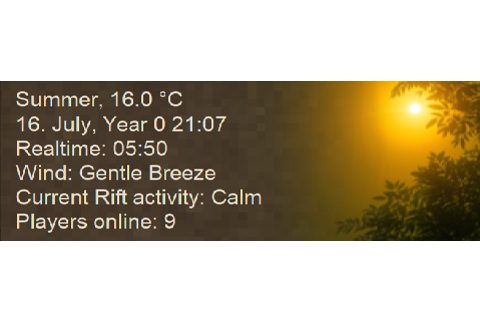
Vintage Story Mod DB · Vintage Story mod
HUD Clock
HUD Clock is a small overlay that tells you the time, the season, the weather, and a handful of other things about the world around you, without making you open a menu to find out. It started as a community patch when the original Simple HUD Clock by Rhonen s
Choose a version Pick your version below, then grab the matching file.
Quick answer
Which HUD Clock release should I use?
Latest stable file 4.4.1
Game version 1.22.0-pre.1, 1.22.0-pre.2, 1.22.0-pre.3
Loader Built-in Vintage Story mod system
HUD Clock 4.4.1 targets 1.22.0-pre.1, 1.22.0-pre.2, 1.22.0-pre.3. It must be installed on the client. Do not install it on the dedicated server. No extra mods listed for this file.
Where it goes
Is HUD Clock required on the client, server, or both?
It must be installed on the client. Do not install it on the dedicated server.
Client Required
Dedicated server Not supported
Loader for this release Built-in Vintage Story mod system
Required install it here Optional supported, not mandatory Not supported do not install here Source doesn’t say do not assume
This Vintage Story file is marked client-only.
What else does HUD Clock 4.4.1 need?
4.4.1. Change the file and its required mods may change too.
This file does not list any required mods. Do not add a library just because a different file uses it.
This file does not list any required or optional mods.
Before you install it
Add HUD Clock without breaking your instance.
Built for HUD Clock 4.4.1. Pick another file and the loader, install side or required mods may change.
- 01
Stick to this file
Use 4.4.1. It targets 1.22.0-pre.1, 1.22.0-pre.2, 1.22.0-pre.3; another release may have different loader, side or dependency requirements.
- 02
Bring the mods it needs
This file does not list any required mods. Do not add a library just because a different file uses it.
- 03
Put it on the correct side
It must be installed on the client. Do not install it on the dedicated server.
- 04
Pick the file you checked
Use the “Get this file” button beside 4.4.1. It opens that exact file at the source.
About this project
What does HUD Clock add?
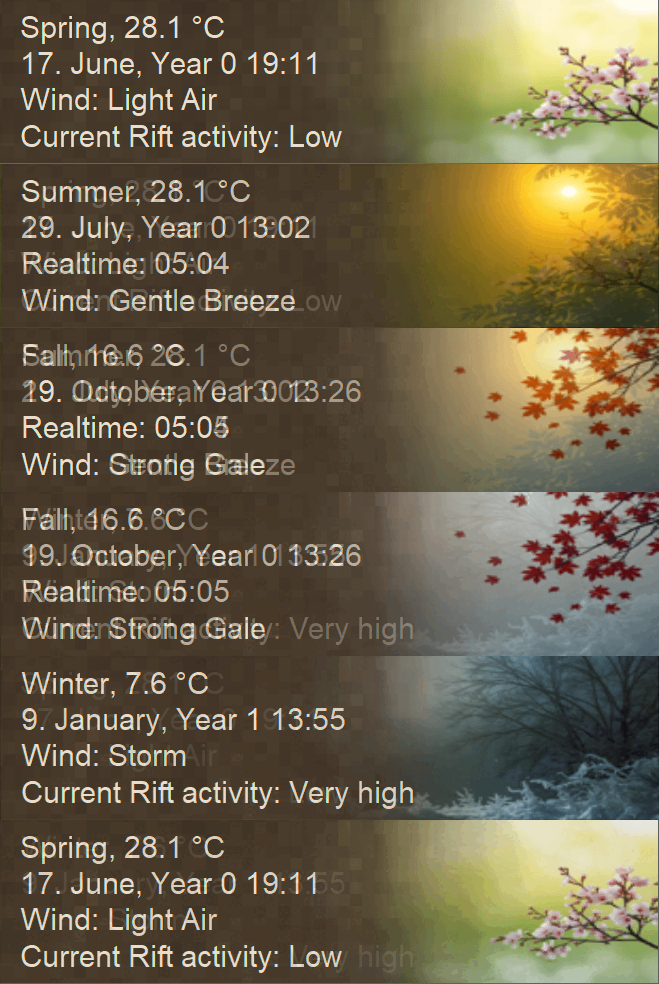
HUD Clock is a small overlay that tells you the time, the season, the weather, and a handful of other things about the world around you, without making you open a menu to find out.
It started as a community patch when the original Simple HUD Clock by Rhonen stopped getting updates. I picked it up with permission, kept it limping along through a couple of VS versions, and eventually decided the codebase needed a clean break - too many accumulated workarounds on top of an architecture that was never meant to grow this far. Version 4.0 was a rewrite from scratch for VS 1.22, rebuilding around something I could actually maintain and build upon. Each release since has added one feature group at a time without breaking what came before.
Client-side only. Multiplayer-safe. Vintage Story 1.22+.
What it shows
By default, the in-game date and time, current season, ambient temperature, and wind. Toggling on extra lines from the settings dialog gets you any combination of:
- Body temperature, with comfort signals (cool, freezing, warm, hot) rather than a raw number - the raw watched-attribute value disagrees with the character GUI, and HUD Clock takes the position that "you're getting cold" is more useful information than a precise wrong number.
- Apparent ("feels like") temperature, when an immersive-temperature mod is installed and providing it. Out of the box this works with Immersive Body Temperature by Cer0; other temperature mods can opt in via a small integration contract.
- Intoxication, current rainfall (mapped to vanilla's Rare/Light/Moderate/High/Very high buckets), current room type, and claim ownership.
- Online player count for multiplayer servers.
- Current rift activity - Calm through Very high, with optional always-on display when world config disables rifts.
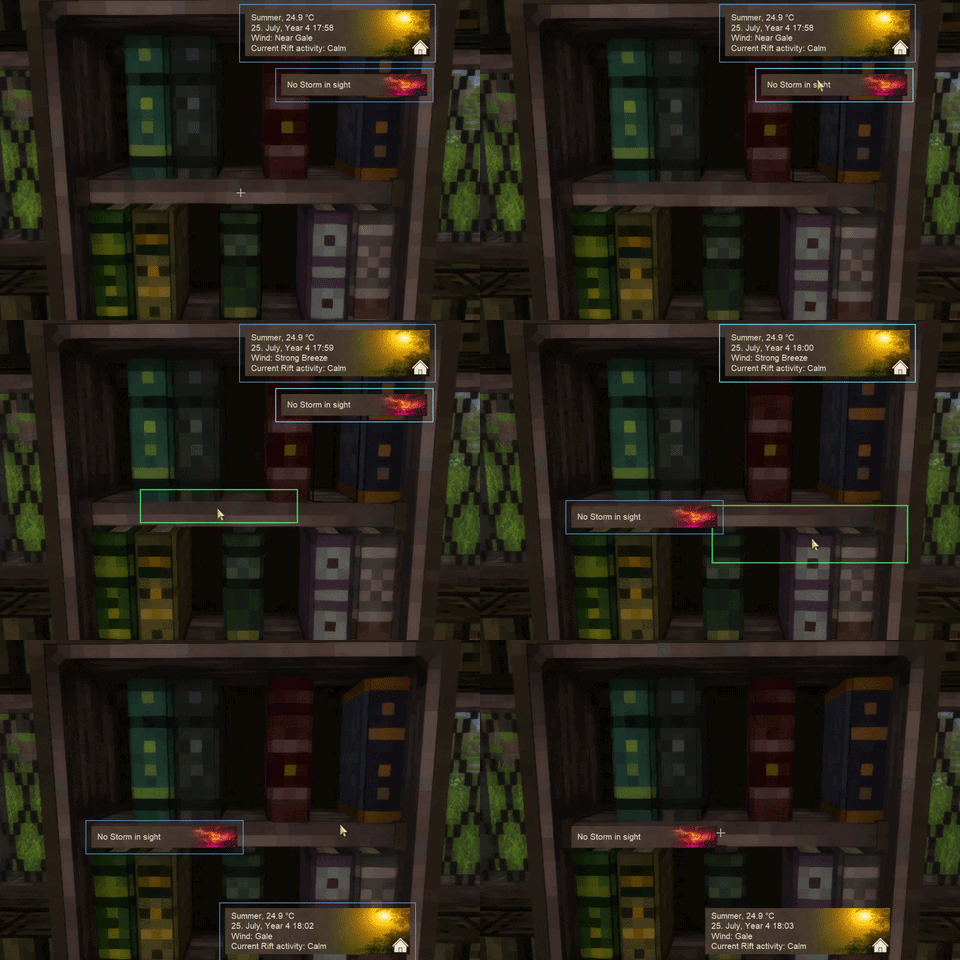
- An approaching temporal storm warning, with its own toggleable HUD that can be parked in a different corner of the screen from the main one.
Plus a real-time clock if you want to know the actual hour, a Fahrenheit toggle, and three icon themes - Modern, Classic, and a Custom slot for anyone who wants to drop their own art in.
With HudShelf installed, both the main HUD and the storm dialog become freely draggable - press HudShelf's edit-mode hotkey, drag either panel wherever you want it on screen, and the position persists across sessions. HudShelf is optional; without it, the anchor dropdown in the settings dialog works exactly as before.
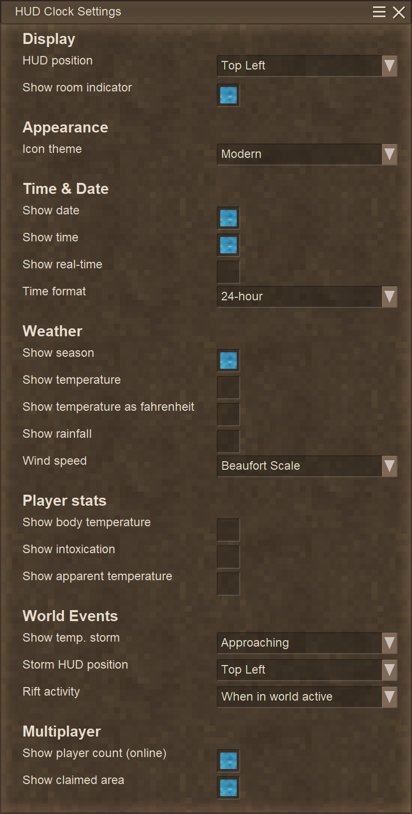
Everything is configurable from in-game without editing JSON. Open the settings with Shift+O.
Controls
| Shift + O | Open settings |
| Ctrl + U | Toggle main HUD |
| Ctrl + I | Toggle storm HUD |
All keybinds rebindable from the in-game Controls menu under "User Interface".
Compatibility
HUD Clock is designed to coexist quietly with other UI mods. It reads from VS's temporal-storm, rift, claim, and weather systems without modifying them, so it shouldn't conflict with mods that touch those subsystems. It runs alongside Status HUD Continued without any issue - they cover different ground and many people use both.
For temperature mods specifically, HUD Clock follows a small, vendor-neutral integration contract: any mod that publishes a few well-known watched-attribute keys gets extended body-temperature display and an apparent-temperature line for free. Cer0's Immersive Body Temperature is the first mod targeting it; the contract is documented in docs/integration.md for any other temperature-mod authors interested in opting in.
HudShelf is supported as an optional companion. Install it to drag the main HUD and storm dialog to any position on screen; uninstall it and HUD Clock's own anchor system takes over seamlessly.
FAQ
Why doesn't the body temperature line show a number?
Because the raw bodytemp watched-attribute value is computed differently from the number the character GUI displays, and getting the GUI's value back out would mean re-deriving the survival mod's full clothing/wetness/climate computation. Rather than show a number that disagrees with vanilla, HUD Clock shows the comfort signal - the line tells you whether you're cool or freezing, with the deviation from normal in the unit of your choice. With an immersive-temperature mod installed, the line extends symmetrically to warm and HOT.
Why is the apparent-temperature toggle there if I don't have a temperature mod?
The toggle is always visible so users with a compatible mod installed can find it. Without one, turning it on does nothing - there's no underlying value to display. Hiding settings dynamically based on which other mods are loaded would be more confusing than a dormant toggle.
Will it conflict with Status HUD Continued or Extended HUD Info?
Not in any way I'm aware of. They sit in different screen corners by default, and HUD Clock only reads from VS's data - it doesn't patch any vanilla subsystems other mods might also touch.
I'm on Vintage Story 1.20 or earlier and 4.x doesn't load.
The 4.x rewrite is for VS 1.22+. Legacy patch versions (1.0.x, 1.1.x) for older VS versions are still available in the Files tab look for HudClockPatch_v1.x.
Can I add it to a server I don't admin?
Yes. HUD Clock is client-side only and doesn't need to be installed on the server.
Translations
HUD Clock currently ships with English, Spanish (Spain & Latin America), German, French, Italian, Japanese, Korean, Polish, Portuguese (Brazil & Portugal), Russian, and Ukrainian. If your language isn't listed and you'd like to contribute, the lang files are plain JSON - open an issue or send a PR on GitHub.
Thanks to everyone who's contributed translations over the years.
Source & support
Source is on GitHub under MIT. Bug reports and feature requests are welcome via the issue tracker - please include your VS version and any other HUD-related mods you have installed.
If you'd like to support continued development, I have a Ko-fi. The mod is and will always be free.

Original Simple HUD Clock by Rhonen. 4.x rewrite by Elocrypt.
Project description from Vintage Story Mod DB.
Pick your setup
HUD Clock releases for each Vintage Story version.
Choose the version and loader you play, then open the matching release.
Vintage Story version
1.22.2
1 loader buildVintage Story version
1.22.1
1 loader buildVintage Story version
1.22.0-rc.10
1 loader buildVintage Story version
1.22.0-rc.9
1 loader buildVintage Story version
1.22.0-rc.8
1 loader buildVintage Story version
1.22.0-rc.7
1 loader buildVintage Story version
1.22.0-rc.6
1 loader buildVintage Story version
1.22.0-rc.5
1 loader buildVintage Story version
1.22.0-rc.4
1 loader buildVintage Story version
1.22.0-rc.3
1 loader buildVintage Story version
1.22.0-rc.2
1 loader buildShowing the newest 12 of 44 game versions. Older files are in the list below.
Check the dependencies, then try the file in a copied instance before changing a world you care about.
Recent files
HUD Clock versions and loaders
4.4.1
HudClock_4.4.1_VS1.22.3.zip
3 Jul 2026
Client Required Server Not supported Dependencies No extras listed Listed on Release listing
Check the 1.22.3 setup 1.22.0-pre.11.22.0-pre.21.22.0-pre.31.22.0-pre.4 release
4.4.0
HudClock_4.4.0_VS1.22.3.zip
8 Jun 2026
Client Source doesn’t say Server Source doesn’t say Dependencies No extras listed Listed on Release listing
Check the 1.22.3 setup 1.22.0-pre.11.22.0-pre.21.22.0-pre.31.22.0-pre.4 release
4.3.3
HudClock_4.3.3_VS1.22.3.zip
8 Jun 2026
Client Source doesn’t say Server Source doesn’t say Dependencies No extras listed Listed on Release listing
Check the 1.22.3 setup 1.22.0-pre.11.22.0-pre.21.22.0-pre.31.22.0-pre.4 release
4.3.2
HudClock_4.3.2.zip
5 Jun 2026
Client Source doesn’t say Server Source doesn’t say Dependencies No extras listed Listed on Release listing
Check the 1.22.3 setup 1.22.01.22.11.22.21.22.3 release
4.3.1
HudClock_4.3.1_VS1.22.2.zip
10 May 2026
Client Source doesn’t say Server Source doesn’t say Dependencies No extras listed Listed on Release listing
Check the 1.22.3 setup 1.22.01.22.11.22.21.22.3 release
4.3.0
HudClock_4.3.0_VS1.22.2.zip
3 May 2026
Client Source doesn’t say Server Source doesn’t say Dependencies No extras listed Listed on Release listing
Check the 1.22.2 setup 1.22.01.22.11.22.2 release
4.2.3
HudClock_4.2.3_VS1.22.1.zip
1 May 2026
Client Source doesn’t say Server Source doesn’t say Dependencies No extras listed Listed on Release listing
Check the 1.22.1 setup 1.22.01.22.1 release
4.2.1
HudClock_4.2.1_VS1.22.0.zip
26 Apr 2026
Client Source doesn’t say Server Source doesn’t say Dependencies No extras listed Listed on Release listing
Check the 1.22.0-rc.10 setup 1.22.0-pre.11.22.0-pre.21.22.0-pre.31.22.0-pre.4 release
4.2.0
HudClock_4.2.0_VS1.22.0.zip
26 Apr 2026
Client Source doesn’t say Server Source doesn’t say Dependencies No extras listed Listed on Release listing
Check the 1.22.0-rc.10 setup 1.22.0-pre.11.22.0-pre.21.22.0-pre.31.22.0-pre.4 release
4.1.0
HudClock_v4.1.0_VS1.22.0.zip
24 Apr 2026
Client Source doesn’t say Server Source doesn’t say Dependencies No extras listed Listed on Release listing
Check the 1.22.0 setup 1.22.0 release
4.0.0
HudClock_v4.0.0_VS1.22.0.zip
24 Apr 2026
Client Source doesn’t say Server Source doesn’t say Dependencies No extras listed Listed on Release listing
Check the 1.22.0 setup 1.22.0 release
1.1.2
HudClockPatch_v1.1.2.zip
2 Oct 2025
Client Source doesn’t say Server Source doesn’t say Dependencies No extras listed Listed on Release listing
Check the 1.21.1-rc.2 setup 1.21.0-rc.11.21.0-rc.21.21.0-rc.31.21.0-rc.4 release
Looking for an older file? The official Vintage Story Mod DB project page is in Resources.