Vintage Story version
Back to mods 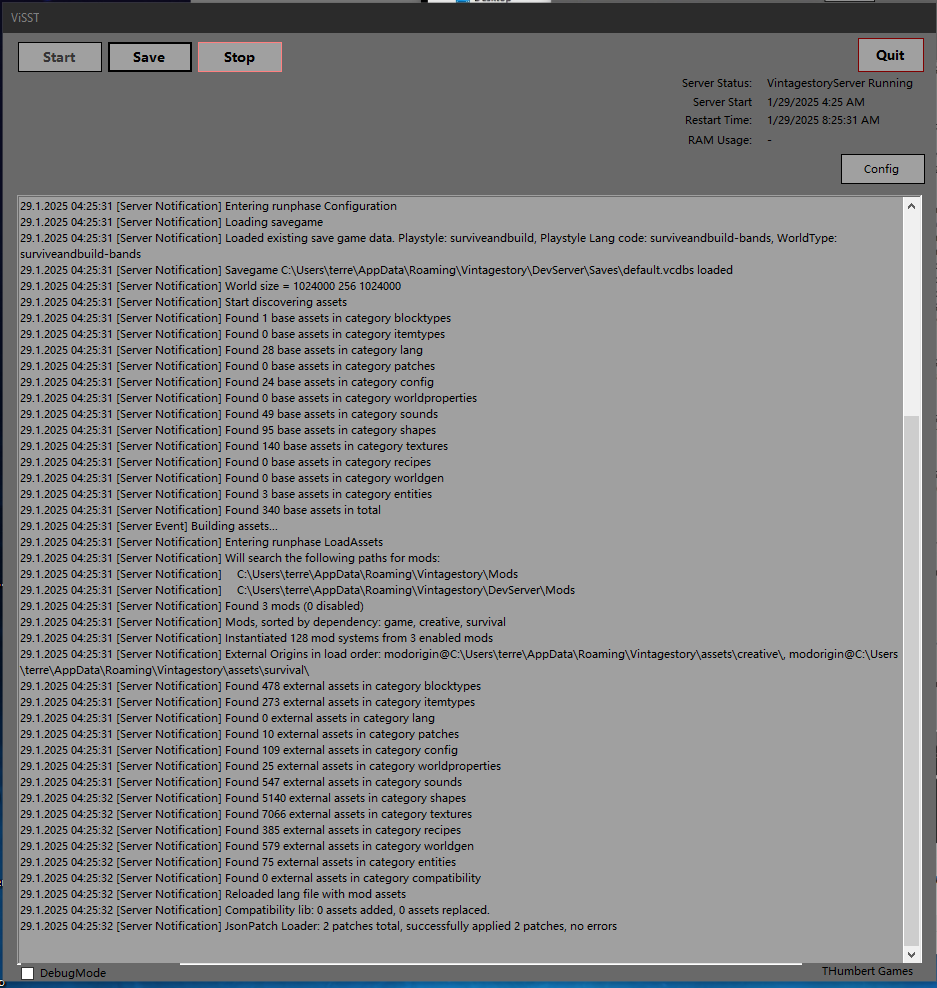
Vintage Story Mod DB · Vintage Story mod
ViSST Server Tool
ViSST - Vintage Story Server Tool 0.5 This is a lightweight tool I created to run my Vintage Story Server from my personal server. It handles automated starting/backup/restarting of a dedicated server. The tool also tracks players currently in the server. Y
Choose a version Pick your version below, then grab the matching file.
Quick answer
Which ViSST Server Tool release should I use?
Latest stable file 0.5.0-pre.1
Game version 0.0.0
Loader Built-in Vintage Story mod system
ViSST Server Tool 0.5.0-pre.1 targets 0.0.0. The project page does not say whether this file belongs on the client, dedicated server, or both. No extra mods listed for this file.
Where it goes
Is ViSST Server Tool required on the client, server, or both?
The project page does not say whether this file belongs on the client, dedicated server, or both.
Client Source doesn’t say
Dedicated server Source doesn’t say
Loader for this release Built-in Vintage Story mod system
Required install it here Optional supported, not mandatory Not supported do not install here Source doesn’t say do not assume
No client/server declaration is available from this source.
What else does ViSST Server Tool 0.5.0-pre.1 need?
0.5.0-pre.1. Change the file and its required mods may change too.
This file does not list any required mods. Do not add a library just because a different file uses it.
This file does not list any required or optional mods.
Before you install it
Add ViSST Server Tool without breaking your instance.
Built for ViSST Server Tool 0.5.0-pre.1. Pick another file and the loader, install side or required mods may change.
- 01
Stick to this file
Use 0.5.0-pre.1. It targets 0.0.0; another release may have different loader, side or dependency requirements.
- 02
Bring the mods it needs
This file does not list any required mods. Do not add a library just because a different file uses it.
- 03
Put it on the correct side
The project page does not say whether this file belongs on the client, dedicated server, or both.
- 04
Pick the file you checked
Use the “Get this file” button beside 0.5.0-pre.1. It opens that exact file at the source.
About this project
What does ViSST Server Tool add?
ViSST - Vintage Story Server Tool 0.5
This is a lightweight tool I created to run my Vintage Story Server from my personal server.
It handles automated starting/backup/restarting of a dedicated server. The tool also tracks players currently in the server. You can also issue commands through the GUI.
I plan on adding the ability to directly modify all settings in Server Config Json through the app. You can edit server data now. World and Roles coming soon. There is very little validation so if you put something crazy in you will probably get a server error.
Please let me know if there are any other features you would like
Executing program
Place the ViSST folder anywhere it is convenient but not in the Mod folder.
Launch the ViSST.exe.
Set the Server Exe Path
Set the Server Data Path to where you want all of the server data to live.(The Server Config Data wont populate until you have launched the server for the first time)
Configure the restart time.
Start the server.
Bugs
Confirmed:
- (Versions 0.2-0.4) During restart ViSST may crash but does not crash the Vintage Story Server. It looks like the fix in 0.5a solved the problem.
- Autosave amount and Interval are not properly saving when the ViSST app is shutdown then Restarted.
Potential:
Project description from Vintage Story Mod DB.
Pick your setup
ViSST Server Tool releases for each Vintage Story version.
Choose the version and loader you play, then open the matching release.
Check the dependencies, then try the file in a copied instance before changing a world you care about.
Recent files
ViSST Server Tool versions and loaders
0.5.0-pre.1
ViSST 0.5a.zip
31 Jan 2025
Client Source doesn’t say Server Source doesn’t say Dependencies No extras listed Listed on Release listing
Check the 0.0.0 setup 0.0.0 release
0.5.0
ViSST_0.5.zip
29 Jan 2025
Client Source doesn’t say Server Source doesn’t say Dependencies No extras listed Listed on Release listing
Check the 0.0.0 setup 0.0.0 release
0.4.0-pre.1
ViSST_0.4.zip
28 Jan 2025
Client Source doesn’t say Server Source doesn’t say Dependencies No extras listed Listed on Release listing
Check the 0.0.0 setup 0.0.0 release
0.4.0
ViSST.zip
28 Jan 2025
Client Source doesn’t say Server Source doesn’t say Dependencies No extras listed Listed on Release listing
Check the 0.0.0 setup 0.0.0 release
0.4.0
ViSST.zip
28 Jan 2025
Client Source doesn’t say Server Source doesn’t say Dependencies No extras listed Listed on Release listing
Check the 0.0.0 setup 0.0.0 release
0.3.0
ViSST.zip
22 Jan 2025
Client Source doesn’t say Server Source doesn’t say Dependencies No extras listed Listed on Release listing
Check the 0.0.0 setup 0.0.0 release
0.2.0
ViSST.zip
18 Jan 2025
Client Source doesn’t say Server Source doesn’t say Dependencies No extras listed Listed on Release listing
Check the 0.0.0 setup 0.0.0 release
0.1.0-pre.1
ViSST.zip
18 Jan 2025
Client Source doesn’t say Server Source doesn’t say Dependencies No extras listed Listed on Release listing
Check the 0.0.0 setup 0.0.0 release
Looking for an older file? The official Vintage Story Mod DB project page is in Resources.
 mod
mod Vintage Story
Obsidiancraft
Adds new obsidian items, including crude arrows, saws, scythes, macuahuitl and tepoztopilli
 mod
mod Vintage Story
Temporally Stable Tweaks
Various tweaks for the Temporally Stable server.
 mod
mod Vintage Story
Distant Vistas
Far LOD terrain. Personal Vintage Horizons fork for fixes I needed. Shared in case it helps. Not tak