Vintage Story version
Back to mods 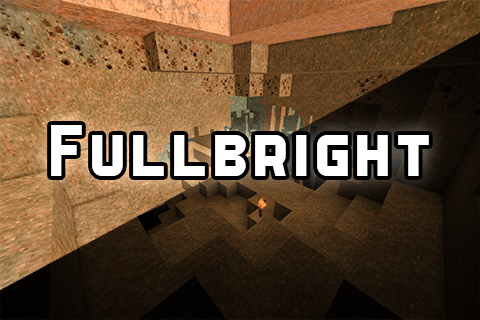
Vintage Story Mod DB · Vintage Story mod
Fullbright Toggle
Very simple clientside mod that allows you to see in the dark like you have night vision. Default key to toggle fullbright is "K", you can change this in the controls. Additionally a config is generated to control the brightness. The mod will reset your bright
Choose a version Pick your version below, then grab the matching file.
Quick answer
Which Fullbright Toggle release should I use?
Latest stable file 1.0.0
Game version 1.21.5, 1.21.6-rc.1, 1.21.6
Loader Built-in Vintage Story mod system
Fullbright Toggle 1.0.0 targets 1.21.5, 1.21.6-rc.1, 1.21.6. It must be installed on the client. Do not install it on the dedicated server. No extra mods listed for this file.
Where it goes
Is Fullbright Toggle required on the client, server, or both?
It must be installed on the client. Do not install it on the dedicated server.
Client Required
Dedicated server Not supported
Loader for this release Built-in Vintage Story mod system
Required install it here Optional supported, not mandatory Not supported do not install here Source doesn’t say do not assume
This Vintage Story file is marked client-only.
What else does Fullbright Toggle 1.0.0 need?
1.0.0. Change the file and its required mods may change too.
This file does not list any required mods. Do not add a library just because a different file uses it.
This file does not list any required or optional mods.
Before you install it
Add Fullbright Toggle without breaking your instance.
Built for Fullbright Toggle 1.0.0. Pick another file and the loader, install side or required mods may change.
- 01
Stick to this file
Use 1.0.0. It targets 1.21.5, 1.21.6-rc.1, 1.21.6; another release may have different loader, side or dependency requirements.
- 02
Bring the mods it needs
This file does not list any required mods. Do not add a library just because a different file uses it.
- 03
Put it on the correct side
It must be installed on the client. Do not install it on the dedicated server.
- 04
Pick the file you checked
Use the “Get this file” button beside 1.0.0. It opens that exact file at the source.
About this project
What does Fullbright Toggle add?
Very simple clientside mod that allows you to see in the dark like you have night vision. Default key to toggle fullbright is "K", you can change this in the controls.
Additionally a config is generated to control the brightness. The mod will reset your brightness back to vanilla/defualt when you reload/quit!
Source is provided in the zip because it's so simple. Seriously all this mod does currently is just adjust the min brightness.
Why not just use the command ".clientconfig minbrightness 1"?
So you can get the same effect by running the command ".clientconfig minbrightness 1". But I wanted a way to toggle this and have it reset when I leave a world
or server. You can set a macro to do this ingame with the ingame macro editor, but it requires two seperate macros and also you gotta remember to actually disable it lol.
Additionally, in the future too I might add some stuff to deal with fog n such. Or similar to mods for MC have the ability to cycle through some preset brightness values.
Config
Config file is located in VintagestoryData\ModConfig and generates after loading at least one world.
All this mod does is change this one value in your settings temporarily. The default vanilla value is 0. Any value higher than 1 will make the game overly bright.
Because of this I reccomend setting a value between 0.5 and 1. A reload is currently required for the config to update, hint: crtl+f1 is a reload hotkey.
DEFAULT VALUE BELOW:
{
"EnabledMinBrightness": 1.0
}
keywords
fullbright
fullbright toggle
nightvision
night vision
lighting
see in dark
brightness
gamma
Project description from Vintage Story Mod DB.
Pick your setup
Fullbright Toggle releases for each Vintage Story version.
Choose the version and loader you play, then open the matching release.
Vintage Story version
1.21.6
1 loader buildVintage Story version
1.21.5
1 loader buildCheck the dependencies, then try the file in a copied instance before changing a world you care about.
Recent files
Fullbright Toggle versions and loaders
1.0.0
Fullbright-1.0.0.zip
25 Nov 2025
Client Required Server Not supported Dependencies No extras listed Listed on Release listing
Check the 1.21.6-rc.1 setup 1.21.51.21.6-rc.11.21.6 release
Looking for an older file? The official Vintage Story Mod DB project page is in Resources.
 mod
mod Vintage Story
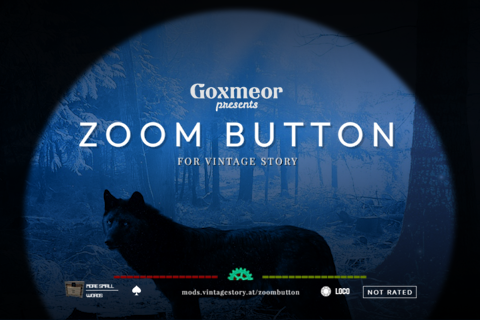
Zoom Button - Reborn
Where's all that damn wolf howling coming from? Press Z to squint and find out.
 mod
mod Vintage Story
The Ultimate Mod Manager
An in-game mod manager that's suitable even for remote servers without terminal/FTP access.
 mod
mod Vintage Story
FrameForgeTSR
Runtime and Visual System to give back frames while looking amazing.