Vintage Story version
Back to mods 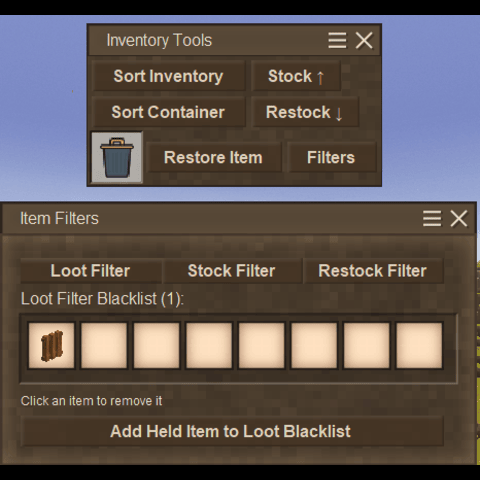
Vintage Story Mod DB · Vintage Story mod
AnotherInventoryManager
Inventory Manager for Vintage Story A quality-of-life mod for managing your inventory efficiently. Sort items, push/pull to nearby containers, filter loot, and safely delete items — all with hotkeys and GUI buttons for casuals like me How to Use GUI T
Choose a version Pick your version below, then grab the matching file.
Quick answer
Which AnotherInventoryManager release should I use?
Latest stable file 1.3.5
Game version 1.22.0-pre.1, 1.22.0-pre.2, 1.22.0-pre.3
Loader Built-in Vintage Story mod system
AnotherInventoryManager 1.3.5 targets 1.22.0-pre.1, 1.22.0-pre.2, 1.22.0-pre.3. It must be installed on the client. Installation on the dedicated server is optional. No extra mods listed for this file.
Where it goes
Is AnotherInventoryManager required on the client, server, or both?
It must be installed on the client. Installation on the dedicated server is optional.
Client Required
Dedicated server Optional
Loader for this release Built-in Vintage Story mod system
Required install it here Optional supported, not mandatory Not supported do not install here Source doesn’t say do not assume
This release supports both sides, but the source does not require it on the server.
What else does AnotherInventoryManager 1.3.5 need?
1.3.5. Change the file and its required mods may change too.
This file does not list any required mods. Do not add a library just because a different file uses it.
This file does not list any required or optional mods.
Before you install it
Add AnotherInventoryManager without breaking your instance.
Built for AnotherInventoryManager 1.3.5. Pick another file and the loader, install side or required mods may change.
- 01
Stick to this file
Use 1.3.5. It targets 1.22.0-pre.1, 1.22.0-pre.2, 1.22.0-pre.3; another release may have different loader, side or dependency requirements.
- 02
Bring the mods it needs
This file does not list any required mods. Do not add a library just because a different file uses it.
- 03
Put it on the correct side
It must be installed on the client. Installation on the dedicated server is optional.
- 04
Pick the file you checked
Use the “Get this file” button beside 1.3.5. It opens that exact file at the source.
About this project
What does AnotherInventoryManager add?
Inventory Manager for Vintage Story
A quality-of-life mod for managing your inventory efficiently. Sort items, push/pull to nearby containers, filter loot, and safely delete items — all with hotkeys and GUI buttons for casuals like me
How to Use
GUI Toolbar
Open your inventory (default: **E**). An **Inventory Tools** toolbar appears below it with buttons for all features. The toolbar also shows a **Trashcan** slot displaying the last deleted item — click **Restore Item** to get it back.
Hotkeys
All hotkeys are remappable in **Settings → Controls** (search for "IM:").
| Default | Action |
|---------|--------|
| **Alt+S** | Sort your inventory A-Z |
| **Alt+D** | Sort the currently open container A-Z |
| **Alt+P** | Push items to nearby containers |
| **Alt+R** | Restock partial stacks from nearby containers |
| **Alt+Q** | Delete the item under your cursor (goes to trashcan first) |
| **Alt+B** | Open/close the Loot Filter blacklist GUI |
| **Alt+F** | Open/close Favorites |
Sorting (A-Z)
Sorts items alphabetically, merging partial stacks first. Works on your backpack.
Sorting Containers (A-Z)
This is also a button among others in the GUI, works on the first opened container. If you ask me why it is there and not right under the container which it is tied to... I just couldn't figure it out.
Sorting Containers (A-Z)
This is also a button among others in the GUI, works on the first opened container. If you ask me why it is there and not right under the container which it is tied to... I just couldn't figure it out.
Push to Containers
Moves items from your inventory into nearby containers (20-block radius, configurable). Only pushes items that already exist in the target container — it won't dump random items into empty chests. Includes Crates (configurage).
Restock from Containers
Tops up partial stacks in your inventory from nearby containers. If you have 12 sticks, it finds sticks in nearby chests and fills your stack. Only affects items already in your inventory.
Safe Item Deletion (Trashcan)
Hover over an item and press **Alt+Q** to delete it. The item goes to a **trashcan** first — visible in the toolbar. Deleting another item permanently removes the previous one. Click **Restore Item** to get the item back.
Filters (Blacklist)
Press **Alt+B** to open the blacklist GUI. Hold an item and click **Add Held Item** to prevent it from being auto-collected, stocked or restocked. Click any item in the blacklist grid to remove it. Supports keyword-based filtering. Blacklist is saved to config and persists across sessions. Filters are dynamic, not just 1 line.
Favorites window
Successor to filters of restock and stock. You can specify your favorite item to be stocked at all times (using stock button or keybinds) or store excess into containers with that item present. You can input desired amount of that item which must be in your inventory at all times.
If that item does not exist in your inventory , it will be restocked from closest chest/container to the desired amount
For multiplayer please note: I didn't not account for multiplayer balancing. Restock/Stock will very likely be able to fetch Other player's inventories and containers/chests and be able to take items from other people's inventories. This balancing might be in future updates.
Favorites window
Successor to filters of restock and stock. You can specify your favorite item to be stocked at all times (using stock button or keybinds) or store excess into containers with that item present. You can input desired amount of that item which must be in your inventory at all times.
If that item does not exist in your inventory , it will be restocked from closest chest/container to the desired amount
For multiplayer please note: I didn't not account for multiplayer balancing. Restock/Stock will very likely be able to fetch Other player's inventories and containers/chests and be able to take items from other people's inventories. This balancing might be in future updates.
Configuration
Config file: `VintagestoryData/ModConfig/inventorymanager.json`
- ContainerSearchRadius — How far Push/Restock scans for containers (default: 20 blocks)
- BlacklistedItemCodes — List of item codes blocked by the loot filter
- BlacklistedKeywords — Keyword-based loot filter rules
- "EnableTrashcan": false --- disables/enables trashcan UI
- "EnableTrashcan": false --- disables/enables trashcan UI
Since Update 1.3.0
- Ability to turn off any buttons - on/off
- Ability to turn off any hotkeys - on/off
- Ability to turn off GUI of inventory tools - on/off
- Ability to turn off crates implemintation -on/off - just because it might ruin someone's immersion
- Ability to turn ON/off debug logs exclusively for the mod - for troubleshooting.
- Ability to turn off any buttons - on/off
- Ability to turn off any hotkeys - on/off
- Ability to turn off GUI of inventory tools - on/off
- Ability to turn off crates implemintation -on/off - just because it might ruin someone's immersion
- Ability to turn ON/off debug logs exclusively for the mod - for troubleshooting.
Installation
1. Download
2. Place `InventoryManager.zip` in `%APPDATA%\VintagestoryData\Mods\`
3. Launch Vintage Story
Known Compatability
Known Incompatability
---- none noticed
Sorting Not Working
- Make sure the inventory is open
- Some special inventories (furnaces, traders) are intentionally skipped
GUI Buttons Not Visible
- GUI buttons only appear when inventory is open
- Check if "Immersive Mouse Mode" is enabled (buttons disabled in this mode)
Inspirational Credits for Fabulous mods!
Sonito's Trash it - I missed that feature from playing modded minecraft so here it is. Thank you for reminding me <3
Xandus Inventory Tweaks - very well put together tweaks for inventory management which i took for the baseline. Keep in mind that Xandus mod is much more tweakable than this one.
Sortable Storage - for giving the idea of soring external containers which for some reason i couldn't find any other mods that do this.
AS ALWAYS
Make sure you make a world backup before using new mods.
Open source
Xandus Inventory Tweaks - very well put together tweaks for inventory management which i took for the baseline. Keep in mind that Xandus mod is much more tweakable than this one.
Sortable Storage - for giving the idea of soring external containers which for some reason i couldn't find any other mods that do this.
AS ALWAYS
Make sure you make a world backup before using new mods.
Open source
Feel free to use this to anyway you like. It seems that I am no longer keep updating this mod, so if anyone would like to takeover or fork it and keep updated, be my guest!
Project description from Vintage Story Mod DB.
Pick your setup
AnotherInventoryManager releases for each Vintage Story version.
Choose the version and loader you play, then open the matching release.
Vintage Story version
1.22.0-pre.2
1 loader buildVintage Story version
1.22.0-pre.1
1 loader buildVintage Story version
1.21.6-rc.1
1 loader buildVintage Story version
1.21.6
1 loader buildVintage Story version
1.21.5
1 loader buildVintage Story version
1.21.4
1 loader buildVintage Story version
1.21.3
1 loader buildVintage Story version
1.21.2-rc.3
1 loader buildVintage Story version
1.21.2-rc.2
1 loader buildVintage Story version
1.21.2-rc.1
1 loader buildVintage Story version
1.21.2
1 loader buildShowing the newest 12 of 26 game versions. Older files are in the list below.
Check the dependencies, then try the file in a copied instance before changing a world you care about.
Recent files
AnotherInventoryManager versions and loaders
1.3.5
InventoryManager_v1.3.5_game1.22.zip
27 Feb 2026
Client Required Server Optional Dependencies No extras listed Listed on Release listing
Check the 1.22.0-pre.3 setup 1.22.0-pre.11.22.0-pre.21.22.0-pre.3 release
1.3.3
InventoryManager_v1.3.3_game1.22.zip
21 Feb 2026
Client Required Server Optional Dependencies No extras listed Listed on Release listing
Check the 1.22.0-pre.3 setup 1.22.0-pre.11.22.0-pre.21.22.0-pre.3 release
1.3.2
InventoryManager_v1.3.2_game1.21.zip
21 Feb 2026
Client Required Server Optional Dependencies No extras listed Listed on Release listing
Check the 1.21.6-rc.1 setup 1.21.0-pre.11.21.0-pre.21.21.0-pre.31.21.0-rc.1 release
1.3.1
InventoryManager_v1.3.1_game1.22.zip
18 Feb 2026
Client Required Server Optional Dependencies No extras listed Listed on Release listing
Check the 1.22.0-pre.2 setup 1.22.0-pre.11.22.0-pre.2 release
1.3.0
InventoryManager_v1.3.0_game1.21.zip
18 Feb 2026
Client Required Server Optional Dependencies No extras listed Listed on Release listing
Check the 1.21.6-rc.1 setup 1.21.0-pre.11.21.0-pre.21.21.0-pre.31.21.0-rc.1 release
1.2.7
InventoryManager_v1.2.7_game1.22.zip
15 Feb 2026
Client Required Server Optional Dependencies No extras listed Listed on Release listing
Check the 1.22.0-pre.2 setup 1.22.0-pre.11.22.0-pre.2 release
1.2.6
InventoryManager_v1.2.6_game1.21.zip
15 Feb 2026
Client Required Server Optional Dependencies No extras listed Listed on Release listing
Check the 1.21.6-rc.1 setup 1.21.0-pre.11.21.0-pre.21.21.0-pre.31.21.0-rc.1 release
1.2.4
InventoryManager_v1.2.4_VS1.21.zip
14 Feb 2026
Client Required Server Optional Dependencies No extras listed Listed on Release listing
Check the 1.21.6-rc.1 setup 1.21.0-pre.11.21.0-pre.21.21.0-pre.31.21.0-rc.1 release
1.2.5
InventoryManager_v1.2.5_VS1.22.zip
14 Feb 2026
Client Required Server Optional Dependencies No extras listed Listed on Release listing
Check the 1.22.0-pre.2 setup 1.22.0-pre.11.22.0-pre.2 release
1.2.2
InventoryManager_v1.2.2_VS1.21.zip
14 Feb 2026
Client Required Server Optional Dependencies No extras listed Listed on Release listing
Check the 1.21.6-rc.1 setup 1.21.0-pre.11.21.0-pre.21.21.0-pre.31.21.0-rc.1 release
1.2.3
InventoryManager_v1.2.3_VS1.22.zip
14 Feb 2026
Client Required Server Optional Dependencies No extras listed Listed on Release listing
Check the 1.22.0-pre.2 setup 1.22.0-pre.11.22.0-pre.2 release
1.2.1
InventoryManager_v1.2.1_VS1.22.zip
14 Feb 2026
Client Required Server Optional Dependencies No extras listed Listed on Release listing
Check the 1.22.0-pre.2 setup 1.22.0-pre.11.22.0-pre.2 release
Looking for an older file? The official Vintage Story Mod DB project page is in Resources.
mod
Vintage Story
Configurable Chat History
Lets you override the hard 30 message limit for chat history
 mod
mod Vintage Story
Backpack for books and scrolls
Backpack for books and scrolls. And another for butterflies
mod
Vintage Story
Safe Haven
AFK, spawn, loading and softcore safety protections for multiplayer servers.