CarryOnLib Needed by Carry On 2.0.0-pre.8
requiredMatching file found Matched file: 1.0.0-pre.8

Vintage Story Mod DB · Vintage Story mod
Fork of mod made by copygirl - CarryCapacity Allows picking up and carrying blocks, especially containers along with their contents, in your hands and on your back. Please support my caffeine consumption Carry On 2.0 - Early testing pre-release Use at your
Quick answer
Carry On 2.0.0-pre.8 targets 1.22.0, 1.22.1, 1.22.2. It must be installed on the client. Installation on the dedicated server is optional. All 1 required mods have matching files.
Where it goes
It must be installed on the client. Installation on the dedicated server is optional.
This release supports both sides, but the source does not require it on the server.
2.0.0-pre.8. Change the file and its required mods may change too.
Install CarryOnLib first. We found matching files for this game-version and loader setup.
We only count dependency files that match this setup. A file for another loader does not fill the gap.
Before you install it
Built for Carry On 2.0.0-pre.8. Pick another file and the loader, install side or required mods may change.
Use 2.0.0-pre.8. It targets 1.22.0, 1.22.1, 1.22.2; another release may have different loader, side or dependency requirements.
Install CarryOnLib first. We found matching files for this game-version and loader setup.
It must be installed on the client. Installation on the dedicated server is optional.
Use the “Get this file” button beside 2.0.0-pre.8. It opens that exact file at the source.
About this project
Fork of mod made by copygirl - CarryCapacity
Allows picking up and carrying blocks, especially containers along with their contents, in your hands and on your back.
Please support my caffeine consumption
Use at your own risk.
CarryOn 2.0 requires CarryOnLib to run.
CarryOn v2.0.0-pre.5
Example:
"CarryHungerRate": {
  "HandsEnabled": false,
  "BackEnabled": true,
  "MinSaturationThreshold": 150.0,
  "ModifierOverrides": {
    "ByBlockCode": [
      {
        "Key": "game:crate",
        "Hands": 0.3,
        "Back": 0.4
      },
      {
        "Key": "game:log*",
        "Back": 0.5
      }
    ],
    "ByBlockClass": [
      {
        "Key": "BlockChest",
        "Back": 0.4
      }
    ],
    "SlotDefaults": {
      "Hands": 0.2,
      "Back": 0.3
    }
  }
}
The config format changed from earlier releases so it can be edited with AutoConfigLib.
"CarryWalkSpeed": {
  "HandsEnabled": true,
  "BackEnabled": true,
  "HandsAllowSprint": false,
  "BackAllowSprint": true,
  "ModifierOverrides": {
    "ByBlockCode": [
      {
        "Key": "game:crate",
        "Hands": -0.4,
        "Back": -0.3
      },
      {
        "Key": "game:log*",
        "Hands": -0.5,
        "Back": -0.25
      },
      {
        "Key": "game:lootvessel|sea",
        "Hands": -0.6
      }
    ],
    "ByBlockClass": [
      {
        "Key": "BlockChest",
        "Hands": -0.35,
        "Back": -0.2
      },
      {
        "Key": "BlockBarrel",
        "Hands": -0.3
      }
    ],
    "SlotDefaults": {
      "Hands": -0.25,
      "Back": -0.15
    }
  }
}
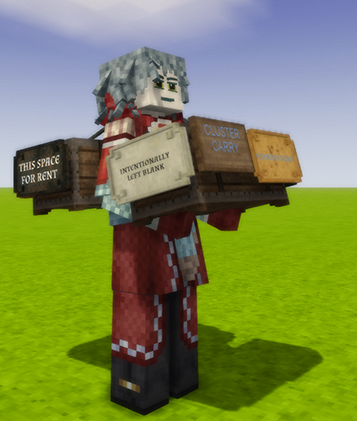
CarryOn v2.0.0-pre.4 - Cluster Carry
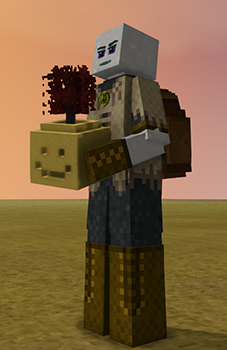
CarryOn v2.0.0-pre.3 allows walk speed overrides in the CarryOnConfig.json file.
e.g.: Add carry penalty for various reed chests when carried on back and crates in hands:
Note that the format has changed in pre.5+
    "WalkSpeedOverrides": {
      "ByBlockCode": {
        "game:stationarybasket*": { "Back": -0.1 },
        "lc:lblstationarybasket*": { "Back": -0.1 },
        "lcupdated:lblstationarybasket*": { "Back": -0.1 }

        "game:chest*|owl*": { "Back": -0.08 },
        "game:chest*|golden*": { "Back": -0.10 },
        "game:chest*": { "Back": -0.15 }
      },
      "ByBlockClass": {
        "BlockCrate": { "Hands": -0.8 }
      },
      "SlotDefaults": {
        "Hands": -0.25,
        "Back": -0.15
      }
    }
Note:
These may not be ready for general gameplay.
CarryOn v1.9.0-pre.1 adds an experimental feature: CarryOn Boating
CarryOn v1.9.0-pre.2:
CarryOn v1.9.0-pre.3:
CarryOn v1.10.0-pre.1
CarryOn v1.10.0-pre.2
----
To pick up a block with your hands, sneak and hold right-click. Both hands must be empty.
A circular progress bar will be visible around your cursor as you wait.
You can only pick up certain supported blocks, such as chests, barrels, vessels (including broken ones), anvils, ...
To put a block onto your back, sneak and hold right-click without aiming at a block (or hold Ctrl when aiming at a block).
A smaller selection of blocks can be put on your back. Notably, baskets can be worn on your back without any downsides.
To put a block down, or from your back into your hands, just sneak and hold right-click again.
You can still interact with most doors and storage with your hands full but with a short delay (hold button to interact).
CarryOn interractions can be disabled in the client by using to Toggle hotkey combination [ALT]+K. This is useful where CarryOn interactions conflict with another mod.
If you are unable to drop a carried block then use the Quickdrop hotkey [CTRL]+[ALT]+K (This is a workaround until the issue can be resolved)
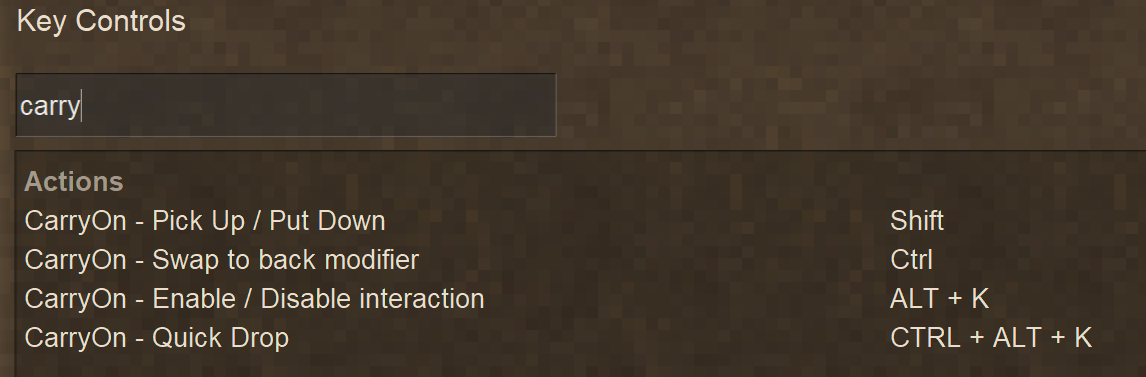
The keybinds for CarryOn only appear after a world has been loaded.
The default keybinds are mapped as above with Shift carry key also being the Sneak key.
It is recommended, if you swap the Run and Sneak keys, that you do the same for the carry and swap keys.
Reload your world after changes to the keybinds to ensure they take effect (Known CarryOn bug)
New Keybind added to v1.9.4:
Toggle Double Tap Dismount: CTRL+K
Typically, when carrying containers, you are slowed down by some amount.
You also cannot sprint when carrying a block in your hands.
When taking any damage, you drop what you're holding in your hands.
When you die, what you're carrying on your back will drop at your death location.
If the death occurs on a land claim on which the player does not have permission and no suitable location can be found to place the block, the items will drop. Containers will spill their contents, loot vessels will smash dropping the loot and some items could break entirely (e.g. clutter has a chance of breaking)
A selection of mods regularly tested with CarryOn - in no particular order.
Feel free to contact me on Discord: nerdscurvy
Discord link: Vintage Story > mods > Carry On (Join the Official Vintage Story Discord server)
To help with resolving issues - send me your logs:
More logging information can be captured by enabling the following in the CarryOn ModConfig:
"LoggingEnabled": true
.carryon gui set L1 hands — attach the Hands carried-item to anchor L1..carryon gui set R2 back — attach the Back carried-item to anchor R2..carryon gui set R1 clear — clear any assignment at anchor R1.
.carryon gui bg color #E4C4A6# and uppercase. Saved to client config..carryon gui bg alpha 0.5
.carryon gui border color #45372D.carryon gui border alpha 1.0
.carryon gui highlight color #FFFFFF.carryon gui highlight alpha 0.8
All carryables can be enabled/disabled via the CarryOnConfig.json file in ModConfig:
Refer to the Default CarryOnConfig.json section below.
Options to enable blocks that can be carried. Each option represents a group of block types and can be set to true or false.
Options to enable blocks that can be interacted with while the player is carrying a block in their hands. Each option represents a group of block types (Doors also covers Trap Doors) and can be set to true or false.
Options and setting to change carry behavior:
Black magic.
Filters to control what other blocks become carryable, interactable based their similarity and what mods and blocks to exclude.
Only a single option related to dropped blocks:
In case of emergency break temporal gear:
{
  "ConfigVersion": 2,
  "Carryables": {
    "Anvil": true,
    "Barrel": true,
    "Bookshelf": false,
    "BunchOCandles": false,
    "Chandelier": false,
    "ChestLabeled": true,
    "ChestTrunk": false,
    "Chest": true,
    "Clutter": false,
    "Crate": true,
    "DisplayCase": false,
    "Flowerpot": false,
    "Forge": false,
    "Henbox": false,
    "LogWithResin": false,
    "LootVessel": true,
    "MoldRack": false,
    "Molds": false,
    "Oven": false,
    "Planter": true,
    "Quern": true,
    "ReedBasket": true,
    "Resonator": true,
    "Shelf": false,
    "Sign": false,
    "StorageVessel": true,
    "ToolRack": false,
    "TorchHolder": false
  },
  "Interactables": {
    "Door": true,
    "Barrel": true,
    "Storage": true
  },
  "CarryOptions": {
    "AllowSprintWhileCarrying": false,
    "IgnoreCarrySpeedPenalty": false,
    "RemoveInteractDelayWhileCarrying": false,
    "InteractSpeedMultiplier": 1.0,
    "BackSlotEnabled": true,
    "AllowChestTrunksOnBack": false,
    "AllowLargeChestsOnBack": false,
    "AllowCratesOnBack": false
  },
  "CarryablesFilters": {
    "AutoMapSimilar": true,
    "AutoMatchIgnoreMods": [
      "mcrate"
    ],
    "AllowedShapeOnlyMatches": [
      "block/clay/lootvessel",
      "block/wood/chest/normal",
      "block/wood/trunk/normal",
      "block/reed/basket-normal"
    ],
    "RemoveBaseCarryableBehaviour": [
      "woodchests:wtrunk"
    ],
    "RemoveCarryableBehaviour": [
      "game:banner"
    ]
  },
  "DroppedBlockOptions": {
    "NonGroundBlockClasses": [
      "BlockWater",
      "BlockLava"
    ]
  },
  "DebuggingOptions": {
    "LoggingEnabled": false,
    "DisableHarmonyPatch": false
  }
}
The values shown are the defaults.
{
  "AnvilEnabled": true,
  "BarrelEnabled": true,
  "BookshelfEnabled": false,
  "BunchOCandlesEnabled": false,
  "ChandelierEnabled": false,
  "ChestLabeledEnabled": true,
  "ChestTrunkEnabled": false,
  "ChestEnabled": true,
  "ClutterEnabled": false,  (Most of the clutter found in ruins)
  "CrateLegacyEnabled": true,
  "CrateEnabled": true,
  "DisplayCaseEnabled": false,
  "FlowerpotEnabled": false,
  "ForgeEnabled": false,
  "HenboxEnabled": false,
  "LogWithResinEnabled": false,
  "LootVesselEnabled": true,
  "MoldRackEnabled": false,
  "MoldsEnabled": false,
  "OvenEnabled": false,
  "PlanterEnabled": true,
  "QuernEnabled": true,
  "ShelfEnabled": false,
  "SignEnabled": false,
  "ReedBasketEnabled": true, (Reed Chest)
  "StorageVesselEnabled": true,
  "ToolRackEnabled": false,
  "TorchHolderEnabled": false,
  "BackSlotEnabled": true, (Used to disable items carried on back)
  "AllowChestTrunksOnBack": false,
  "AllowLargeChestsOnBack": false, (e.g. ExtraChests)
  "AllowCratesOnBack": false,
  "NonGroundBlockClasses": [
    "BlockWater",
    "BlockLava"
  ],
  "AutoMatchIgnoreMods": [
    "mcrate"
  ],
  "AllowedShapeOnlyMatches": [
    "block/clay/lootvessel",
    "block/wood/chest/normal",
    "block/wood/trunk/normal",
    "block/reed/basket-normal"
  ],
  "InteractDoorEnabled": true, (Hold interact button to open doors when carrying block in hands)
  "InteractStorageEnabled": true, (Hold interact button to open storage container when carrying block in hands)
  "AllowSprintWhileCarrying": false, (When true, players can still sprint while carrying chests, etc.)
  "IgnoreCarrySpeedPenalty": false, (When true, players will have normal movement speed when carrying block in hands and on back)
  "RemoveInteractDelayWhileCarrying": false, (When true, players can open doors and chests instantly while carrying a block in their hands)
  "InteractSpeedMultiplier": 1.0, (Multiplier to change the speed of the progress circle when interacting with carryable blocks)
  "LoggingEnabled": false (Output extra logging information)
}
NonGroundBlockClasses is used to determine if a dropped block will sink through these types when looking for ground or placing the block.
e.g. Adding "BlockLeaves" will cause dropped blocks to fall through tree foliage.
CarryOn will try to auto-match similar blocks in other mods to make them carryable. The following Config sections affect the auto-matching:
The HoldControlForBackSwapFocus option can be used to disable to Ctrl key interaction to prioritise swapping blocks to and from the back slot.
CarryOnClientConfig.json in ModConfig:
{
  "HoldControlForBackSwapFocus": true
}
Project description from Vintage Story Mod DB.
Pick your setup
Choose the version and loader you play, then open the matching release.
Showing the newest 12 of 72 game versions. Older files are in the list below.
Check the dependencies, then try the file in a copied instance before changing a world you care about.
Recent files
CarryOn-1.22.0_v2.0.0-pre.8.zip
22 Jul 2026
CarryOn-1.22.0_v2.0.0-pre.7.zip
4 Jul 2026
CarryOn-1.22.0_v2.0.0-pre.6.zip
2 Jul 2026
CarryOn-1.22.0_v2.0.0-pre.5.zip
30 Jun 2026
CarryOn-1.22.0_v2.0.0-pre.4.zip
10 Jun 2026
CarryOn-1.22.0_v2.0.0-pre.3.zip
4 Jun 2026
CarryOn-1.22.0_v2.0.0-pre.2.zip
1 Jun 2026
CarryOn-1.22.0_v2.0.0-pre.1.zip
25 May 2026
CarryOn-1.22.0_v1.14.2.zip
21 May 2026
CarryOn-1.22.0_v1.14.1.zip
18 May 2026
CarryOn-1.22.0_v1.14.1-pre.1.zip
10 May 2026
CarryOn-1.22.0_v1.14.0.zip
26 Apr 2026
Looking for an older file? The official Vintage Story Mod DB project page is in Resources.
 mod
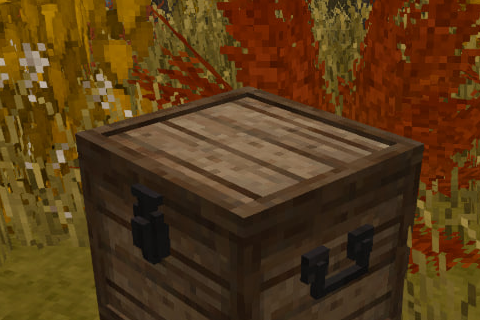
modThese chests were created for the [UA] Eternal Seraph server
 mod
modПатч для серверу Вічний Серафим. Patch for the server Eternal Seraph.
 mod
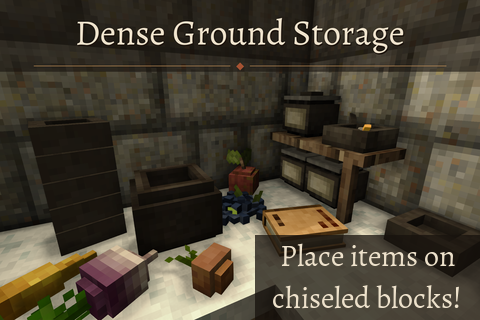
modPlace down more items per block and on chiseled blocks