Vintage Story version
Back to mods
Vintage Story Mod DB · Vintage Story mod
Venoms Vanilla Patching
Temporary Patch for ForgeContentsRenderer with bad RenderMultiTextureMesh https://github.com/anegostudios/VintageStory-Issues/issues/9139 This was specifically made for Version 1.22.2 after I ran into this issue on my friends server around a generated dungeo
Choose a version Pick your version below, then grab the matching file.
Quick answer
Which Venoms Vanilla Patching release should I use?
Latest stable file 1.0.2
Game version 1.22.2
Loader Built-in Vintage Story mod system
Venoms Vanilla Patching 1.0.2 targets 1.22.2. It must be installed on the client. Do not install it on the dedicated server. No extra mods listed for this file.
Where it goes
Is Venoms Vanilla Patching required on the client, server, or both?
It must be installed on the client. Do not install it on the dedicated server.
Client Required
Dedicated server Not supported
Loader for this release Built-in Vintage Story mod system
Required install it here Optional supported, not mandatory Not supported do not install here Source doesn’t say do not assume
This Vintage Story file is marked client-only.
What else does Venoms Vanilla Patching 1.0.2 need?
1.0.2. Change the file and its required mods may change too.
This file does not list any required mods. Do not add a library just because a different file uses it.
This file does not list any required or optional mods.
Before you install it
Add Venoms Vanilla Patching without breaking your instance.
Built for Venoms Vanilla Patching 1.0.2. Pick another file and the loader, install side or required mods may change.
- 01
Stick to this file
Use 1.0.2. It targets 1.22.2; another release may have different loader, side or dependency requirements.
- 02
Bring the mods it needs
This file does not list any required mods. Do not add a library just because a different file uses it.
- 03
Put it on the correct side
It must be installed on the client. Do not install it on the dedicated server.
- 04
Pick the file you checked
Use the “Get this file” button beside 1.0.2. It opens that exact file at the source.
About this project
What does Venoms Vanilla Patching add?
Temporary Patch for ForgeContentsRenderer with bad RenderMultiTextureMesh
https://github.com/anegostudios/VintageStory-Issues/issues/9139
This was specifically made for Version 1.22.2 after I ran into this issue on my friends server around a generated dungeon.
Safety checks to stop the crashing altogether, as well as placing a large green "game:pocketsun" above forges that display crashes around Generated Structures due to reference errors.
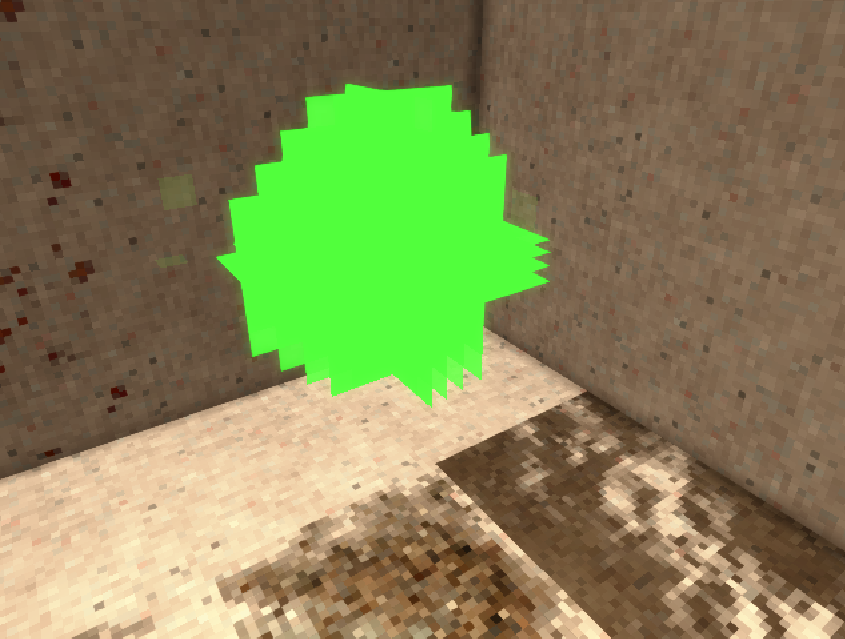
If you see it floating in the air with seemingly no forge in sight, this seems to be where a forge was overwritten by WorldGen, you can place a block at the position (1 block under the green sun) and then break it, this should destroy the corrupted forge data.
System.NullReferenceException: Object reference not set to an instance of an object.
   at Vintagestory.Client.RenderAPIBase.RenderMultiTextureMesh(MultiTextureMeshRef mmr, String textureSampleName, Int32 textureNumber) in VintagestoryLib\Client\API\RenderAPIBase.cs:line 112
   at Vintagestory.GameContent.ForgeContentsRenderer.OnRenderFrame(Single dt, EnumRenderStage stage) in VSSurvivalMod\BlockEntityRenderer\ForgeContentsRenderer.cs:line 243
   at Vintagestory.Client.NoObf.ClientEventManager.TriggerRenderStage(EnumRenderStage stage, Single dt) in VintagestoryLib\Client\Util\ClientEventManager.cs:line 257
   at Vintagestory.Client.NoObf.ClientMain.TriggerRenderStage(EnumRenderStage stage, Single dt) in VintagestoryLib\Client\ClientMain.cs:line 858
   at Vintagestory.Client.NoObf.ClientMain.MainRenderLoop(Single dt) in VintagestoryLib\Client\ClientMain.cs:line 953
   at Vintagestory.Client.NoObf.ClientMain.MainGameLoop(Single deltaTime) in VintagestoryLib\Client\ClientMain.cs:line 782
   at Vintagestory.Client.GuiScreenRunningGame.RenderToPrimary(Single dt) in VintagestoryLib\Client\MainMenu\Screens\GuiScreenRunningGame.cs:line 173
   at Vintagestory.Client.ScreenManager.Render(Single dt) in VintagestoryLib\Client\ScreenManager.cs:line 742
   at Vintagestory.Client.ScreenManager.OnNewFrame(Single dt) in VintagestoryLib\Client\ScreenManager.cs:line 686
   at Vintagestory.Client.NoObf.ClientPlatformWindows.window_RenderFrame(FrameEventArgs e) in VintagestoryLib\Client\ClientPlatform\GameWindow.cs:line 112
   at OpenTK.Windowing.Desktop.GameWindow.Run()
Project description from Vintage Story Mod DB.
Pick your setup
Venoms Vanilla Patching releases for each Vintage Story version.
Choose the version and loader you play, then open the matching release.
Check the dependencies, then try the file in a copied instance before changing a world you care about.
Recent files
Venoms Vanilla Patching versions and loaders
1.0.2
venomsvanillapatches_1.0.2.zip
26 May 2026
Client Required Server Not supported Dependencies No extras listed Listed on Release listing
Check the 1.22.2 setup 1.22.2 release
Looking for an older file? The official Vintage Story Mod DB project page is in Resources.