Vintage Story version
Back to mods 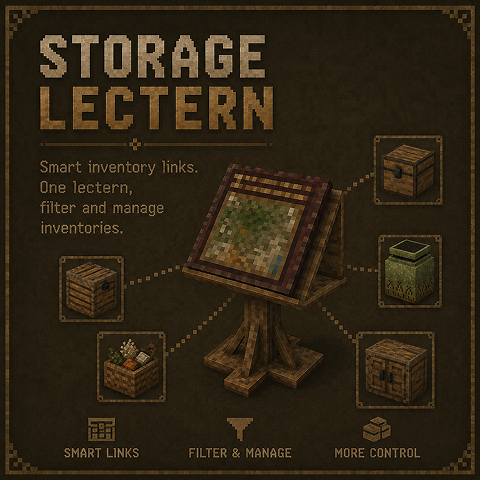
Vintage Story Mod DB · Vintage Story mod
Storage Lectern
A tiered storage management block for Vintage Story 1.22. Place a lectern near your containers and use the Tome of Linking to register them — the lectern then gives you a single interface to browse, search, and retrieve items from all linked containers a
Choose a version Pick your version below, then grab the matching file.
Quick answer
Which Storage Lectern release should I use?
Latest stable file 1.4.0
Game version 1.22.0, 1.22.1, 1.22.2
Loader Built-in Vintage Story mod system
Storage Lectern 1.4.0 targets 1.22.0, 1.22.1, 1.22.2. It must be installed on the client. Installation on the dedicated server is optional. No extra mods listed for this file.
Where it goes
Is Storage Lectern required on the client, server, or both?
It must be installed on the client. Installation on the dedicated server is optional.
Client Required
Dedicated server Optional
Loader for this release Built-in Vintage Story mod system
Required install it here Optional supported, not mandatory Not supported do not install here Source doesn’t say do not assume
This release supports both sides, but the source does not require it on the server.
What else does Storage Lectern 1.4.0 need?
1.4.0. Change the file and its required mods may change too.
This file does not list any required mods. Do not add a library just because a different file uses it.
This file does not list any required or optional mods.
Before you install it
Add Storage Lectern without breaking your instance.
Built for Storage Lectern 1.4.0. Pick another file and the loader, install side or required mods may change.
- 01
Stick to this file
Use 1.4.0. It targets 1.22.0, 1.22.1, 1.22.2; another release may have different loader, side or dependency requirements.
- 02
Bring the mods it needs
This file does not list any required mods. Do not add a library just because a different file uses it.
- 03
Put it on the correct side
It must be installed on the client. Installation on the dedicated server is optional.
- 04
Pick the file you checked
Use the “Get this file” button beside 1.4.0. It opens that exact file at the source.
About this project
What does Storage Lectern add?
A tiered storage management block for Vintage Story 1.22. Place a lectern near your containers
and use the Tome of Linking to register them — the lectern then gives you a single interface
to browse, search, and retrieve items from all linked containers at once.
Tome of Linking
- Sneak + left-click any container (costs 1 charcoal) to record it
- Sneak + right-click a lectern to transfer all recorded links
- Sneak + right-click air to erase all records
Lectern tiers
| Tier | Max links | Recipe | Range |
| 1 | 7 | Wood + Charcoal | 16 |
| 2 | 25 | Stone + Tome | 24 |
| 3 | 40 | Metal + Tome | 32 |
GUI features
- Aggregated view — browse every item across all linked containers in one grid
- Per-container view — switch to a single container via the dropdown
- Search — filter items by name in real time
- Sort — by name or quantity
- Deposit tray — drop items directly into the best-fit linked container
- Scan — discover and link nearby containers without leaving the GUI
- Unlink — remove a specific container from the lectern
- Custom labels — rename individual containers for easier identification
- Lectern name — give the lectern itself a name visible in the world
Compatible with vanilla chests, crates, and storage vessels. Works in multiplayer (universal
mod, required on both client and server).
Project description from Vintage Story Mod DB.
Pick your setup
Storage Lectern releases for each Vintage Story version.
Choose the version and loader you play, then open the matching release.
Vintage Story version
1.22.6
1 loader buildVintage Story version
1.22.5
1 loader buildVintage Story version
1.22.4
1 loader buildVintage Story version
1.22.3
1 loader buildVintage Story version
1.22.2
1 loader buildVintage Story version
1.22.1
1 loader buildVintage Story version
1.22.0
1 loader buildCheck the dependencies, then try the file in a copied instance before changing a world you care about.
Recent files
Storage Lectern versions and loaders
1.4.0
storagelectern_v1.4.0.zip
12 Oct 2026
Client Required Server Optional Dependencies No extras listed Listed on Release listing
Check the 1.22.7 setup 1.22.01.22.11.22.21.22.3 release
1.3.0
storagelectern_v1.3.0.zip
5 Oct 2026
Client Required Server Optional Dependencies No extras listed Listed on Release listing
Check the 1.22.7 setup 1.22.01.22.11.22.21.22.3 release
1.2.0
storagelectern_v1.2.0.zip
2 Jul 2026
Client Required Server Optional Dependencies No extras listed Listed on Release listing
Check the 1.22.3 setup 1.22.01.22.11.22.21.22.3 release
1.1.0
storagelectern_v1.1.0.zip
14 Jun 2026
Client Required Server Optional Dependencies No extras listed Listed on Release listing
Check the 1.22.3 setup 1.22.01.22.11.22.21.22.3 release
1.0.0
storagelectern_v1.0.0.zip
11 Jun 2026
Client Required Server Optional Dependencies No extras listed Listed on Release listing
Check the 1.22.3 setup 1.22.01.22.11.22.21.22.3 release
Looking for an older file? The official Vintage Story Mod DB project page is in Resources.
mod
Vintage Story
The Almanac: Illuminated
A living questbook opened with Alt+J. Chapters appear only for the mods you have loaded.
mod
Vintage Story
The Almanac: Trades, Callings & Mastery
Twenty-two trades, Novice to Grandmaster, earned by the work of your hands, not by grinding.
 mod
mod Vintage Story
SpecializedBags Revived
Specialty bags that only hold items related to their bag type.