libGUI Needed by PlayerInvUI 1.2.0
requiredMatching file found Matched file: 3.1.0
Vintage Story Mod DB · Vintage Story mod
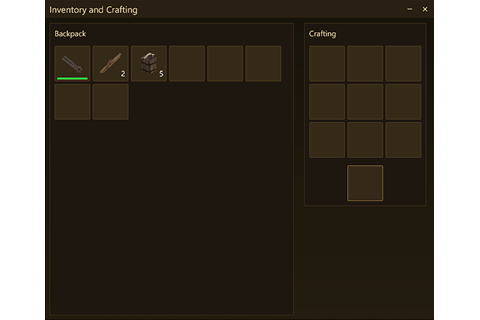
Overview PlayerInvUI replaces the vanilla inventory dialog with a custom UI built on libGUI. Both the survival and creative inventories are rebuilt from scratch — theme support, cleaner layout. Theming To switch themes, set "theme" in ModConfig/libgui.json
Quick answer
PlayerInvUI 1.2.0 targets 1.22.0, 1.22.1, 1.22.2. It must be installed on the client. Installation on the dedicated server is optional. All 1 required mods have matching files.
Where it goes
It must be installed on the client. Installation on the dedicated server is optional.
This release supports both sides, but the source does not require it on the server.
1.2.0. Change the file and its required mods may change too.
Install libGUI first. We found matching files for this game-version and loader setup.
We only count dependency files that match this setup. A file for another loader does not fill the gap.
Before you install it
Built for PlayerInvUI 1.2.0. Pick another file and the loader, install side or required mods may change.
Use 1.2.0. It targets 1.22.0, 1.22.1, 1.22.2; another release may have different loader, side or dependency requirements.
Install libGUI first. We found matching files for this game-version and loader setup.
It must be installed on the client. Installation on the dedicated server is optional.
Use the “Get this file” button beside 1.2.0. It opens that exact file at the source.
About this project
Overview
PlayerInvUI replaces the vanilla inventory dialog with a custom UI built on libGUI.
Both the survival and creative inventories are rebuilt from scratch — theme support, cleaner layout.
To switch themes, set "theme" in ModConfig/libgui.json. The UI redraws the moment you save the file — no game restart, no reload command.
Looking for more looks? Check here.
| Quivers and Sheaths Fork | Quiver slots appear in their own group alongside the rest of the backpack. |
Project description from Vintage Story Mod DB.
Pick your setup
Choose the version and loader you play, then open the matching release.
Check the dependencies, then try the file in a copied instance before changing a world you care about.
Recent files
playerinvui_1.2.0.zip
26 Jul 2026
playerinvui_1.0.0.zip
19 Jun 2026
Looking for an older file? The official Vintage Story Mod DB project page is in Resources.