Tabletop Games Needed by Tabletop Games - Cardbacks 1.2.0
requiredNo matching file Version asked for: 4.0.0
Vintage Story Mod DB · Vintage Story mod
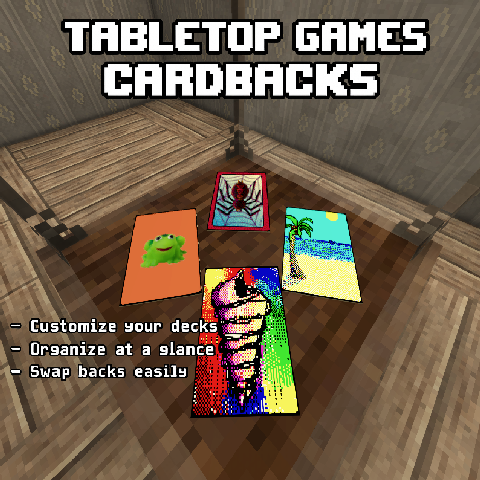
Customize your Tabletop Games decks with 53 removable card backs featuring retro computer-inspired and fantasy designs. FEATURES • 53 configurable card-back designs• 12 Windows 98-inspired designs• 12 Windows XP-inspired designs• 29 addit
Quick answer
Tabletop Games - Cardbacks 1.2.0 targets 1.22.7. It must be installed on the client. Installation on the dedicated server is optional. 2 required mods need a matching file.
Where it goes
It must be installed on the client. Installation on the dedicated server is optional.
This release supports both sides, but the source does not require it on the server.
1.2.0. Change the file and its required mods may change too.
Install Tabletop Games, Attribute Rendering Library first, but 2 required mods have no matching file for this setup. Do not mix loader builds to force a match.
We only count dependency files that match this setup. A file for another loader does not fill the gap.
Before you install it
Built for Tabletop Games - Cardbacks 1.2.0. Pick another file and the loader, install side or required mods may change.
Use 1.2.0. It targets 1.22.7; another release may have different loader, side or dependency requirements.
Install Tabletop Games, Attribute Rendering Library first, but 2 required mods have no matching file for this setup. Do not mix loader builds to force a match.
It must be installed on the client. Installation on the dedicated server is optional.
Use the “Get this file” button beside 1.2.0. It opens that exact file at the source.
About this project
Customize your Tabletop Games decks with 53 removable card backs featuring retro computer-inspired and fantasy designs.
• 53 configurable card-back designs
• 12 Windows 98-inspired designs
• 12 Windows XP-inspired designs
• 29 additional card-back variants
• Support for standard playing cards
• Apply, preview, remove, and directly swap card backs
• Live deck reassembly counter
• Safe ownership and duplication protection
• Toggleable designs
• Survival Handbook instructions
• Trader and ruin-loot distribution
• Traders offer no more than 3 card-back variants at a time
Obtain a card-back item and use the Card Back Slot in a deck's tool-mode menu to apply it.
When a card back is installed, the deck records exactly how many cards were present and gives that customized deck a unique installation identity.
Cards drawn from the deck retain their customized back. Only cards belonging to that original customized deck can be returned after installation.
The counter above the Card Back Slot displays the current and required card totals:
• Green means the original customized deck is complete and the back can be removed or swapped.
• White means cards are missing, mismatched, or the deck is incomplete.
All cards from the original customized installation must be returned before the physical card-back item can be removed. This prevents duplicate card-back items from being created.
A completed customized deck can also have its card back directly swapped for another design without first removing the currently installed back.
Card backs are not craftable.
Enabled card backs may appear:
• In Luxuries Trader inventories
• In Treasure Hunter inventories
• As rare ruin and dungeon gear loot
Traders may carry up to 3 different card-back variants at one time, preventing card backs from overwhelming their normal inventories while still making them obtainable through exploration and trade.
The combined card-back loot frequency is kept limited and is distributed across the currently enabled designs.
After launching the game once, edit:
ModConfig/tabletopgamescardbacks.json
Every card-back design is enabled by default.
Set a design's Enabled value to false and restart the game or server to disable it.
Disabled designs will no longer be selected for new trader or loot distribution.
Existing installed card backs remain visible and removable even after their design is disabled, protecting existing saves and customized decks.
• Vintage Story 1.22.3
• Tabletop Games 4.0.0-pre.2
• Attribute Rendering Library 3.1.5
Created by yuttgyh.
Developed with assistance from OpenAI.
Built as an addon for Tabletop Games by DanaCraluminum, using Attribute Rendering Library.
Additional fantasy card-back artwork is from the Fever Dream Card Asset by ZgameStudio, purchased for use in this project.
https://zgamestudio.itch.io/fever-dream-card-asset
Released under the MIT License.
Project description from Vintage Story Mod DB.
Pick your setup
Choose the version and loader you play, then open the matching release.
Check the dependencies, then try the file in a copied instance before changing a world you care about.
Recent files
TabletopGamesCardBacks-1.2.0.zip
4 Sept 2026
TabletopGamesCardBacks-1.1.0.zip
4 Sept 2026
TabletopGamesCardBacks-1.0.0.zip
20 Jun 2026
Looking for an older file? The official Vintage Story Mod DB project page is in Resources.
 mod
modWelcome to the alchemists' guild <3
 mod
modA maintained fork of XLib and XSkills for 1.22: thirteen skill trees, 185 abilities.
 mod
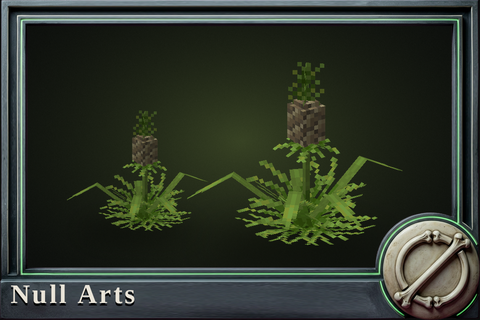
modThe breeding ladder for the four crops it never covered: fennel, cassava, pineapple, licorice.