
Vintage Story version
Back to mods 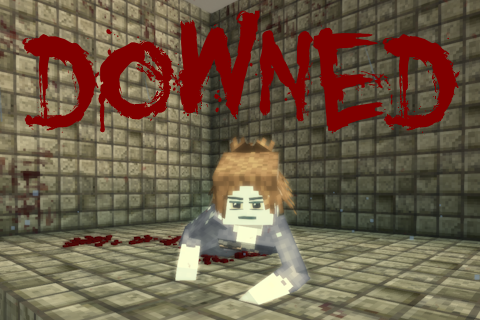
Vintage Story Mod DB · Vintage Story mod
Downed
Downed This mod replaces the vanilla wounded state with a survivable downed state. It basically functions like the Unconscious mod. Instead of dying when your health reaches 0, you drop to the ground and bleed out over time, giving other players a chance to s
Choose a version Pick your version below, then grab the matching file.
Quick answer
Which Downed release should I use?
Latest stable file 2.4.1
Game version 1.22.0-pre.1, 1.22.0-pre.2, 1.22.0-pre.3
Loader Built-in Vintage Story mod system
Downed 2.4.1 targets 1.22.0-pre.1, 1.22.0-pre.2, 1.22.0-pre.3. It must be installed on the client. Installation on the dedicated server is optional. No extra mods listed for this file.
Where it goes
Is Downed required on the client, server, or both?
It must be installed on the client. Installation on the dedicated server is optional.
Client Required
Dedicated server Optional
Loader for this release Built-in Vintage Story mod system
Required install it here Optional supported, not mandatory Not supported do not install here Source doesn’t say do not assume
This release supports both sides, but the source does not require it on the server.
What else does Downed 2.4.1 need?
2.4.1. Change the file and its required mods may change too.
This file does not list any required mods. Do not add a library just because a different file uses it.
This file does not list any required or optional mods.
Before you install it
Add Downed without breaking your instance.
Built for Downed 2.4.1. Pick another file and the loader, install side or required mods may change.
- 01
Stick to this file
Use 2.4.1. It targets 1.22.0-pre.1, 1.22.0-pre.2, 1.22.0-pre.3; another release may have different loader, side or dependency requirements.
- 02
Bring the mods it needs
This file does not list any required mods. Do not add a library just because a different file uses it.
- 03
Put it on the correct side
It must be installed on the client. Installation on the dedicated server is optional.
- 04
Pick the file you checked
Use the “Get this file” button beside 2.4.1. It opens that exact file at the source.
About this project
What does Downed add?
Downed
This mod replaces the vanilla wounded state with a survivable downed state. It basically functions like the Unconscious mod. Instead of dying when your health reaches 0, you drop to the ground and bleed out over time, giving other players a chance to save you, drag you to safety, or finish you off.
Features
Being downed
- When your health reaches zero you go down instead of dying. You are invulnerable while downed.
- You can crawl along the ground, but slowly (85% movespeed penalty, configurable), and you cannot use items or some revealing commands. You also cannot attack.
- A timer shows how long until you bleed out. If it runs out, you die.
- You leave a trail of blood in your wake.
- To give up early, hold the give up key. (Ctrl + Shift + G by default)
- The minimap, map and coordinates are hidden while you are downed (configurable).

Reviving
Heal a downed player with a healing item (poultice, bandage, modded healing items should work too) to bring them back up.

Dragging
With empty hands, hold RMB on a downed player to drag them. Let go of RMB to stop dragging. Useful for pulling someone out of a fight.

Stowing
- Drag a downed player to your elk and look at the back slot while still holding RMB to stow it on the elk
- Right click the body to unstow it or target the back slot and press Shift + RMB to unstow
- Requires that the back slot is empty of any attachments or bodies.

Executing
While holding a weapon, hold Shift + E on a downed player to execute them. The execution plays a short animation and sprays blood across nearby surfaces (configurable).
Blood
Blood trails and execution sprays leave decals on blocks (chiseled blocks too, unless they have too little material). These are cleaned up automatically after a configurable number of in-game days (default 45 ingame days), so they do not pile up forever. Some blood decals (Long lasting decals, as I call them) last 2x the cleanup time.
The cleanup is quite optimized and runs only once per 30 minutes IRL by default (and also on chunk load).
You can also use the watering can to clean the blood off yourself.

Configuration
Install ConfigLib for an in-game settings menu, or edit the config file (downed.json) directly.
{ "DurationSeconds": 300, // seconds downed before bleeding out "DownedFloorHealth": 0.1, // min HP while downed "CrawlWalkSpeedMultiplier": -0.85, // crawl speed penalty (-1 = 100% flat movespeed removal) "HideMap": true, // hide world map, minimap, debug menu, and coordinate overlay while downed "CommandBlacklist": [ ".cp" ], // chat commands blocked while downed (with prefix (. or /)) "GiveUpHoldSeconds": 5, // hold time to give up and die "ExecuteHoldSeconds": 5, // hold time to finish an execution "ExecuteRange": 3, // max blocks to start/keep an execution "DragHoldSeconds": 3, // hold time to start dragging "DragWalkSpeedMultiplier": -0.65, // move speed penalty while dragging "DragRange": 3, // max blocks to grab and start a drag "DragMaxDistance": 6, // drag auto-breaks past this distance "BloodTrailParticles": true, // show blood particles while crawling "BloodTrailDecals": true, // leave blood decals on the ground while crawling "BloodTrailDistance": 0.4, // min blocks moved between trail decals "BloodTrailSpread": 0.5, // random spread of trail particles/decals "BloodTrailParticleSeconds": 7.6, // blood particle lifetime "ExecuteBloodExplosion": true, // create blood burst on execution "ExecuteBloodRange": 5, // radius of execution splatter "ExecuteBloodRayCount": 1200, // splatter decal rays (higher = denser, more CPU, but also nice and bloody) "ExecuteBloodParticleCount": 500, // particles in the execution burst "BloodDecalCleanupIngameDays": 45, // in-game days before decals are removed (0 = never) "LongLastingBloodDecalChance": 0.1, // chance (0-1) a decal stays and is not cleaned up "BloodDecalCleanupIntervalMinutes": 30 // real minutes between cleanup passes "MonstersIgnoreDowned": true // whether monsters continue attacking you while downed "AllowSelfRevive": false // allow healing items to be used by downed players themselves. this option is meant for solo play "MaxBloodDecalsPerFace": 32, // max decals per block face; when full, refreshes cleanup timer instead (0 = unlimited, capped by game at 256) "DownedCooldownIngameHours": 0 // If a player gets fatally wounded while the cooldown is still ongoing, they will die}Commands (all of these require the controlserver permission)
/downed make <player>- force a player into the downed state/downed revive <player>- revive a downed player/downed execute <player>- execute a downed player remotely/downed decals clear [range]- clear blood decals around you
Auditing
The mod logs into server-audit.log:
- Player downed (by whom, where)
- Player revived (by whom, where)
- Player executed (by whom, where)
Compatibility
- Works with Combat Overhaul.
- Works with PlayerModelLib, but the dragging animation may be offset depending on size differences between models.
- ConfigLib is optional, used for the in-game config menu.
- LowHealthSlowdown, disabled movespeed penalty effect while downed
- PlayerCollisions, disabled collision while dragging or executing
- NoInCombatHealing, debuff removed when revived
- Searchable, allow to search downed players' inventories without consent
Animations for this mod were made by W4RD0
Project description from Vintage Story Mod DB.
Pick your setup
Downed releases for each Vintage Story version.
Choose the version and loader you play, then open the matching release.
Vintage Story version
1.22.5
1 loader buildVintage Story version
1.22.4
1 loader buildVintage Story version
1.22.3
1 loader buildVintage Story version
1.22.2
1 loader buildVintage Story version
1.22.1
1 loader buildVintage Story version
1.22.0-rc.10
1 loader buildVintage Story version
1.22.0-rc.9
1 loader buildVintage Story version
1.22.0-rc.8
1 loader buildVintage Story version
1.22.0-rc.7
1 loader buildVintage Story version
1.22.0-rc.6
1 loader buildVintage Story version
1.22.0-rc.5
1 loader buildShowing the newest 12 of 46 game versions. Older files are in the list below.
Check the dependencies, then try the file in a copied instance before changing a world you care about.
Recent files
Downed versions and loaders
2.4.1
downed_2.4.1.zip
9 Aug 2026
Client Required Server Optional Dependencies No extras listed Listed on Release listing
Check the 1.22.6 setup 1.22.0-pre.11.22.0-pre.21.22.0-pre.31.22.0-pre.4 release
1.4.1
downed_1.4.1.zip
9 Aug 2026
Client Source doesn’t say Server Source doesn’t say Dependencies No extras listed Listed on Release listing
Check the 1.21.7 setup 1.21.0-pre.11.21.0-pre.21.21.0-pre.31.21.0-rc.1 release
1.4.0
downed_1.4.0.zip
9 Aug 2026
Client Source doesn’t say Server Source doesn’t say Dependencies No extras listed Listed on Release listing
Check the 1.21.7 setup 1.21.0-pre.11.21.0-pre.21.21.0-pre.31.21.0-rc.1 release
2.4.0
downed_2.4.0.zip
9 Aug 2026
Client Source doesn’t say Server Source doesn’t say Dependencies No extras listed Listed on Release listing
Check the 1.22.6 setup 1.22.0-pre.11.22.0-pre.21.22.0-pre.31.22.0-pre.4 release
2.3.2
downed_2.3.2.zip
28 Jul 2026
Client Source doesn’t say Server Source doesn’t say Dependencies No extras listed Listed on Release listing
Check the 1.22.5 setup 1.22.0-pre.11.22.0-pre.21.22.0-pre.31.22.0-pre.4 release
2.3.1
downed_2.3.1.zip
19 Jul 2026
Client Source doesn’t say Server Source doesn’t say Dependencies No extras listed Listed on Release listing
Check the 1.22.3 setup 1.22.0-pre.11.22.0-pre.21.22.0-pre.31.22.0-pre.4 release
2.3.0
downed_2.3.0.zip
18 Jul 2026
Client Source doesn’t say Server Source doesn’t say Dependencies No extras listed Listed on Release listing
Check the 1.22.3 setup 1.22.0-pre.11.22.0-pre.21.22.0-pre.31.22.0-pre.4 release
1.3.0
downed_1.3.0.zip
18 Jul 2026
Client Source doesn’t say Server Source doesn’t say Dependencies No extras listed Listed on Release listing
Check the 1.21.7 setup 1.21.0-pre.11.21.0-pre.21.21.0-pre.31.21.0-rc.1 release
2.2.2
downed_2.2.2.zip
8 Jul 2026
Client Source doesn’t say Server Source doesn’t say Dependencies No extras listed Listed on Release listing
Check the 1.22.3 setup 1.22.0-pre.11.22.0-pre.21.22.0-pre.31.22.0-pre.4 release
2.2.1
downed_2.2.1.zip
8 Jul 2026
Client Source doesn’t say Server Source doesn’t say Dependencies No extras listed Listed on Release listing
Check the 1.22.3 setup 1.22.0-pre.11.22.0-pre.21.22.0-pre.31.22.0-pre.4 release
1.2.1
downed_1.2.1.zip
8 Jul 2026
Client Source doesn’t say Server Source doesn’t say Dependencies No extras listed Listed on Release listing
Check the 1.21.7 setup 1.21.0-pre.11.21.0-pre.21.21.0-pre.31.21.0-rc.1 release
1.2.0
downed_1.2.0.zip
7 Jul 2026
Client Source doesn’t say Server Source doesn’t say Dependencies No extras listed Listed on Release listing
Check the 1.21.7 setup 1.21.0-pre.11.21.0-pre.21.21.0-pre.31.21.0-rc.1 release
Looking for an older file? The official Vintage Story Mod DB project page is in Resources.