Minecraft version
Back to modpacks 
Modrinth · Minecraft modpack
InsertName Utility
A client-side utility modpack optimised for mutiplayer gameplay, packed with QOL and performance boosting mods
Choose a version Pick your version below, then grab the matching file.
Quick answer
Which InsertName Utility release should I use?
Latest stable file 0.0.10
Game version 26.2
Loader Fabric 0.19.3
0.0.10 is a complete pack release for 26.2 with Fabric 0.19.3. Install it as its own launcher instance. If the creator publishes a separate server file, make sure it names this exact pack release. 39 mods in this pack file.
Pack setup
How should I set up InsertName Utility for players and a server?
Use 0.0.10 as the pack version. Install the pack as its own launcher instance. The creator’s listing does not name a separate server file, so check the release notes before setting up a dedicated server. Do not upload the ordinary client folder blindly.
Client instance Install 0.0.10
Dedicated server setup Match 0.0.10
Pack loader Fabric 0.19.3
A pack is a matched client and server setup, not one mod with an install-side label. Keep its release, loader, manifest and overrides together.
Referenced mods 39
Client only 27
Server only 0
Not labelled 12
These numbers come from the pack file you chose. “Not labelled” means we don’t know which side it belongs on—not that it is safe everywhere. The file count is not a RAM estimate.
What are the server requirements for InsertName Utility?
0.0.10. Change the pack release and its contents or setup may change too.
The selected pack release is 0.0.10. That file is for Minecraft 26.2 with Fabric 0.19.3. It contains 39 mod projects. The creator’s listing does not name a separate server file. Check their notes before using one, and do not upload an ordinary client folder or rebuild the pack mod by mod. A file count cannot tell us the right RAM, CPU or storage; size the server for the players and world you actually run.
About this project
What kind of pack is InsertName Utility?
InsertName Utility
InsertName Utility is a small modpack that includes QOL mods including, but not limited to Simple Voice Chat, Sound Physics Remastered and Gamma Utils together with mods which improve the game's performance, like Sodium, Indium and Lithium. It's useful for improving your game experience in a lot of ways while still staying close to the vanilla game.
FAQ
Which mods are included?
You have an entire list of the included mods in the dependencies section of the versions page
I'm getting issues with the modpack, what do I do?
You can simply contact me using the "Contact" page, I will try and help you
I have an idea for a mod that you should add to the modpack
Just contact me using one of the options on the "Contact" page and I'll consider your suggestion.
Installation
To install this modpack, there are a few options. The preferred one being
Using a third party launcher
To install this modpack, I recommend using the Modrinth App or other launchers like Prism Launcher or MultiMC as they allow an easy installation of the modpack. A guide on how to install these can be found here: Prism Launcher Documentation, MultiMC Downloads Page
After you've downloaded the launcher and finished the installation process (including adding your Minecraft account), follow one of the instructions below:
Modrinth App
So first after you've installed the app, you need to click on the search icon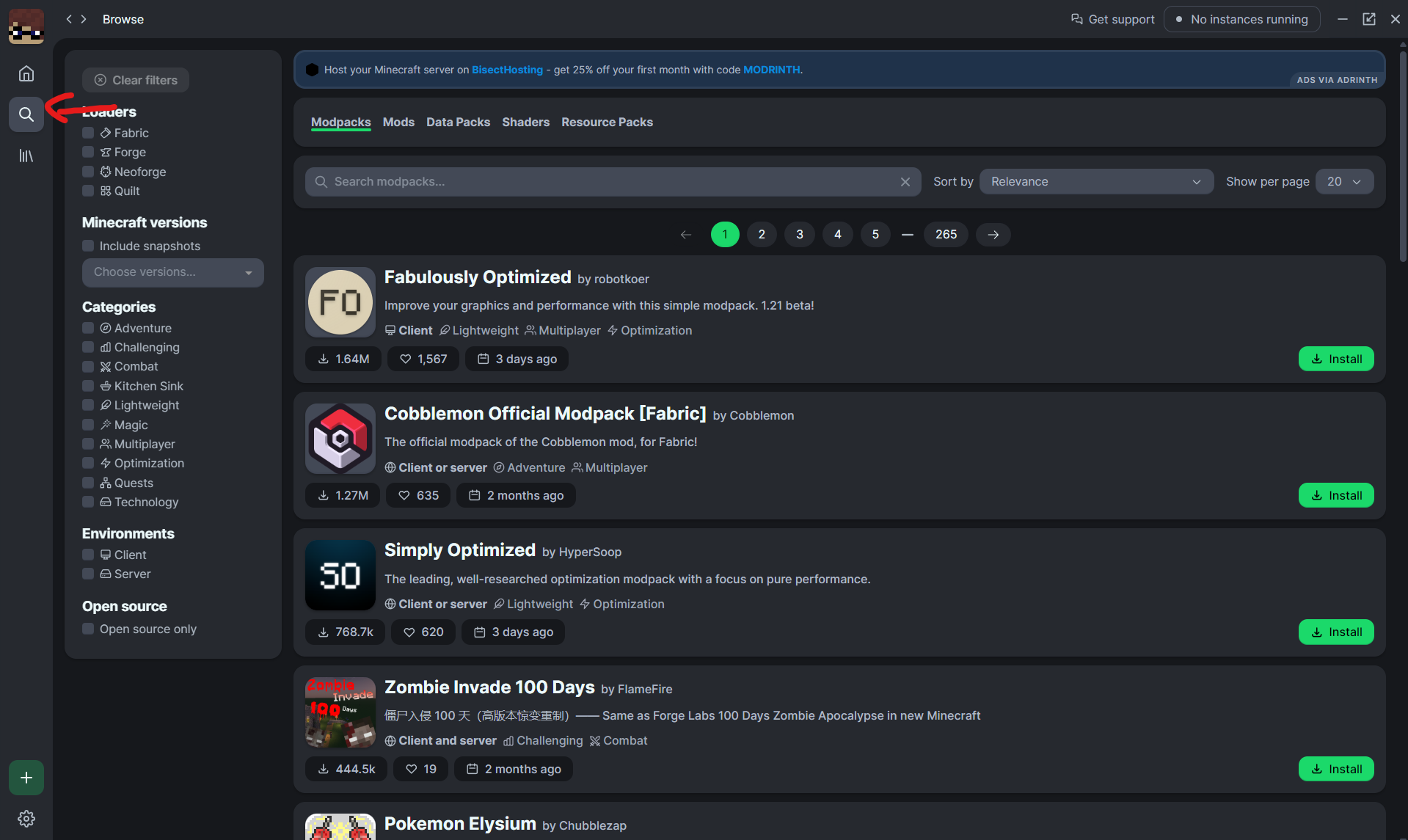
Then you need to search for the name "InsertName" and press on install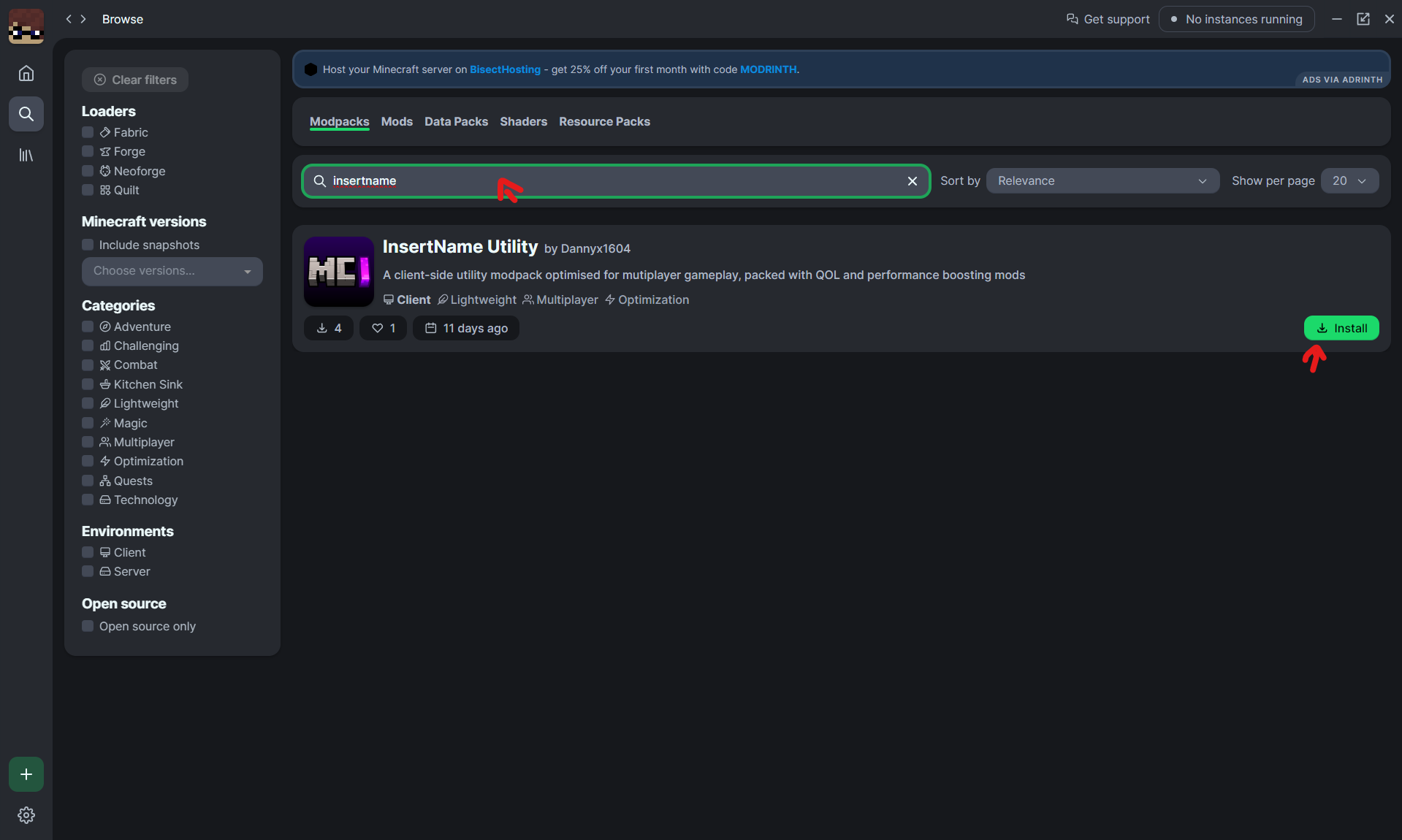
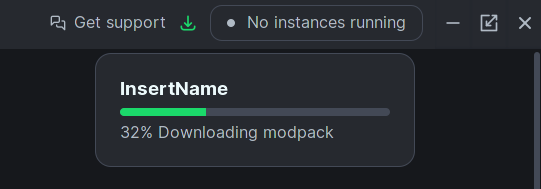
After you've selected the previously downloaded pack, you'd need to wait until it has installed all of the dependencies
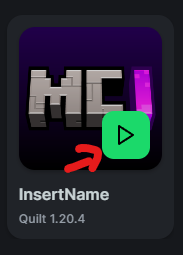
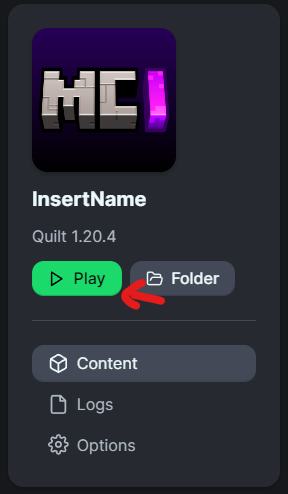
And then press on "Play" as seen on one of those images
Prism Launcher
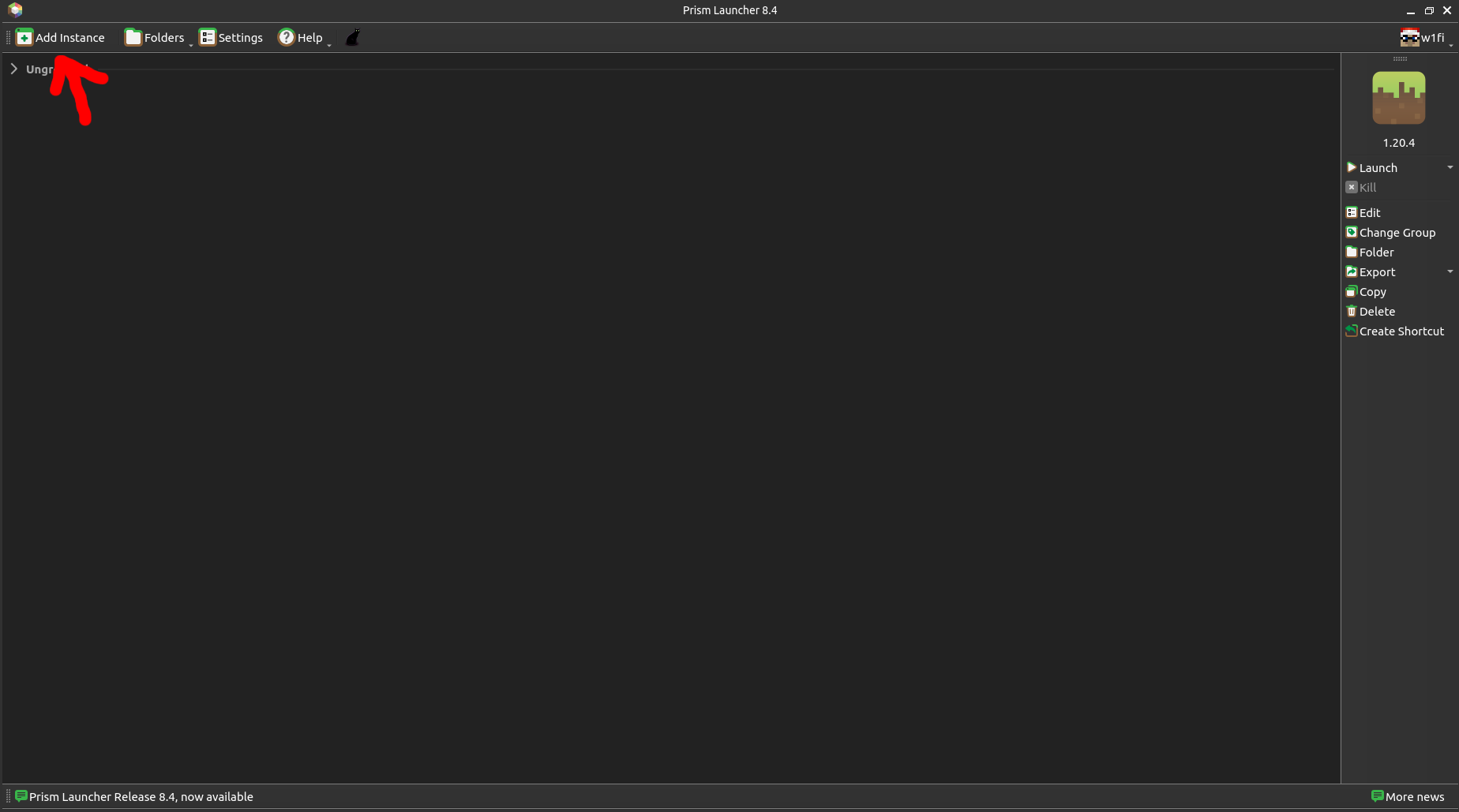
After you've installed Prism Launcher, you're greeted with the menu below. Press the button "Add Instance"
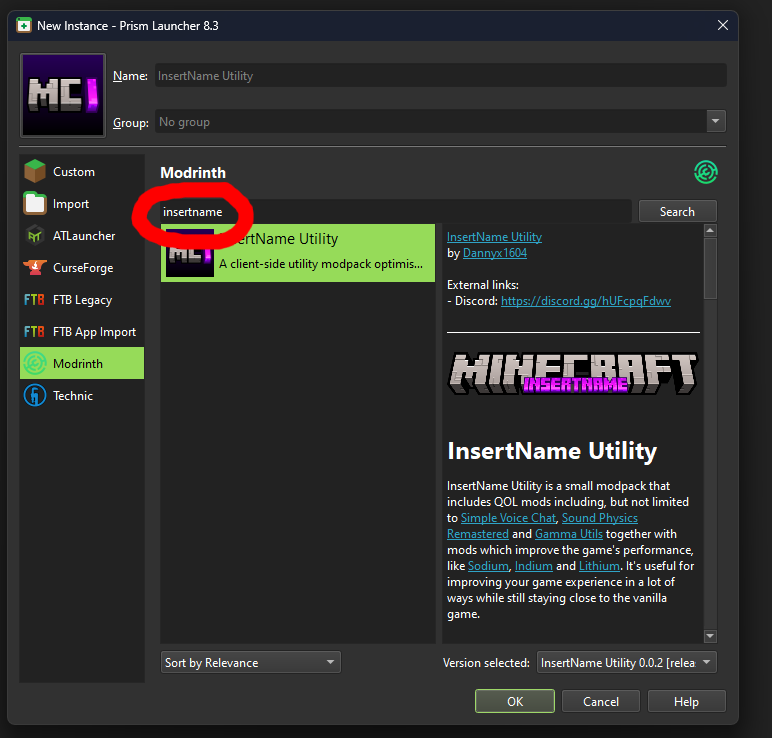
Then select the menu "Modrinth" and search for the term "insertname". This will show you the modpack. Just select it, select the latest version in the bottom-right corner (as it is per default) and press on "OK".
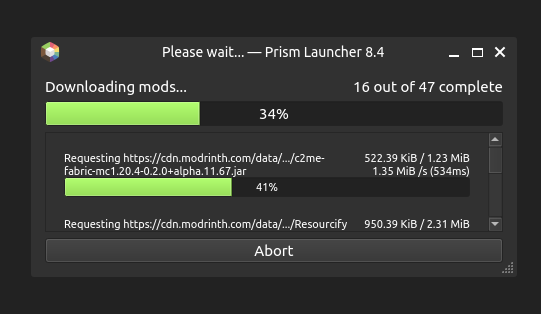
After that, it will download all of the dependencies
And finally, press on "Launch" to launch the game
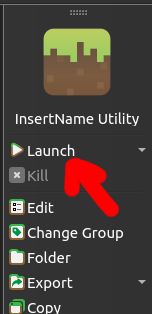
Other launchers that support importing modpacks
If you want to use another launcher that supports downloading modpacks from Modrinth, follow the steps from Prism, you'll just have a different GUI. If the launcher you're using doesn't have that option, instead it has an option to import (Modrinth) modpacks, just import the .mrpack file from the releases folder as a modpack.Contact
You can contact me through Discord (preferred), but also via E-Mail (dannyx@dannyx.de)
Project description from Modrinth.
Mods in 0.0.10
Open any mod on Modpacks.ch to check its files and dependencies.
autoreconnectrf-fabric-3.103.0+26.2.jar SHA-1
b352164051a7c107ca550e813754068ef397170a · Modrinth version vHDagTHf · Project link unavailable Client onlyAxiom-5.5.0-for-MC26.2.jar SHA-1
6fe1591a7f1d08acd976d72a4b29472d9e630125 · Modrinth version QO99kC52 · Project link unavailable Side not labelledchat_heads-1.2.5-fabric-26.1.jar SHA-1
2e9caf68afa58e895034f4bbf1c3cee65c69e25e · Modrinth version bASLtZKx · Project link unavailable Client onlychatanimation-fabric-1.3.0+mc26.2.jar SHA-1
4dfc46f32ba66b21234cc97c2bb1aafcff37bffd · Modrinth version 7UGcRlKL · Project link unavailable Client onlychatpatches-8.0-alpha.11+26.2-fabric.jar SHA-1
7d2539a4f4fd5bd4a19798cc73b1431511de1431 · Modrinth version iEULL77f · Project link unavailable Client onlycloth-config-26.2.155.jar SHA-1
babcf16dbd15e09d326e21ffe85ab3f7d843ef9e · Modrinth version Nv3xnWXd · Project link unavailable Side not labelledcomponentviewer-fabric-1.3.5+26.2.jar SHA-1
5a2ee5822dec73044a64a4c7817ea861b363a0a3 · Modrinth version BkdknKQy · Project link unavailable Client onlyentity_texture_features-7.1.1-26.2-fabric.jar SHA-1
2d09a60630e8f25a25d9c06d87684c74a843caac · Modrinth version HLCBKYFD · Project link unavailable Client onlyentityculling-fabric-1.10.5-mc26.2.jar SHA-1
f66f9d8cbb1f76466aaf45e46fb11b18207e3aef · Modrinth version iiF6U3Ne · Project link unavailable Client onlyEssential_1-4-1-1_fabric_26-2.jar SHA-1
5a26631c7eca58b2e5a852002bfa8d1b01b1f10c · Modrinth version F6WKM1HY · Project link unavailable Client onlyfabric-api-0.156.0+26.2.jar SHA-1
d96e0d9ef8ea3604fac4ca7495d7c6148f3ac816 · Modrinth version 3gT0I5vt · Project link unavailable Side not labelledfabric-language-kotlin-1.13.13+kotlin.2.4.10.jar SHA-1
620cb137a9dc69ce86f3114f19d9eedab16366f5 · Modrinth version bdhiINYC · Project link unavailable Side not labelledfabrishot-1.17.0.jar.disabled SHA-1
cabc7f77ce10fd58cf33cbfd04eeda3ef33167c8 · Modrinth version Y8Tsud9e · Project link unavailable Client onlyfast-ip-ping-v1.0.11-mc26.1.2.jar SHA-1
6b69eaa6323da9f7933206d55cdb09ea3299cde3 · Modrinth version H7KycYXE · Project link unavailable Client onlyferritecore-9.0.0-fabric.jar SHA-1
eac76ff0f3753422c61b2c44487d0d195d88d4bc · Modrinth version d5ddUdiB · Project link unavailable Side not labelledFlashback-0.42.1-for-MC26.2.jar SHA-1
801ea2798e216fe62809a4d6255db6cb6f72ba09 · Modrinth version HkyawEi6 · Project link unavailable Client onlyforcecloseloadingscreen-2.3.6.jar SHA-1
19629eb45c00005a8f71c831df4e5d59b4dda54d · Modrinth version KpFKKs8P · Project link unavailable Client onlyGamma-Utils-Fabric-3.1.1+mc26.2.jar SHA-1
75e9be3a18d5ab7a853d294bcf5209e5c4bc5358 · Modrinth version bR4tEPFq · Project link unavailable Client onlyImmediatelyFast-Fabric-1.16.2+26.2.jar SHA-1
2d1cd27b0b570f908b665c02a35b49381b4c5ec1 · Modrinth version uJHxuQxy · Project link unavailable Client onlyiris-fabric-1.11.2+mc26.2.jar SHA-1
f7d526b1062c4bfe2567113cf933d1de26eddd3f · Modrinth version oaD6KQls · Project link unavailable Client onlykrypton-0.3.1.jar SHA-1
c83ed92c0f9f8523d7e6096151e74222fea91e96 · Modrinth version 5WeL0Nkz · Project link unavailable Side not labelledlazy-language-loader-0.5.1.jar SHA-1
33f9715034e034fcac2b866ecfe41c0de680a601 · Modrinth version wFfJYc4n · Project link unavailable Client onlymalilib-fabric-26.2-0.29.3.jar SHA-1
c5a86e2c868d8918265361694eebbb73eee6c861 · Modrinth version xKxhjDJ2 · Project link unavailable Client onlymodmenu-20.0.1.jar SHA-1
8562dee49eae1a6bdd14b026be1b300aedb5ce0f · Modrinth version njXb639R · Project link unavailable Client onlymoreculling-fabric-26.2-1.8.0.jar SHA-1
6a2ae8fa02102f078657f02fd70b2d34c66ae898 · Modrinth version SYFaYeMK · Project link unavailable Client onlymultiscoreboard-1.5.1+26.2.jar SHA-1
ae61a4e2e93972be26ee1132f46e03eadf9f5b68 · Modrinth version 1aCcIq43 · Project link unavailable Side not labelledNBTac-FABRIC-26.2-1.3.15.jar SHA-1
598aa0df345cc4f55cd03f79cb323ffda49dbac6 · Modrinth version YQZQthmh · Project link unavailable Client onlyNoChatRestrictions-Fabric-MC26.2-v1.2.0.jar SHA-1
8fa564d5114eb4793f5402947966a3f0d6e192cc · Modrinth version UYVIULf7 · Project link unavailable Client onlyplaceholder-api-3.1.0-beta.1+26.2.jar SHA-1
99b57ccc1d4323c4ef71887828dac25ce4ce2103 · Modrinth version NDqH16LT · Project link unavailable Side not labelledResourcify (26.2-fabric)-1.8.5.jar SHA-1
d268692f5c16f34e082911d1283d1654adcb5adf · Modrinth version 6haoMa46 · Project link unavailable Client onlyskinlayers3d-fabric-1.11.2-mc26.2.jar SHA-1
7c8a66d009051bab26f7489e1edef8b3c64f7b0e · Modrinth version rJYtiDew · Project link unavailable Client onlysodium-fabric-0.9.1+mc26.2.jar SHA-1
14f3388694fa77f870d28262f74562de67eabcbe · Modrinth version 2Yom1N68 · Project link unavailable Client onlysound-physics-remastered-fabric-1.5.1+26.2.jar SHA-1
63657ef05768d2a7a102549bc8ef5f5fc04e2fc4 · Modrinth version d8iioMMp · Project link unavailable Side not labelledsymbol-chat-26.2-1.4.2.jar SHA-1
73ac4fab8b3d4e035e49ef25e36dc68bf4c8f8d6 · Modrinth version cEUoYVjN · Project link unavailable Client onlyViaFabricPlus-4.6.1.jar SHA-1
8c3aa8a41557b5b96d78bd6d8ee2203fcf2db106 · Modrinth version NVFW4VRx · Project link unavailable Client onlyvoicechat-fabric-2.6.21+26.2.jar SHA-1
445f7e1f1490e16385b04be554cf173c2a4fe780 · Modrinth version 3SOh5iiX · Project link unavailable Side not labelledvoxy-0.2.18-beta.jar SHA-1
34206446f7625782b04382256083f44fe9551b83 · Modrinth version zZX86mbc · Project link unavailable Client onlyworldedit-mod-7.4.4.jar SHA-1
40f943ddabba673251edf468e65314851be240be · Modrinth version j2w3GmPv · Project link unavailable Side not labelledyet_another_config_lib_v3-3.9.6+26.2-fabric.jar SHA-1
40887775504751acd752545e6370a76ca3b5bda9 · Modrinth version cnfPzuFU · Project link unavailable Side not labelledPick your setup
InsertName Utility by Minecraft version and loader
Choose the version and loader you play, then open the matching release.
Minecraft version
1.21.10
1 loader buildMinecraft version
1.21.8
1 loader buildMinecraft version
1.21.5
1 loader buildMinecraft version
1.21.4
1 loader buildMinecraft version
1.21.3
1 loader buildMinecraft version
1.21.1
1 loader buildMinecraft version
1.20.4
1 loader buildMade local changes? Try them in a copied instance before touching a world you care about.
Recent files
InsertName Utility versions and loaders
Fabric 0.19.326.28.0.312+7 release
Fabric1.21.10 release
Fabric1.21.8 release
Fabric1.21.5 release
Fabric1.21.4 release
Fabric1.21.3 release
Fabric1.21.3 release
Quilt1.21.1 release
Quilt1.20.4 release
Quilt1.20.4 release
Looking for an older file? The official Modrinth project page is in Resources.
 modpack
 CurseForge · Minecraft
PandoraLand
An RPG adventure modpack with unique professions, custom menus, dragons, and an economy system. / Modpack de aventura RPG con profesiones, menús personalizados, dragones y economía.
 modpack
 CurseForge · Minecraft
Cobblemon Reign
Cobblemon Server with Battle factory, Mega evolution, Gyms, Real Elite four, Wonder Trade system, and much more!
 modpack
 CurseForge · Minecraft
Ravenholm Cobblemon
Experience Cobblemon on friendly Weekly Event driven Server. Join a community and catch some Pokemon with new found friends.