
Hytale version
Back to mods 
CurseForge · Hytale mod
AdminUI
Manage your server with multiple interactive GUIs. Using and interface is much better than commands.
Choose a version Pick your version below, then grab the matching file.
Quick answer
Which AdminUI release should I use?
Latest stable file AdminUI-1.0.8.jar
Game version 0.7
Mod system Built-in Hytale mod system
AdminUI-1.0.8.jar targets 0.7. Do not install it as a separate client mod. Enable it on the world host—the local server in singleplayer or the dedicated server in multiplayer. No required dependencies listed for this file.
Where it goes
Where should AdminUI be installed in Hytale?
Do not install it as a separate client mod. Enable it on the world host—the local server in singleplayer or the dedicated server in multiplayer.
Separate client mod Not supported
World host / dedicated server Required
Mod system for this release Built-in Hytale mod system
Required install it here Optional supported, not mandatory Not supported do not install here Source doesn’t say do not assume
Put Hytale mods on the world host or dedicated server. Singleplayer runs a local server too; Hytale does not use separate client mods.
What else does AdminUI-1.0.8.jar need?
AdminUI-1.0.8.jar. Change the file and its required mods may change too.
This file does not list any required mods. Do not add a library just because a different file uses it.
This file does not list any required or optional project dependencies. Check the creator notes before changing an existing world.
Before you install it
Add AdminUI without breaking your instance.
Built for AdminUI-1.0.8.jar. Pick another file and the loader, install side or required mods may change.
- 01
Stick to this file
Use AdminUI-1.0.8.jar. It targets 0.7; another release may target a different game build or dependency set.
- 02
Bring the mods it needs
This file does not list any required mods. Do not add a library just because a different file uses it.
- 03
Enable it on the world host
Do not install it as a separate client mod. Enable it on the world host—the local server in singleplayer or the dedicated server in multiplayer.
- 04
Pick the file you checked
Use the “Get this file” button beside AdminUI-1.0.8.jar. It opens that exact file at the source.
About this project
What does AdminUI add?




AdminUI adds multiple GUI that will allow you to handle all server administrative operations.
These include:
- Whitelist (/admin wl)
- Mute (Custom Feature) (/admin m)
- Ban (/admin b)
- Players (/admin p)
- Warps (/admin w)
- Live Server Stats Page (/admin st)
- Backup managing (/admin bk)
You can also open the main interface with GUI

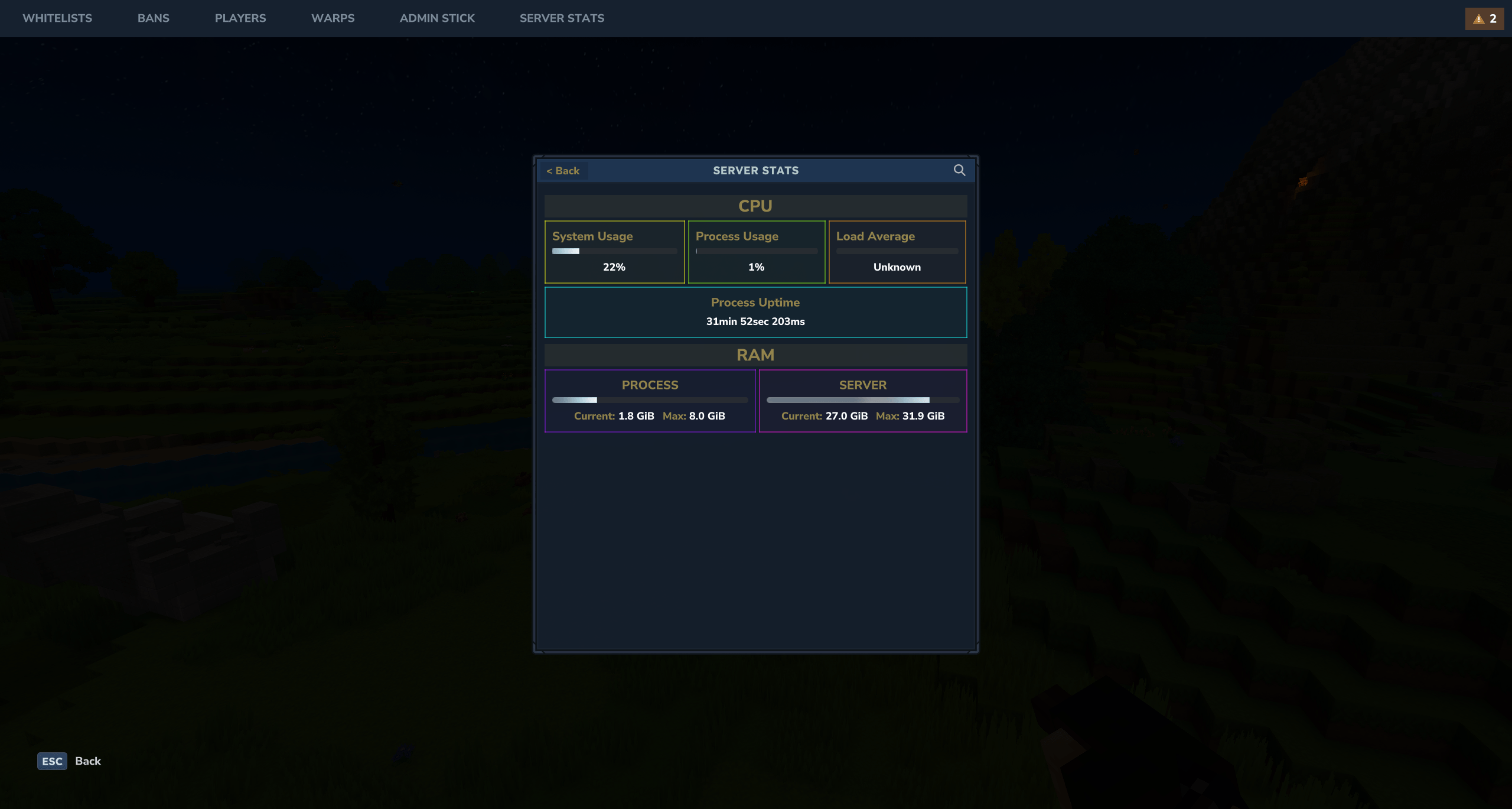
You can open the AdminUI interface with the /admin command. You can also open the GUI with the Admin Stick.
The Admin Stick is a configurable shortcuts item, where you can specify which GUI each action will do. This configuration is player based so each player can have a configuration each.
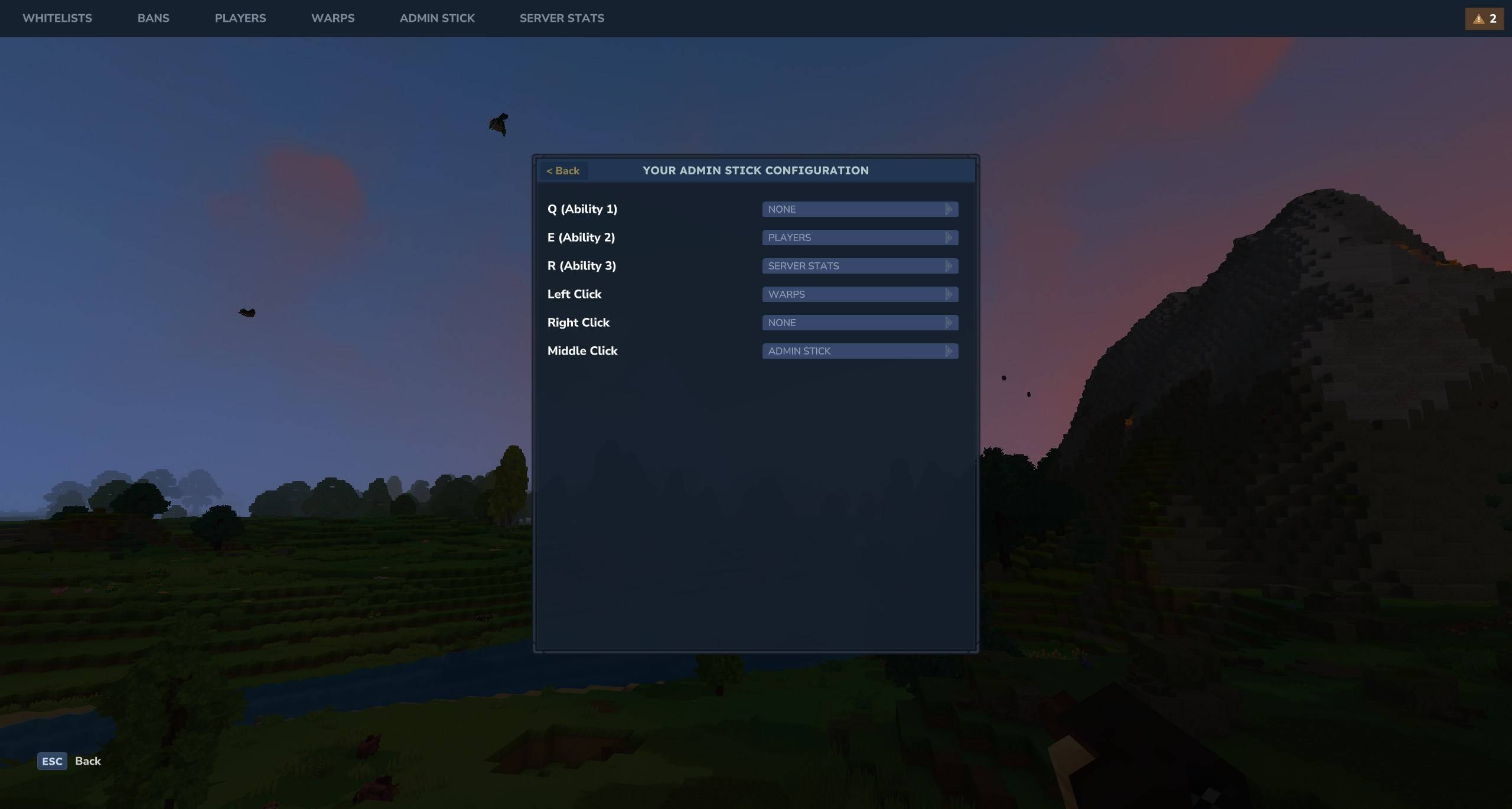
AdminUI Permissions
Core Permissions
| Permission | Description |
|---|---|
AdminUI.admin |
Master permission. Grants access to all AdminUI features. |
Module Permissions
These permissions grant access to specific modules within the AdminUI. They control visibility in the navigation bar and the ability to open the respective GUIs.
Granting the root permission (e.g., AdminUI.whitelist) grants access to all actions within that module.
| Permission | Description |
|---|---|
AdminUI.ban.open |
Access to the Ban management GUI. |
AdminUI.mute.open |
Access to the Mute management GUI. |
AdminUI.player.open |
Access to the Player management GUI. |
AdminUI.stats.open |
Access to the Server Stats GUI. |
AdminUI.ui.open |
Grants access to the main /admin command and index GUI. |
AdminUI.warp.open |
Access to the Warps management GUI. |
AdminUI.whitelist.open |
Access to the Whitelist management GUI. |
AdminUI.adminstick.open |
Access to the Admin Stick configuration GUI. |
AdminUI.adminstick.use |
Access to the Admin Stick usage. |
AdminUI.backup.open |
Access to the Server Backups management GUI. |
Permission Roots
You can also use these root permissions to grant full access to a specific module:
AdminUI.uiAdminUI.banAdminUI.muteAdminUI.playerAdminUI.statsAdminUI.warpAdminUI.whitelistAdminUI.adminstickAdminUI.backup
Project description from CurseForge.
Pick your setup
AdminUI releases for each Hytale build.
Choose the version and loader you play, then open the matching release.
Hytale version
0.5
1 loader buildCheck the dependencies, then try the file in a copied instance before changing a world you care about.
Recent files
AdminUI releases and Hytale builds
AdminUI-1.0.8.jar
26 Aug 2026
Client Not supported Server Required Dependencies No extras listed Listed on Project page
Check the 0.7 setup 0.7 release
AdminUI-1.0.7.jar
24 May 2026
Client Not supported Server Required Dependencies No extras listed Listed on Project page
Check the 0.5 setup 0.5 release
AdminUI-1.0.6.jar
18 Feb 2026
Client Not supported Server Required Dependencies No extras listed Listed on Project page
Check the setup AdminUI-1.0.5.jar
29 Jan 2026
Client Not supported Server Required Dependencies No extras listed Listed on Project page
Check the setup AdminUI-1.0.4.jar
18 Jan 2026
Client Not supported Server Required Dependencies No extras listed Listed on Project page
Check the setup AdminUI-1.0.3.jar
16 Jan 2026
Client Not supported Server Required Dependencies No extras listed Listed on Project page
Check the setup AdminUI-1.0.2.jar
15 Jan 2026
Client Not supported Server Required Dependencies No extras listed Listed on Project page
Check the setup AdminUI-1.0.1.jar
11 Jan 2026
Client Not supported Server Required Dependencies No extras listed Listed on Project page
Check the setup AdminUI-1.0.0.jar
4 Jan 2026
Client Not supported Server Required Dependencies No extras listed Listed on Project page
Check the setup Looking for an older file? The official CurseForge project page is in Resources.
 mod
mod CurseForge · Hytale
Tempest Lottery – Automated Server-Wide Timed Draws & Growing Jackpot Pot
A server lottery with tickets, automatic timed draws, a growing jackpot pot, live HUD & board countdown, crash-safe rollover, and Discord winner posts. Play money only. Works with any economy.
 mod
mod CurseForge · Hytale
Tempest Coinflip – Provably Fair SHA-256 1v1 Wager Rooms & Live Coin Spin
Coinflip rooms for your server: two players stake coins and a 22-frame spinning Gold/Silver coin decides, with live spectators, crash-safe escrow, and SHA-256 provably fair seed verification. Works with any economy.
 mod
mod CurseForge · Hytale
Tempest Events – Server-Wide Boosts, Community Goals, Overdrive Stages & Server Fund
Server events and boosts: double ore and monster gold, bigger rewards, more pass XP, shop sales. Community goals, overdrive stages, top-3 prizes, a player server fund (/events give), weekly schedule & in-game editor.