Hytale version
Back to mods 
CurseForge · Hytale mod
DiscordRelay
A simple chat bridge between your Hytale server and Discord.
Choose a version Pick your version below, then grab the matching file.
Quick answer
Which DiscordRelay release should I use?
Latest stable file discord-relay-2.0.2.jar
Game version 0.5
Mod system Built-in Hytale mod system
DiscordRelay discord-relay-2.0.2.jar targets 0.5. Do not install it as a separate client mod. Enable it on the world host—the local server in singleplayer or the dedicated server in multiplayer. No required dependencies listed for this file.
Where it goes
Where should DiscordRelay be installed in Hytale?
Do not install it as a separate client mod. Enable it on the world host—the local server in singleplayer or the dedicated server in multiplayer.
Separate client mod Not supported
World host / dedicated server Required
Mod system for this release Built-in Hytale mod system
Required install it here Optional supported, not mandatory Not supported do not install here Source doesn’t say do not assume
Put Hytale mods on the world host or dedicated server. Singleplayer runs a local server too; Hytale does not use separate client mods.
What else does DiscordRelay discord-relay-2.0.2.jar need?
discord-relay-2.0.2.jar. Change the file and its required mods may change too.
This file does not list any required mods. Do not add a library just because a different file uses it.
This file does not list any required or optional project dependencies. Check the creator notes before changing an existing world.
Before you install it
Add DiscordRelay without breaking your instance.
Built for DiscordRelay discord-relay-2.0.2.jar. Pick another file and the loader, install side or required mods may change.
- 01
Stick to this file
Use discord-relay-2.0.2.jar. It targets 0.5; another release may target a different game build or dependency set.
- 02
Bring the mods it needs
This file does not list any required mods. Do not add a library just because a different file uses it.
- 03
Enable it on the world host
Do not install it as a separate client mod. Enable it on the world host—the local server in singleplayer or the dedicated server in multiplayer.
- 04
Pick the file you checked
Use the “Get this file” button beside discord-relay-2.0.2.jar. It opens that exact file at the source.
About this project
What does DiscordRelay add?
DiscordRelay
A two way bridge between your Hytale server and Discord. Relay chat both ways, announce player events, run console commands from Discord, link accounts, sync bans, track stats, and more.
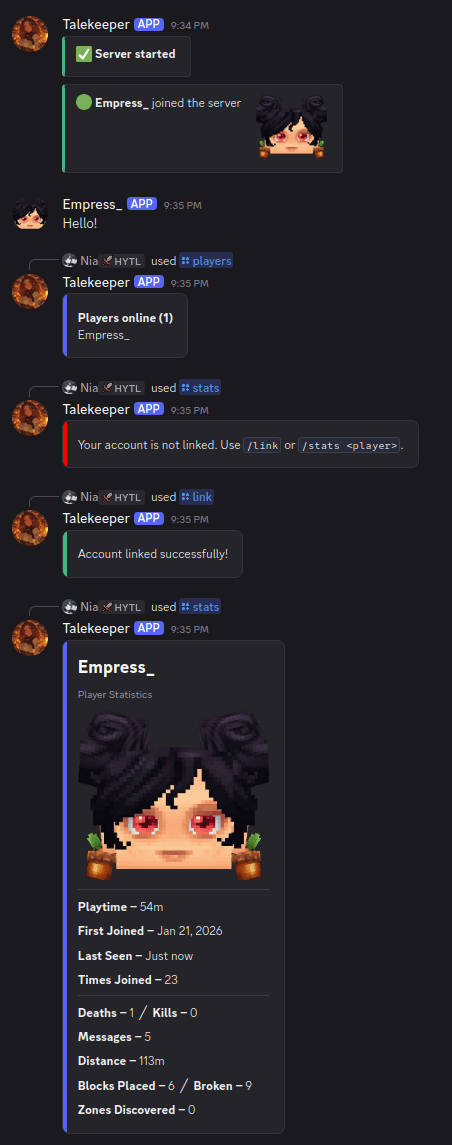
Source and issues: https://github.com/darkcupid412/discord-relay
Features
- Chat relay - messages sync between Discord and in game, with player names and avatars
- Join / leave notifications with player avatar thumbnails
- Death messages using the game's own kill feed, with a pool of randomized formats
- Server start / stop announcements
- Console channel - run server commands from Discord, role gated and limited to a command allowlist
- Account linking - link Discord to in game accounts with
/link - Role sync - auto assign Discord roles when linked (bot needs Manage Roles)
- Nickname sync - set the Discord nickname to the in game name (bot needs Manage Nicknames)
- Require linking - optionally require a linked account to chat from Discord and/or to play
- Discord name in game - show a linked player's Discord name on the world map, above their head, and in chat
- Player stats - playtime, blocks placed/broken, deaths, kills, messages, zones, and a paginated
/playtimeleaderboard with all time, today, 7 day, and 30 day ranges - Bot status - shows the player count as the Discord bot status
- Live status embed - one self updating status message instead of repeated posts
- Ban sync - a game ban bans the linked Discord user and a Discord ban blocks the player, plus ban and unban broadcasts
- Zone discovery broadcasts
- Chat filter - censor or block words (configurable word list)
- Embed messages for join / leave / death / status (bot needs Embed Links), toggleable per event
- AFK detection - announces when a player goes idle and returns
- Update check - notes in the log when a newer release is out
Commands
Discord slash commands:
/players- list online players/link <code>- link your account/unlink- unlink your account/stats [player]- view player statistics/playtime [range] [page]- playtime leaderboard
In game:
/players(aliases list, online) - list online players/link- get a link code/unlink- unlink your account
Config
The config is a self documenting config.yml: every option has a comment explaining what it does.
- Toggle any feature on or off
- Custom message formats with
%player%and%message%placeholders - Console command allowlist and blacklist (dangerous commands blocked by default)
- Named colors (red, dodgerblue, …) or hex codes for the in game Discord line
- Chat filter with censor or block mode
- Optional embeds (can be disabled for plain text), per event
- Separate channels for chat, console, and join/leave
- Webhook chat - the bot can auto create a webhook to relay chat as the player with their avatar
Upgrading from 1.5.1: your existing config.yml is converted automatically on first start and your settings are kept (the original is saved as config.yml.old).
Setup
- Create a bot at https://discord.com/developers/applications and enable the Message Content intent
- Drop the JAR in your server's mods folder
- Start the server once, then edit
mods/Discord_Relay/config.yml - Add your bot token and chat channel ID
- Restart
Privacy
Player avatars are rendered by Crafthead (crafthead.net) from player UUIDs. To disable avatars, set AvatarEnabled to false in the config and messages are sent without them.
Support
Issues and suggestions: https://github.com/darkcupid412/discord-relay/issues Discord: https://discord.gg/knXSzeute3
Project description from CurseForge.
Pick your setup
DiscordRelay releases for each Hytale build.
Choose the version and loader you play, then open the matching release.
Check the dependencies, then try the file in a copied instance before changing a world you care about.
Recent files
DiscordRelay releases and Hytale builds
discord-relay-2.0.2.jar
4 Jun 2026
Client Not supported Server Required Dependencies No extras listed Listed on Project page
Check the 0.5 setup 0.5 release
discord-relay-2.0.1.jar
1 Jun 2026
Client Not supported Server Required Dependencies No extras listed Listed on Project page
Check the 0.5 setup 0.5 release
discord-relay-2.0.0.jar
31 May 2026
Client Not supported Server Required Dependencies No extras listed Listed on Project page
Check the 0.5 setup 0.5 release
discord-relay-1.5.1.jar
18 Feb 2026
Client Not supported Server Required Dependencies No extras listed Listed on Project page
Check the setup discord-relay-1.5.0.jar
3 Feb 2026
Client Not supported Server Required Dependencies No extras listed Listed on Project page
Check the setup discord-relay-1.5.0.jar
28 Jan 2026
Client Not supported Server Required Dependencies No extras listed Listed on Project page
Check the setup discord-relay-1.4.1.jar
22 Jan 2026
Client Not supported Server Required Dependencies No extras listed Listed on Project page
Check the setup discord-relay-1.4.0.jar
22 Jan 2026
Client Not supported Server Required Dependencies No extras listed Listed on Project page
Check the setup discord-relay-1.3.6.jar
19 Jan 2026
Client Not supported Server Required Dependencies No extras listed Listed on Project page
Check the setup discord-relay-1.3.5.jar
18 Jan 2026
Client Not supported Server Required Dependencies No extras listed Listed on Project page
Check the setup discord-relay-1.3.0.jar
18 Jan 2026
Client Not supported Server Required Dependencies No extras listed Listed on Project page
Check the setup discord-relay-1.2.0.jar
17 Jan 2026
Client Not supported Server Required Dependencies No extras listed Listed on Project page
Check the setup Looking for an older file? The official CurseForge project page is in Resources.