HomesPlus-2.1.8.jar
20 Jan 2026
Client Not supported Server Required Dependencies No extras listed Listed on Project page
Check the setup 
CurseForge · Hytale mod
A fully configurable home teleportation plugin with GUI that lets players set, manage, and teleport to multiple named homes with rank-based limits and delays. Teleports will also cancel on move or damage. Fully customizable config.
Quick answer
HomesPlus-2.1.8.jar targets Hytale. Do not install it as a separate client mod. Enable it on the world host—the local server in singleplayer or the dedicated server in multiplayer. No required dependencies listed for this file.
Where it goes
Do not install it as a separate client mod. Enable it on the world host—the local server in singleplayer or the dedicated server in multiplayer.
Put Hytale mods on the world host or dedicated server. Singleplayer runs a local server too; Hytale does not use separate client mods.
HomesPlus-2.1.8.jar. Change the file and its required mods may change too.
This file does not list any required mods. Do not add a library just because a different file uses it.
This file does not list any required or optional project dependencies. Check the creator notes before changing an existing world.
Before you install it
Built for HomesPlus-2.1.8.jar. Pick another file and the loader, install side or required mods may change.
Use HomesPlus-2.1.8.jar. It targets Hytale; another release may target a different game build or dependency set.
This file does not list any required mods. Do not add a library just because a different file uses it.
Do not install it as a separate client mod. Enable it on the world host—the local server in singleplayer or the dedicated server in multiplayer.
Use the “Get this file” button beside HomesPlus-2.1.8.jar. It opens that exact file at the source.
About this project
UI IS HERE!!
HomesPlus is a feature-rich home teleportation plugin for Hytale servers. It allows players to set multiple personal home locations and teleport back to them with configurable delays. Perfect for survival servers, RPG servers, or any server where players need quick travel to their bases!
config.jsonFor Singleplayer:
/op self (this makes you an OP of the single player game)
/homes admin (gives you access to the admin GUI to make edits)
If you use /op self again it will remove you from OP so that you're a normal player.
/homes GUI
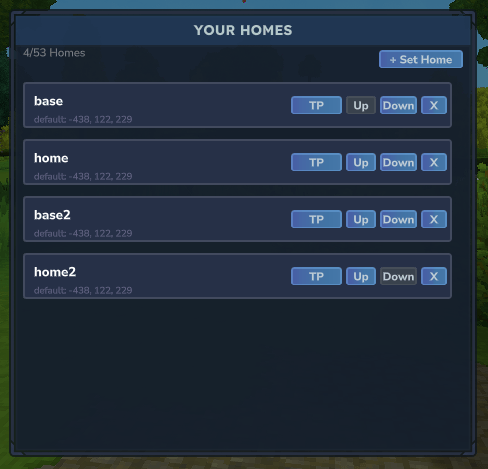
/homes admin GUI
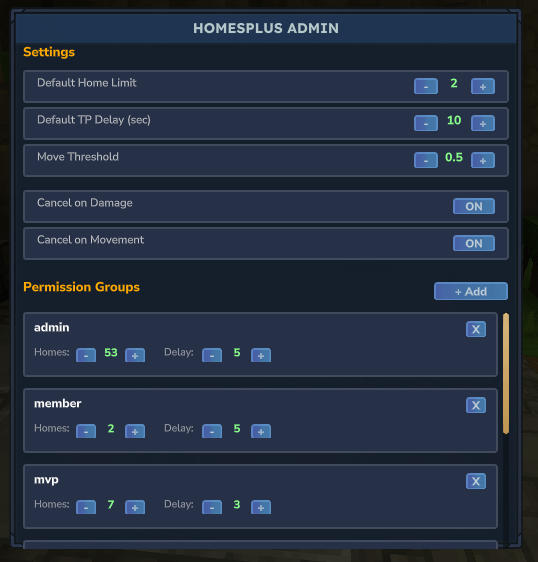
| Command | Description | Example |
|---|---|---|
/sethome <name> |
Set a home at your current location | /sethome base |
/home <name> |
Teleport to one of your homes | /home base |
/homes |
Open homes GUI | /homes |
/delhome <name> |
Delete a home | /delhome base |
On first run, the plugin creates a config.json file in the plugin's data folder with the following options:
| Option | Type | Description |
|---|---|---|
homeLimits |
Map | Permission node → max homes allowed |
teleportDelays |
Map | Permission node → delay in seconds |
defaultHomeLimit |
Integer | Default homes for players without permissions (default: 1) |
defaultTeleportDelay |
Integer | Default delay in seconds (default: 5) |
cancelOnDamage |
Boolean | Cancel teleport if player takes damage |
cancelOnMove |
Boolean | Cancel teleport if player moves |
moveThreshold |
Double | Distance (blocks) player can move before cancel |
Admin UI:
Home Limits:
home.limit.member - 2 homeshome.limit.vip - 3 homeshome.limit.vipplus - 5 homeshome.limit.mvp - 7 homeshome.limit.mvpplus - 10 homeshome.limit.admin - 50 homesTeleport Delays:
home.delay.member - 4 secondshome.delay.vip - 3 secondshome.delay.vipplus - 2 secondshome.delay.mvp - 1 secondhome.delay.mvpplus - 0 seconds (instant)home.delay.admin - 0 seconds (instant)You can add your own custom permission nodes VIA '/homes admin' GUI or in the config file!
HomesPlus.jar filemods folderconfig.json in the plugin's data folder (optional)moveThreshold in config or set cancelOnMove to falsehomeLimitshome.delay.* permission set to 0Join our Discord server 'The Outpost' here: https://discord.gg/MRKGZqagbm
Our Hytale Server is opening soon!

Project description from CurseForge.
Recent files
20 Jan 2026
18 Jan 2026
17 Jan 2026
17 Jan 2026
17 Jan 2026
17 Jan 2026
16 Jan 2026
15 Jan 2026
15 Jan 2026
15 Jan 2026
14 Jan 2026
14 Jan 2026
Looking for an older file? The official CurseForge project page is in Resources.