
HyCommands-1.5.0.jar
10 Feb 2026
Client Not supported Server Required Dependencies No extras listed Listed on Project page
Check the setup 
CurseForge · Hytale mod
A server side mod that adds /home /spawn /warps /msg /broadcast and much more ...
Quick answer
HyCommands-1.5.0.jar targets Hytale. Do not install it as a separate client mod. Enable it on the world host—the local server in singleplayer or the dedicated server in multiplayer. No required dependencies listed for this file.
Where it goes
Do not install it as a separate client mod. Enable it on the world host—the local server in singleplayer or the dedicated server in multiplayer.
Put Hytale mods on the world host or dedicated server. Singleplayer runs a local server too; Hytale does not use separate client mods.
HyCommands-1.5.0.jar. Change the file and its required mods may change too.
This file does not list any required mods. Do not add a library just because a different file uses it.
This file does not list any required or optional project dependencies. Check the creator notes before changing an existing world.
Before you install it
Built for HyCommands-1.5.0.jar. Pick another file and the loader, install side or required mods may change.
Use HyCommands-1.5.0.jar. It targets Hytale; another release may target a different game build or dependency set.
This file does not list any required mods. Do not add a library just because a different file uses it.
Do not install it as a separate client mod. Enable it on the world host—the local server in singleplayer or the dedicated server in multiplayer.
Use the “Get this file” button beside HyCommands-1.5.0.jar. It opens that exact file at the source.
About this project






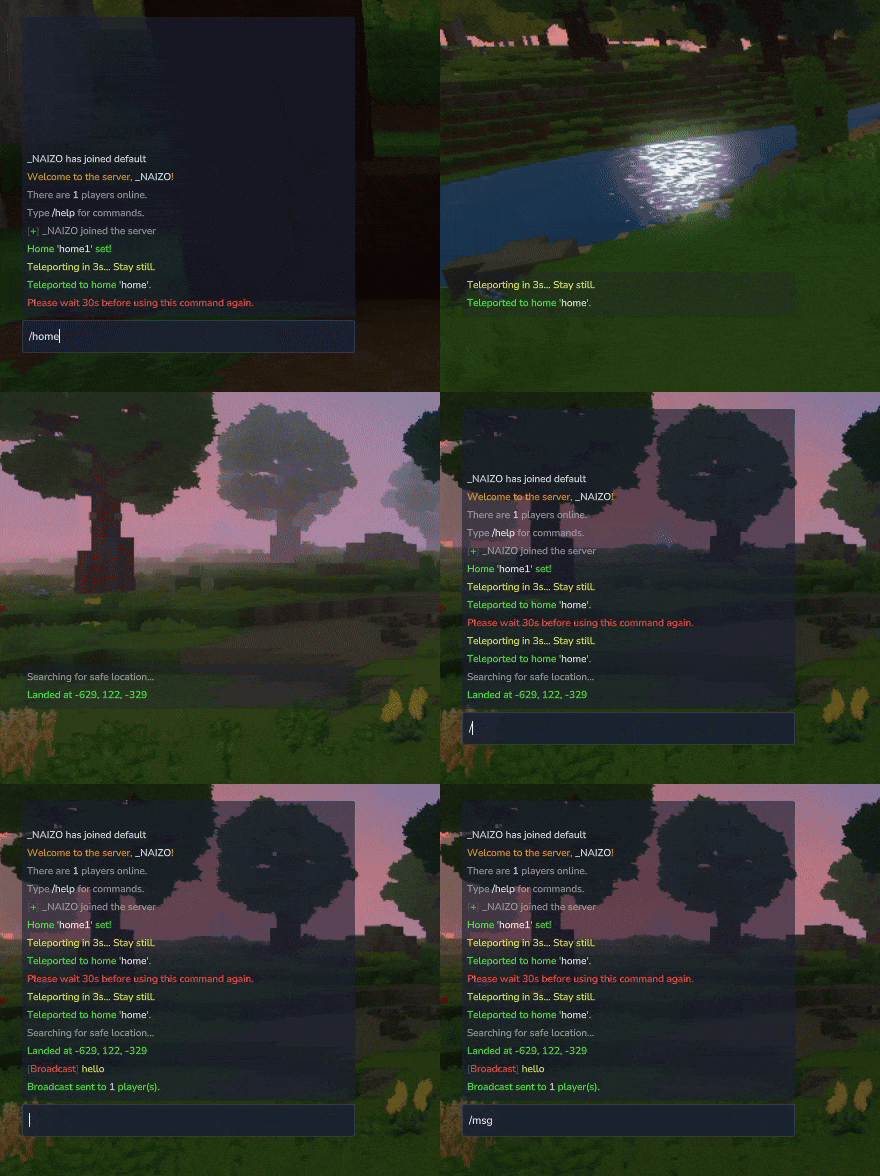
HyCommands is a lightweight, configurable server utility plugin for Hytale that consolidates common server features into a single, high-performance mod. It's designed for server operators who want robust defaults, safe async operations, and easy integration with other server-side plugins (for example, AurumX economy).

Core goals: performance, configurability, small footprint, safe async persistence, and predictable permission hooks.

mods/HyCommands/ using a thread-safe JsonRepository.AbstractPlayerCommand and check requirePermission() up-front./chatrooms (list), /chatroom <join|leave|create|delete> [name], /chatcolor <color> (set your chat color for room messages)./gmc, /gma, /gamemode <mode>, /fly, /speed <value>, /heal, /feed, /god, /near <radius>, /ping, /playtime, /seen <player>, /playerlist./tp <player|x y z>, /tphere <player>, /tpall, /tppos <x> <y> <z>, /back, /switchworld <world>, /switchserver <address>./balance [player], /balancetop, /pay <player> <amount>, admin money commands /addmoney <player> <amount>, /removemoney <player> <amount>, /setmoney <player> <amount>, and /currency to list currencies. Economy features are optional and enabled when AurumX is available on the server classpath./playtime, /seen, /playerlist, and to drive automated announcements or moderation tools.These systems are configurable — see the configuration.md additions for chat and playerStats sections.
| Command | Usage | Description |
|---|---|---|
| /sethome | /sethome [name] |
Save your current location as a named home |
| /home | /home [name] |
Teleport to a saved home |
| /delhome | /delhome [name] |
Delete a saved home |
| /homes | /homes |
List your saved homes |
| /setwarp | /setwarp <name> |
Create a server warp at your location |
| /warp | /warp <name> |
Teleport to a warp |
| /delwarp | /delwarp <name> |
Remove a warp |
| /warps | /warps |
List available warps |
| /tpa | /tpa <player> |
Send a teleport request to another player |
| /tpaccept | /tpaccept |
Accept an incoming teleport request |
| /tpdeny | /tpdeny |
Deny an incoming teleport request |
| /back | /back |
Return to your previous location (supports death/back) |
| /rtp | /rtp |
Random safe teleport |
| /spawn | /spawn |
Teleport to world spawn |
| /setspawn | /setspawn |
Set the world spawn point |
| /sleeppercent | /sleeppercent [value] |
Set required percent of players to sleep |
| /msg | /msg <player> <message> |
Send a private message |
| /broadcast | /broadcast <message> |
Send server-wide announcement |
| Command | Usage | Description |
|---|---|---|
| /chatrooms | /chatrooms |
List configured chat rooms |
| /chatroom | /chatroom <join|leave|create|delete> [name] |
Manage or join chat rooms |
| /chatcolor | /chatcolor <color> |
Set your chat color for room messages |
| /gmc | /gmc |
Set creative mode (admin) |
| /gma | /gma |
Set adventure mode (admin) |
| /gamemode | /gamemode <mode> [player] |
Change a player's game mode |
| /fly | /fly [on|off] |
Toggle flight |
| /speed | /speed <value> |
Set player movement speed |
| /heal | /heal [player] |
Restore health |
| /feed | /feed [player] |
Restore hunger |
| /god | /god [player] |
Toggle invulnerability |
| /near | /near [radius] |
List nearby players or entities |
| /ping | /ping [player] |
Show network latency |
| /playtime | /playtime [player] |
Show playtime statistics |
| /seen | /seen <player> |
Show last seen time for a player |
| /playerlist | /playerlist |
List online players with basic stats |
| /tp | /tp <player|x y z> |
Teleport player or to coordinates |
| /tphere | /tphere <player> |
Bring a player to you |
| /tpall | /tpall |
Teleport everyone to you |
| /tppos | /tppos <x> <y> <z> |
Teleport to specific coordinates |
| /switchworld | /switchworld <world> |
Move player to another world |
| /switchserver | /switchserver <address> |
Connect player to an external server (if supported) |
| /balance | /balance [player] |
Show economy balance (AurumX) |
| /balancetop | /balancetop |
Show top balances (AurumX) |
| /pay | /pay <player> <amount> |
Pay another player (AurumX) |
| /addmoney | /addmoney <player> <amount> |
Admin: add money (AurumX) |
| /removemoney | /removemoney <player> <amount> |
Admin: remove money (AurumX) |
| /setmoney | /setmoney <player> <amount> |
Admin: set balance (AurumX) |
| /currency | /currency |
List currencies provided by AurumX |
For full command options and permissions, see the commands.md in this module.
hycommands.home — use homeshycommands.home.set — set homeshycommands.home.limit.<n> — grant home slots (highest wins)hycommands.warp — use warpshycommands.warp.set — create warpshycommands.warp.use.<name> — use a specific warphycommands.warp.bypass — ignore warp protectionshycommands.tpa — send teleport requestshycommands.tpaccept — accept teleport requestshycommands.spawn.set — set spawnhycommands.admin.* — administrative commands (broadcast, delhome, delwarp, etc.)Permissions are intentionally flat and simple — see permissions.md for the exhaustive list and examples.
Configurations are written to mods/HyCommands/hycommands.json. Key configurable sections:
homes — default limits, cooldowns, warmupswarps — public/private defaults and per-warp permissionsteleport — warmup durations, movement-cancel thresholds, cooldown timessleep — requiredPercent to skip nightmessages — templates for announcements, placeholders like {player}, {time}chat — chat rooms, per-room color, visibility, and permissionsplayerStats — enable/disable playtime and join tracking, retention and storage optionsMinimal example (hycommands.json excerpt):
{
  "homes": {
    "defaultLimit": 3,
    "cooldownSeconds": 30
  },
  "teleport": {
    "warmupSeconds": 5,
    "movementCancel": 1.5
  },
  "sleep": {
    "requiredPercent": 50
  }
}
See configuration.md for the full schema and defaults.
Build the jar with Gradle (root or module):
./gradlew :hycommands:shadowJar
Drop the produced HyCommands-<version>.jar into your server mods/ folder and restart the server. The plugin will generate a config in mods/HyCommands/ on first run.
Notes:
TestServer/HytaleServer.jar (compileOnly) — ensure server/TestServer/HytaleServer.jar is present for local builds.compileOnly(project(":aurumx")) so include the AurumX module on the classpath for related features.Player and server data are stored under mods/HyCommands/ in JSON format using a thread-safe JsonRepository. The repository writes off the main thread to avoid server stalls.
Feel free to include HyCommands in modpacks.
Please do not redistribute modified versions without permission.

Project description from CurseForge.
Recent files
10 Feb 2026
25 Jan 2026
16 Jan 2026
15 Jan 2026
15 Jan 2026
14 Jan 2026
14 Jan 2026
14 Jan 2026
Looking for an older file? The official CurseForge project page is in Resources.