Quick answer
Which JEI Lumenia release should I use?
Latest stable file Lumenia-1.0.14.jar
Game version Not listed
Mod system Built-in Hytale mod system
JEI Lumenia Lumenia-1.0.14.jar targets Hytale. Do not install it as a separate client mod. Enable it on the world host—the local server in singleplayer or the dedicated server in multiplayer. No required dependencies listed for this file.
Where it goes
Where should JEI Lumenia be installed in Hytale?
Do not install it as a separate client mod. Enable it on the world host—the local server in singleplayer or the dedicated server in multiplayer.
Separate client mod Not supported
World host / dedicated server Required
Mod system for this release Built-in Hytale mod system
Required install it here Optional supported, not mandatory Not supported do not install here Source doesn’t say do not assume
Put Hytale mods on the world host or dedicated server. Singleplayer runs a local server too; Hytale does not use separate client mods.
What else does JEI Lumenia Lumenia-1.0.14.jar need?
Lumenia-1.0.14.jar. Change the file and its required mods may change too.
This file does not list any required mods. Do not add a library just because a different file uses it.
This file does not list any required or optional project dependencies. Check the creator notes before changing an existing world.
Before you install it
Add JEI Lumenia without breaking your instance.
Built for JEI Lumenia Lumenia-1.0.14.jar. Pick another file and the loader, install side or required mods may change.
- 01
Stick to this file
Use Lumenia-1.0.14.jar. It targets Hytale; another release may target a different game build or dependency set.
- 02
Bring the mods it needs
This file does not list any required mods. Do not add a library just because a different file uses it.
- 03
Enable it on the world host
Do not install it as a separate client mod. Enable it on the world host—the local server in singleplayer or the dedicated server in multiplayer.
- 04
Pick the file you checked
Use the “Get this file” button beside Lumenia-1.0.14.jar. It opens that exact file at the source.
About this project
What does JEI Lumenia add?
Lumenia: Ultimate Quality of Life Integration
Lumenia is a comprehensive utility and enhancement mod designed to streamline the player experience in Hytale. By combining dozens of essential Quality of Life (QoL) features into a single, lightweight package, Lumenia eliminates the need for multiple smaller mods while ensuring peak performance and compatibility.
JEI-Like Item Browser
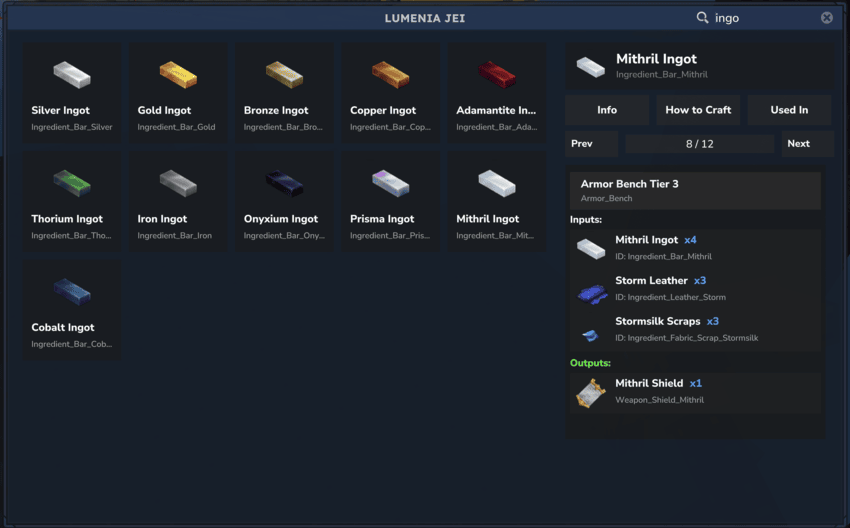
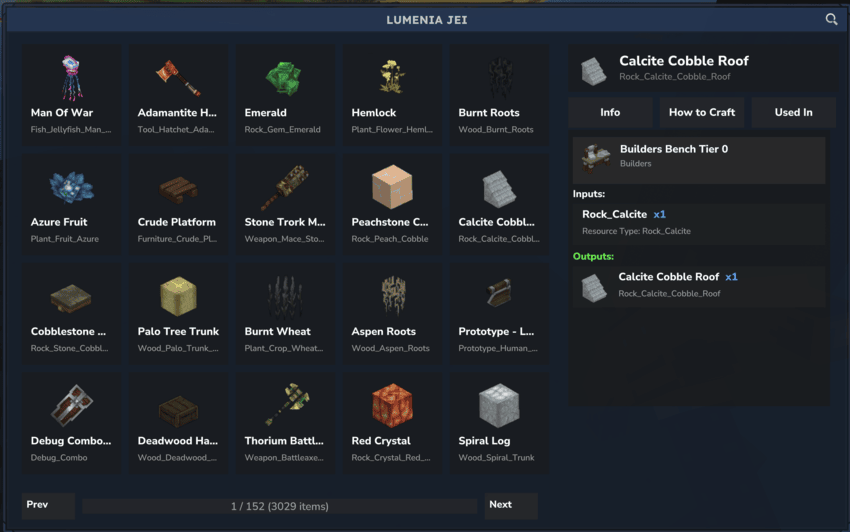
Lumenia features a powerful Just Enough Items (JEI) style panel that provides comprehensive item and recipe information at your fingertips.
Opening the JEI Panel
You can open the JEI panel using any of the following commands:
/jei - Opens the JEI panel/lumenia - Opens the JEI panel/recipe - Opens the JEI panel/recipes - Opens the JEI panel
Optional Parameters:
/jei --item=<text> - Opens the JEI panel with the search field pre-filled, allowing you to quickly find specific items
Keybind Support:
- Press Alt while walking to quickly open the JEI panel
- This can be enabled\disabled using the uI
- You can also change from Alt to Ctrl ( Walk to Crouch )
You can also open the JEI using the custom iteraction
OpenLumeniaBookInteraction
Features
🔍 Advanced Search System
- Search by Name: Find items by their display name
- Search by ID: Locate items using their exact item ID
- Combined Search: Use both name and ID simultaneously for precise results
📦 Comprehensive Item Information
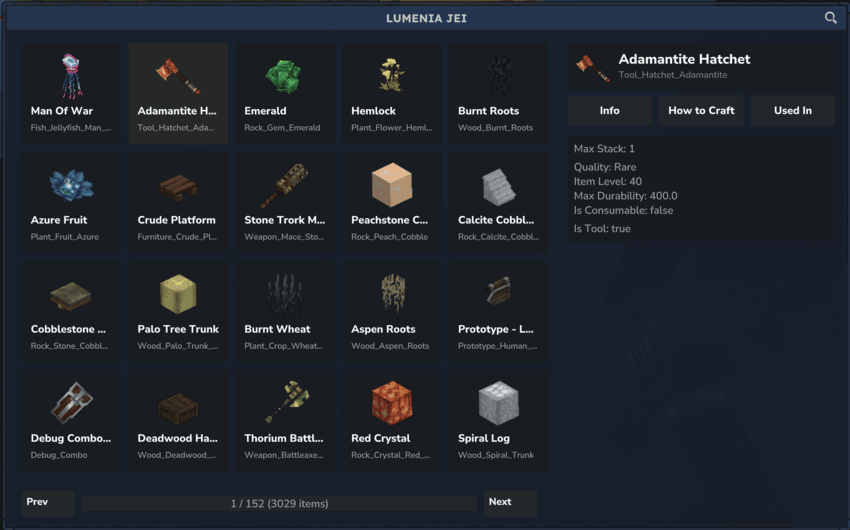
When you select an item, the panel displays detailed information including:
- Item Icon & Name: Visual identification with localized names
- Item ID: The unique identifier for the item ( if click on itemid this will send a message to your chat linking to an external website where you can at least copy the itemid )
- Origin: Whether the item is vanilla or modded (with mod name if applicable)
- Quality Tier: Displayed with appropriate color coding
- Item Level: The level requirement or tier of the item
- Max Stack Size: Maximum items that can be stacked
- Max Durability: Maximum durability for tools and equipment
- Dropped by: List of mobs that drop the item with quantities, mob names (translated), role IDs
- Item Properties:
- Is Consumable
- Has Block Type
- Fuel Quality
- Is Tool / Weapon / Armor
🔨 Recipe Information
How to Craft:
- View all recipes that produce the selected item
- See required crafting bench and tier level
- Display input materials with quantities
- Paginated recipe list for easy navigation
Used In:
- Discover all recipes that use the selected item as an ingredient
- See what items can be crafted using the selected item
- Complete recipe details with all requirements
⚡ Quick Actions
Give Item (Creative Mode Only):
- Instantly add the selected item to your inventory
- Only available when in Creative mode
- Convenient button in the item info panel
🎨 User Interface
- Clean, Modern Design: Intuitive interface that's easy to navigate
- Paginated Lists: Efficient browsing through large item catalogs
- Responsive Layout: Adapts to different screen sizes
- Color-Coded Quality: Visual indicators for item quality tiers
- Text Wrapping: Long item names and descriptions wrap properly
Configuration
Customize Lumenia's behavior through the Lumenia.json configuration file:
{
  "DefaultOpenJeiKeybind": true
}
- DefaultOpenJeiKeybind: Enable/disable the Alt key keybind to open JEI (default:
true)
Performance
Lumenia is designed with performance in mind:
- Lightweight and efficient
- Minimal impact on server performance
- Optimized asset loading and caching
- Thread-safe operations
Compatibility
- Compatible with vanilla Hytale items and recipes
- Supports modded items and custom recipes
- Works seamlessly with other mods
- Early Access compatible
Installation
- Download
Lumenia-1.0.13.jar
- Place the JAR file in your server's plugins directory
- Restart your server
- Start using
/jei to open the panel! or press Alt
Project description from CurseForge.
Recent files
JEI Lumenia releases and Hytale builds
17 Feb 2026
Client Not supported Server Required Dependencies No extras listed Listed on Project page
Check the setup → 10 Feb 2026
Client Not supported Server Required Dependencies No extras listed Listed on Project page
Check the setup → 5 Feb 2026
Client Not supported Server Required Dependencies No extras listed Listed on Project page
Check the setup → 31 Jan 2026
Client Not supported Server Required Dependencies No extras listed Listed on Project page
Check the setup → 23 Jan 2026
Client Not supported Server Required Dependencies No extras listed Listed on Project page
Check the setup → 20 Jan 2026
Client Not supported Server Required Dependencies No extras listed Listed on Project page
Check the setup → 19 Jan 2026
Client Not supported Server Required Dependencies No extras listed Listed on Project page
Check the setup → 19 Jan 2026
Client Not supported Server Required Dependencies No extras listed Listed on Project page
Check the setup → 18 Jan 2026
Client Not supported Server Required Dependencies No extras listed Listed on Project page
Check the setup → 18 Jan 2026
Client Not supported Server Required Dependencies No extras listed Listed on Project page
Check the setup → 14 Jan 2026
Client Not supported Server Required Dependencies No extras listed Listed on Project page
Check the setup → 14 Jan 2026
Client Not supported Server Required Dependencies No extras listed Listed on Project page
Check the setup →