
Hytale version
Back to mods 
CurseForge · Hytale mod
Better Item Viewer - JEI
JEI for Hytale. Adds an item recipe viewer with a bunch of extra information about tools, weapons and other items that are not visible in the base game. Basically JustEnoughItems for Hytale!
Choose a version Pick your version below, then grab the matching file.
Quick answer
Which Better Item Viewer - JEI release should I use?
Latest stable file BetterItemViewer-1.17.10.jar
Game version 0.6
Mod system Built-in Hytale mod system
Better Item Viewer - JEI BetterItemViewer-1.17.10.jar targets 0.6. Do not install it as a separate client mod. Enable it on the world host—the local server in singleplayer or the dedicated server in multiplayer. No required dependencies listed for this file.
Where it goes
Where should Better Item Viewer - JEI be installed in Hytale?
Do not install it as a separate client mod. Enable it on the world host—the local server in singleplayer or the dedicated server in multiplayer.
Separate client mod Not supported
World host / dedicated server Required
Mod system for this release Built-in Hytale mod system
Required install it here Optional supported, not mandatory Not supported do not install here Source doesn’t say do not assume
Put Hytale mods on the world host or dedicated server. Singleplayer runs a local server too; Hytale does not use separate client mods.
What else does Better Item Viewer - JEI BetterItemViewer-1.17.10.jar need?
BetterItemViewer-1.17.10.jar. Change the file and its required mods may change too.
This file does not list any required mods. Do not add a library just because a different file uses it.
This file does not list any required or optional project dependencies. Check the creator notes before changing an existing world.
Before you install it
Add Better Item Viewer - JEI without breaking your instance.
Built for Better Item Viewer - JEI BetterItemViewer-1.17.10.jar. Pick another file and the loader, install side or required mods may change.
- 01
Stick to this file
Use BetterItemViewer-1.17.10.jar. It targets 0.6; another release may target a different game build or dependency set.
- 02
Bring the mods it needs
This file does not list any required mods. Do not add a library just because a different file uses it.
- 03
Enable it on the world host
Do not install it as a separate client mod. Enable it on the world host—the local server in singleplayer or the dedicated server in multiplayer.
- 04
Pick the file you checked
Use the “Get this file” button beside BetterItemViewer-1.17.10.jar. It opens that exact file at the source.
About this project
What does Better Item Viewer - JEI add?
This projects adds a gui for all items in the game, similar to Just Enough Items JEI in minecraft. All item details, as well as recipes and item usages, are displayed in a side panel. You can view all items from specific mods, categories, tags, or simply search them by their name. You can use it to compare weapon (and other item) stats, which are otherwise not viewable in the game.
Features
Item Details
You can click on any item in the item list to pull up the item detail side panel, which includes the following information:
- All Item Recipes
- All Recipes that an Item is used in
- Mining Tool Stats
- Armor Stats
- Weapon Damage
- A list of all attacks and their respective damage values
- Item stat modifier details (Signature details, Extra Ammo, …)
- Works on all kind of weapons (swords, axes, daggers, spears, mace, bow, …)
- Mob Loot (what mobs drop that item)
- General Stats
- Durability
- Max Stack Size
- Item Quality
- Mod origin
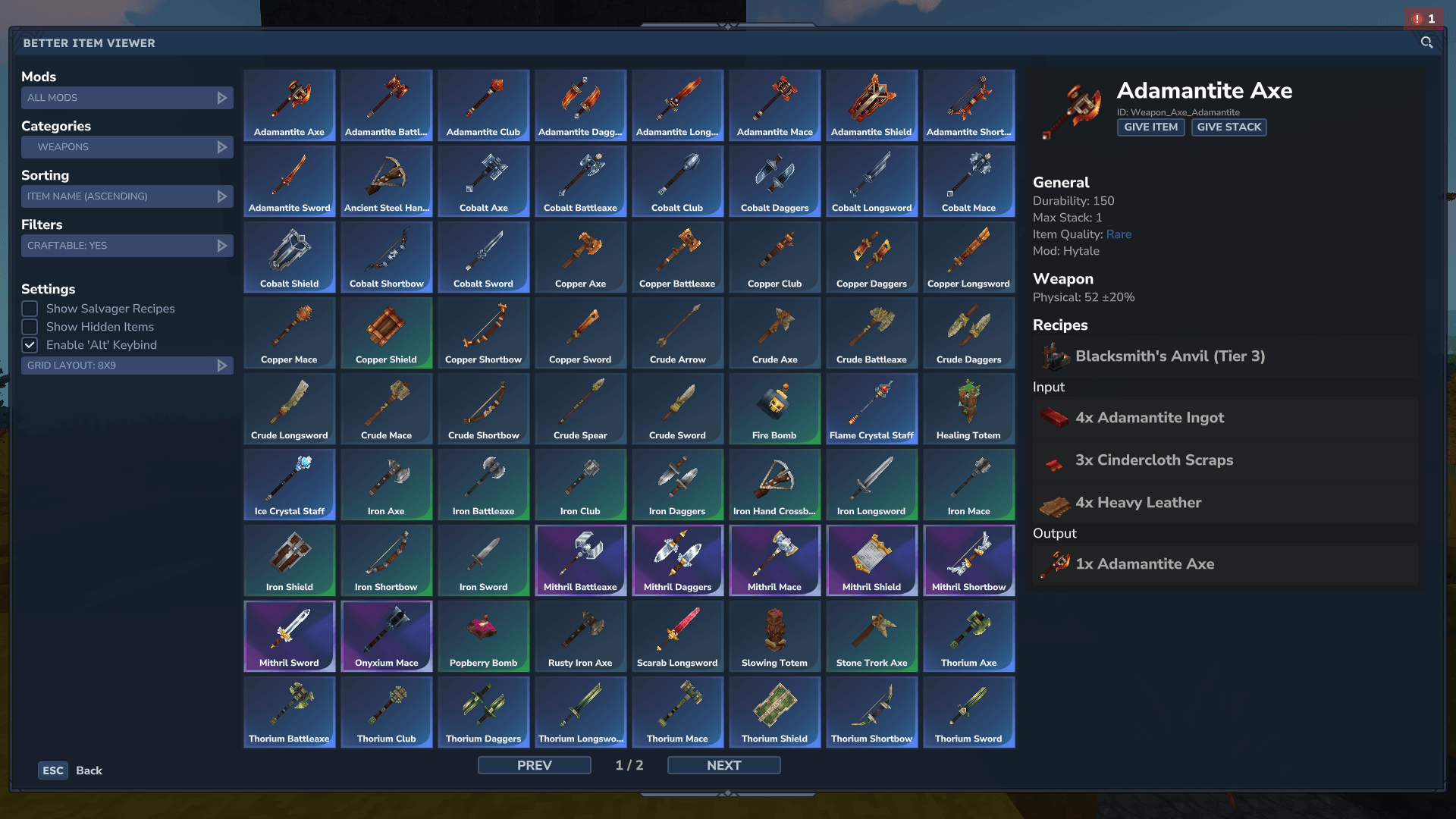
Recipes
You can browse all item recipes by clicking on the item. You can also click on any recipe ingredient to get details about that item. You can click on recipe input tags to view all items that can be used to craft that recipe.
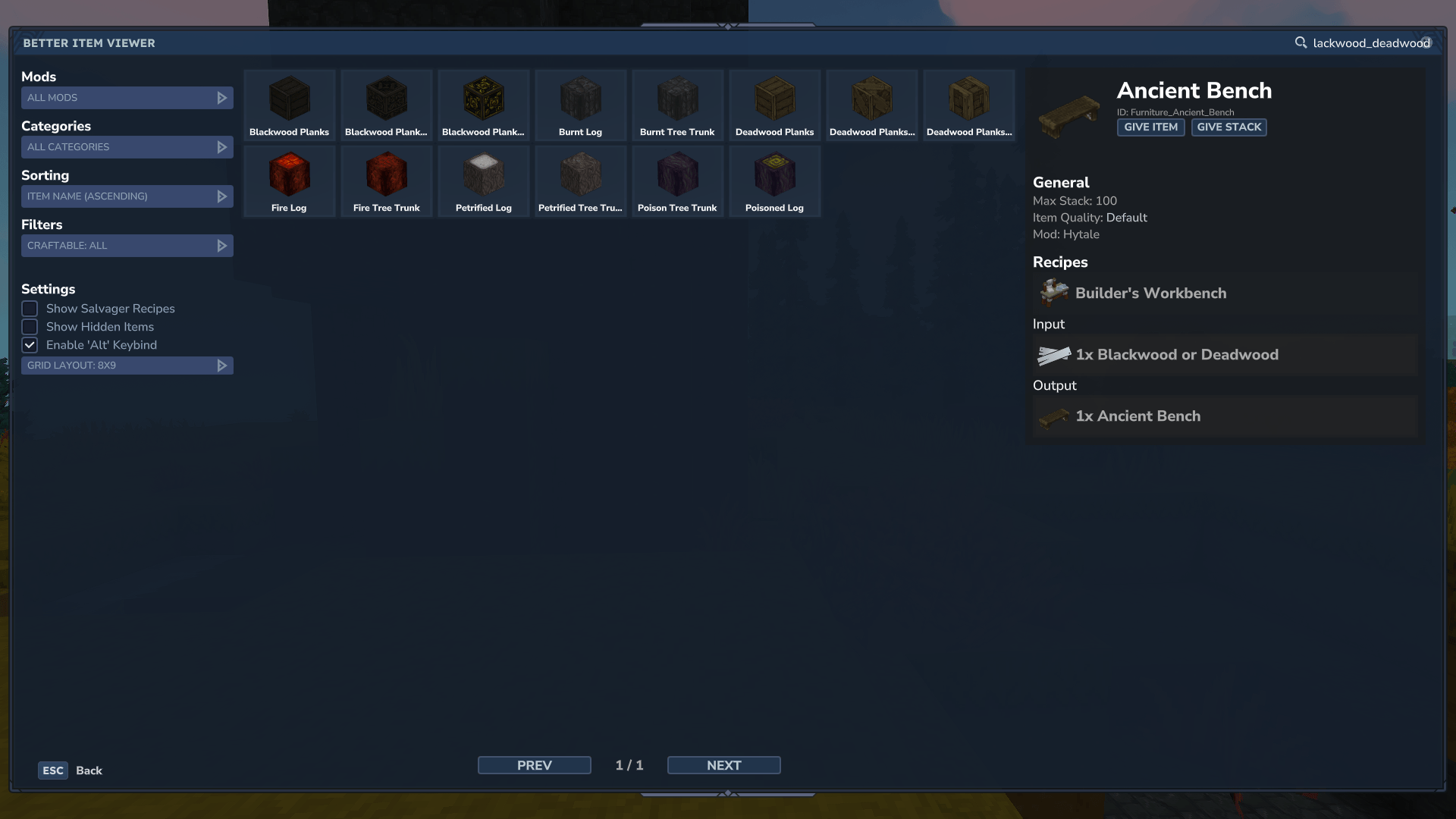
Giving Items
If you are in creative mode, or are a server operator, you can right-click on any item in the item list, or click on the "Give Item" / "Give Stack" button in the item detail section to add that item to your hotbar / inventory.
Filters
There are many different filters you can use to narrow down the list of items you are looking at. All of these filters can be combined arbitrarily. You can also use the search bar in the top right to further narrow down the results. By prefixing a search with # you can search by item tags (this is also used for displaying the available items for item tags in recipes)
Mods
If you select a specific mod in the Mods section the item section will only show items that have been registered by that mod. This is great for figuring out what content a mod adds and gather details about its items.
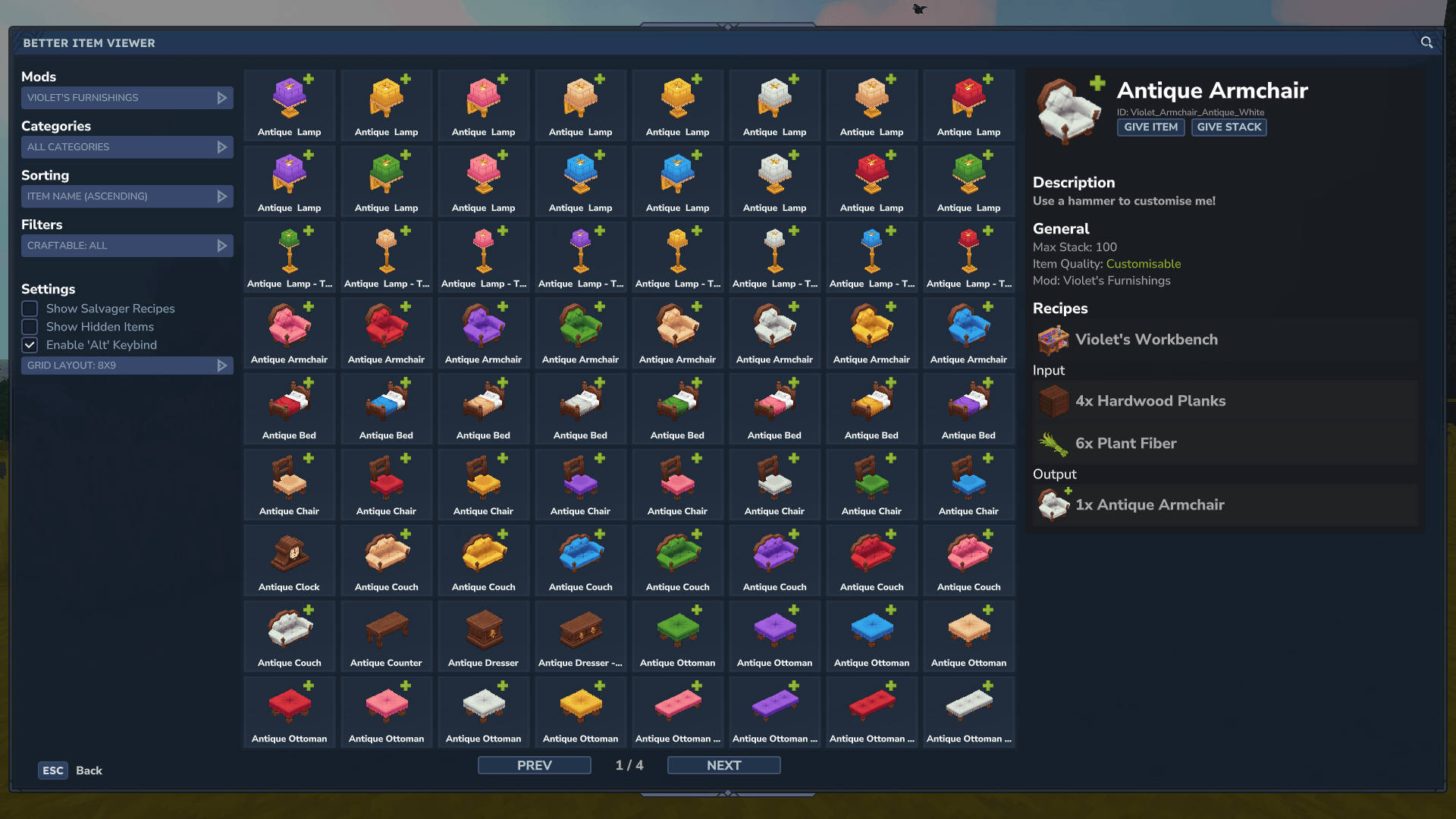
Categories
There are more than 30 different categories of items that you can filter by. You can either filter by main categories, like Items, Tool, Blocks or you can click on any of their subcategories for finer control of the filtered items.
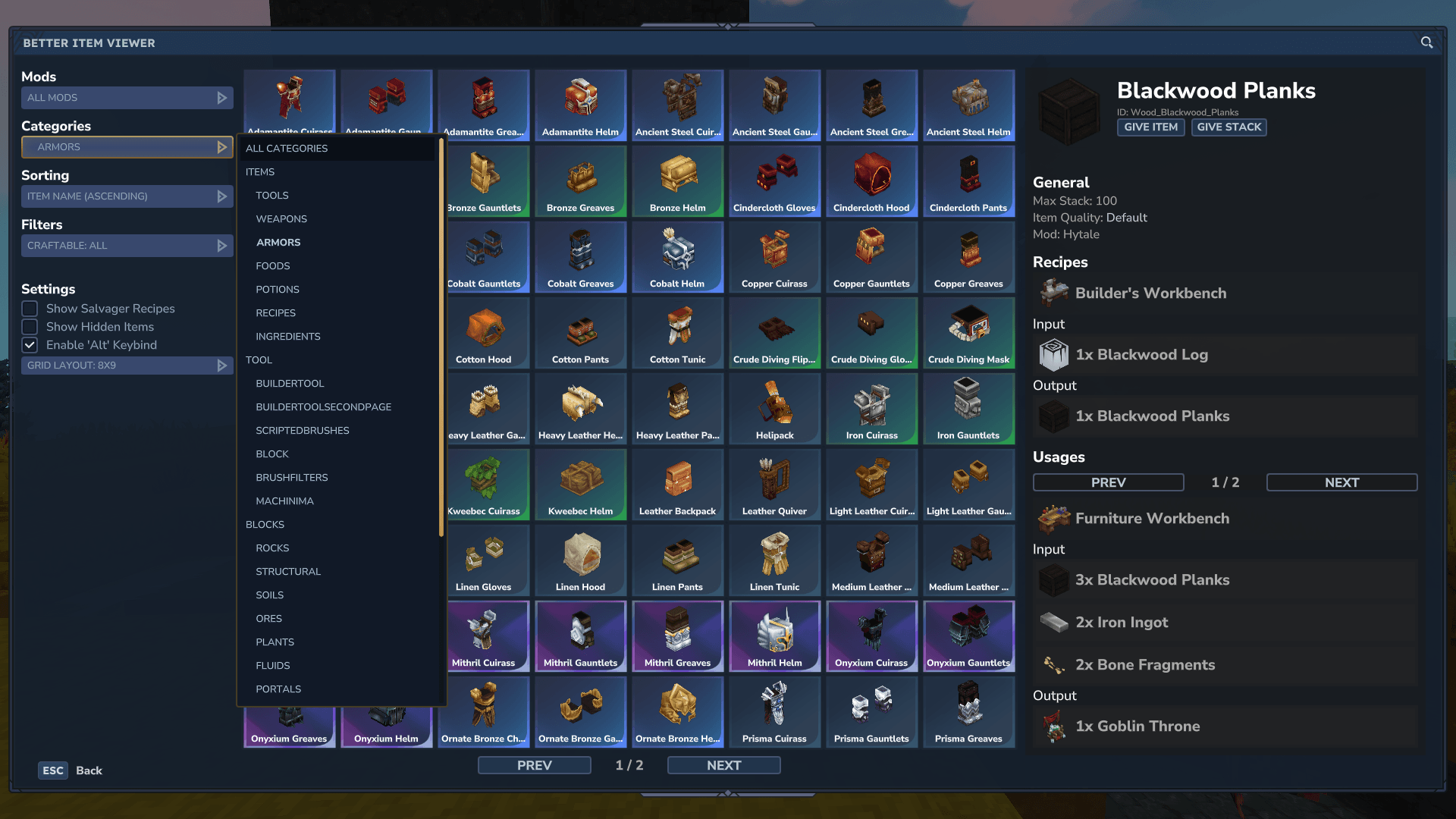
Craftable
You can also filter items to only include any that have a recipe to craft them. Or alternatively all items without a recipe.
How to Access
There are currently 3 different ways to access the item viewer. All of them have their pros and cons and can be configured by modpack creators and server owners to fit their needs.
Commands
The mod adds a simple /betteritemviewer command to open the gui from anywhere. The command also has some aliases to make it easier to run the command. The aliases are /biv and /jei!
The commands are simple, but not very convenient.
Keybind
If you press the Left Alt key on your keyboard the gui will also open. The mod has to overwrite Hytales Walking keybind to achieve this behavior. If you don't want this you can disable the keybind in the gui. Server owners / modpack creators can choose to completely disable this functionality by adjusting the mod config.
Please not that it is not possible to change this keybind. Hytale doesn't provide any systems for registering custom keybinds, so we have to hack our way around this limitation!
Recipe Book
The mod also adds a recipe book item, which you can right-click to open the gui. This book is currently not obtainable in survival. It can be used by modpack creators or server owners to give a convenient option for players to use the mod.
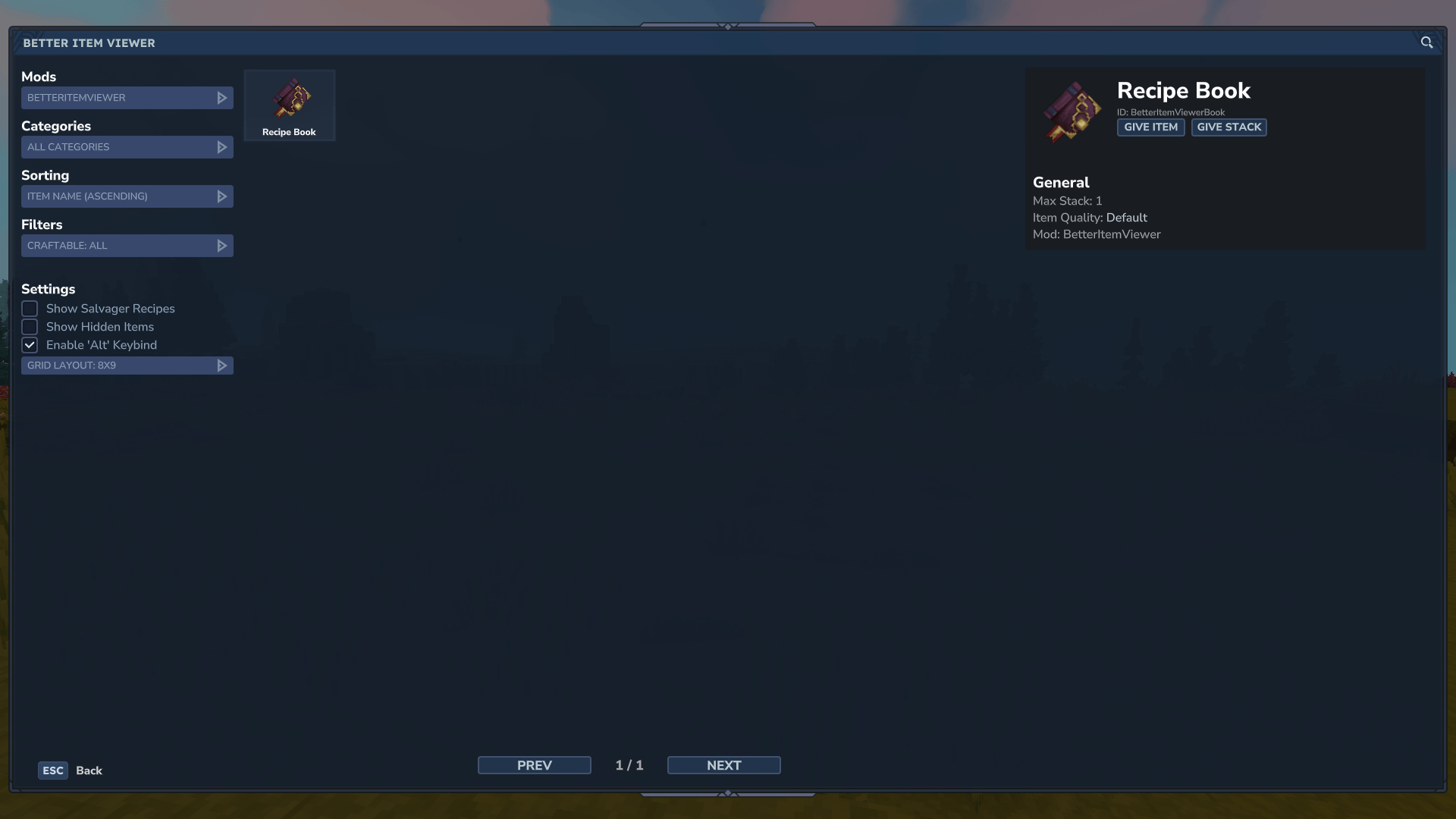
If you want to create your own item that opens the gui you can do so by adding the OpenBetterItemViewer interaction to its interactions.
"Interactions": {
    "Secondary": {
        "Interactions": [
            {
                "Type": "OpenBetterItemViewer"
            }
        ]
    }
}
Make it yours
You can change the mods config at mods/Drex_BetterItemViewer/BetterItemViewer.json to configure the mod to your liking.
This is the current default config of the mod, with some comments briefly explaining what each option does
{
  // The default value of the keybind setting (when set to true the keybind will be automatically enabled for all new players)
  "DefaultAltKeyBind": true,
  // true = The /biv command is no longer accessible
  "DisableCommand": false,
  // true = The keybind is completely disabled (for everyone)
  "DisableKeybind": false,
  // true = The mod filter option in the gui is removed
  "DisableModFilter": false,
  // true = The "Show Creator Info" toggle in the gui is removed
  "DisableCreatorInfoSetting": false,
  // true = The "Show Hidden Items" toggle in the gui is removed
  "DisableHiddenItemsSetting": false,
  // A list of qualities that will be hidden when "Show Hidden Items" is not enabled in the gui
  "HiddenQualities": [
    "Technical",
    "Tool",
    "Developer"
  ]
}
Project description from CurseForge.
Pick your setup
Better Item Viewer - JEI releases for each Hytale build.
Choose the version and loader you play, then open the matching release.
Hytale version
0.5
1 loader buildCheck the dependencies, then try the file in a copied instance before changing a world you care about.
Recent files
Better Item Viewer - JEI releases and Hytale builds
BetterItemViewer-1.17.10.jar
28 Aug 2026
Client Not supported Server Required Dependencies No extras listed Listed on Project page
Check the 0.6 setup 0.6 release
BetterItemViewer-1.17.9.jar
29 May 2026
Client Not supported Server Required Dependencies No extras listed Listed on Project page
Check the 0.5 setup 0.5 release
BetterItemViewer-1.17.8.jar
26 May 2026
Client Not supported Server Required Dependencies No extras listed Listed on Project page
Check the 0.5 setup 0.5 release
BetterItemViewer-1.17.7.jar
26 Mar 2026
Client Not supported Server Required Dependencies No extras listed Listed on Project page
Check the setup BetterItemViewer-1.17.6.jar
23 Mar 2026
Client Not supported Server Required Dependencies No extras listed Listed on Project page
Check the setup BetterItemViewer-1.17.5.jar
6 Mar 2026
Client Not supported Server Required Dependencies No extras listed Listed on Project page
Check the setup BetterItemViewer-1.17.4.jar
1 Mar 2026
Client Not supported Server Required Dependencies No extras listed Listed on Project page
Check the setup BetterItemViewer-1.17.3.jar
25 Feb 2026
Client Not supported Server Required Dependencies No extras listed Listed on Project page
Check the setup BetterItemViewer-1.17.2.jar
17 Feb 2026
Client Not supported Server Required Dependencies No extras listed Listed on Project page
Check the setup BetterItemViewer-1.17.1.jar
16 Feb 2026
Client Not supported Server Required Dependencies No extras listed Listed on Project page
Check the setup BetterItemViewer-1.17.0.jar
12 Feb 2026
Client Not supported Server Required Dependencies No extras listed Listed on Project page
Check the setup BetterItemViewer-1.16.0.jar
7 Feb 2026
Client Not supported Server Required Dependencies No extras listed Listed on Project page
Check the setup Looking for an older file? The official CurseForge project page is in Resources.