SmartBenches-1.3.1.jar
18 Mar 2026
Client Not supported Server Required Dependencies No extras listed Listed on Project page
Check the setup 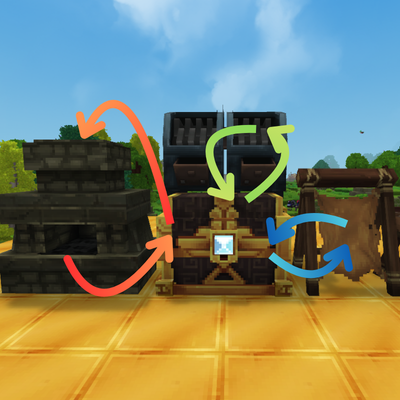
CurseForge · Hytale mod
You want benches output to go straight into a chest? There we go!
Quick answer
Smart benches SmartBenches-1.3.1.jar targets Hytale. Do not install it as a separate client mod. Enable it on the world host—the local server in singleplayer or the dedicated server in multiplayer. No required dependencies listed for this file.
Where it goes
Do not install it as a separate client mod. Enable it on the world host—the local server in singleplayer or the dedicated server in multiplayer.
Put Hytale mods on the world host or dedicated server. Singleplayer runs a local server too; Hytale does not use separate client mods.
SmartBenches-1.3.1.jar. Change the file and its required mods may change too.
This file does not list any required mods. Do not add a library just because a different file uses it.
This file does not list any required or optional project dependencies. Check the creator notes before changing an existing world.
Before you install it
Built for Smart benches SmartBenches-1.3.1.jar. Pick another file and the loader, install side or required mods may change.
Use SmartBenches-1.3.1.jar. It targets Hytale; another release may target a different game build or dependency set.
This file does not list any required mods. Do not add a library just because a different file uses it.
Do not install it as a separate client mod. Enable it on the world host—the local server in singleplayer or the dedicated server in multiplayer.
Use the “Get this file” button beside SmartBenches-1.3.1.jar. It opens that exact file at the source.
About this project
**Want bench output to go straight into a chest? Here i am**

This mod works with Processing Benches — stations that have dedicated containers where items are processed (furnaces, forges, kilns, etc.).
| Bench Type | Has Output? | Works? |
|---|---|---|
| 🔥 Furnace / Forge / Kiln | ✅ Yes | ✅ Auto-transfers to chest |
| ⚒️ Crafting Table | ❌ No (goes to player) | ❌ Not applicable |
| 🧪 Processing stations | ✅ Yes | ✅ Auto-transfers to chest |
/smartbenches to see the full list of commands:/smartbenches input - Toggle auto-feeding from chests./smartbenches output - Toggle auto-output to chests./smartbenches status - View the live status of your configurations./smartbenches toggle <Bench_ID> - Turn off automation for specific bench types altogether./smartbenches searchradius <number> - Adjust the chest scanning range (1-10 blocks)./smartbenches tickinterval <number> - Change the processing delay to optimize server performance. [Chest]
↓ ↑
[Furnace] → Processed items flow to chest! + Gets auto-fueled!
Linceros.SmartBenches-1.3.0.jar..jar file into your Hytale server's mods folder.Created by Linceros.
Part of the Linceros Mod Collection for Hytale.
Project description from CurseForge.
Recent files
18 Mar 2026
20 Feb 2026
19 Jan 2026
19 Jan 2026
16 Jan 2026
15 Jan 2026
14 Jan 2026
Looking for an older file? The official CurseForge project page is in Resources.
 mod
modPlay some classic games with your friends.
 mod
modAdds animated icons to NPC enities. Extention Plugin for QuestLines
 mod
modBuild custom in-game interfaces for your Hytale server — no Java, no rebuilds, no restarts