
Hylograms 1.1.2
19 Feb 2026
Client Not supported Server Required Dependencies No extras listed Listed on Project page
Check the setup 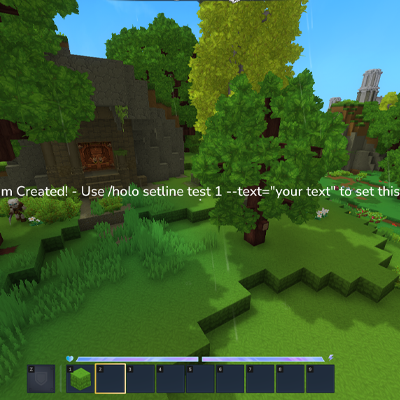
CurseForge · Hytale mod
Create floating text for your servers with easy-to-use commands.
Quick answer
Hylograms 1.1.2 targets Hytale. Do not install it as a separate client mod. Enable it on the world host—the local server in singleplayer or the dedicated server in multiplayer. No required dependencies listed for this file.
Where it goes
Do not install it as a separate client mod. Enable it on the world host—the local server in singleplayer or the dedicated server in multiplayer.
Put Hytale mods on the world host or dedicated server. Singleplayer runs a local server too; Hytale does not use separate client mods.
Hylograms 1.1.2. Change the file and its required mods may change too.
This file does not list any required mods. Do not add a library just because a different file uses it.
This file does not list any required or optional project dependencies. Check the creator notes before changing an existing world.
Before you install it
Built for Hylograms 1.1.2. Pick another file and the loader, install side or required mods may change.
Use Hylograms 1.1.2. It targets Hytale; another release may target a different game build or dependency set.
This file does not list any required mods. Do not add a library just because a different file uses it.
Do not install it as a separate client mod. Enable it on the world host—the local server in singleplayer or the dedicated server in multiplayer.
Use the “Get this file” button beside Hylograms 1.1.2. It opens that exact file at the source.
About this project
A powerful hologram plugin for Hytale servers with multi-line text, item displays, animations, and an easy-to-use API.
Note: Hytale nameplates currently do not expose rich text formatting for holograms, so color/style text formatting is not available yet. I tried to use Mixin and it wasn't happy :(
image:<id> lines/holo image reload)/holo stats)All commands are under /hologram (alias: /holo).
/holo create <id> [--text="..."] [--temporary=true]/holo delete <id>/holo list/holo move <id>/holo teleport <id>/holo save/holo reload/holo respawn [id]/holo stats/holo addline <id> --text="..."/holo setline <id> <line> --text="..."/holo removeline <id> <line>/holo alignline <id> <line> --x=.. --y=.. --z=.. [--clear=true]/holo visibility <hide|show|toggle|status>/holo vis <hide|show|toggle|status>/holo interact <id> <line> <enable|disable> [--hint="..."] [--collision=SoftCollision] [--width=.. --height=.. --depth=..] [--action="..."]Built-in action formats:
player-command:<command>user-command:<command> (alias of player-command)console-command:<command>message:<text>/holo image <reload|list|path>/holo images <reload|list|path>/holo anim list/holo anim create <name> [--loop=true] [--autoplay=false]/holo anim delete <name>/holo anim keyframe <name> <time> [--x=.. --y=.. --z=.. --pitch=.. --yaw=.. --roll=.. --scale=.. --easing=..]/holo anim assign <id> <line> <animation>/holo anim clear <id> <line>/holo anim play <id> <line>/holo anim stop <id> <line>HylogramsFramework/holograms.jsonHylogramsFramework/animations.jsonpersistent=false) that do not save to diskalignline)Welcome to spawnitem:<itemId>[:scale[:pitch:yaw:roll]]block:<blockTypeId>[:scale[:pitch:yaw:roll]]entity:<modelId>[:scale[:pitch:yaw:roll]]image:<imageId>[:scale[:pitch:yaw:roll]]Notes:
1.0.Input folder:
HylogramsFramework/images-inputSupported input:
.png, .jpg, .jpeg (jpg/jpeg are converted to .png at runtime)Generated output:
HylogramsFramework/image-assetsmods/HylogramsThe plugin watches images-input and can hot-reload via:
/holo image reloadConfiguration file:
HylogramsFramework/config.propertiesMain options:
line-spacingitem-spacing-factortext-line-interaction-y-offsetautosave-on-changecheck-for-updatesdefault-per-player-renderingplaceholder-refresh-enabledplaceholder-refresh-interval-secondsplaceholder-refresh-max-holograms-per-runplaceholder-refresh-only-when-placeholdersdebugCore:
hylograms.createhylograms.addlinehylograms.setlinehylograms.removelinehylograms.alignlinehylograms.movehylograms.teleporthylograms.deletehylograms.listhylograms.statshylograms.interacthylograms.savehylograms.reloadhylograms.respawnhylograms.imageAnimation:
hylograms.anim.listhylograms.anim.createhylograms.anim.deletehylograms.anim.keyframehylograms.anim.assignhylograms.anim.clearhylograms.anim.playhylograms.anim.stopUpdate-notify admin checks (join notifications):
*hylograms.*hylograms.adminhylograms.notifyupdateshylograms.reloadPrimary entrypoint:
dev.ehko.hylograms.framework.api.HylogramsApiCompatibility entrypoint:
dev.ehko.hylograms.api.HologramsAPIMain interface:
dev.ehko.hylograms.framework.api.HylogramsDeveloperApiimport com.hypixel.hytale.math.vector.Vector3d;
import com.hypixel.hytale.math.vector.Vector3f;
import dev.ehko.hylograms.api.HologramsAPI;
import dev.ehko.hylograms.framework.api.HylogramsDeveloperApi;
HylogramsDeveloperApi api = HologramsAPI.get();
api.create(
"shop",
"overworld",
new Vector3d(100, 65, 200),
new Vector3f(0, 180, 0),
"Welcome to the Shop!"
);
api.addLine("shop", "item:Items/Weapons/Sword_Iron");
api.addLine("shop", "Click to browse");
api.respawn("shop");
import java.util.List;

HylogramsDeveloperApi api = HologramsAPI.get();

api.setLine("shop", 1, "Shop is OPEN!");
api.alignLine("shop", 2, 0.5, 0.0, 0.0);
api.setLines("shop", List.of(
    "Welcome to the Shop!",
    "item:Items/Weapons/Sword_Iron:1.3",
    "Best prices in town"
));

api.setLineInteractable(
    "shop",
    1,
    "Open Shop",
    1.8,
    0.9,
    0.8,
    "SoftCollision",
    "player-command:/shop"
);

api.respawn("shop");
api.saveNow();
import com.hypixel.hytale.math.vector.Vector3d;
import com.hypixel.hytale.math.vector.Vector3f;
import dev.ehko.hylograms.framework.animation.EasingType;
import dev.ehko.hylograms.framework.animation.Keyframe;

HylogramsDeveloperApi api = HologramsAPI.get();

api.createAnimation("spin", true, false);
api.addAnimationKeyframe("spin", new Keyframe(
    0.0f,
    new Vector3d(0, 0, 0),
    new Vector3f(0, 0, 0),
    1.0f,
    EasingType.LINEAR
));
api.addAnimationKeyframe("spin", new Keyframe(
    2.0f,
    new Vector3d(0, 0, 0),
    new Vector3f(0, 360, 0),
    1.0f,
    EasingType.LINEAR
));

api.assignLineAnimation("shop", 2, "spin");
api.playLineAnimation("shop", 2);
HylogramsDeveloperApi api = HologramsAPI.get();

if (api.exists("shop")) {
    api.delete("shop");
}

api.list();                  // List<HologramDefinition>
api.listAnimations();        // List<AnimationData>
api.getStats();              // Runtime snapshot
api.respawnAllLoaded();      // Queue full respawn
api.reloadFromDiskAndRespawn();
HylogramsDeveloperApi api = HologramsAPI.get();

// Queue periodic per-player placeholder refresh work
api.refreshPerPlayerHolograms(20, true);
HylogramsDeveloperApi api = HologramsAPI.get();

if (api.isImageServiceAvailable()) {
    api.reloadImageAssets();
    api.listImageAssets();
    api.getImageInputDirectory();
}
mods/ folder.HylogramsFramework/config.properties if needed./holo create ... to start building holograms.Placeholder support target:
HelpChat:PlaceholderAPIWhen present, %placeholder% tokens can be resolved per player.
Project description from CurseForge.
Recent files
19 Feb 2026
17 Feb 2026
14 Feb 2026
26 Jan 2026
17 Jan 2026
17 Jan 2026
16 Jan 2026
16 Jan 2026
15 Jan 2026
15 Jan 2026
15 Jan 2026
Looking for an older file? The official CurseForge project page is in Resources.