Repair Kit Plus.zip
15 Jan 2026
Client Not supported Server Required Dependencies No extras listed Listed on Project page
Check the setup ![Repair Kit Plus [ABANDONED] project artwork](https://media.forgecdn.net/avatars/1614/643/639040670578355915.png)
CurseForge · Hytale mod
Outdated and no longer works. Please use "Repair Workbench" mod
Quick answer
Repair Kit Plus [ABANDONED] Repair Kit Plus.zip targets Hytale. Do not install it as a separate client mod. Enable it on the world host—the local server in singleplayer or the dedicated server in multiplayer. No required dependencies listed for this file.
Where it goes
Do not install it as a separate client mod. Enable it on the world host—the local server in singleplayer or the dedicated server in multiplayer.
Put Hytale mods on the world host or dedicated server. Singleplayer runs a local server too; Hytale does not use separate client mods.
Repair Kit Plus.zip. Change the file and its required mods may change too.
This file does not list any required mods. Do not add a library just because a different file uses it.
This file does not list any required or optional project dependencies. Check the creator notes before changing an existing world.
Before you install it
Built for Repair Kit Plus [ABANDONED] Repair Kit Plus.zip. Pick another file and the loader, install side or required mods may change.
Use Repair Kit Plus.zip. It targets Hytale; another release may target a different game build or dependency set.
This file does not list any required mods. Do not add a library just because a different file uses it.
Do not install it as a separate client mod. Enable it on the world host—the local server in singleplayer or the dedicated server in multiplayer.
Use the “Get this file” button beside Repair Kit Plus.zip. It opens that exact file at the source.
About this project
Description:
Tired of the repair tool taking away max durability? I was too! This mod adds a simple repair kit that doesn't take away maximum tool durability upon use. Same crafting recipie, same crafting icon (mostly same, couldn't find the original png) except with a "plus"
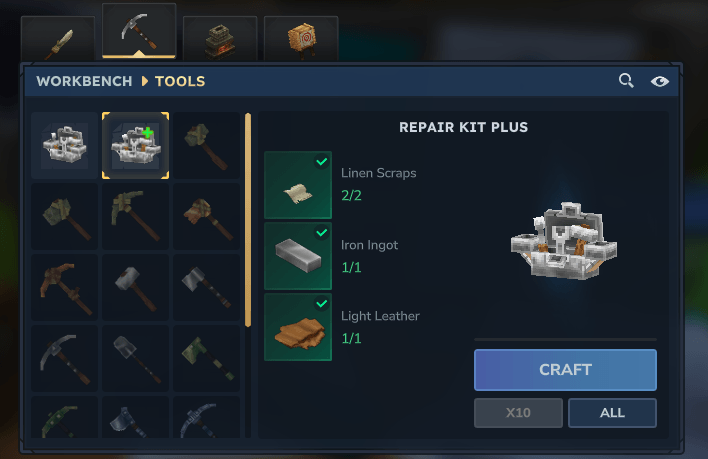
Installation:
Put the mod in to the global mods folder
Hytale/UserData/Mods
Or
Put the file in to your world mods folder
Hytale/Userdata/Saves/ExampleWorldName/mods
Warning! may cause crashes if put inside of both folders
Issues:
This is my first time modding a game so it's less than perfect if you have any ideas/fixes please comment or add me on discord (auglyz) on how i could implement them.
Usage: Feel free to use and improve this however you want, but i'd prefer if you gave me credit or... Even better just told me how to improve it.
Project description from CurseForge.
Recent files
15 Jan 2026
Looking for an older file? The official CurseForge project page is in Resources.
 mod
modMinecraft JEI, but in Hytale. An item and recipe viewer, search by mod with autocomplete using @. Left click for recipe, Right click for Usages. Shift left click settings button for Cheat Mode (/give Item, useful for creative mode), can bookmark items.
 mod
modBlocks, decorations, items and elements for worlds, minigames and servers.
 mod
modThis Mod will Increase the Fuel Time of Charcoal and other Fuel Sources.