HytaleConsole-0.0.4.jar
19 Jan 2026
Client Not supported Server Required Dependencies No extras listed Listed on Project page
Check the setup 
CurseForge · Hytale mod
A handy in game console (log) viewer!
Quick answer
In-Game Console HytaleConsole-0.0.4.jar targets Hytale. Do not install it as a separate client mod. Enable it on the world host—the local server in singleplayer or the dedicated server in multiplayer. No required dependencies listed for this file.
Where it goes
Do not install it as a separate client mod. Enable it on the world host—the local server in singleplayer or the dedicated server in multiplayer.
Put Hytale mods on the world host or dedicated server. Singleplayer runs a local server too; Hytale does not use separate client mods.
HytaleConsole-0.0.4.jar. Change the file and its required mods may change too.
This file does not list any required mods. Do not add a library just because a different file uses it.
This file does not list any required or optional project dependencies. Check the creator notes before changing an existing world.
Before you install it
Built for In-Game Console HytaleConsole-0.0.4.jar. Pick another file and the loader, install side or required mods may change.
Use HytaleConsole-0.0.4.jar. It targets Hytale; another release may target a different game build or dependency set.
This file does not list any required mods. Do not add a library just because a different file uses it.
Do not install it as a separate client mod. Enable it on the world host—the local server in singleplayer or the dedicated server in multiplayer.
Use the “Get this file” button beside HytaleConsole-0.0.4.jar. It opens that exact file at the source.
About this project
I got bored of opening the .log file in on my PC everytime I wanted to view my other mods log outputs so I built this.
You can filter by Logger Name, Log Level and log text!
To see the console type /console in game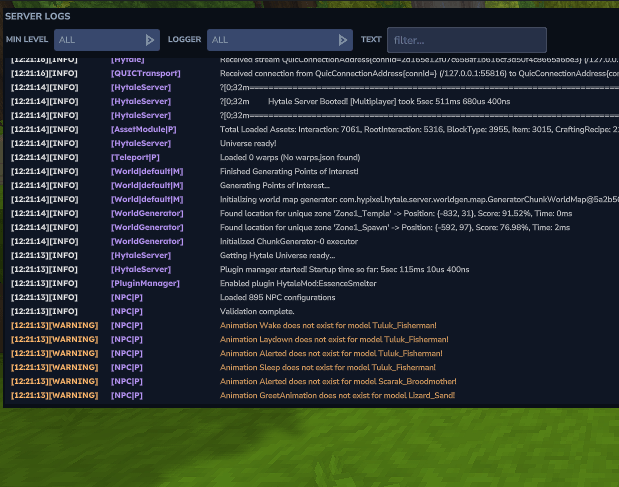
I really wanted to bind the opening to '~' but I cant find any way to do that yet, if you do see it, let me know!
Project description from CurseForge.
Recent files
19 Jan 2026
17 Jan 2026
15 Jan 2026
Looking for an older file? The official CurseForge project page is in Resources.
 mod
modAdds a brand-new Labyrinth Dimension featuring a vast desert surface and an endless maze stretching deep below. Discover unique locations and face a variety of dangerous new enemies as you explore its depths!
 mod
modEnhances the sawmill from the RPG Stations mod and adds rich NPC driven questlines. Also adds a woodcutters MMO Armor set.
 mod
modRPG Stations adds interactive work stations to your Hytale server. No menus, no instant conversions - materials go in, your character (or a stand-in performer) visibly does the work over real time, and results come out.