
ProtectAreaPlugin-0.8.2-SNAPSHOT-LogsFix.jar
29 Jan 2026
Client Not supported Server Required Dependencies No extras listed Listed on Project page
Check the setup 
CurseForge · Hytale mod
🛡️ Protect builds, control PvP/PvE combat, NPC spawn, fall damage, difficulty (damage and stamina) and override permissions with granular protections. Set custom enter/leave titles, multi-tier permissions. Perfect for spawns, arenas, and private zones!
Quick answer
💥Protect Area - v0.8.2 💥 ProtectAreaPlugin-0.8.2-SNAPSHOT-LogsFix.jar targets Hytale. Do not install it as a separate client mod. Enable it on the world host—the local server in singleplayer or the dedicated server in multiplayer. No required dependencies listed for this file.
Where it goes
Do not install it as a separate client mod. Enable it on the world host—the local server in singleplayer or the dedicated server in multiplayer.
Put Hytale mods on the world host or dedicated server. Singleplayer runs a local server too; Hytale does not use separate client mods.
ProtectAreaPlugin-0.8.2-SNAPSHOT-LogsFix.jar. Change the file and its required mods may change too.
This file does not list any required mods. Do not add a library just because a different file uses it.
This file does not list any required or optional project dependencies. Check the creator notes before changing an existing world.
Before you install it
Built for 💥Protect Area - v0.8.2 💥 ProtectAreaPlugin-0.8.2-SNAPSHOT-LogsFix.jar. Pick another file and the loader, install side or required mods may change.
Use ProtectAreaPlugin-0.8.2-SNAPSHOT-LogsFix.jar. It targets Hytale; another release may target a different game build or dependency set.
This file does not list any required mods. Do not add a library just because a different file uses it.
Do not install it as a separate client mod. Enable it on the world host—the local server in singleplayer or the dedicated server in multiplayer.
Use the “Get this file” button beside ProtectAreaPlugin-0.8.2-SNAPSHOT-LogsFix.jar. It opens that exact file at the source.
About this project
Protect your builds, control combat, and customize your world zones with powerful cuboid protection! Create multiple protected areas with granular control over block protection, PvP/PvE/EvP settings, fall damage, mob spawns, and custom enter/leave messages. Perfect for spawn protection, safe zones, PvP arenas, or any area where you need precise control over player interactions.
Titles: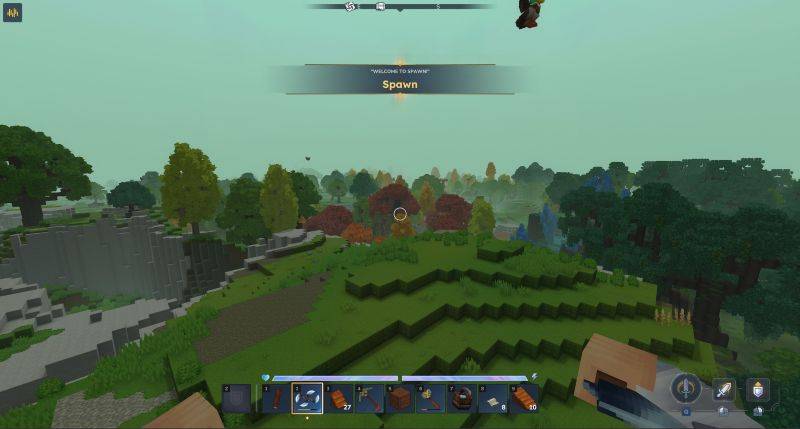
Selecting the region to be added to an area:
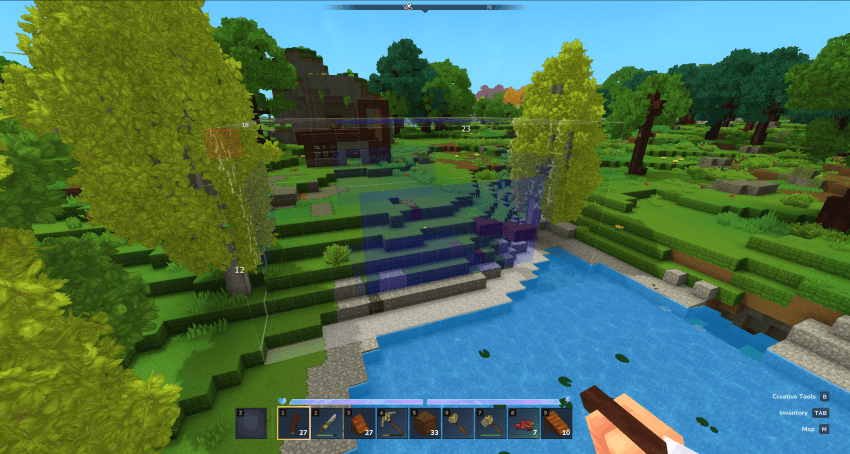
After protecting some areas:
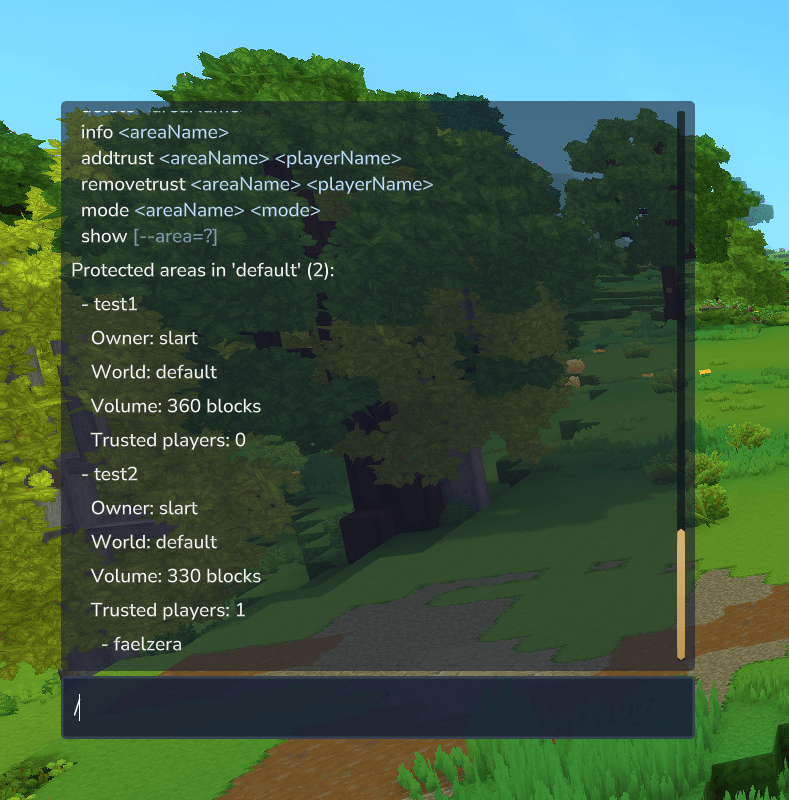
Showing a protected area:
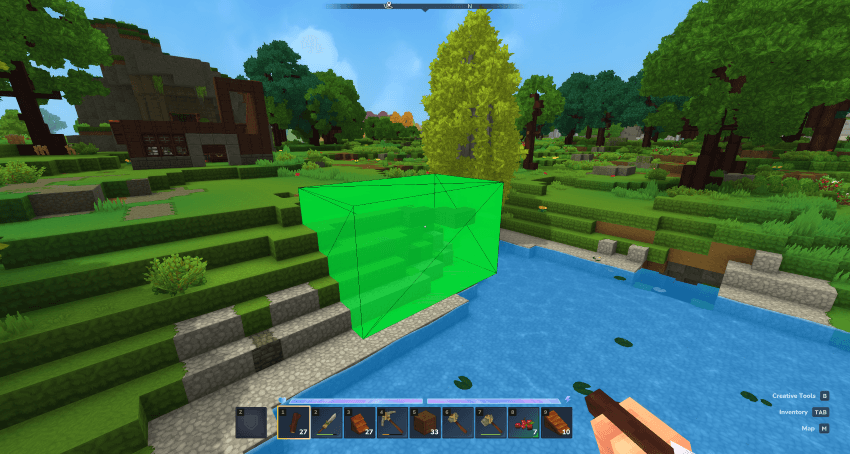
Multiple regions area:
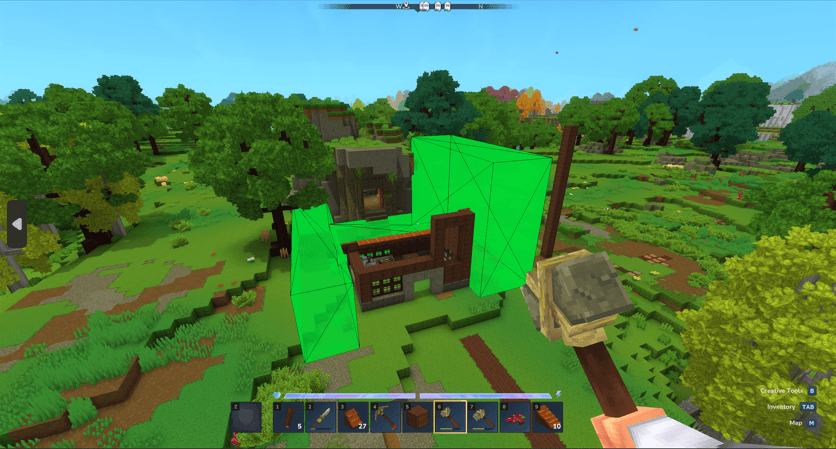
Regions example with arena (blue) on the center and the spawn (orange) surrounding it. You can create the two areas and add the regions to them.
The new mob spawn protection feature might leave some unresponsive mobs, we are working on a fix. Also, its better if you regenerate the world, as mobs saved in the chunk can show this behavior until the chunk is saved without the mobs being in the area. This doesn't affect the gameplay.
I fixed a compatibility issue with permission-changing plugins. The permission provider now gracefully handles group operations that it doesn't support, preventing crashes when used alongside other permission plugins. A more robust permission system detection and configuration system is planned for a future update.
This plugin is currently in SNAPSHOT version. Features may be incomplete, unstable, or subject to breaking changes. Use at your own risk. Things may break between versions, and data loss or corruption is possible.
Copy the jar file to the mods folder of your server, restart and enjoy!
/op self - To be able to use the /pos1 and /pos2 commands for selection (or allow using permissions)/gamemode creative - To fly and use the creative tools :)/protect area create <area-name> to create a protected area (starts with no regions)/pos1/pos2/expand, /contractselection, /protect expand, /deselect to adjust/redo the selection if needed/protect addregion <area-name> to add the selection as a region to the areaQuick Start:
/protect area create MyArea (creates empty area with no regions)/pos1 and /pos2, then add it: /protect addregion MyArea/protect blocks MyArea break true/protect combat MyArea pvp true and /protect combat MyArea falldamage true/protect addowner MyArea PlayerNameCommon Commands:
/protect area create <name> - Create area (no regions initially)/protect addregion <name> - Add region from current selection/protect removeregion <name> - Remove region containing your position/protect blocks <name> break true - Enable block protection/protect combat <name> pvp true - Enable PvP protection/protect message enter <name> "Welcome!" - Set enter message/protect notification <chat|notification> - Set notification preference/protect removenpcs <name> - Remove all NPCs from an area/protect area list - List your areas/protect info <name> - View area detailsQuick Examples:
# Protect a base with single region
/protect area create MyBase
/pos1 100 64 200
/pos2 150 80 250
/protect addregion MyBase
/protect blocks MyBase break true
/protect blocks MyBase buildertools true

# Create multi-region area
/protect area create MyComplexBase
/pos1 100 64 200
/pos2 150 80 250
/protect addregion MyComplexBase
/pos1 200 64 200
/pos2 250 80 250
/protect addregion MyComplexBase

# Create safe spawn zone (global)
/protect area create Spawn --global
/protect combat Spawn pvp true
/protect combat Spawn falldamage true
/protect combat Spawn allmobspawn true
/protect message enter Spawn "Welcome to Spawn!"
Players are considered admins and automatically bypass all protection checks if they meet any of the following criteria:
OP group (experimental)* permission (wildcard permission) directly assigned* permission assigned (experimental)Admin players automatically bypass all protection checks, which means:
Note: The plugin queries all permission providers to check group permissions, ensuring compatibility with permission management systems (experimental)
/protect area create <area-name> [--global] [--priority <0-100>]Creates a new protected area with no regions initially. The area will be created with no protection enabled by default. Use /protect addregion <areaname> to add regions, then configure protection settings, owners, messages, and scope using the subcommands below.
Default behavior:
/protect addregion <areaname> to add regions)players (players only)--priority to set higher priority for overlapping areas)/protect addowner <areaname> <player> to add owners)/protect message enter <areaname> <text> to set messages)Examples:
# Create area (no regions yet)
/protect area create MyBase

# Add first region from selection - /pos command uses your position if you dont use any arguments
/pos1 100 64 200
/pos2 150 80 250
/protect addregion MyBase

# Add additional regions to the same area - /pos command uses your position if you dont use any arguments
/pos1 200 64 200
/pos2 250 80 250
/protect addregion MyBase

# Create global area (no regions needed)
/protect area create SpawnZone --global

# Create area with high priority (takes precedence when overlapping)
/protect area create VIPZone --priority 100

# Create area with custom priority
/protect area create ImportantArea --priority 75

# Then configure the area using subcommands:
/protect blocks MyBase break true
/protect blocks MyBase buildertools true
/protect blocks MyBase use true
/protect combat SpawnZone pvp true
/protect combat SpawnZone falldamage true
/protect combat SpawnZone allmobspawn true
/protect message enter SpawnZone "Welcome to Spawn!"
/protect message leave SpawnZone "You left the safe zone"
/protect mode SpawnZone all
/protect addowner MyBase PlayerName
/protect addregion <area-name>Adds a region to a protected area from your current builder tool selection. Regions cannot overlap with existing regions in the same area.
/pos1 and /pos2Examples:
# Create area and add first region
/protect area create MyBase - /pos command uses your position if you dont use any arguments
/pos1 100 64 200
/pos2 150 80 250
/protect addregion MyBase

# Add more regions to create complex protected zones - /pos command uses your position if you dont use any arguments
/pos1 200 64 200
/pos2 250 80 250
/protect addregion MyBase
/protect removeregion <area-name>Removes the region containing your current position from a protected area.
Examples:
# Remove the region you're currently standing in
/protect removeregion MyBase
/protect area listLists the names of protected areas you have access to (as owner or trusted), or all areas if you're an admin.
/protect area delete <area-name>Delete an area. Only admins can delete areas.
/protect rename <area-name> <new-name>Rename a protected area. Only owners can rename areas. Admins bypass ownership requirements.
Examples:
# Rename an area
/protect rename MyBase MyNewBase

# Rename a global area
/protect rename OldSpawn NewSpawn
/protect priority <area-name> <0-100>Set the priority of a protected area. When multiple areas overlap at the same position, the area with the highest priority (0-100) takes precedence. Only owners and admins can change priority.
Use Cases:
Examples:
# Set spawn area to highest priority (always wins)
/protect priority SpawnZone 100

# Set VIP area to high priority
/protect priority VIPZone 90

# Set regular area to default/low priority
/protect priority MyBase 0

# Set arena to medium priority (overrides regular areas but not VIP)
/protect priority PvPArena 50

# Check current priority
/protect info MyArea
# Shows: Priority: 50 (0-100, higher = takes precedence when overlapping)
Priority Resolution:
When multiple areas overlap at a position:
/protect info <areaname>Get detailed information about a protected area (owners, world, priority, regions, volume, protection mode, flags, trusted players, messages). For multi-region areas, shows all regions with their individual corners and volumes.
The info command displays the area's priority value, which shows how it compares to other areas when overlapping.
/protect show <areaname>Displays all regions of a protected area visually. All regions are shown simultaneously with individual cuboid visualizations. Owners, trusted players, and admins can view areas.
Auto-Hide Timer:
protected-areas-config.json in your universe directory and setting autoShowDurationSeconds (set to 0 to disable auto-hide)/protect addregion <areaname>, all regions are automatically shown for the configured durationVisualization Refresh:
/protect addtrust <areaname> <player-name>Add a trusted player to an area you own. Trusted players can modify blocks in the area. Admins bypass ownership requirements.
/protect removetrust <areaname> <player-name>Remove a trusted player from an area you own. Admins bypass ownership requirements.
/protect addowner <areaname> <player-name>Add an owner to an area you own. Owners can modify the area settings and manage trusted players. Admins bypass ownership requirements.
/protect removeowner <areaname> <player-name>Remove an owner from an area you own. Cannot remove the last owner (an area must have at least one owner). Admins bypass ownership requirements.
/protect combat <areaname> <flag> <true|false>Modify combat protection settings for a protected area. Set one flag at a time.
pvp, pve, evp, falldamage, allmobspawn, hostilemobspawn, neutralmobspawn, friendlymobspawntrue, false, 1, 0, yes, no, on, or offFlags:
pvp: Enable/disable player-vs-player damage protection (no PvP damage is dealt to players in the area)pve: Enable/disable player-vs-environment damage protection (prevents players from attacking entities/NPCs)evp: Enable/disable environment-vs-player damage protection (prevents entities/NPCs from attacking players)falldamage: Enable/disable fall damage protection (prevents fall damage for entities in the area)allmobspawn: Enable/disable all mob/NPC spawn protection (blocks all NPCs - most efficient option)hostilemobspawn: Enable/disable hostile mob/NPC spawn protection (blocks only hostile NPCs)neutralmobspawn: Enable/disable neutral mob/NPC spawn protection (blocks only neutral NPCs)friendlymobspawn: Enable/disable friendly mob/NPC spawn protection (blocks only friendly NPCs)Note: When allmobspawn is enabled, it blocks all NPCs and specific mob spawn flags are ignored. You cannot enable both allmobspawn and specific flags at the same time.
Examples:
# Enable PvP and EvP protection, disable PvE (players can't attack NPCs, but NPCs can't attack players)
/protect combat SpawnZone pvp true
/protect combat SpawnZone pve false
/protect combat SpawnZone evp true
/protect combat SpawnZone falldamage true

# Global safe zone with fall damage and all mob spawn protection
/protect combat SafeZone falldamage true
/protect combat SafeZone allmobspawn true

# Block only hostile mobs, allow friendly NPCs
/protect combat HostileFree hostilemobspawn true
/protect combat HostileFree friendlymobspawn false

# Disable PvP but enable fall damage and all mob spawn
/protect combat MyArea pvp false
/protect combat MyArea falldamage true
/protect combat MyArea allmobspawn true

# Granular mob control: block hostile and neutral, allow friendly
/protect combat MixedZone hostilemobspawn true
/protect combat MixedZone neutralmobspawn true
/protect combat MixedZone friendlymobspawn false

# Global zone blocking all NPCs
/protect combat NoMobsZone allmobspawn true
/protect blocks <areaname> <flag> <true|false>Modify block protection settings for a protected area. Set one flag at a time.
break, buildertools, usetrue, false, 1, 0, yes, no, on, or offFlags:
break: Enable/disable block place/break/damage protectionbuildertools: Enable/disable builder tool protectionuse: Enable/disable full block interaction protectionExamples:
# Create area first, then enable block protection
/protect area create MyBase
/protect blocks MyBase break true
/protect blocks MyBase buildertools true
/protect blocks MyBase use true

# Allow builder tools but protect regular blocks
/protect blocks SafeZone break true
/protect blocks SafeZone buildertools false
/protect blocks SafeZone use true

# Disable all block protection (allow building)
/protect blocks BuildZone break false
/protect blocks BuildZone buildertools false
/protect blocks BuildZone use false

# Protect blocks but allow interactions
/protect blocks ProtectedZone break true
/protect blocks ProtectedZone use false
/protect message enter <areaname> <text>Set the enter message for a protected area. Use empty string to clear the message.
Examples:
# Set welcome message
/protect area create SpawnZone --global
/protect message enter SpawnZone "Welcome to Spawn!"

# Set enter message for an area
/protect message enter MyArea "Entering protected area"

# Clear the enter message
/protect message enter MyArea ""
/protect message leave <areaname> <text>Set the leave message for a protected area. Use empty string to clear the message.
Examples:
# Set leave message
/protect message leave SpawnZone "You left the safe zone"

# Clear the leave message
/protect message leave MyArea ""
/protect message block <areaname> <text>Set a custom block protection message for a protected area. This message is shown when players try to break/place blocks. Use reset or empty string to clear.
Examples:
# Set custom block protection message
/protect message block MyArea "You cannot modify blocks in this area!"

# Clear the custom message (use default)
/protect message block MyArea reset
/protect message combat <areaname> <text>Set a custom combat protection message for a protected area. This message is shown when combat is prevented. Use reset or empty string to clear.
Examples:
# Set custom combat protection message
/protect message combat SafeZone "PvP is disabled in this area!"

# Clear the custom message (use default)
/protect message combat SafeZone reset
/protect message title <areaname> <enter|leave> <message> [--icon <icon-id>] [--major] [--duration <seconds>] [--fadein <seconds>] [--fadeout <seconds>]Set title messages that display as visual overlays when players enter or leave protected areas. Titles work independently from chat messages - you can use both, either, or neither.
"" to clear)Note: Title settings (icon, major flag, durations) apply to both enter and leave titles for the area. If you want different settings for enter vs leave, you'll need to set them separately.
Examples:
# Basic title for entering an area
/protect message title SpawnZone enter "Welcome to Spawn!"

# Title with icon and major flag for important areas
/protect message title Arena enter "Entering Arena" --icon "arena_icon" --major

# Title with custom duration and fade effects
/protect message title ImportantArea enter "Welcome!" --duration 8.0 --fadein 2.0 --fadeout 2.0

# Leave title with icon
/protect message title SpawnZone leave "You left the safe zone" --icon "spawn_icon"

# Clear a title message
/protect message title MyArea enter ""

# Full example: Spawn zone with both chat and title messages
/protect area create Spawn --global
/protect message enter Spawn "Welcome to Spawn!"
/protect message leave Spawn "You left spawn"
/protect message title Spawn enter "Welcome to Spawn!" --icon "spawn_icon" --major
/protect message title Spawn leave "You left spawn" --icon "spawn_icon"
/protect mode <areaname> <players|all>Set the protection mode for a protected area.
players: Protect from players onlyall: Protect from all entities (except admins)Examples:
# Set mode to protect from all entities
/protect mode MyBase all

# Change mode to players only
/protect mode SafeZone players
/protect publicperms add <areaname> <perm1,perm2,...>Add public permissions to a protected area. Public permissions apply to anyone inside the area, regardless of ownership or trusted status.
Examples:
# Grant builder tools permission to anyone in a build area
/protect publicperms add BuildArea hytale.editor.builderTools

# Add multiple permissions (comma-separated)
/protect publicperms add CreativeZone hytale.editor.builderTools,hytale.editor.fly
/protect publicperms remove <areaname> <perm1,perm2,...>Remove public permissions from a protected area.
Examples:
# Remove PvP permission from anyone in a safe zone
/protect publicperms remove SafeZone hytale.combat.pvp
/protect publicperms list <areaname>List current public permission overrides for a protected area.
Example:
/protect publicperms list MyArea
/protect publicperms clear <areaname>Clear all public permission overrides from a protected area.
Example:
/protect publicperms clear MyArea
/protect trustedperms add <areaname> <perm1,perm2,...>Add trusted permissions to a protected area. Trusted permissions apply only to owners and trusted players inside the area.
Examples:
# Grant special permissions to owners/trusted in an area
/protect trustedperms add AdminArea hytale.editor.builderTools,hytale.editor.fly
/protect trustedperms remove <areaname> <perm1,perm2,...>Remove trusted permissions from a protected area.
Examples:
# Remove a permission from owners/trusted (even if public allows it)
/protect trustedperms remove RestrictedArea hytale.combat.pvp
/protect trustedperms list <areaname>List current trusted permission overrides for a protected area.
Example:
/protect trustedperms list MyArea
/protect trustedperms clear <areaname>Clear all trusted permission overrides from a protected area.
Example:
/protect trustedperms clear MyArea
Permission Override Details:
Public permissions apply to anyone inside the area, regardless of ownership or trusted status. Trusted permissions apply only to owners and trusted players inside the area. These take precedence over public permissions for owners/trusted players.
Layered Permission Model:
Precedence Rules:
Note:
Example: Public removes PvP, but trusted allows it for owners
/protect publicperms remove SafeZone hytale.combat.pvp
/protect trustedperms add SafeZone hytale.combat.pvp
# Result: Regular players can't PvP, but owners/trusted can
/protect notification <chat|notification>Set your global preference for how protection violation messages are displayed.
This preference applies to all protection violation messages (block break, place, damage, use, and combat protection). The preference is stored per-player and persists across server restarts.
Examples:
# Use chat messages for protection alerts (default)
/protect notification chat

# Use notifications for protection alerts
/protect notification notification
/protect expandExpands the current builder tool selection vertically from Y: 0 to 319 (full world height). Requires an active selection created with /pos1 and /pos2. Useful for quickly creating full-height protected areas.
Example:
/pos1 100 64 200
/pos2 150 80 250
/protect expand  (expands selection to Y: 0-319)
/protect area create MyTower
/protect removenpcs <areaname>Removes all NPCs from a protected area and marks overlapping chunks as unspawnable to prevent respawn. Only owners and admins can use this command.
This command performs two operations:
This is useful when:
Note: The command only works in the current world. If the area is in a different world, you'll need to run the command from that world.
Examples:
# Remove all NPCs from a protected area
/protect removenpcs MyBase

# Remove NPCs from a global area
/protect removenpcs SpawnZone
The plugin works seamlessly with creative mode, but creative mode players are subject to the same protection rules as survival players. Creative mode does not automatically bypass protections.
⚠️ Creative mode does NOT bypass protections: Players in creative mode must still be configured as admins, owners, or trusted players to modify blocks in protected areas.
⚠️ Protection checks are independent: The plugin checks admin/owner/trusted status and protection flags, not game mode. A creative mode player without proper permissions will be blocked just like a survival player.
For collaborative builds where creative players need access to specific areas:
# Add creative player as owner
/protect addowner <area-name> <player-name>

# OR add as trusted player
/protect addtrust <area-name> <player-name>

# Now they can modify blocks in that specific area
Best for: Collaborative builds, team projects, specific protected zones, builders working on designated areas
Create areas where creative players can build freely:
# Create a creative build zone
/protect area create CreativeBuildZone
/pos1 <corner1>
/pos2 <corner2>
/protect addregion CreativeBuildZone

# Disable all block protections
/protect blocks CreativeBuildZone break false
/protect blocks CreativeBuildZone buildertools false
/protect blocks CreativeBuildZone use false

# Optionally grant creative permissions (builder tools, fly)
/protect publicperms add CreativeBuildZone hytale.editor.builderTools,hytale.editor.fly
Best for: Public build zones, creative servers, unrestricted areas, designated build spaces
Grant creative permissions but note that protection checks still apply:
# Grant builder tools and fly permissions
/protect publicperms add <area-name> hytale.editor.builderTools,hytale.editor.fly
Note: This grants the permissions to use builder tools and fly, but players still cannot modify blocks unless they're admin/owner/trusted. Protection checks are separate from permission grants.
Best for: Granting creative features (fly, builder tools) without allowing block modifications
⚠️ Warning: OP access grants full server control and bypasses ALL protections. Only grant to trusted server administrators, not regular builders.
# Make player an admin (bypasses all protections)
/op <player-name>
# OR
/permission add <player-name> *

# Now they can:
# - Use creative mode freely
# - Build anywhere including protected areas
# - Bypass all protection checks automatically
Best for: Server administrators only - not recommended for regular builders
# 1. Create protected spawn area (survival players protected)
/protect area create Spawn --global
/protect combat Spawn pvp true
/protect combat Spawn falldamage true
/protect blocks Spawn break true
/protect blocks Spawn buildertools true
/protect blocks Spawn use true

# 2. Create creative build zone (anyone can build)
/protect area create CreativeZone
/pos1 1000 64 1000
/pos2 2000 200 2000
/protect addregion CreativeZone
/protect blocks CreativeZone break false
/protect blocks CreativeZone buildertools false
/protect blocks CreativeZone use false
/protect publicperms add CreativeZone hytale.editor.builderTools,hytale.editor.fly

# 3. Add builders as owners/trusted for specific project areas
/protect area create ProjectArea
/pos1 500 64 500
/pos2 800 200 800
/protect addregion ProjectArea
/protect blocks ProjectArea break true
/protect blocks ProjectArea buildertools true
/protect blocks ProjectArea use true
/protect addowner ProjectArea Builder1
/protect addtrust ProjectArea Builder2
/protect addtrust ProjectArea Builder3
The plugin uses Hytale's permission system to control access to commands. All permissions follow the pattern protectarea.command.protect.<subcommand>.
protectarea.command.protect - Base permission for all /protect commands. Players need this to use any protect command.protectarea.command.protect.area.create - Permission to create protected areasprotectarea.command.protect.area.list - Permission to list protected areasprotectarea.command.protect.area.delete - Permission to delete protected areas (admins only by default)protectarea.command.protect.rename - Permission to rename protected areasprotectarea.command.protect.info - Permission to view detailed information about protected areasprotectarea.command.protect.show - Permission to visually display protected area boundariesprotectarea.command.protect.addtrust - Permission to add trusted players to areasprotectarea.command.protect.removetrust - Permission to remove trusted players from areasprotectarea.command.protect.addowner - Permission to add owners to areasprotectarea.command.protect.removeowner - Permission to remove owners from areasprotectarea.command.protect.blocks - Permission to modify block protection settingsprotectarea.command.protect.combat - Permission to modify combat protection settingsprotectarea.command.protect.message - Permission to modify enter/leave messagesprotectarea.command.protect.mode - Permission to modify protection modeprotectarea.command.protect.publicperms - Permission to modify public permission overridesprotectarea.command.protect.trustedperms - Permission to modify trusted permission overridesprotectarea.command.protect.modifiers - Permission to modify damage and stamina modifiersprotectarea.command.protect.modifiers.players - Permission to modify player modifiers (subcommand)protectarea.command.protect.expand - Permission to expand builder tool selectionsprotectarea.command.protect.addregion - Permission to add regions to protected areasprotectarea.command.protect.removeregion - Permission to remove regions from protected areasprotectarea.command.protect.notification - Permission to modify notification preferencesprotectarea.command.protect.removenpcs - Permission to remove NPCs from protected areasModifiers use a multiplicative system where values are multiplied:
Formula: newValue = originalValue * modifier
Examples:
damagetaken = 0.5 → Damage taken is multiplied by 0.5 (50% less damage)damagedealt = 1.0 → Damage dealt is multiplied by 1 (no effect)staminataken = 0.3 → Stamina consumption is multiplied by 0.3 (70% less stamina used)staminataken = 1.25 → Stamina consumption is multiplied by 1.25 (12.5% more stamina used)/protect modifiers npcs <areaname>) - Apply to all NPCs in the area/protect modifiers players public <areaname>) - Apply to non-owners/trusted players/protect modifiers players trusted <areaname>) - Apply to owners and trusted players* permission) automatically bypass all modifier effects# Make NPCs take 50% less damage
/protect modifiers npcs MyArea damagetaken 0.5
# Make public players take 50% less damage, trusted players take normal damage
/protect modifiers players public MyArea damagetaken 0.5
/protect modifiers players trusted MyArea damagetaken 1.0
# Make trusted players deal double damage
/protect modifiers players trusted MyArea damagedealt 2.0
# Make NPCs consume 30% less stamina
/protect modifiers npcs MyArea staminataken 0.3
# View all modifier configurations
/protect modifiers show MyArea
/protect removenpcs <areaname> to manually remove all NPCs from a protected area and mark chunks to prevent respawn/protect <areaname> priority <value>/protect <areaname> priority <value> to set priority; optional --priority <n> when creating areas. Resolves overlapping-area behavior (see Bucket List)./protect <areaname> message title enter <message> and /protect <areaname> message title leave <message> to set title messages. Titles work independently from chat messages - you can use both, either, or neither/protect message title <areaname> enter <message> and /protect message title <areaname> leave <message> to set title messages. Titles work independently from chat messages - you can use both, either, or neither/protect removenpcs <areaname> command allows owners and admins to manually remove all NPCs from a protected area. The command marks chunks as unspawnable to prevent respawn and provides feedback on how many NPCs were removeddamagetaken, damagedealt, and staminataken independently for fine-grained control/protect modifiers npcs <areaname>, /protect modifiers players public <areaname>, /protect modifiers players trusted <areaname>, and /protect modifiers show <areaname> for organized modifier management/protect rename <areaname> <new-name>. Only owners can rename areas, and the new name must be unique within the same worldAreas created with the old modifier system (v0.6.0 and earlier) will automatically migrate:
damageModifier → publicModifiers.damageTaken and publicModifiers.damageDealtstaminaModifier → publicModifiers.staminaTakenHelp us improve Protected Areas! We're actively seeking dedicated testers to help identify bugs, test new features, and provide feedback. With limited free time, we can either focus on coding or testing - and we'd love your help with the testing side!
What we're looking for:
Compensation can be arranged - we're open to discussing fair compensation for dedicated testers who help improve the mod. Reach out on Discord if you're interested!
All Rights Reserved
This plugin is provided as-is for use with Hytale servers. The author assumes no responsibility for any consequences, damages, or issues that may arise from using this plugin.
Restrictions:
Project description from CurseForge.
Recent files
29 Jan 2026
Looking for an older file? The official CurseForge project page is in Resources.
 mod
modMod aimed at making the crafting system and mob drops more interesting and useful.
 mod
modReward a good night's sleep with configurable healing, buffs, sleep streaks, and Night Skipping — all managed through an intuitive in-game GUI.
 mod
modWalk the path of a Xianxia cultivator. Meditate for Spirit Qi, break through 7 realms, found a sect, walk an elemental Dao, wield flying-sword techniques, tame spirit beasts, and survive the heavens' tribulations.