
community-plugin-1.0.0.jar
18 Jan 2026
Client Not supported Server Required Dependencies No extras listed Listed on Project page
Check the setup 
CurseForge · Hytale mod
Custom Welcome Messages
Quick answer
The Ultimate Welcome Plugin community-plugin-1.0.0.jar targets Hytale. Do not install it as a separate client mod. Enable it on the world host—the local server in singleplayer or the dedicated server in multiplayer. No required dependencies listed for this file.
Where it goes
Do not install it as a separate client mod. Enable it on the world host—the local server in singleplayer or the dedicated server in multiplayer.
Put Hytale mods on the world host or dedicated server. Singleplayer runs a local server too; Hytale does not use separate client mods.
community-plugin-1.0.0.jar. Change the file and its required mods may change too.
This file does not list any required mods. Do not add a library just because a different file uses it.
This file does not list any required or optional project dependencies. Check the creator notes before changing an existing world.
Before you install it
Built for The Ultimate Welcome Plugin community-plugin-1.0.0.jar. Pick another file and the loader, install side or required mods may change.
Use community-plugin-1.0.0.jar. It targets Hytale; another release may target a different game build or dependency set.
This file does not list any required mods. Do not add a library just because a different file uses it.
Do not install it as a separate client mod. Enable it on the world host—the local server in singleplayer or the dedicated server in multiplayer.
Use the “Get this file” button beside community-plugin-1.0.0.jar. It opens that exact file at the source.
About this project
The ultimate community management plugin for your Hytale server!
Build your community with automated broadcasts, welcome messages, and clickable links - all fully customizable through a simple config file.
Join Hytaleus Server! https://hytaleus.com/
Keep your players informed with rotating broadcast messages that appear at configurable intervals. Perfect for promoting your Discord, website, or vote links.
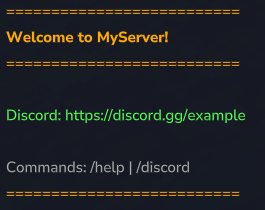
Greet new players with a customizable welcome message when they join your server. Make a great first impression!
All links (Discord, Website, Vote) are clickable in chat - players can join your community with a single click.
Every single message, color, and formatting option can be configured through the config.json file. No coding required!
%WEBSITE% are automatically hidden if no website is configured%VOTE% are automatically hidden if no vote link is configuredReload your config without restarting the server! All settings are applied immediately, including broadcast intervals.
| Command | Permission | Description |
|---|---|---|
/discord |
Everyone | Shows all server links (Discord, Website, Vote) |
/vote |
Everyone | Shows the vote link (only available if configured) |
/community |
OP only | Reloads the config without server restart |
The plugin uses the server's permissions.json file. Only players in a group with * (all permissions) can use /community.
Example permissions.json:
{
  "users": {
    "your-uuid-here": {
      "groups": ["OP"]
    }
  },
  "groups": {
    "Default": [],
    "OP": ["*"]
  }
}
community-plugin.jarmods/ foldermods/community-plugin/config.jsonThe config file is located at mods/community-plugin/config.json
{
  "serverName": "MyServer",
  "discordLink": "https://discord.gg/example",
  "websiteLink": "https://myserver.com",
  "voteLink": "https://vote-site.com/myserver",
  "broadcastIntervalMinutes": 30,
  "enableWelcomeMessage": true,
  "enableBroadcasts": true
}
| Setting | Description |
|---|---|
serverName |
Your server name (used in messages via %SERVER%) |
discordLink |
Your Discord invite link |
websiteLink |
Your website URL (leave empty "" to disable) |
voteLink |
Your vote page URL (leave empty "" to disable) |
broadcastIntervalMinutes |
Time between broadcasts in minutes |
enableWelcomeMessage |
Enable/disable welcome messages |
enableBroadcasts |
Enable/disable automated broadcasts |
Each message line is an object with these properties:
{
  "text": "Your message here",
  "color": "#FFAA00",
  "bold": true,
  "isLink": false
}
| Property | Description |
|---|---|
text |
The message text (supports placeholders) |
color |
Hex color code (e.g. #FF0000 for red) |
bold |
Make text bold (true/false) |
isLink |
Make text clickable (true/false) |
Use these placeholders in your messages:
| Placeholder | Replaced with |
|---|---|
%SERVER% |
Your server name |
%DISCORD% |
Your Discord link |
%WEBSITE% |
Your website link |
%VOTE% |
Your vote link |
Broadcasts rotate through the configured messages. You can require specific links:
{
  "lines": [
    { "text": "Visit our website!", "color": "#FFAA00", "bold": true, "isLink": false },
    { "text": "%WEBSITE%", "color": "#55FFFF", "bold": false, "isLink": true }
  ],
  "requiresWebsite": true,
  "requiresVote": false
}
requiresWebsite: Only show this broadcast if a website is configuredrequiresVote: Only show this broadcast if a vote link is configured{
"serverName": "MyAwesomeServer",
"discordLink": "https://discord.gg/example",
"websiteLink": "https://myserver.com",
"voteLink": "",
"broadcastIntervalMinutes": 15,
"enableWelcomeMessage": true,
"enableBroadcasts": true,
"welcomeMessages": [
{ "text": "==========================", "color": "#FFAA00", "bold": false, "isLink": false },
{ "text": "Welcome to %SERVER%!", "color": "#FFAA00", "bold": true, "isLink": false },
{ "text": "==========================", "color": "#FFAA00", "bold": false, "isLink": false },
{ "text": "", "color": "#FFFFFF", "bold": false, "isLink": false },
{ "text": "Discord: %DISCORD%", "color": "#55FF55", "bold": false, "isLink": true },
{ "text": "", "color": "#FFFFFF", "bold": false, "isLink": false },
{ "text": "Have fun!", "color": "#AAAAAA", "bold": false, "isLink": false },
{ "text": "==========================", "color": "#FFAA00", "bold": false, "isLink": false }
]
}
Some common hex colors:
| Color | Hex Code |
|---|---|
| Gold | #FFAA00 |
| Green | #55FF55 |
| Cyan | #55FFFF |
| Red | #FF5555 |
| Blue | #5555FF |
| Purple | #AA55FF |
| White | #FFFFFF |
| Gray | #AAAAAA |
Need help? Have suggestions?
Enjoy building your community!
Project description from CurseForge.
Recent files
18 Jan 2026
Looking for an older file? The official CurseForge project page is in Resources.
 mod
modVandoria Party adds a complete party system with a custom menu, party chat, persistent parties, configurable XP sharing, and an adjustable player HUD.
 mod
modExtended Backpacks adds additional backpack inventory slot upgrades to Hytale, allowing you to carry more items on your adventures. Expand your storage and keep your gear organized like never before!
 mod
modHytale RPG Leveling Mod - Endless Leveling adds full character progression: levels, stats, classes, races, augments, skills/abilities, dungeons & dynamic events. Solo Leveling inspired endless growth for singleplayer & servers.