The Buster Sword V 1.0
16 Jan 2026
Client Not supported Server Required Dependencies No extras listed Listed on Project page
Check the setup 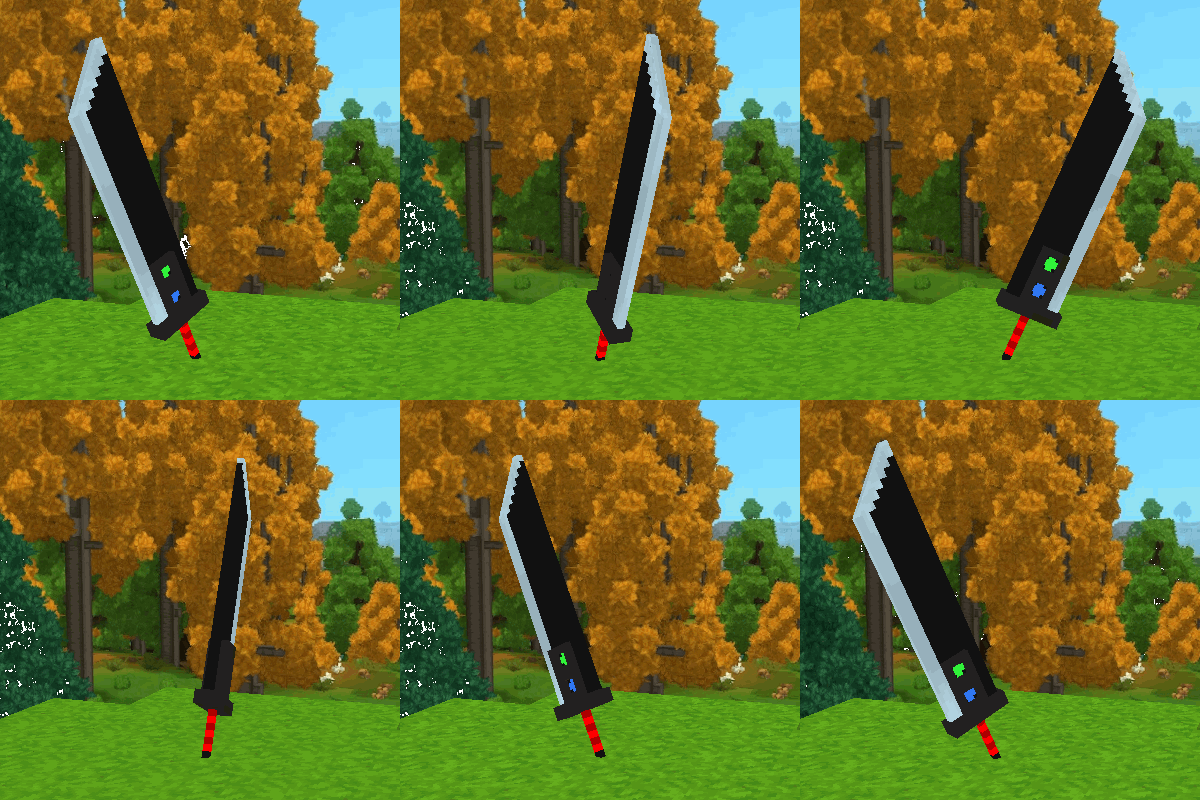
CurseForge · Hytale mod
Embrace your dreams and wield the blade of an Ex-SOLDIER!
Quick answer
The Buster Sword! The Buster Sword V 1.0 targets Hytale. Do not install it as a separate client mod. Enable it on the world host—the local server in singleplayer or the dedicated server in multiplayer. No required dependencies listed for this file.
Where it goes
Do not install it as a separate client mod. Enable it on the world host—the local server in singleplayer or the dedicated server in multiplayer.
Put Hytale mods on the world host or dedicated server. Singleplayer runs a local server too; Hytale does not use separate client mods.
The Buster Sword V 1.0. Change the file and its required mods may change too.
This file does not list any required mods. Do not add a library just because a different file uses it.
This file does not list any required or optional project dependencies. Check the creator notes before changing an existing world.
Before you install it
Built for The Buster Sword! The Buster Sword V 1.0. Pick another file and the loader, install side or required mods may change.
Use The Buster Sword V 1.0. It targets Hytale; another release may target a different game build or dependency set.
This file does not list any required mods. Do not add a library just because a different file uses it.
Do not install it as a separate client mod. Enable it on the world host—the local server in singleplayer or the dedicated server in multiplayer.
Use the “Get this file” button beside The Buster Sword V 1.0. It opens that exact file at the source.
About this project
Cloud Strife's legendary Buster Sword is placed in the Hytale Arsenal!
The Buster Sword is a Mithril sword with extra *spice.*The sword can still attack, charge, guard and use it's ultimate as normal. But now, by pressing and holding the "Ability 2" button, can send out fireballs!
(Not much, I know. But, I felt the need to test the modding waters with Hytale.)
The Buster Sword can be created at any Tier 3 Blacksmith Anvil!
INSTALLATION DIRECTIONS:- Download the mod and place it in your "mods" folder.
Any and all feedback is welcome!
Project description from CurseForge.
Recent files
16 Jan 2026
Looking for an older file? The official CurseForge project page is in Resources.
 mod
modRecruit, command, equip, and level up companions that fight for you against enemies and rival player teams, farm, mine, loot, and haul items for you in Hytale. Note: My current version (0.6.0)is targeted for Hytale 0.6.0 which is currently in prerelease.
 mod
modEver wanted to be a Mermaid, Werewolf, or Vampire? This mod allows the player to transform into a Mermaid when entering the water, transform into a Werewolf at night, and transform into a Vampire, each with their own unique abilities and playstyles.
 mod
modA ongoing project to bring Middle-Earth to Hytale.