v3.5.5.1+0.5.3
30 May 2026
Client Not supported Server Required Dependencies No extras listed Listed on Project page
Check the setup 
CurseForge · Hytale mod
This mod disables the Teleporter limit and introduces private and restricted teleporters, as well as true Teleporter Ownership and true cross-world Teleporters. Temporary Teleports. Intra World Teleports, and much more.
Quick answer
Extended Teleporters v3.5.5.1+0.5.3 targets Hytale. Do not install it as a separate client mod. Enable it on the world host—the local server in singleplayer or the dedicated server in multiplayer. No required dependencies listed for this file.
Where it goes
Do not install it as a separate client mod. Enable it on the world host—the local server in singleplayer or the dedicated server in multiplayer.
Put Hytale mods on the world host or dedicated server. Singleplayer runs a local server too; Hytale does not use separate client mods.
v3.5.5.1+0.5.3. Change the file and its required mods may change too.
This file does not list any required mods. Do not add a library just because a different file uses it.
This file does not list any required or optional project dependencies. Check the creator notes before changing an existing world.
Before you install it
Built for Extended Teleporters v3.5.5.1+0.5.3. Pick another file and the loader, install side or required mods may change.
Use v3.5.5.1+0.5.3. It targets Hytale; another release may target a different game build or dependency set.
This file does not list any required mods. Do not add a library just because a different file uses it.
Do not install it as a separate client mod. Enable it on the world host—the local server in singleplayer or the dedicated server in multiplayer.
Use the “Get this file” button beside v3.5.5.1+0.5.3. It opens that exact file at the source.
About this project
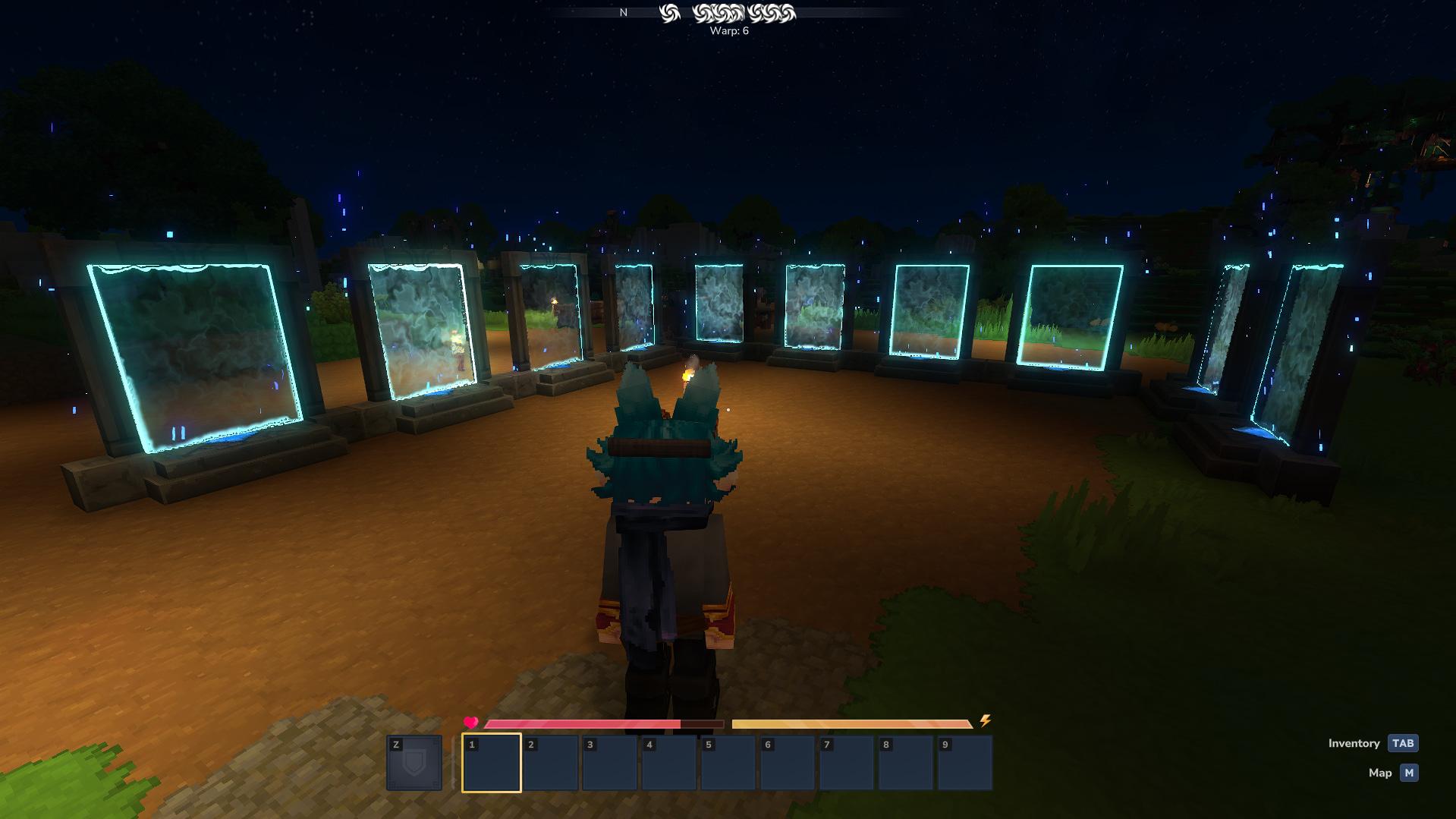
Hytale has a built-in Teleporter block that lets players create fast-travel points around the world. It's an amazing feature for exploration and building communities.
But here's the catch: the game only allows a VERY limited amount of teleporters per world (in relation to memories). You also CANNOT manage your own teleporters independently or control who uses them.
For a singleplayer experience, ~8 might be enough. But on a multiplayer server running more than 10 players? That's a disaster.
Imagine running a server with 20, 50, or even 100 players. Everyone wants to set up their base, mark important locations, and create public hubs. With only 8 Teleporters for the entire world, a single player will hit that limit before your server even gets started. Plus, there's no way to make teleporters private or create organized networks — everyone shares the same messy pool of destinations.
Players see the dreaded message:
"Placement limit reached"
— and there's nothing they can do about it.
This mod transforms Teleporters from a shared limitation into a personal fast-travel system. Here's what changes:
Ownership System: When you place a teleporter, you own it. Press F on your teleporter to open the configuration GUI, or use the /teleporter command remotely to manage your warp names, destinations, and settings — completely independent from other players.
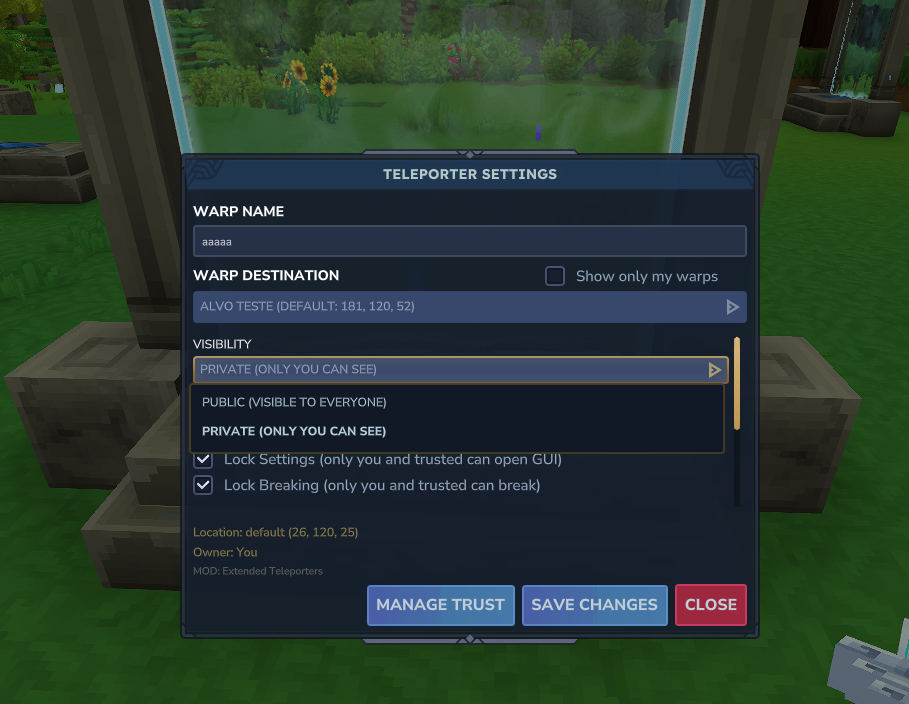
This mod supports localization, you can translate it on github
Teleporter Settings: You can now configure exactly how your teleporter behaves using the options found in the GUI:
NOTE: Single-use and Self-Destruct are mutually exclusive features.
Trust System (GUI in the works): Share access to your teleporters with other players using a full trust management system. Add trusted players (subowners) and control exactly what they can do with your teleporter:
For now it only really allows trusted players through your teleporter if restricted or enables them to do party mode.
Access the trust system through the "Manage Trust" button in your teleporter settings, or use /teleporter trustgui to manage trust across all your teleporters from anywhere.
Increased Limits: The mod raises the placement cap to 9999 teleporters by default. Server owners can configure per-player limits and use LuckPerms for granular rank-based restrictions.
LuckPerms Integration: Server admins can set feature toggles and numeric limits per player or rank:
Smart UI: The settings interface adapts to your permissions. If you don't have access to a feature, it won't clutter your screen — you only see the options you can actually use.
Admin Tools: Server operators have powerful management commands:
/teleporter bypass - Toggle admin mode to access all teleporters/teleporter list [page] - Paginated list showing Player, name, flags/coords, and creation date/teleporter go <name> - Teleport to any teleporter (spawns you 6 blocks above to avoid auto-teleport)/teleporter server <name> - Convert teleporters into admin-controlled Server Teleporters (settings locked, destination changes still allowed if interaction is enabled)/teleporter trustgui - Open the trust management interfaceCustom Destinations: Admins can create coordinate-only destinations for teleporters:
/teleporter destination create <name> <x> <y> <z> - Create a custom destination/teleporter destination list - List all custom destinations with coordinates/teleporter destination set <teleporter> <destination> - Link a teleporter to a custom destination/teleporter destination remove <name> - Delete a custom destinationCustom destinations are hidden from GUI dropdowns and can only be assigned via commands — perfect for admin-managed hubs or spawn points.
That's it. Simple, clean, and it gives players real control over their fast-travel networks.
Update Required: All teleporters placed before version 2.0 need to be removed and replaced to properly register an owner. Old teleporters won't have the new ownership features until replaced.
LuckPerms Setup: If you use LuckPerms, you MUST set permissions for your default group, otherwise players won't be able to use any features. See the Discord or file changelog for setup examples.
Warp Name Security: Version 3.0+ enforces strict warp name validation to prevent JSON corruption and SQL injection. Only alphanumeric characters, spaces, underscores, hyphens, and periods are allowed (max 64 characters). Duplicate names are auto-numbered. Without this, any and all servers can have its teleport system broken if a player uses a quotation mark in the name.
Chunk Unload Fix (Experimental): Version 3.0+ includes experimental fixes for chunk unload issues that could cause restricted teleporters to lose their destinations. If you experience issues, please report them on Discord.
Third-Party Optimization: Hyfixes (third party plugin I have no involvement with) has an option to turn each Teleporter into a chunk loader to prevent the vanilla bug where chunks unload and things break! It also optimizes your game server, look into the project (but personally, avoid using the earlyplugins setup it has).
You can translate the mod by sending a PR to https://github.com/katomaro/hytale-extended-teleporters-localization. Below are credits for each currently supported language.
| Language | Code | Status | Translator |
|---|---|---|---|
| English (US) | en-US |
✅ Complete | Katomaro |
| Portuguese (Brazil) | pt-BR |
✅ Complete | Katomaro |
| German (DE) | de-DE |
✅ Complete | AZB |
| Spanish | es-ES |
PARTIAL -- The repository was not updated when the translators started | @zonazero y @carre321 |
The Discord server was deleted, do not give away your legal documents.
Project description from CurseForge.
Recent files
30 May 2026
1 Feb 2026
29 Jan 2026
28 Jan 2026
27 Jan 2026
27 Jan 2026
26 Jan 2026
21 Jan 2026
21 Jan 2026
20 Jan 2026
20 Jan 2026
19 Jan 2026
Looking for an older file? The official CurseForge project page is in Resources.