Hytale version
Back to mods 
CurseForge · Hytale mod
HyUI
A mod library for easy, clean user interface creation and modification. This is intended for mod creators.
Choose a version Pick your version below, then grab the matching file.
Quick answer
Which HyUI release should I use?
Latest stable file HyUI-0.9.8-all.jar
Game version 0.5
Mod system Built-in Hytale mod system
HyUI-0.9.8-all.jar targets 0.5. Do not install it as a separate client mod. Enable it on the world host—the local server in singleplayer or the dedicated server in multiplayer. No required dependencies listed for this file.
Where it goes
Where should HyUI be installed in Hytale?
Do not install it as a separate client mod. Enable it on the world host—the local server in singleplayer or the dedicated server in multiplayer.
Separate client mod Not supported
World host / dedicated server Required
Mod system for this release Built-in Hytale mod system
Required install it here Optional supported, not mandatory Not supported do not install here Source doesn’t say do not assume
Put Hytale mods on the world host or dedicated server. Singleplayer runs a local server too; Hytale does not use separate client mods.
What else does HyUI-0.9.8-all.jar need?
HyUI-0.9.8-all.jar. Change the file and its required mods may change too.
This file does not list any required mods. Do not add a library just because a different file uses it.
This file does not list any required or optional project dependencies. Check the creator notes before changing an existing world.
Before you install it
Add HyUI without breaking your instance.
Built for HyUI-0.9.8-all.jar. Pick another file and the loader, install side or required mods may change.
- 01
Stick to this file
Use HyUI-0.9.8-all.jar. It targets 0.5; another release may target a different game build or dependency set.
- 02
Bring the mods it needs
This file does not list any required mods. Do not add a library just because a different file uses it.
- 03
Enable it on the world host
Do not install it as a separate client mod. Enable it on the world host—the local server in singleplayer or the dedicated server in multiplayer.
- 04
Pick the file you checked
Use the “Get this file” button beside HyUI-0.9.8-all.jar. It opens that exact file at the source.
About this project
What does HyUI add?
HyUI is a powerful, developer-friendly Java library designed to simplify the creation and management of custom User Interfaces for Hytale servers. By bridging Hytale's raw UI protocol with high-level abstractions, HyUI allows you to build complex, interactive, and high-performance UIs using either a fluent Java Builder API or HYUIML, a declarative HTML/CSS-like syntax.
Whether you are building a simple admin panel, a persistent HUD, or a full-scale RPG menu system, HyUI provides the tools and "escape hatches" needed to get the job done efficiently.
Documentation: https://hyui.gitbook.io/docs
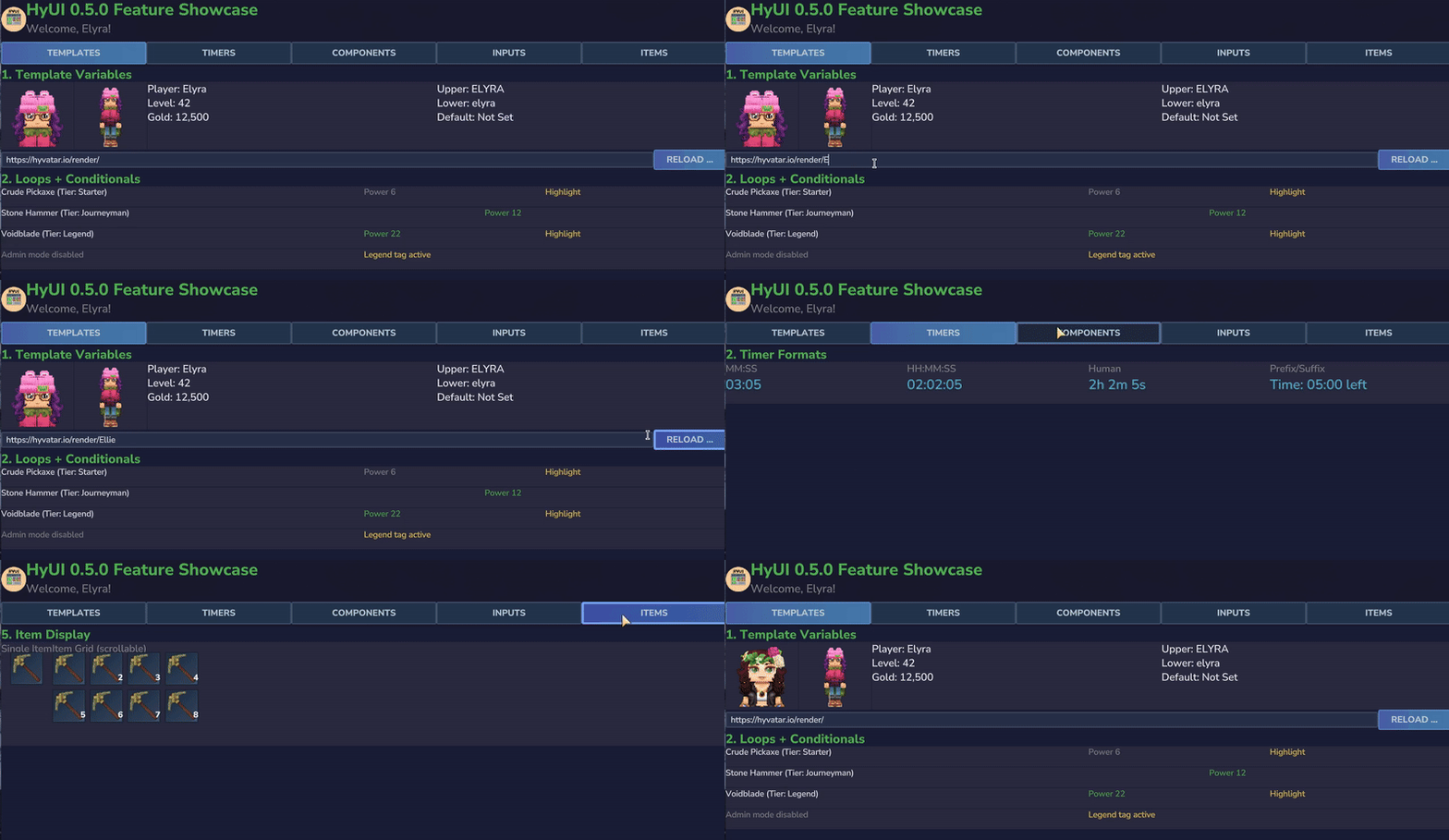
Features
- HYUIML (HTML/CSS): Build interfaces using a familiar, declarative HTML-like syntax with CSS styling, plus templating and reusable components.
- Fluent Builder API: Construct nested UI hierarchies (Groups, Buttons, Labels, etc.) using a clean, readable chain of methods.
- Multi-HUD System: Coexist with other mods effortlessly. HyUI automatically manages Hytale's single HUD slot to allow multiple independent HUD elements to be displayed simultaneously.
- Dynamic Element Injection: Load base
.uifiles and inject dynamic elements into specific selectors at runtime. - Event Handling Simplified: Bind server-side logic directly to UI events using simple lambda expressions and access UI state via
UIContext. - Periodic UI Refresh: Built-in support for batched, periodic HUD updates with low performance overhead.
- Specialized Builders: Includes ready-to-use builders for:
- Buttons: Standardized game-themed text buttons and back buttons.
- Input Fields: Text, Numbers, Sliders, Checkboxes, and Color Pickers.
- Progress Bars: Dynamic progress indicators with customizable textures and effects.
- Item Icons: Display item icons with asset-backed textures.
- Containers: Flexible Group builders with various layout modes and window frames.
- Images: Easy asset-backed images, plus runtime-downloaded dynamic images.
- Advanced Logic (Escape Hatches): Access raw
UICommandBuilderinstances at any point for properties not natively covered by the API.
Quick Start
1. Installation (Gradle)
To use HyUI in your Hytale project, you can get started quickly by using the example project: https://github.com/Elliesaur/Hytale-Example-UI-Project
Otherwise, add HyUI to your project via Cursemaven:
repositories {
    maven { url "https://www.cursemaven.com" }
}

dependencies {
    // Project ID: 1431415
    implementation "curse.maven:hyui-1431415:<file-id>"
}
2. Creating a Page with HYUIML (HTML)
For most use cases, HYUIML is the fastest way to build layouts:
String html = """
    <div class="page-overlay">
        <div class="container" data-hyui-title="My Menu">
            <div class="container-contents">
                <p>Welcome to the menu!</p>
                <button id="myBtn">Click Me</button>
                <img class="dynamic-image" src="https://example.invalid/render/PlayerName" />
            </div>
        </div>
    </div>
    """;

PageBuilder.pageForPlayer(playerRef)
    .fromHtml(html)
    .addEventListener("myBtn", CustomUIEventBindingType.Activating, (ctx) -> {
        playerRef.sendMessage(Message.raw("Clicked!"));
    })
    .open(store);
3. Creating a HUD
HUDs are persistent on-screen elements:
HudBuilder.hudForPlayer(playerRef)
    .fromHtml("<div style='anchor-top: 10; anchor-left: 10;'><p>Health: 100</p></div>")
    .show(store);
Components
| Builder | Purpose |
|---|---|
PageBuilder |
Entry point for full-screen UIs; manages file loading and lifecycle. |
HudBuilder |
Entry point for HUD creation; manages multi-HUD coexistence and refreshes. |
GroupBuilder |
A container used to organize and layout child elements. |
ContainerBuilder |
Provides the standard Hytale window frame. |
PageOverlayBuilder |
Full-screen overlay container. |
TabNavigationBuilder |
Tabbed navigation bar. |
TabContentBuilder |
Tab content container. |
ButtonBuilder |
For interactive buttons; supports standard Hytale aesthetics. |
LabelBuilder |
For displaying dynamic text with style and anchor support. |
ImageBuilder |
For displaying asset-backed images (.png). |
DynamicImageBuilder |
Runtime-downloaded PNG images. |
TextFieldBuilder |
Captures string input from the player. |
NumberFieldBuilder |
Captures numeric input from the player. |
DropdownBoxBuilder |
Dropdown selection control. |
CheckBoxBuilder |
Checkbox input control. |
ColorPickerBuilder |
Provides a Hex color selection interface. |
SliderBuilder |
Provides support for number sliders. |
ProgressBarBuilder |
Provides support for progress bars. |
TimerLabelBuilder |
Timer labels with formatting. |
SpriteBuilder |
Animated sprite rendering. |
ItemIconBuilder |
Provides support for item icons. |
ItemSlotBuilder |
Item slot UI elements. |
ItemGridBuilder |
Scrollable item grid. |
Documentation & Examples
Detailed documentation for installation, page building, HUD building, and HYUIML can be found in the docs folder.
Click the Source button on this page (details -> source on mobile, right sidebar on desktop) to view the full documentation and implementation examples!
Requirements:
- Hytale Server added as a dependency
- Java 25 (or current Hytale-compatible version)
- jsoup (embedded in the JAR under MIT license)
- MultipleHUD - optional requirement - included source in JAR (not embedded) under MIT license.
Licenses
All open source licenses can be found within the JAR and GitHub repo.
Help and Support
Feel free to join the Discord: https://discord.gg/NYeK9JqmNB - happy to help!
Project description from CurseForge.
Pick your setup
HyUI releases for each Hytale build.
Choose the version and loader you play, then open the matching release.
Check the dependencies, then try the file in a copied instance before changing a world you care about.
Recent files
HyUI releases and Hytale builds
HyUI-0.9.8-all.jar
3 Jul 2026
Client Not supported Server Required Dependencies No extras listed Listed on Project page
Check the 0.5 setup 0.5 release
HyUI-0.9.7-all.jar
27 May 2026
Client Not supported Server Required Dependencies No extras listed Listed on Project page
Check the 0.5 setup 0.5 release
HyUI-0.9.5-all.jar
27 Mar 2026
Client Not supported Server Required Dependencies No extras listed Listed on Project page
Check the setup HyUI-0.9.4-all.jar
9 Mar 2026
Client Not supported Server Required Dependencies No extras listed Listed on Project page
Check the setup HyUI-0.9.3-all.jar
8 Mar 2026
Client Not supported Server Required Dependencies No extras listed Listed on Project page
Check the setup HyUI-0.9.2-all.jar
5 Mar 2026
Client Not supported Server Required Dependencies No extras listed Listed on Project page
Check the setup HyUI-0.9.1-all.jar
1 Mar 2026
Client Not supported Server Required Dependencies No extras listed Listed on Project page
Check the setup HyUI-0.9.0-2026.02.19.jar
23 Feb 2026
Client Not supported Server Required Dependencies No extras listed Listed on Project page
Check the setup HyUI-0.8.8-2026-02-18.jar
18 Feb 2026
Client Not supported Server Required Dependencies No extras listed Listed on Project page
Check the setup HyUI-0.8.7-all.jar
15 Feb 2026
Client Not supported Server Required Dependencies No extras listed Listed on Project page
Check the setup HyUI-0.8.4-all.jar
10 Feb 2026
Client Not supported Server Required Dependencies No extras listed Listed on Project page
Check the setup HyUI-0.8.3-all.jar
9 Feb 2026
Client Not supported Server Required Dependencies No extras listed Listed on Project page
Check the setup Looking for an older file? The official CurseForge project page is in Resources.
 mod
mod CurseForge · Hytale
JEI (With Inventory)
Minecraft JEI, but in Hytale. An item and recipe viewer, search by mod with autocomplete using @. Left click for recipe, Right click for Usages. Shift left click settings button for Cheat Mode (/give Item, useful for creative mode), can bookmark items.
 mod
mod CurseForge · Hytale
Loot Fountains
Adds functionality for custom chests which release their loot as dropped items instead of providing an interface.