Quick answer
Which Zelda Gear release should I use?
Latest stable file ZeldaGear1.9.5
Game version Not listed
Mod system Built-in Hytale mod system
Zelda Gear ZeldaGear1.9.5 targets Hytale. Do not install it as a separate client mod. Enable it on the world host—the local server in singleplayer or the dedicated server in multiplayer. No required dependencies listed for this file.
Where it goes
Where should Zelda Gear be installed in Hytale?
Do not install it as a separate client mod. Enable it on the world host—the local server in singleplayer or the dedicated server in multiplayer.
Separate client mod Not supported
World host / dedicated server Required
Mod system for this release Built-in Hytale mod system
Required install it here Optional supported, not mandatory Not supported do not install here Source doesn’t say do not assume
Put Hytale mods on the world host or dedicated server. Singleplayer runs a local server too; Hytale does not use separate client mods.
What else does Zelda Gear ZeldaGear1.9.5 need?
ZeldaGear1.9.5. Change the file and its required mods may change too.
This file does not list any required mods. Do not add a library just because a different file uses it.
This file does not list any required or optional project dependencies. Check the creator notes before changing an existing world.
Before you install it
Add Zelda Gear without breaking your instance.
Built for Zelda Gear ZeldaGear1.9.5. Pick another file and the loader, install side or required mods may change.
- 01
Stick to this file
Use ZeldaGear1.9.5. It targets Hytale; another release may target a different game build or dependency set.
- 02
Bring the mods it needs
This file does not list any required mods. Do not add a library just because a different file uses it.
- 03
Enable it on the world host
Do not install it as a separate client mod. Enable it on the world host—the local server in singleplayer or the dedicated server in multiplayer.
- 04
Pick the file you checked
Use the “Get this file” button beside ZeldaGear1.9.5. It opens that exact file at the source.
About this project
What does Zelda Gear add?
This mod adds various items from the Legend of Zelda franchise to Hytale.
Every model and texture is hand-made, with fitting the games art style being the top priority.
Version 1.9.5:
- Added Bunny Hood
- Added Ancient Shield
- Added Magical Shield
- Fixed Master Sword Beam
- Fixed Hylian Forge
- Fixed Hookshots
- Increased Zora Tunic breath duration
Version 1.9:
- Added Phantom Shield
- Added Spirit Shield
- Added Ordon Shield
- Various Fixes
Version 1.8:
- Master Sword now has a fully custom move set, including beams at full health, unique signature, and spin attacks when holding down. Complete with custom sounds and animations.
- New crafting table named the Hylian Forge, where all items from the mod are now crafted.
- Item/Armor now renders correctly in menus.
- Physics on the heros hat and its variants.
- Hats texture and model updated.
- Master Sword texture and model updated.
- Goddess Sword texture and model updated.
- Master Sword emblem now glows when full health.
- Items now have descriptions.
- Added Razor Sword
- Added Wind Sword
- Added Wind Shield
- Added Ordon Sword
- Added Wind Tunic
- Added Lobster Shirt
- Added Twlight Helmet
Currently Adds:
- Master Sword
- Goddess Sword
- Biggoron's Sword
- Megaton Hammer
- Hylian Shield
- Mirror Shield
- Masked Mirror Shield
- Gossip Stone
- Hero's Sword
- Hero's Shield
- Kokiri Sword
- Lokomo Sword
- Phantom Sword
- Fairy Bow
- Heros Tunic
- Goron Tunic
- Zora Tunic
- Purple Tunic
- Yellow Tunic
- Dark Tunic
- Dark Master Sword
- Dark Shield
- Silver and Gold Gauntlets
- Hookshot
- Longshot
- Princess Outfit
- Farmer Dress
- Razor Sword
- Wind Sword
- Wind Shield
- Ordon Sword
- Wind Tunic
- Lobster Shirt
- Twlight Helmet
- Hylian Forge
- Phantom Shield
- Spirit Shield
- Ordon Shield
Project description from CurseForge.
Recent files
Zelda Gear releases and Hytale builds
19 Apr 2026
Client Not supported Server Required Dependencies No extras listed Listed on Project page
Check the setup → 19 Feb 2026
Client Not supported Server Required Dependencies No extras listed Listed on Project page
Check the setup → 14 Feb 2026
Client Not supported Server Required Dependencies No extras listed Listed on Project page
Check the setup → 14 Feb 2026
Client Not supported Server Required Dependencies No extras listed Listed on Project page
Check the setup → 29 Jan 2026
Client Not supported Server Required Dependencies No extras listed Listed on Project page
Check the setup → 22 Jan 2026
Client Not supported Server Required Dependencies No extras listed Listed on Project page
Check the setup → 21 Jan 2026
Client Not supported Server Required Dependencies No extras listed Listed on Project page
Check the setup → 19 Jan 2026
Client Not supported Server Required Dependencies No extras listed Listed on Project page
Check the setup → 18 Jan 2026
Client Not supported Server Required Dependencies No extras listed Listed on Project page
Check the setup → 17 Jan 2026
Client Not supported Server Required Dependencies No extras listed Listed on Project page
Check the setup → 16 Jan 2026
Client Not supported Server Required Dependencies No extras listed Listed on Project page
Check the setup → 16 Jan 2026
Client Not supported Server Required Dependencies No extras listed Listed on Project page
Check the setup → 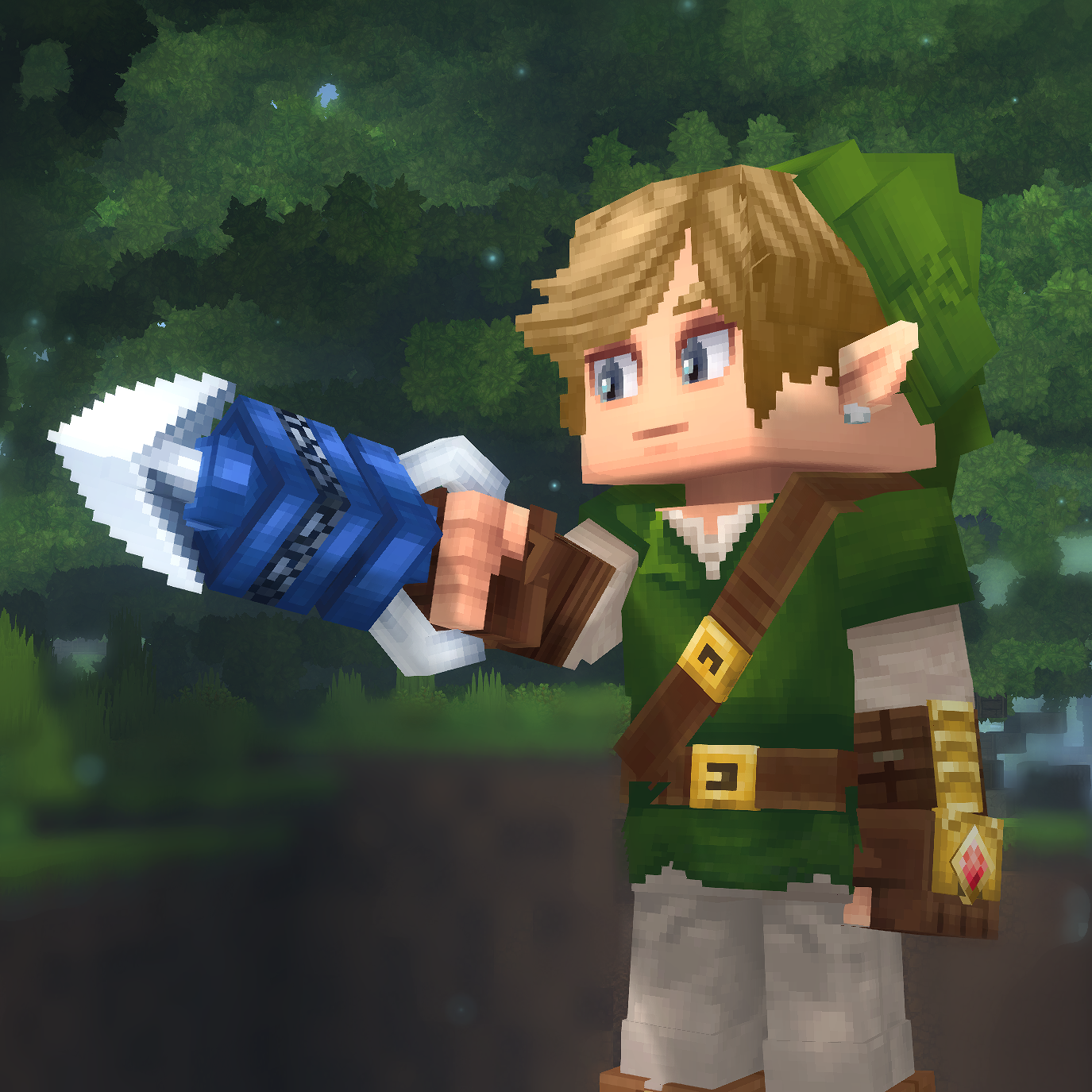
 mod
mod mod
mod mod
mod