Hytale version
Back to mods 
CurseForge · Hytale mod
Brightness Tweaks
type /br | Brightness Tweaks emits dynamic light when torch is inside your utility belt, and lets you change the warmth, strength, and color!
Choose a version Pick your version below, then grab the matching file.
Quick answer
Which Brightness Tweaks release should I use?
Latest stable file Brightness-Tweaks-0.4.7.jar
Game version 0.5
Mod system Built-in Hytale mod system
Brightness Tweaks Brightness-Tweaks-0.4.7.jar targets 0.5. Do not install it as a separate client mod. Enable it on the world host—the local server in singleplayer or the dedicated server in multiplayer. No required dependencies listed for this file.
Where it goes
Where should Brightness Tweaks be installed in Hytale?
Do not install it as a separate client mod. Enable it on the world host—the local server in singleplayer or the dedicated server in multiplayer.
Separate client mod Not supported
World host / dedicated server Required
Mod system for this release Built-in Hytale mod system
Required install it here Optional supported, not mandatory Not supported do not install here Source doesn’t say do not assume
Put Hytale mods on the world host or dedicated server. Singleplayer runs a local server too; Hytale does not use separate client mods.
What else does Brightness Tweaks Brightness-Tweaks-0.4.7.jar need?
Brightness-Tweaks-0.4.7.jar. Change the file and its required mods may change too.
This file does not list any required mods. Do not add a library just because a different file uses it.
This file does not list any required or optional project dependencies. Check the creator notes before changing an existing world.
Before you install it
Add Brightness Tweaks without breaking your instance.
Built for Brightness Tweaks Brightness-Tweaks-0.4.7.jar. Pick another file and the loader, install side or required mods may change.
- 01
Stick to this file
Use Brightness-Tweaks-0.4.7.jar. It targets 0.5; another release may target a different game build or dependency set.
- 02
Bring the mods it needs
This file does not list any required mods. Do not add a library just because a different file uses it.
- 03
Enable it on the world host
Do not install it as a separate client mod. Enable it on the world host—the local server in singleplayer or the dedicated server in multiplayer.
- 04
Pick the file you checked
Use the “Get this file” button beside Brightness-Tweaks-0.4.7.jar. It opens that exact file at the source.
About this project
What does Brightness Tweaks add?
Brightness (and Torch) Tweaks
Brightness Tweaks adds fully configurable, dynamic light around the player so you can see better at night or underground while you fight and mine. Put any torch inside the utility belt, and set brightness using menu under /br command.
Developer's note:
- Looks 10x better with Shading Quality set higher than Low
- From 0.1.9+ set settings once, they persist forever
- UI added (0.2.0+); mod is now prod-ready but I'm open to suggestions
Features
- Player-centered dynamic light
- Adjust warmth, color, and strength of the light around you
- Lightweight, server & single compatible, persistent across restarts
Commands & Usage
Equip / Put any torch in the utility belt and run:
/brto display user-friendly menu
Or use commands:
/brightnessdisables the effect (resets to normal)/brightness <value>sets brightness from0.01to1.0e.g.
/brightness 0.1or/brightness 1/brightness warmth <value>from0.1to1.0/brightness color <hex>e.g. #aa0000
Server config:
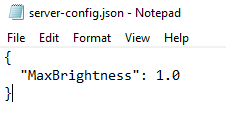
After downloading the mod and restarting the server/world, check for a new file created at this path: UserData\Mods\plugin-config\FLOCK4H_BrightnessTweaks or in the /mods folder in server's filesystem. Modify or create the server-config.json if you want to tweak the global max brightness, example structure:
Installation
Download
Brightness-Tweaks-x.x.x.jarwhere x.x.x is the most recently uploaded filePut it in your server
mods/folder (or your local .../Hytale/UserData/Mods folder)Restart the server / start the local world
Links / Community
Feedback / Bugs
If you find issues or have suggestions, post them in Discord/Telegram (links above) or open an issue on the project repo.
About author
Software Engineer & Cybersecurity Specialist currently exploring game development, I also provide development services for clients, so if you're interested in working together please reach out via official media in Links section above, check out my work:
github.com/FLOCK4H
Project description from CurseForge.
Pick your setup
Brightness Tweaks releases for each Hytale build.
Choose the version and loader you play, then open the matching release.
Check the dependencies, then try the file in a copied instance before changing a world you care about.
Recent files
Brightness Tweaks releases and Hytale builds
Brightness-Tweaks-0.4.7.jar
7 Jun 2026
Client Not supported Server Required Dependencies No extras listed Listed on Project page
Check the 0.5 setup 0.5 release
Brightness-Tweaks-0.4.0-89796e57b.jar
18 Apr 2026
Client Not supported Server Required Dependencies No extras listed Listed on Project page
Check the setup Brightness-Tweaks-0.4.0-*.jar
18 Apr 2026
Client Not supported Server Required Dependencies No extras listed Listed on Project page
Check the setup Brightness-Tweaks-0.2.1.jar
26 Jan 2026
Client Not supported Server Required Dependencies No extras listed Listed on Project page
Check the setup Brightness-Tweaks-0.2.0.jar
19 Jan 2026
Client Not supported Server Required Dependencies No extras listed Listed on Project page
Check the setup Brightness-Tweaks-0.1.9.jar
17 Jan 2026
Client Not supported Server Required Dependencies No extras listed Listed on Project page
Check the setup Brightness-Tweaks-0.1.5.jar
17 Jan 2026
Client Not supported Server Required Dependencies No extras listed Listed on Project page
Check the setup Brightness-Tweaks-0.1.4.jar
17 Jan 2026
Client Not supported Server Required Dependencies No extras listed Listed on Project page
Check the setup Brightness-Tweaks.jar
16 Jan 2026
Client Not supported Server Required Dependencies No extras listed Listed on Project page
Check the setup Looking for an older file? The official CurseForge project page is in Resources.
 mod
mod CurseForge · Hytale
PJ Difficulty
Allows changing the server difficulty, including presets from peaceful to ultra-hardcore.
 mod
mod CurseForge · Hytale
Better Shop/Auction/OfferHouse
The all-in-one Hytale economy: Shop, Auction House & Offer Board. Dynamic pricing, stacking boosts, in-game admin, exploit-proof sell loop, hot-reload. Auto-plugs into EconomySystem, Ecotale, PJ-Money, Coins and all VaultUnlocked compatible plugins!
 mod
mod CurseForge · Hytale
Shadowbind - Capture & Summon Shadow Minions
Kill a creature and it may leave a shadow. Bind it, and it fights for you: a dark copy with the real animal's health, reach and attacks. Build a squad out of anything you can kill