Hytale version
Back to mods 
CurseForge · Hytale mod
LevelTools/Weapons 2.0
Level up your tools when broken! Like a muscle!!!
Choose a version Pick your version below, then grab the matching file.
Quick answer
Which LevelTools/Weapons 2.0 release should I use?
Latest stable file LincerosLevelTools-2.5.0.jar
Game version 0.5
Mod system Built-in Hytale mod system
LevelTools/Weapons 2.0 LincerosLevelTools-2.5.0.jar targets 0.5. Do not install it as a separate client mod. Enable it on the world host—the local server in singleplayer or the dedicated server in multiplayer. No required dependencies listed for this file.
Where it goes
Where should LevelTools/Weapons 2.0 be installed in Hytale?
Do not install it as a separate client mod. Enable it on the world host—the local server in singleplayer or the dedicated server in multiplayer.
Separate client mod Not supported
World host / dedicated server Required
Mod system for this release Built-in Hytale mod system
Required install it here Optional supported, not mandatory Not supported do not install here Source doesn’t say do not assume
Put Hytale mods on the world host or dedicated server. Singleplayer runs a local server too; Hytale does not use separate client mods.
What else does LevelTools/Weapons 2.0 LincerosLevelTools-2.5.0.jar need?
LincerosLevelTools-2.5.0.jar. Change the file and its required mods may change too.
This file does not list any required mods. Do not add a library just because a different file uses it.
This file does not list any required or optional project dependencies. Check the creator notes before changing an existing world.
Before you install it
Add LevelTools/Weapons 2.0 without breaking your instance.
Built for LevelTools/Weapons 2.0 LincerosLevelTools-2.5.0.jar. Pick another file and the loader, install side or required mods may change.
- 01
Stick to this file
Use LincerosLevelTools-2.5.0.jar. It targets 0.5; another release may target a different game build or dependency set.
- 02
Bring the mods it needs
This file does not list any required mods. Do not add a library just because a different file uses it.
- 03
Enable it on the world host
Do not install it as a separate client mod. Enable it on the world host—the local server in singleplayer or the dedicated server in multiplayer.
- 04
Pick the file you checked
Use the “Get this file” button beside LincerosLevelTools-2.5.0.jar. It opens that exact file at the source.
About this project
What does LevelTools/Weapons 2.0 add?
⚔️ LEVEL TOOLS
Don't let your tools break… let them EVOLVE!
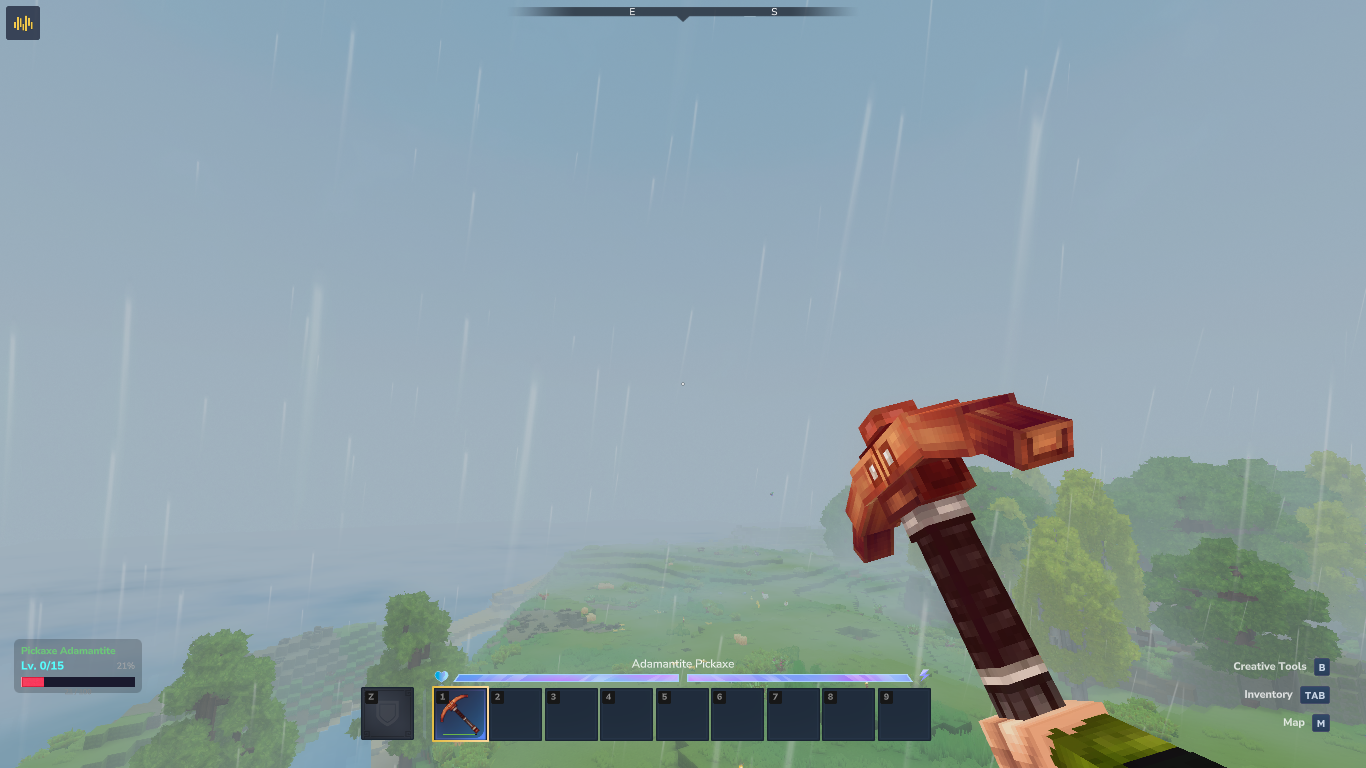

⚠️ IMPORTANT REQUIREMENT ⚠️
Please install MultipleHUD for the custom HUD to function correctly.
🆕 What's New in v2.4.2
| Feature | Description | |
|---|---|---|
| 🪨 | Tiered Evolution Stones | 7 unique stones (Copper to Onyxium) with custom crafting recipes |
| 🔒 | Strict Tier Progression | Evolution stones only upgrade items from the immediately preceding tier |
| 🖼️ | Custom 3D Models | Full support for .blockymodel and .png textures for each stone tier |
🆕 What's New in v2.4.1
| Feature | Description | |
|---|---|---|
| 📊 | Item Statistics | Each tool/weapon records enemies defeated, blocks mined, and total XP earned |
| 🔍 | Stats Page | Use /leveltools stats to open a dedicated panel for your held item |
| ⭐ | Milestone Messages | Reaching levels 5, 10, 15, 25, 50 triggers a special styled message |
| 🔧 | Hytale 0.5.3 Support | Full ECS compatibility, HUD thread safety, and native Tool Belt detection |
| 🛠️ | Debug Command | Use /leveltools debug to troubleshoot active items and components |
🔥 How It Works
Use your tools and weapons. Durability lost = XP gained. Fill the bar → level up → full auto-repair. Simple.
| Event | What happens |
|---|---|
| Level Up | Full repair, stats increase, level-up message |
| Manual Repair | Resets current-level XP progress |
| Hit Max Level | Item stops advancing (Legendary & Crude Hoe scale infinitely) |
| Prestige | Converts levels into Ability Tokens and resets the item |
📈 Stat Bonuses per Level
| Stat | Bonus | Who benefits |
|---|---|---|
| Max Durability | +15% | All items |
| Damage | +5% | Weapons |
| Mining Speed | +5% | Tools |
💎 Rarity Level Caps
| Rarity | Max Level |
|---|---|
| Trash / Junk | 3 |
| Common | 5 |
| Uncommon | 10 |
| Rare | 15 |
| Epic | 25 |
| Legendary | ∞ |
Special exception: Crude Hoe also scales infinitely.
🪙 Ability Tokens
Reach the level cap → /leveltools prestige → earn Ability Tokens → spend them in /leveltools tokens. Every 5 levels (configurable) = 1 token. Tokens stay on the item across prestiges.
⚔️ Weapon Abilities
| Ability | Cost | Effect |
|---|---|---|
| Fire Aspect | 1 | Sets target on fire |
| Vampirism | 2 | Heals you for a portion of damage dealt |
| Poison | 1 | Poisons target on hit |
| Unstoppable | 3 | Bypasses enemy defense |
| Energy Saver | 2 | Restores stamina on each hit |
⛏️ Tool Abilities
| Ability | Cost | Effect |
|---|---|---|
| Vein Miner | 1 | Mines all connected ore blocks at once (up to 20) |
| Auto Smelt | 1 | Mined ores are automatically smelted |
🪨 Evolution Stones (Tiered Upgrades!)
Why throw away your trusty, leveled-up sword just because you found some new ores? Now you don't have to! Instead of crafting a completely new tool from scratch, you can Evolve your existing tools and weapons while keeping their progress and abilities!
We've introduced 7 Unique Tiers of Evolution Stones. Each stone has its own custom 3D model, custom texture, and requires specific, tier-appropriate materials to craft (scaling with Hytale's progression).
🛠️ How it works:
- Strict Progression: You can't skip tiers! An Evolution Stone only works on the tool from the immediately preceding tier.
- Dynamic Validation: If you try to use an Iron Stone on a Thorium pickaxe, the UI will intelligently block you and tell you exactly what went wrong.
- The Ritual: Just right-click while holding the stone in your hand to open the Evolution UI. Then, click the tool in your inventory that you want to ascend to the next level!
💎 The 7 Tiers of Evolution
| Tier | Evolution Stone | Required Base Material | Quality |
|---|---|---|---|
 |
Copper | Crude | Common |
 |
Iron | Copper | Uncommon |
 |
Thorium | Iron | Rare |
 |
Cobalt | Thorium | Rare |
 |
Mithril | Cobalt | Epic |
 |
Adamantite | Mithril | Epic |
| Onyxium | Adamantite | Legendary |
Modder Note: I am terrible at creating 3D models and textures. If anyone wants to contribute cool models for the Evolution Stones, you are more than welcome and will be added to the credits!
🎮 Commands
👤 Player
| Command | Description |
|---|---|
/leveltools |
List all available commands |
/leveltools tokens |
Open the Weapon Mastery menu to spend Ability Tokens |
/leveltools prestige |
Convert levels into Ability Tokens (hold the item) |
/leveltools stats |
View statistics for the held item |
/leveltools hud |
Toggle the LevelTools HUD on/off |
/leveltools hud position <x> <y> |
Move the HUD to a custom pixel position on screen |
/leveltools hud reset |
Restore the HUD to its default position |
🔧 Admin (requires leveltools.admin)
| Command | Description |
|---|---|
/leveltools setlevel <level> |
Force-set the level of the held item |
⚙️ Configuration
Settings live in LevelTools.json (auto-generated on first run). Key fields:
{
    "DurabilityLossToLevel": 100.0,
    "DurabilityBonusPercent": 15.0,
    "DamageBonusPercent": 5.0,
    "SpeedBonusPercent": 5.0,
    "WeaponXPMultiplier": 2.5,
    "ToolXPMultiplier": 1.0,
    "TokensPerLevel": 5,
    "VeinMinerMaxBlocks": 20,
    "ShowLevelUpMessage": true
}
Full config includes HUD position defaults, ability durations, rarity caps, salvage compat, and more.
📥 Installation
- Download
Linceros.LevelTools-2.4.jar - Install MultipleHUD
- Drop both
.jarfiles in your server'smods/folder - Restart — and start grinding!
👨💻 Author
Created by Linceros — part of the Linceros Mod Collection for Hytale.
Project description from CurseForge.
Pick your setup
LevelTools/Weapons 2.0 releases for each Hytale build.
Choose the version and loader you play, then open the matching release.
Check the dependencies, then try the file in a copied instance before changing a world you care about.
Recent files
LevelTools/Weapons 2.0 releases and Hytale builds
LincerosLevelTools-2.5.0.jar
4 Jun 2026
Client Not supported Server Required Dependencies No extras listed Listed on Project page
Check the 0.5 setup 0.5 release
LincerosLevelTools-2.4.1.jar
3 Jun 2026
Client Not supported Server Required Dependencies No extras listed Listed on Project page
Check the 0.5 setup 0.5 release
LincerosLevelTools-2.3.7.jar
3 Jun 2026
Client Not supported Server Required Dependencies No extras listed Listed on Project page
Check the 0.5 setup 0.5 release
LincerosLevelTools-2.3.6.jar
1 Jun 2026
Client Not supported Server Required Dependencies No extras listed Listed on Project page
Check the 0.5 setup 0.5 release
LincerosLevelTools-2.3.5.jar
30 May 2026
Client Not supported Server Required Dependencies No extras listed Listed on Project page
Check the 0.5 setup 0.5 release
LincerosLevelTools-2.3.4.jar
3 Apr 2026
Client Not supported Server Required Dependencies No extras listed Listed on Project page
Check the setup LincerosLevelTools-2.3.3.jar
23 Mar 2026
Client Not supported Server Required Dependencies No extras listed Listed on Project page
Check the setup LincerosLevelTools-2.3.2.jar
16 Mar 2026
Client Not supported Server Required Dependencies No extras listed Listed on Project page
Check the setup LincerosLevelTools-2.3.1.jar
10 Mar 2026
Client Not supported Server Required Dependencies No extras listed Listed on Project page
Check the setup LincerosLevelTools-2.3.jar
6 Mar 2026
Client Not supported Server Required Dependencies No extras listed Listed on Project page
Check the setup LincerosLevelTools-2.2.jar
19 Feb 2026
Client Not supported Server Required Dependencies No extras listed Listed on Project page
Check the setup LincerosLevelTools-2.1.jar
22 Jan 2026
Client Not supported Server Required Dependencies No extras listed Listed on Project page
Check the setup Looking for an older file? The official CurseForge project page is in Resources.
 mod
mod CurseForge · Hytale
Hexcode - Magic by Design
Magic is unexplained science. To make magic, you must first invent science.
 mod
mod CurseForge · Hytale
Vandoria Jetpacks - Custom Balanced Jetpacks with sounds and visual effects.
Vandoria Jetpacks adds four unique craftable jetpacks to Hytale, each offering progressively better flight performance, improved player stats, custom models, animated thruster effects, immersive engine sounds, and balanced stamina-based flight.
 mod
mod CurseForge · Hytale
Patchly
The Perfect Pure Patch Plugin. A modern in-place Zima, Patchwork, and Hytalor Alternative