)
&logoSize=auto&label=Follow&labelColor=rgb(85,85,85)&color=rgb(147,147,147))
Hytale version
Back to mods 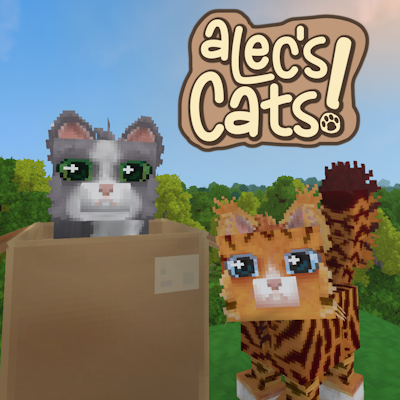
CurseForge · Hytale mod
Alec's Cats!
Tame, breed, care for and team up with over 1000 possible cat variants!
Choose a version Pick your version below, then grab the matching file.
Quick answer
Which Alec's Cats! release should I use?
Latest stable file Alec's Cats! v1.13.1
Game version 0.6
Mod system Built-in Hytale mod system
Alec's Cats! v1.13.1 targets 0.6. Do not install it as a separate client mod. Enable it on the world host—the local server in singleplayer or the dedicated server in multiplayer. No required dependencies listed for this file.
Where it goes
Where should Alec's Cats! be installed in Hytale?
Do not install it as a separate client mod. Enable it on the world host—the local server in singleplayer or the dedicated server in multiplayer.
Separate client mod Not supported
World host / dedicated server Required
Mod system for this release Built-in Hytale mod system
Required install it here Optional supported, not mandatory Not supported do not install here Source doesn’t say do not assume
Put Hytale mods on the world host or dedicated server. Singleplayer runs a local server too; Hytale does not use separate client mods.
What else does Alec's Cats! v1.13.1 need?
Alec's Cats! v1.13.1. Change the file and its required mods may change too.
This file does not list any required mods. Do not add a library just because a different file uses it.
This file does not list any required or optional project dependencies. Check the creator notes before changing an existing world.
Before you install it
Add Alec's Cats! without breaking your instance.
Built for Alec's Cats! v1.13.1. Pick another file and the loader, install side or required mods may change.
- 01
Stick to this file
Use Alec's Cats! v1.13.1. It targets 0.6; another release may target a different game build or dependency set.
- 02
Bring the mods it needs
This file does not list any required mods. Do not add a library just because a different file uses it.
- 03
Enable it on the world host
Do not install it as a separate client mod. Enable it on the world host—the local server in singleplayer or the dedicated server in multiplayer.
- 04
Pick the file you checked
Use the “Get this file” button beside Alec's Cats! v1.13.1. It opens that exact file at the source.
About this project
What does Alec's Cats! add?
)
)
)
)



Summary
This mod started as a simple cat conversion from unused base-game assets and has grown into a full pet system with:
- Taming + ownership
- Capture/spawn with persistent appearance variants
- Command controls (Follow, Hold, Recall, Move To Ping, Set Home, Return Home, Attack Target)
- Happiness/needs simulation with resource seeking
- Passive companion breeding
- Trait generation and inheritance for bred companion cats
- Multi-language localization
Required:
- Alec's Tamework! 2.14.x
Recommended:
Craftable Items
Cat Collar (Capture/Spawn Item)
- 3x Light Leather
- 1x Gold Bar
- Bench: Workbench Tier 2 (Tinkering)
- Stored cats use generated collar icons that match their body type and coat.
Cat Treat Bag (Command Item)
- 2x Light Leather
- 5x Raw Fish
- 5x Raw Meat
- Bench: Workbench Tier 2 (Tinkering)
Cat Cardboard Box
- 10x Plant Fiber
- 5x Catnip Plant
- Bench: Workbench Tier 2 (Tinkering)
Large Cat Cardboard Box
- 20x Plant Fiber
- 10x Catnip Plant
- Bench: Workbench Tier 2 (Tinkering)
Quick Start
- Find a wild cat.
- Feed raw fish to make it friendly.
- Use a Cat Collar to capture/tame it.
- Place your cat from the Soul Lantern item.
- Use one of these control methods:
- Interact directly to cycle basic modes (Follow / Defend / Stay).
- Use the Cat Treat Bag for advanced commands.
Cat Treat Bag (Command Item)
- Left click on a cat: link/unlink that cat to the bag.
- Right click: open command selection wheel.
- Left click (while not targeting link action): execute selected command on linked cats.
Default commands:
- Follow
- Hold
- Recall
- Move To Ping
- Set Home
- Return Home
- Attack Target
Notes:
- Commands require ownership + tamed cats by default.
Taming and Ownership
- Taming assigns ownership.
- Only the owner can interact with/store the cat by default.
- When stored in an item, ownership can be cleared until re-spawn (trading-friendly flow).
- Owner damage/invulnerability behavior is controlled by Tamework companion config:
- Alec's Cats!\Server\Tamework\Companion\ACCompCat.json
Happiness and Needs
- Happiness fluctuates based on if the Cat's needs are being met
- Cats will automatically eat raw fish or Tamework Carnivore Kibble from storage containers nearby
- Tamework Carnivore Kibble can also be used as backup hand-feed, but it is less satisfying than their preferred food
- Cats will automatically drink water from water sources nearby
- Cats prefer to have at least one cat friend nearby, but don't like to be overcrowded
- Cats like when their owner is nearby
Breeding and Traits
- Cats can automatically breed if they are happy and have a suitable partner
- Cats can spawn with 0-4 traits
- Traits can alter anything from size, to strength, to fertility and more
- Traits can be inherited from parents, and breeding cats with the same traits together can result in higher trait values (or lower!)
- Fur and eye color are also inherited from parents
- Body type roles can be inherited from either parent, with a small chance of a different body type appearing as a mutation
- Cat breeding uses Tamework gender support, so compatible breeding pairs must be different genders when that Tamework setting is enabled
Spawns
Cats are uncommon but not extremely rare.
- Mediumhair: Zone 1 Plains and Forests
- Shorthair: Zone 2 Oasis, Plateau, and Savanna
- Bobtail: Zone 1 Mountains, Zone 2 Plateau, and Zone 3 Mountains
- Longhair: Zone 3 Forests and Tundra
They usually spawn solo, but can spawn in small groups.
1,216 Appearance Variations
All cat textures are now made by an artist far more skilled than me, Celly (@Excel Lynt).
Appearance combines body type, coat, and eyes. Eye colors are separate randomized attachments, so cats can inherit eyes independently from coat color.
| Category | Count | Variants |
|---|---|---|
| Body types | 4 | Mediumhair Longhair Shorthair Bobtail |
| Coats | 19 | Black and White Gray Light Gray Silver Tabby Orange Tabby Brown Tabby White Cream Cream Tuxedo Gray Tuxedo Brown Tuxedo Light Orange Tabby Tuxedo Black Tuxedo Black Snowshoe Sand Tabby Dark Gray Tabby Chocolate Point Blue Point |
| Eyes | 16 | Bright Orange Bright Yellow Dark Orange Forest Green Green Hazel Ice Blue Light Blue Blue and Green-Yellow (Rare) Blue and Green (Rare) Orange and Yellow (Rare) Yellow and Green (Rare) Pumpkin Orange Teal Yellow-Lime Yellow |
Total combinations: 4 body types x 19 coats x 16 eye variants = 1,216 appearance variations.
Config Files
- Companion Config:
- Server/Tamework/Companion/ACCompCat.json
- Interaction Config:
- Server/Tamework/Interactions/ACIntCat.json
- Server/Tamework/Interactions/ACIntCatTemp.json
- Spawner Config:
- Server/Tamework/Items/Spawners/ACSpawnCat.json
- Command-item Config:
- Server/Tamework/Items/Commands/ACCommCat.json
- Happiness Config:
- Server/Tamework/Happiness/ACHappCat.json
- Needs Config:
- Server/Tamework/Needs/ACNeedsCat.json
- Breeding Config:
- Server/Tamework/Breeding/ACBreedCat.json
- Trait Config:
- Server/Tamework/Traits/ACTraitsCat.json
- Attachment Migration Config:
- Server/Tamework/AttachmentMigrations/ACAttachmentMigrationCatEyesPre190.json
- Attachment Display Config:
- Server/Tamework/AttachmentDisplays/ACAttachmentDisplayCat.json
Want More?
If you're interested in bringing the same mechanics to vanilla mobs in Hytale, check out:
If you're a modder interested in adding these mechanics to your NPCs, check out my comprehensive taming framework built specifically for modders to integrate my systems with their mods. By referencing Tamework, you can add complex systems to your NPCs without writing any Java code at all:
Known Issues
- Some wake/laydown animation transitions are still placeholder quality and will be improved.
Issue Reporting
If you run into issues, please report them here:
Telemetry
Alec's Tamework, and thus Alec's Cats, utilizes Alec's Telemetry to report crash, error, performance, and usage telemetry data to the developer.
This data is anonymous and does not contain any personally identifiable information, and is exclusively used to diagnose issues in the mod to provide a better user experience.
You may disable this feature at any time in the /tw settings menu in the Telemetry section.
Alec's Tamework also reports anonymized active user numbers to HStats to track active user count summaries.
Project description from CurseForge.
Pick your setup
Alec's Cats! releases for each Hytale build.
Choose the version and loader you play, then open the matching release.
Hytale version
0.5
1 loader buildCheck the dependencies, then try the file in a copied instance before changing a world you care about.
Recent files
Alec's Cats! releases and Hytale builds
Alec's Cats! v1.13.1
16 Sept 2026
Client Not supported Server Required Dependencies No extras listed Listed on Project page
Check the 0.6 setup 0.6 release
Alec's Cats! v1.12.5
31 Aug 2026
Client Not supported Server Required Dependencies No extras listed Listed on Project page
Check the 0.6 setup 0.6 release
Alec's Cats! v1.12.4
27 Aug 2026
Client Not supported Server Required Dependencies No extras listed Listed on Project page
Check the 0.6 setup 0.6 release
Alec's Cats! v1.12.3
5 Jul 2026
Client Not supported Server Required Dependencies No extras listed Listed on Project page
Check the 0.6 setup 0.6 release
Alec's Cats! v1.12.2
19 Jun 2026
Client Not supported Server Required Dependencies No extras listed Listed on Project page
Check the 0.5 setup 0.5 release
Alec's Cats! v1.12.1
16 Jun 2026
Client Not supported Server Required Dependencies No extras listed Listed on Project page
Check the 0.5 setup 0.5 release
Alec's Cats! v1.12.0
7 Jun 2026
Client Not supported Server Required Dependencies No extras listed Listed on Project page
Check the 0.5 setup 0.5 release
Alec's Cats! v1.11.1
26 May 2026
Client Not supported Server Required Dependencies No extras listed Listed on Project page
Check the 0.5 setup 0.5 release
Alec's Cats! v1.11.0
22 May 2026
Client Not supported Server Required Dependencies No extras listed Listed on Project page
Check the setup Alec's Cats! v1.10.0
19 May 2026
Client Not supported Server Required Dependencies No extras listed Listed on Project page
Check the setup Alec's Cats! v1.9.0
13 May 2026
Client Not supported Server Required Dependencies No extras listed Listed on Project page
Check the setup Alec's Cats! v1.8.2
21 Apr 2026
Client Not supported Server Required Dependencies No extras listed Listed on Project page
Check the setup Looking for an older file? The official CurseForge project page is in Resources.
 mod
mod CurseForge · Hytale
Alec's Tamework!
Mob taming framework and asset patcher. Breeding, traits, leveling, tame management UI, easier interaction chains, capture/spawn items that store metadata, ownership/tamed status, lots of behavior components and more!
 mod
mod CurseForge · Hytale
Fullmetal Labyrinth
Adds a brand-new Labyrinth Dimension featuring a vast desert surface and an endless maze stretching deep below. Discover unique locations and face a variety of dangerous new enemies as you explore its depths!
 mod
mod CurseForge · Hytale
Jujutsu limitless
Become the strongest sorcerer! Play as Satoru Gojo in Hytale with 100% accurate mechanics: Infinity defense, Lapse Blue, Reversal Red, Hollow Purple, and the legendary Domain Expansion: Unlimited Void. Can anyone defeat the Honored One?