Translucent Screen Effects V3.zip
24 Jan 2026
Client Not supported Server Required Dependencies No extras listed Listed on Project page
Check the setup 
CurseForge · Hytale mod
A lightweight quality-of-life mod that makes screen effects 50% more transparent, improving visibility and comfort during gameplay.
Quick answer
Translucent Screen Effects V3.zip targets Hytale. Do not install it as a separate client mod. Enable it on the world host—the local server in singleplayer or the dedicated server in multiplayer. No required dependencies listed for this file.
Where it goes
Do not install it as a separate client mod. Enable it on the world host—the local server in singleplayer or the dedicated server in multiplayer.
Put Hytale mods on the world host or dedicated server. Singleplayer runs a local server too; Hytale does not use separate client mods.
Translucent Screen Effects V3.zip. Change the file and its required mods may change too.
This file does not list any required mods. Do not add a library just because a different file uses it.
This file does not list any required or optional project dependencies. Check the creator notes before changing an existing world.
Before you install it
Built for Translucent Screen Effects V3.zip. Pick another file and the loader, install side or required mods may change.
Use Translucent Screen Effects V3.zip. It targets Hytale; another release may target a different game build or dependency set.
This file does not list any required mods. Do not add a library just because a different file uses it.
Do not install it as a separate client mod. Enable it on the world host—the local server in singleplayer or the dedicated server in multiplayer.
Use the “Get this file” button beside Translucent Screen Effects V3.zip. It opens that exact file at the source.
About this project
Translucent Screen Effects is a lightweight client-side quality-of-life mod that reduces the opacity of screen effects by 50%, making gameplay more comfortable and visually clear.
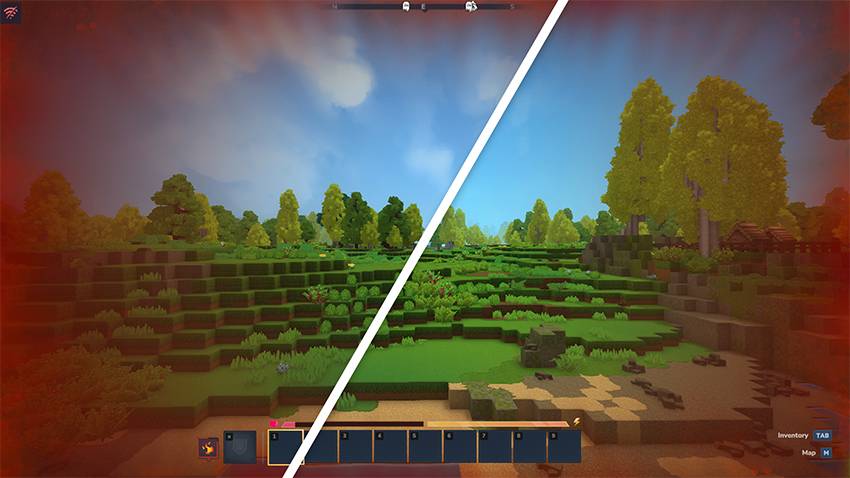
Comparison of fire screen effects without and with the mod enabled.
This mod is designed for players who find screen overlays distracting or too intense. It preserves the original visual style of the game while improving visibility and reducing eye strain during long play sessions.
Features:
Compatibility:
Project description from CurseForge.
Recent files
24 Jan 2026
19 Jan 2026
16 Jan 2026
Looking for an older file? The official CurseForge project page is in Resources.
 mod
modA class expansion for **Endless Leveling** that adds two new Paladin abilities.
 mod
modweaponised femboy body pillows (dakimakura), cozy cushion blocks, plushie characters, silly fumo, futon bed, lain onesie mage robes (kigurumi), pillow hexstaff + hexbook + glyph guide for hexcode magic via patchly! anime ref: astolfo, ferris, rimuru, lain!
 mod
modHere is the new version of Home Furniture V2, a much more optimized version of the first, with a renaming of all object types to avoid bugs, improved user-friendliness and usefulness, and of course, new objects.