Quick answer
Which BiomeDisplay release should I use?
Latest stable file BiomeDisplay-1.5.0.jar
Game version Not listed
Mod system Built-in Hytale mod system
BiomeDisplay-1.5.0.jar targets Hytale. Do not install it as a separate client mod. Enable it on the world host—the local server in singleplayer or the dedicated server in multiplayer. No required dependencies listed for this file.
Where it goes
Where should BiomeDisplay be installed in Hytale?
Do not install it as a separate client mod. Enable it on the world host—the local server in singleplayer or the dedicated server in multiplayer.
Separate client mod Not supported
World host / dedicated server Required
Mod system for this release Built-in Hytale mod system
Required install it here Optional supported, not mandatory Not supported do not install here Source doesn’t say do not assume
Put Hytale mods on the world host or dedicated server. Singleplayer runs a local server too; Hytale does not use separate client mods.
What else does BiomeDisplay-1.5.0.jar need?
BiomeDisplay-1.5.0.jar. Change the file and its required mods may change too.
This file does not list any required mods. Do not add a library just because a different file uses it.
This file does not list any required or optional project dependencies. Check the creator notes before changing an existing world.
Before you install it
Add BiomeDisplay without breaking your instance.
Built for BiomeDisplay-1.5.0.jar. Pick another file and the loader, install side or required mods may change.
- 01
Stick to this file
Use BiomeDisplay-1.5.0.jar. It targets Hytale; another release may target a different game build or dependency set.
- 02
Bring the mods it needs
This file does not list any required mods. Do not add a library just because a different file uses it.
- 03
Enable it on the world host
Do not install it as a separate client mod. Enable it on the world host—the local server in singleplayer or the dedicated server in multiplayer.
- 04
Pick the file you checked
Use the “Get this file” button beside BiomeDisplay-1.5.0.jar. It opens that exact file at the source.
About this project
What does BiomeDisplay add?
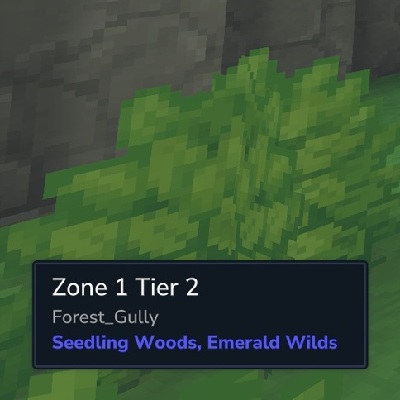
BiomeDisplay is a mod for Hytale that displays the current biome information in the UI.
If the MultipleHUD mod is present, this mod can be used alongside other mods that support multiple custom HUDS (e.g. EyeSpy).
Usage
Hide or show the HUD
/biome toggle
Adjust the position of the HUD
/biome position top center
/biome position middle right
/biome position bottom left
Set the positional offset of the HUD
/biome offset 100 0
/biome offset -500 20
/biome offset 0 -120
Adjust the size of the HUD
/biome size small
/biome size medium
/biome size large
Make background semi-transparent
/biome transparent true
/biome transparent false
Config
A config file can be proved at
- Servers:
mods/n8chur_BiomeDisplay/config.json
- Local:
%appdata%/Hytale/UserData/Saves/<world_name>/mods/n8chur_BiomeDisplay/config.json
This file will be created on first launch if one is not already provided.
The config file uses the following format:
{
  "DefaultHidden": true,
  "DefaultPosition": {
    "Vertical": "top",
    "Horizontal": "right"
  },
  "DefaultSize": "small",
  "DefaultIsTransparent": true
}
DefaultHidden: Whether the HUD is hidden to the user when they first join a server.
- Values:
true, false
- Default:
false
DefaultPosition: The default position of the HUD element when a user first joins a server.
Vertical- Values:
"top", "middle", "bottom"
- Default:
"bottom"
Horizontal- Values:
"left", "center", "right"
- Default:
"left"
DefaultOffset: The default positional offset of the HUD element when a user first joins a server.
X- Values: Integer (e.g. -100, 0, 64)
- Default: 0
Y- Values: Integer (e.g. -100, 0, 64)
- Default: 0
DefaultSize: The default size of the HUD element when a user first joins a server.
- Values:
"small", "medium", "large"
- Default:
"medium"
DefaultIsTransparent: Whether the background of the HUD element is semi-transparent when a user first joins a server.
- Values:
true, false
- Default:
false
Changelog
1.5.0
- Updated MultipleHUD support to 1.0.6.
- Added
/biome offset <x> <y> for fine-grained HUD positioning and config-backed default offset support.
1.4.1
- Fixed compatibility with AutoMultiHud when using mods that have the same UI selector names (e.g. EyeSpy's #Info selector). All UI selectors are now prefixed by "BD" (for BiomeDisplay).
- Updated MultipleHUD support to 1.0.4.
1.4.0
- Added a command (
/biome transparent <true|false>) to toggle whether the background of the HUD is semi-transparent.
- Added config file support to determine if the HUD background is semi-transparent when a user first joins.
- Updated config setup such that it will always save on launch instead of only writing the defaults if the file does not exist. This will ensure that new keys are shown in the config as they are added in future versions.
1.3.4
- Attempt to fix a crash that could occur when an update was requested while the UI was in in an invalid state ("Crash - Selected element in CustomUI command was not found. Selector: #TierLabel.Style").
1.3.3
- Config file is now created if one does not already exist.
- Further attempts at fixing concurrency issues.
1.3.2
- Fixed a potential crash when attempting to create user settings due to not dispatching the work to a world thread.
1.3.1
- Improved performance by skipping UI updates the contents and layout are unchanged on tick.
- Added better fallback if localizations are not present (uses raw values instead of presenting the user with a non-existent localization key).
1.3.0
- Added support for
config.json to provide default configuration values.
1.2.1
- Attempting to work around an issue that could cause BiomeDisplay to flicker a full screen overlay occasionally when in a high latency environment and used alongside other mods that integration with MultipleHUD.
1.2.0
- Added resize command with support for
small, medium, and large via /biome size <size>.
1.1.1
- Fixed MultipleHUD 1.0.2 support as well as some issues when integrating with other mods (like Wayfinder).
1.1.0
- Added support for moving the position of the window using the
/biome position command (e.g. /biome position top left)
- Updated the command to toggle the HUD on or off using
/biome toggle (was just /biome)
- Removed erroneously added example dirt crafting recipe.
- The mod will now default on instead of off.
- Added Better Modlist icon
- Minor performance and server memory improvements
Project description from CurseForge.
Recent files
BiomeDisplay releases and Hytale builds
20 Feb 2026
Client Not supported Server Required Dependencies No extras listed Listed on Project page
Check the setup → 5 Feb 2026
Client Not supported Server Required Dependencies No extras listed Listed on Project page
Check the setup → 22 Jan 2026
Client Not supported Server Required Dependencies No extras listed Listed on Project page
Check the setup → 21 Jan 2026
Client Not supported Server Required Dependencies No extras listed Listed on Project page
Check the setup → 20 Jan 2026
Client Not supported Server Required Dependencies No extras listed Listed on Project page
Check the setup → 20 Jan 2026
Client Not supported Server Required Dependencies No extras listed Listed on Project page
Check the setup → 19 Jan 2026
Client Not supported Server Required Dependencies No extras listed Listed on Project page
Check the setup → 19 Jan 2026
Client Not supported Server Required Dependencies No extras listed Listed on Project page
Check the setup → 19 Jan 2026
Client Not supported Server Required Dependencies No extras listed Listed on Project page
Check the setup → 19 Jan 2026
Client Not supported Server Required Dependencies No extras listed Listed on Project page
Check the setup → 19 Jan 2026
Client Not supported Server Required Dependencies No extras listed Listed on Project page
Check the setup → 18 Jan 2026
Client Not supported Server Required Dependencies No extras listed Listed on Project page
Check the setup →