Hytale version
Back to mods 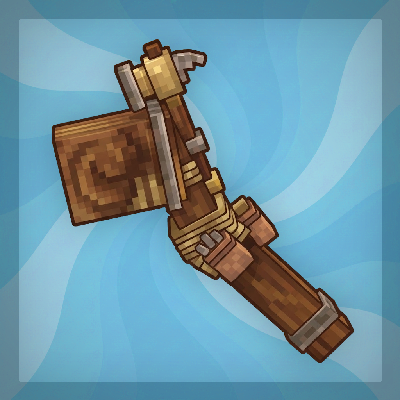
CurseForge · Hytale mod
Builder's Wand
Extend block faces and build structures in seconds
Choose a version Pick your version below, then grab the matching file.
Quick answer
Which Builder's Wand release should I use?
Latest stable file builders-wand-2.0.1.jar
Game version 0.7
Mod system Built-in Hytale mod system
Builder's Wand builders-wand-2.0.1.jar targets 0.7. Do not install it as a separate client mod. Enable it on the world host—the local server in singleplayer or the dedicated server in multiplayer. No required dependencies listed for this file.
Where it goes
Where should Builder's Wand be installed in Hytale?
Do not install it as a separate client mod. Enable it on the world host—the local server in singleplayer or the dedicated server in multiplayer.
Separate client mod Not supported
World host / dedicated server Required
Mod system for this release Built-in Hytale mod system
Required install it here Optional supported, not mandatory Not supported do not install here Source doesn’t say do not assume
Put Hytale mods on the world host or dedicated server. Singleplayer runs a local server too; Hytale does not use separate client mods.
What else does Builder's Wand builders-wand-2.0.1.jar need?
builders-wand-2.0.1.jar. Change the file and its required mods may change too.
This file does not list any required mods. Do not add a library just because a different file uses it.
This file does not list any required or optional project dependencies. Check the creator notes before changing an existing world.
Before you install it
Add Builder's Wand without breaking your instance.
Built for Builder's Wand builders-wand-2.0.1.jar. Pick another file and the loader, install side or required mods may change.
- 01
Stick to this file
Use builders-wand-2.0.1.jar. It targets 0.7; another release may target a different game build or dependency set.
- 02
Bring the mods it needs
This file does not list any required mods. Do not add a library just because a different file uses it.
- 03
Enable it on the world host
Do not install it as a separate client mod. Enable it on the world host—the local server in singleplayer or the dedicated server in multiplayer.
- 04
Pick the file you checked
Use the “Get this file” button beside builders-wand-2.0.1.jar. It opens that exact file at the source.
About this project
What does Builder's Wand add?
Updated for Hytale v0.7! Version 2.0
Extend walls, floors and ceilings with one click. Look at a surface, see exactly what will be built, right-click.
Features
- Right-click a block face with the Builder's Wand to extend the whole surface with the same block.
- Live preview, only visible to you: translucent ghost blocks, a white outline, or both.
- Follows the game's rules: normal reach, no illegal placements, grass and flowers give way like when placing by hand.
- Takes the blocks from your inventory (grass builds dirt), costs 1 durability per block. Free in creative.
- /oops takes back your last build and returns the blocks.
- Standalone: no other mod needed.
Recipe
Craft in the Workbench (Tools): 3 Iron Bars, 3 Light Leather, 3 Sticks.
The menu (/bw)
Open it with /bw (also /wand and /builderswand).
- Preview — Outline, Ghost or Both
- Rotation — Adapt: every block of the same type extends and takes its neighbour's rotation (logs, stairs). Exact: only blocks turned like the one you click.
- Diagonals — blocks that touch only at a corner join in (like the classic Minecraft wand)
- Extend — Free, Flat, Up/Down, N-S or E-W: which directions the surface may spread in
- Blocks per click — your own limit, up to what the server allows
- Undo last build
- Server settings (admins) — switch the wand off, durability, behaviour at water, default rotation, server maximum, default limit
Chat Configuration
Available Flags:
--limit: number of blocks per click--preview: ghost, outline, both
Example Command:
/bw --limit 100 --preview both
Permissions
| Node | Default | Effect |
|---|---|---|
builderswand.use |
everyone | Use the wand |
builderswand.menu |
everyone | Open /bw |
builderswand.admin |
OP only | Server settings, limit = server maximum |
builderswand.limit.<n> |
nobody | Up to n blocks per click (n = 100, 250 or 500 by default) |
Wildcards (builderswand.*) and deny nodes (-builderswand.use) work as usual.
Configuration File
Advanced settings are in the BuildersWand.json config file (or in /bw > Server settings as admin):
Enabled— master switchServerMaxBuildSize— hard cap of blocks per clickDefaultLimit— blocks per click without a limit permissionLimitTiers— values abuilderswand.limit.<n>permission can grantUseDurability— building wears the wandBuildThroughFluid— false = the wand stops at waterMatchRotation— default rotation mode (false = adapt)BlacklistedBlocks— block ids the wand never extends
How to Edit Configs
Configurations are stored per world. To edit them manually:
- Go to:
%APPDATA%\Hytale\UserData\Saves\YourWorldName\mods\EineNT_BuildersWand - Open BuildersWand.json with a text editor.
- Apply changes by restarting the server or running /pl reload EineNT:BuildersWand.

Project description from CurseForge.
Pick your setup
Builder's Wand releases for each Hytale build.
Choose the version and loader you play, then open the matching release.
Check the dependencies, then try the file in a copied instance before changing a world you care about.
Recent files
Builder's Wand releases and Hytale builds
builders-wand-2.0.1.jar
1 Nov 2026
Client Not supported Server Required Dependencies No extras listed Listed on Project page
Check the 0.7 setup 0.7 release
builders-wand-2.0.0.jar
1 Nov 2026
Client Not supported Server Required Dependencies No extras listed Listed on Project page
Check the 0.7 setup 0.7 release
builders-wand-1.0.0.jar
21 Jan 2026
Client Not supported Server Required Dependencies No extras listed Listed on Project page
Check the setup Looking for an older file? The official CurseForge project page is in Resources.
 mod
CurseForge · Hytale
Axo Tales
Your first spellbook is free. Hunt Cursed Knights for crafting materials, forge gear that boosts your mana, and work your way up to calling down meteor storms
 mod
CurseForge · Hytale
AWI Industrial Field Guide
Full featured in game documentation and wiki for AWI Industrial
 mod
CurseForge · Hytale
AWI Power
AWI Power is an add on for AWI Industrial - It brings electricity and working systems to Hytale!