JemAnnouncements-1.3.1.jar
19 Feb 2026
Client Not supported Server Required Dependencies No extras listed Listed on Project page
Check the setup 
CurseForge · Hytale mod
Sheduled/automated announcement system with chat, notifications, titles, and sounds.
Quick answer
JemAnnouncements-1.3.1.jar targets Hytale. Do not install it as a separate client mod. Enable it on the world host—the local server in singleplayer or the dedicated server in multiplayer. No required dependencies listed for this file.
Where it goes
Do not install it as a separate client mod. Enable it on the world host—the local server in singleplayer or the dedicated server in multiplayer.
Put Hytale mods on the world host or dedicated server. Singleplayer runs a local server too; Hytale does not use separate client mods.
JemAnnouncements-1.3.1.jar. Change the file and its required mods may change too.
This file does not list any required mods. Do not add a library just because a different file uses it.
This file does not list any required or optional project dependencies. Check the creator notes before changing an existing world.
Before you install it
Built for JemAnnouncements-1.3.1.jar. Pick another file and the loader, install side or required mods may change.
Use JemAnnouncements-1.3.1.jar. It targets Hytale; another release may target a different game build or dependency set.
This file does not list any required mods. Do not add a library just because a different file uses it.
Do not install it as a separate client mod. Enable it on the world host—the local server in singleplayer or the dedicated server in multiplayer.
Use the “Get this file” button beside JemAnnouncements-1.3.1.jar. It opens that exact file at the source.
About this project
A Hytale server plugin that provides an automated announcement system with support for chat, notifications, titles, and sound messages. This plugin allows you to schedule and customize announcements that are automatically sent to all online players at configurable intervals.
& codes), and TinyMsg tags/announce-reload/announce <message-name>. For messages in subfolders, use the relative path (e.g., /announce example/example-chat).Chat Messages: Send formatted chat messages to all players (supports multiple lines, centering, and rich formatting) 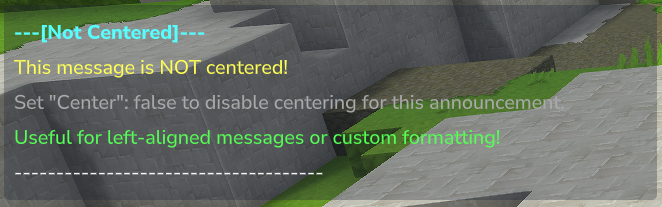
Notification: Display notifications similar to item pickup notifications with custom icons 
Title Messages: Show title and subtitle messages with customizable fade in/out timing and major title support 
Sound Effects: Play custom sounds to all players with configurable volume and pitch
JemAnnouncements-x.x.x.jar file into your Hytale server's mods folderJemsire_JemAnnouncements/AnnouncementConfig.json file to configure intervals and orderingJemsire_JemAnnouncements/messages/ folder/announce-reload to hot reload the config and start the pluginNote: Example message templates are automatically created on first launch. You can customize them or create your own message files.
After first launch, configuration files will be created in your mods folder. The plugin uses a two-tier configuration system:
The main configuration file is located at Jemsire_JemAnnouncements/AnnouncementConfig.json:
{
  "IntervalSeconds": 300,
  "EnableRandomization": false,
  "CreateExampleMessages": true,
  "LogLevel": "INFO",
  "Version": 1
}
Configuration Options:
IntervalSeconds: Time in seconds between announcements (default: 300 = 5 minutes)EnableRandomization: Set to true for random message order, false for sequential order (default: false)CreateExampleMessages: If set to true, the plugin will automatically create example message files if none exist (default: true).LogLevel: Controls the detail of plugin logs in the console."INFO" (Default): Shows standard plugin information and errors."DEBUG": Shows detailed internal tracing, useful for troubleshooting message parsing and delivery."NONE": Disables all logs except for critical errors.Version: Configuration version (currently 1)Each announcement message has its own configuration file in Jemsire_JemAnnouncements/messages/. The plugin recursively scans this folder, allowing you to organize your messages into subfolders if desired.
Example templates are automatically created on first launch in the messages/example/ subfolder:
example/example.json - Complete example with all message typesexample/example-chat.json - Chat messages onlyexample/example-notification.json - Action bar notification onlyexample/example-title.json - Title message onlyexample/example-sound.json - Sound effect onlyexample/example-all.json - All message types combinedexample/example-no-center.json - Example without message centering{
"Enabled": true,
"Center": true,
"Priority": 0,
"ChatMessages": [
"<aqua><bold>---[Announcement]---</bold></aqua>",
"<yellow>This is an announcement message!</yellow>"
],
"Notification": {
"Title": "<yellow><bold>Announcement</bold></yellow>",
"Subtitle": "<gray>This is a notification</gray>",
"Icon": "Weapon_Sword_Mithril"
},
"Title": {
"Title": "<green><bold>Announcement</bold></green>",
"Subtitle": "<gray>This is a title</gray>",
"IsMajor": false,
"FadeIn": 0.25,
"Stay": 5.0,
"FadeOut": 0.25
},
"Sound": {
"SoundName": "SFX_Unbreakable_Block",
"Volume": 1.0,
"Pitch": 1.0
}
}
Configuration Options:
Enabled: Enable or disable this message (true/false)Center: Center chat messages in the chat window (true/false, default: true)Priority: Higher priority messages are shown first when sorted (default: 0)ChatMessages: Array of chat message strings (sent in order)Notification: notification configuration (optional)Title: Title/subtitle configuration (optional)Sound: Sound effect configuration (optional)Chat Messages Only:
{
  "Enabled": true,
  "Center": true,
  "ChatMessages": [
    "<aqua><b>---[Server Rules]---</b></aqua>",
    "<e>1. Be respectful to other players</e>",
    "<e>2. No griefing or cheating</e>",
    "<e>3. Have fun!</e>"
  ]
}
Centered with offset (fine-tune centering per line):
{
  "Enabled": true,
  "Center": true,
  "ChatMessages": [
    "<offset:-3><6>Shifted left by 3 spaces</6>",
    "<aqua>Normal centered line</aqua>",
    "<offset:5><green>Shifted right by 5 spaces</green>"
  ]
}
Notification:
{
  "Enabled": true,
  "Notification": {
    "Title": "<yellow><bold>Server Event Starting!</bold></yellow>",
    "Subtitle": "<gray>Join us in 5 minutes</gray>",
    "Icon": "Weapon_Sword_Mithril"
  }
}
Title Message:
{
  "Enabled": true,
  "Title": {
    "Title": "<green><bold>Welcome to the Server!</bold></green>",
    "Subtitle": "<gray>Enjoy your stay</gray>",
    "IsMajor": true,
    "FadeIn": 0.5,
    "Stay": 7.0,
    "FadeOut": 0.5
  }
}
Sound Effect:
{
  "Enabled": true,
  "Sound": {
    "SoundName": "SFX_Unbreakable_Block",
    "Volume": 1.0,
    "Pitch": 1.0
  }
}
Combined (All Types):
{
  "Enabled": true,
  "Center": true,
  "ChatMessages": [
    "<aqua><bold>---[Complete Example]---</bold></aqua>",
    "<yellow>This includes all message types!</yellow>"
  ],
  "Notification": {
    "Title": "<yellow><bold>Complete Example</bold></yellow>",
    "Subtitle": "<gray>All message types combined</gray>",
    "Icon": "Weapon_Sword_Mithril"
  },
  "Title": {
    "Title": "<green><bold>Full Announcement</bold></green>",
    "Subtitle": "<gray>Chat, Notification, Title, and Sound</gray>",
    "IsMajor": true,
    "FadeIn": 0.5,
    "Stay": 7.0,
    "FadeOut": 0.5
  },
  "Sound": {
    "SoundName": "SFX_Unbreakable_Block",
    "Volume": 1.0,
    "Pitch": 1.0
  },
  "Priority": 0
}
The plugin supports TinyMsg tags, legacy & color codes, and centering offsets.
TinyMsg tags (HTML-like):
| Tag | Aliases | Example | Description |
|---|---|---|---|
<color:X> |
<c:X>, <colour:X> |
<color:red>text</color> |
Named or hex color |
<gradient:X:Y> |
<grnt:X:Y> |
<gradient:gold:red>text</gradient> |
Color gradient |
<bold> |
<b> |
<b>text</b> |
Bold |
<italic> |
<i>, <em> |
<i>text</i> |
Italic |
<underline> |
<u> |
<u>text</u> |
Underline |
<monospace> |
<mono> |
<mono>text</mono> |
Monospace |
<link:URL> |
<url:URL> |
<link:https://example.com>click</link> |
Clickable link |
<reset> |
<r> |
<b>bold<reset>normal |
Reset formatting |
Named colors: black, dark_blue, dark_green, dark_aqua, dark_red, dark_purple, gold, gray, dark_gray, blue, green, aqua, red, light_purple, yellow, white
Minecraft-style legacy tags: Use <0>–<9> and <a>, <b>, <d>, <e>, <f> for the same colors as &0–&f (e.g. <e>yellow</e>, <6>gold</6>). Use <red> or <color:red> for red so <c:#FF0000> still works for hex.
Hex colors: <color:#FF0000>red</color> or <c:#FF00FF>magenta</color>
Legacy & color codes (converted to TinyMsg before parsing):
&0–&f – Colors (e.g. &a green, &c red)&l bold, &o italic, &n underline, &r reset&#RRGGBB and &x&R&R&G&G&B&B – Hex colorsCentering offset (one per line when Center is enabled):
<offset:N> – Adjust leading spaces: positive = shift right, negative = shift left (e.g. <offset:-2>, <offset:5>). The tag is stripped and not shown.Note: Legacy & codes are converted to TinyMsg tags before parsing. You can mix tags and & codes in the same message.
/announce-reload - Reloads the plugin configuration and messages without restarting the server
jemsire.announcements.reload/announce <message-name> - Manually trigger an announcement by message name
jemsire.announcements.announce/announce example (message name without .json extension)/announce example triggers the message from example.jsonFeel free to contribute or spin it into your own system! Check out the Github
Join the discord! Join Now!
Project description from CurseForge.
Recent files
19 Feb 2026
10 Feb 2026
7 Feb 2026
29 Jan 2026
25 Jan 2026
19 Jan 2026
18 Jan 2026
18 Jan 2026
Looking for an older file? The official CurseForge project page is in Resources.
 mod
mod**Twinfang Glaives** adds a growing collection of dual-wielded glaives to Hytale.
 mod
modadds a kweebec helper that can mine, fight, build, and gather resources.
 mod
modHytale RPG Leveling Mod - Endless Leveling adds full character progression: levels, stats, classes, races, augments, skills/abilities, dungeons & dynamic events. Solo Leveling inspired endless growth for singleplayer & servers.