TransmogAssets-1.0.7.jar
4 Feb 2026
Client Not supported Server Required Dependencies No extras listed Listed on Project page
Check the setup 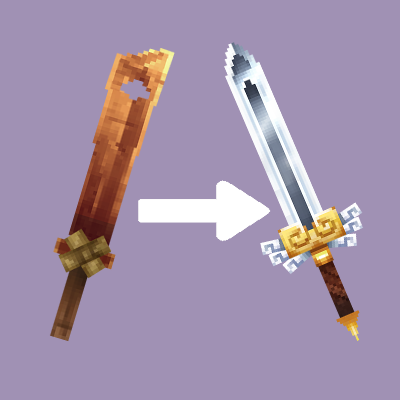
CurseForge · Hytale mod
Commands and work benches to change the appearance of weapons and armor without modifying their behavior.
Quick answer
Transmog and Hide Armor TransmogAssets-1.0.7.jar targets Hytale. Do not install it as a separate client mod. Enable it on the world host—the local server in singleplayer or the dedicated server in multiplayer. No required dependencies listed for this file.
Where it goes
Do not install it as a separate client mod. Enable it on the world host—the local server in singleplayer or the dedicated server in multiplayer.
Put Hytale mods on the world host or dedicated server. Singleplayer runs a local server too; Hytale does not use separate client mods.
TransmogAssets-1.0.7.jar. Change the file and its required mods may change too.
This file does not list any required mods. Do not add a library just because a different file uses it.
This file does not list any required or optional project dependencies. Check the creator notes before changing an existing world.
Before you install it
Built for Transmog and Hide Armor TransmogAssets-1.0.7.jar. Pick another file and the loader, install side or required mods may change.
Use TransmogAssets-1.0.7.jar. It targets Hytale; another release may target a different game build or dependency set.
This file does not list any required mods. Do not add a library just because a different file uses it.
Do not install it as a separate client mod. Enable it on the world host—the local server in singleplayer or the dedicated server in multiplayer.
Use the “Get this file” button beside TransmogAssets-1.0.7.jar. It opens that exact file at the source.
About this project
A Hytale plugin that allows for players to change the appearance of armor and weapons without impacting gameplay.
Files for pre-release versions can be found under beta releases.
Multiplayer Compatible - Changes will be visible to all players
Persistant - Modified items will be saved and loaded automatically
Crafting Menus - Two new added workbenches make changing appearances easy and vanilla friendly
The Transmog Table and Transmog Cleaner are added with this plugin to make applying and removing the effects more accessible. They are both craftable at a Tier 1 workbench with 5 wood and 5 stone.
To use the Transmog Table menu, place your item in the fuel slot. Place any weapon/armor in the input slot to copy its appearance.
The Transmog Cleaner menu will automatically reset any item put into the input slots.
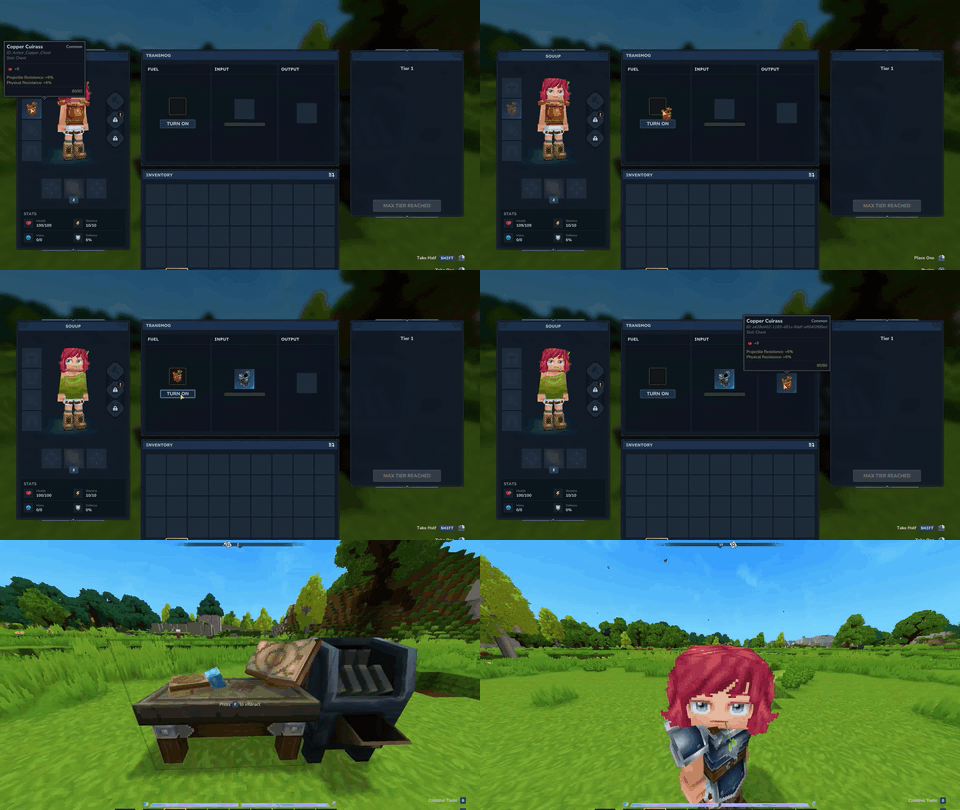
Indivisibility (this has been removed as of 1.0.6 for Update 2)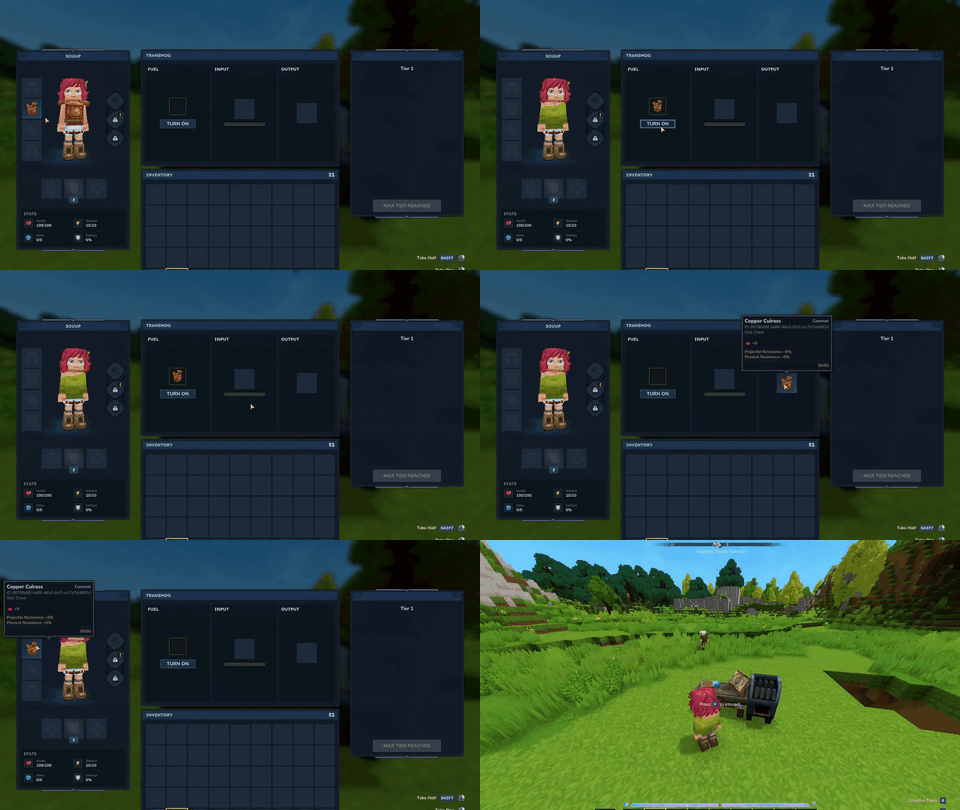
By default you the commands will be inaccessible. You will need the specific player permissions or op to utilize them.
| Command | Description |
|---|---|
/transmog set --id={item_id} |
Changes the appearance of currently held item into that of the given item id. |
/transmog makeinvisible |
Makes the held armor piece hidden when equipped. |
/transmog remove |
Resets the appearance of the currently held item. |
/transmog menu |
Opens the transmog work bench menu |
/transmog cleanmenu |
Opens the transmog cleaning work bench menu |
Permissions are left default: com.souup.transmog.command.transmog.{subcommand}
The transmog system works by creating new registers items at runtime. This will cause minor lag spikes to players every time the effect is applied as all players will need to load in the new item.
Currently, only armor and weapons can have their appearance changed, however, with the set command their appearance can use ANY model/texture (may break with certain non-weapons/armor). This is blocked in the work bench menu which can only copy the appearance of weapons and armor.
Weapons and armor types do not need to match. Dagger->Sword, Weapon->Armor, Armor->Weapon, etc, are all currently possible. This is intentional because its funny.
Hytale is in early access so many things will change that may break the mod. If you find any bugs leave a comment or dm me on discord (Molder in the official Hytale discord)
Project description from CurseForge.
Recent files
4 Feb 2026
24 Jan 2026
22 Jan 2026
19 Jan 2026
Looking for an older file? The official CurseForge project page is in Resources.