SimpleHotbarSwapper-1.1.1.jar
20 Jan 2026
Client Not supported Server Required Dependencies No extras listed Listed on Project page
Check the setup 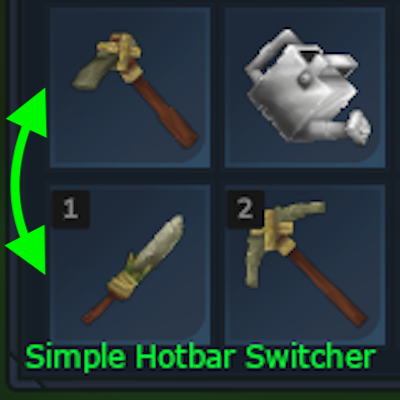
CurseForge · Hytale mod
Quickly swap player hotbar with inventory or backpack rows
Quick answer
Simple Hotbar Swapper SimpleHotbarSwapper-1.1.1.jar targets Hytale. Do not install it as a separate client mod. Enable it on the world host—the local server in singleplayer or the dedicated server in multiplayer. No required dependencies listed for this file.
Where it goes
Do not install it as a separate client mod. Enable it on the world host—the local server in singleplayer or the dedicated server in multiplayer.
Put Hytale mods on the world host or dedicated server. Singleplayer runs a local server too; Hytale does not use separate client mods.
SimpleHotbarSwapper-1.1.1.jar. Change the file and its required mods may change too.
This file does not list any required mods. Do not add a library just because a different file uses it.
This file does not list any required or optional project dependencies. Check the creator notes before changing an existing world.
Before you install it
Built for Simple Hotbar Swapper SimpleHotbarSwapper-1.1.1.jar. Pick another file and the loader, install side or required mods may change.
Use SimpleHotbarSwapper-1.1.1.jar. It targets Hytale; another release may target a different game build or dependency set.
This file does not list any required mods. Do not add a library just because a different file uses it.
Do not install it as a separate client mod. Enable it on the world host—the local server in singleplayer or the dedicated server in multiplayer.
Use the “Get this file” button beside SimpleHotbarSwapper-1.1.1.jar. It opens that exact file at the source.
About this project
A Hytale server mod that allows players to easily swap hotbar items with any row in their inventory or backpack.

Simple Hotbar Swapper is a mod for Hytale that enables players to quickly swap their hotbar items. You can swap the hotbar with any of the 4 rows in your main inventory or multiple rows in your backpack with a single command.
shs command for quick access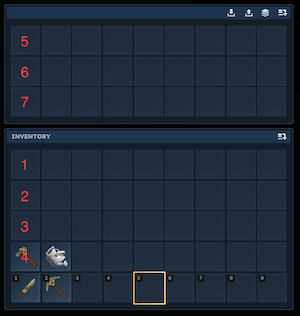
/simple_hotbar_switcher <row_number>
/shs <row_number>
/shs 5
This feature works with bag items like [NoCube's] Simple Bags that contain inventory containers.
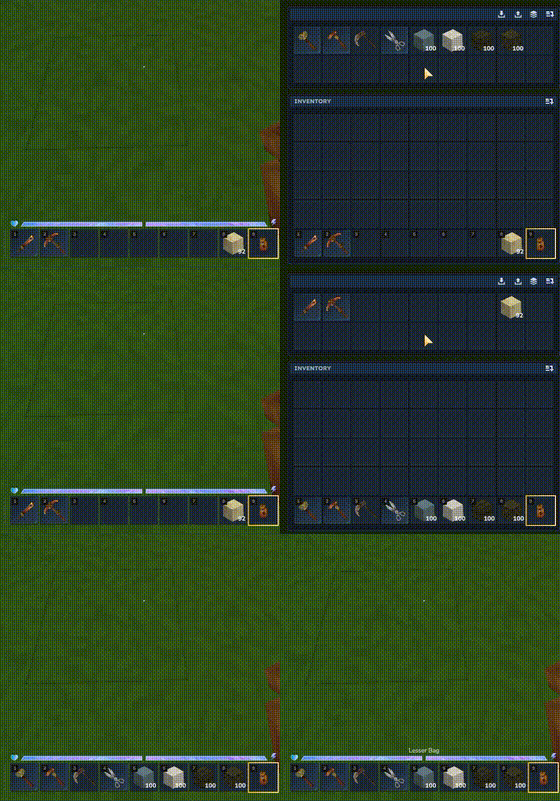
When you're holding a bag item in slot 9:
This feature allows you to quickly access items stored in your bag without manually swapping rows.
There are two ways to drop a bag item:
Using Inventory Screen: Open your inventory screen, and drop the bag from slot 9 normally
Using Hotbar (G key): Press G key with the bag in slot 9
The automatic swap only triggers when:
Project description from CurseForge.
Recent files
20 Jan 2026
19 Jan 2026
18 Jan 2026
Looking for an older file? The official CurseForge project page is in Resources.
 mod
modTurn decorative wardrobes into functional loot containers!
 mod
modMob taming framework and asset patcher. Breeding, traits, leveling, tame management UI, easier interaction chains, capture/spawn items that store metadata, ownership/tamed status, lots of behavior components and more!
 mod
modVocally's Omnitool & Arsenal introduces a versatile, all-in-one multi-tool spanning Iron through Mythril alongside 11 unique weapons to streamline your adventure.