AdvancedScoreboard-1.0.5-a
28 Jan 2026
Client Not supported Server Required Dependencies No extras listed Listed on Project page
Check the setup 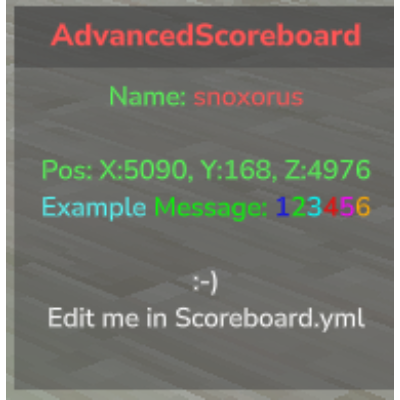
CurseForge · Hytale mod
Clean, config-first Minecraft-style scoreboard for Hytale servers.
Quick answer
Advanced Scoreboard AdvancedScoreboard-1.0.5-a targets Hytale. Do not install it as a separate client mod. Enable it on the world host—the local server in singleplayer or the dedicated server in multiplayer. No required dependencies listed for this file.
Where it goes
Do not install it as a separate client mod. Enable it on the world host—the local server in singleplayer or the dedicated server in multiplayer.
Put Hytale mods on the world host or dedicated server. Singleplayer runs a local server too; Hytale does not use separate client mods.
AdvancedScoreboard-1.0.5-a. Change the file and its required mods may change too.
This file does not list any required mods. Do not add a library just because a different file uses it.
This file does not list any required or optional project dependencies. Check the creator notes before changing an existing world.
Before you install it
Built for Advanced Scoreboard AdvancedScoreboard-1.0.5-a. Pick another file and the loader, install side or required mods may change.
Use AdvancedScoreboard-1.0.5-a. It targets Hytale; another release may target a different game build or dependency set.
This file does not list any required mods. Do not add a library just because a different file uses it.
Do not install it as a separate client mod. Enable it on the world host—the local server in singleplayer or the dedicated server in multiplayer.
Use the “Get this file” button beside AdvancedScoreboard-1.0.5-a. It opens that exact file at the source.
About this project

Transform your Hytale server with a fully customizable, Minecraft-style scoreboard that displays real-time player and server information.
Designed to be clean, predictable, and config-first — not command-heavy or visually cluttered. This is the better scoreboard!
Custom Logo & Colors
Add your own logo and use full color support, including hex codes, to brand your scoreboard.
Dynamic Placeholders
Uses PlaceholderLib to display live player and server information.
Real-Time Updates
Scoreboard content refreshes automatically as values change.
Player Toggle Command
Players can use /sboard to toggle the scoreboard on or off.
Admin Reload Command
Admins can use /sbrl to reload the configuration without restarting the server.
Fully Configurable
Customize the title, lines, colors, and layout entirely via Scoreboard.yml.
Custom Animations
Create animated text with frame-by-frame control using Animations.yml.
AdvancedScoreboard.jar and the required mods into your server’s mods folder.mods/AdvancedScoreboard/Scoreboard.yml to your liking./sbrl in-game to apply changes instantly./sboard
Toggles the scoreboard on or off for the player.
/sbrl
Reloads the scoreboard configuration file.
(Requires admin / configured permissions)
Customize your scoreboard by editing mods/AdvancedScoreboard/Scoreboard.yml.
Note: The scoreboard currently supports a maximum of 12 lines.
Example Scoreboard.yml:
title: "&cAdvanced &dScoreboard"
showLogo: true
lines:
  - "{animation:welcome}"
  - "&aName: &c%player_name%"
  - "&aRank: %luckperms_prefix% %luckperms_group% %luckperms_suffix%"
  - ""
  - "&aPos: X:%player_x%, Y:%player_y%, Z:%player_z%"
  - "&aOnline: _online/%server_max_players%"
  - "&bExample &2Message: &11&22&33&44&55&66"
  - ""
& followed by a number/letter (e.g., &c for red).&# followed by a 6-digit hex code (e.g., &#FF5733).&l (Bold), &o (Italic), &n (Underline).Create animated text effects using Animations.yml:
  change-interval: 400
  frames:
  - "&eH_"
  - "&eHe_"
  - "&eHel_"
  - "&eHell_"
  - "&eHello_"
Using Animations: Add animations to your scoreboard using {animation:name} format:
lines:
  - "{animation:hello}"
  - "&aPlayer: &c%player_name%"
AdvancedScoreboard gets its power from PlaceholderLib.
Any placeholder available on your server will work automatically.
(Required for these placeholders)
%luckperms_prefix%%luckperms_suffix%%luckperms_group%
%player_name%%player_uuid%%player_x% %player_y% %player_z%%player_language%
%server_name%%server_max_players%%server_default_world%%server_gamemode%
Legacy Placeholders (Deprecated):_player _online _pos_x _pos_y _pos_z _lp_prefix _lp_suffix _lp_group
It is strongly recommended to use PlaceholderLib equivalents.
/sbrl command.Scoreboard.yml has valid YAML syntax.logo.png) must be manually replaced inside the .jar file. You can find it at \Common\UI\Custom\Textures\logo.png within the jar.{animation:name} match exactly with those defined in Animations.yml.Animations.yml file is in the correct location (mods/AdvancedScoreboard/Animations.yml)./sbrl to reload both scoreboard and animation configurations.Join our Discord Server for support, to suggest features, or to check out our other mods!
Project description from CurseForge.
Recent files
28 Jan 2026
27 Jan 2026
22 Jan 2026
20 Jan 2026
19 Jan 2026
19 Jan 2026
18 Jan 2026
Looking for an older file? The official CurseForge project page is in Resources.