Hytale version
Back to mods 
CurseForge · Hytale mod
Admin Portals
Create customizable portals that execute commands when players enter or interact with them
Choose a version Pick your version below, then grab the matching file.
Quick answer
Which Admin Portals release should I use?
Latest stable file hiwire-adminportals-mod-0.8.0.jar
Game version 0.6
Mod system Built-in Hytale mod system
Admin Portals hiwire-adminportals-mod-0.8.0.jar targets 0.6. Do not install it as a separate client mod. Enable it on the world host—the local server in singleplayer or the dedicated server in multiplayer. No required dependencies listed for this file.
Where it goes
Where should Admin Portals be installed in Hytale?
Do not install it as a separate client mod. Enable it on the world host—the local server in singleplayer or the dedicated server in multiplayer.
Separate client mod Not supported
World host / dedicated server Required
Mod system for this release Built-in Hytale mod system
Required install it here Optional supported, not mandatory Not supported do not install here Source doesn’t say do not assume
Put Hytale mods on the world host or dedicated server. Singleplayer runs a local server too; Hytale does not use separate client mods.
What else does Admin Portals hiwire-adminportals-mod-0.8.0.jar need?
hiwire-adminportals-mod-0.8.0.jar. Change the file and its required mods may change too.
This file does not list any required mods. Do not add a library just because a different file uses it.
This file does not list any required or optional project dependencies. Check the creator notes before changing an existing world.
Before you install it
Add Admin Portals without breaking your instance.
Built for Admin Portals hiwire-adminportals-mod-0.8.0.jar. Pick another file and the loader, install side or required mods may change.
- 01
Stick to this file
Use hiwire-adminportals-mod-0.8.0.jar. It targets 0.6; another release may target a different game build or dependency set.
- 02
Bring the mods it needs
This file does not list any required mods. Do not add a library just because a different file uses it.
- 03
Enable it on the world host
Do not install it as a separate client mod. Enable it on the world host—the local server in singleplayer or the dedicated server in multiplayer.
- 04
Pick the file you checked
Use the “Get this file” button beside hiwire-adminportals-mod-0.8.0.jar. It opens that exact file at the source.
About this project
What does Admin Portals add?
HiWire - AdminPortals
A custom portal management mod for Hytale single- and multiplayer by HiWire Studio
Need to teleport players to another world when they interact with a portal? Check out our other mod — the default /tp command can't do that:
TP2World
Features
- Configurable Portals - Place portal blocks that execute one or more commands when players interact with them
- Multiple Portal Styles - Choose between Forgotten Temple (blue) and Void (purple) portal variants
- Command Execution Modes - Execute commands as the server or as the interacting player
- Dynamic Placeholders - Use placeholders in commands to insert player/location data
- Map Markers - Optionally display portals on the world map with custom icons and labels
- Multilingual - Supports English (en-US), German (de-DE) and many more (if added)
- Customizable - Override translations, UI definitions, and assets
Requirements
- Hytale or Hytale Server
- Java 25
Installation
Using CurseForge App
The easiest way to install mods is via the CurseForge App, which handles installation and updates automatically.
Manual Installation
- Download the mod JAR file
- Place it in the mods directory:
- Windows:
%appdata%\Hytale\UserData\Mods - Mac:
~/Library/Application Support/Hytale/UserData/Mods - Linux (Flatpak):
~/.var/app/com.hypixel.HytaleLauncher/data/Hytale/UserData/Mods - Dedicated Server:
/modsfolder in your server directory
- Windows:
- Restart the game or server
Since Hytale uses a server internally for both singleplayer and multiplayer, this mod works in both modes.
Commands
| Command | Description | Executor | Permission |
|---|---|---|---|
/adminportals |
Root command for AdminPortals | Any | hiwire.adminportals.command.adminportals |
/adminportals configmode |
Configuration mode commands | Any | hiwire.adminportals.command.adminportals.configmode |
/adminportals configmode toggle |
Toggle configuration mode for yourself | Player only | hiwire.adminportals.command.adminportals.configmode.toggle |
/adminportals placeholder |
Placeholder management commands | Any | hiwire.adminportals.command.adminportals.placeholder |
/adminportals placeholder list |
List all registered placeholders | Any | hiwire.adminportals.command.adminportals.placeholder.list |
Permissions
For command permissions, see the Commands table above.
| Permission | Description |
|---|---|
hiwire.adminportals.portal.config.view |
Open the portal configuration UI |
hiwire.adminportals.portal.config.edit |
Save changes to the portal configuration |
Configuration
Entering Configuration Mode
To configure portals, you must first enter configuration mode by running:
/adminportals configmode toggle
While in configuration mode, interacting with a portal block using the interact key will open the configuration UI. Run the command again to exit configuration mode.
Configuration UI
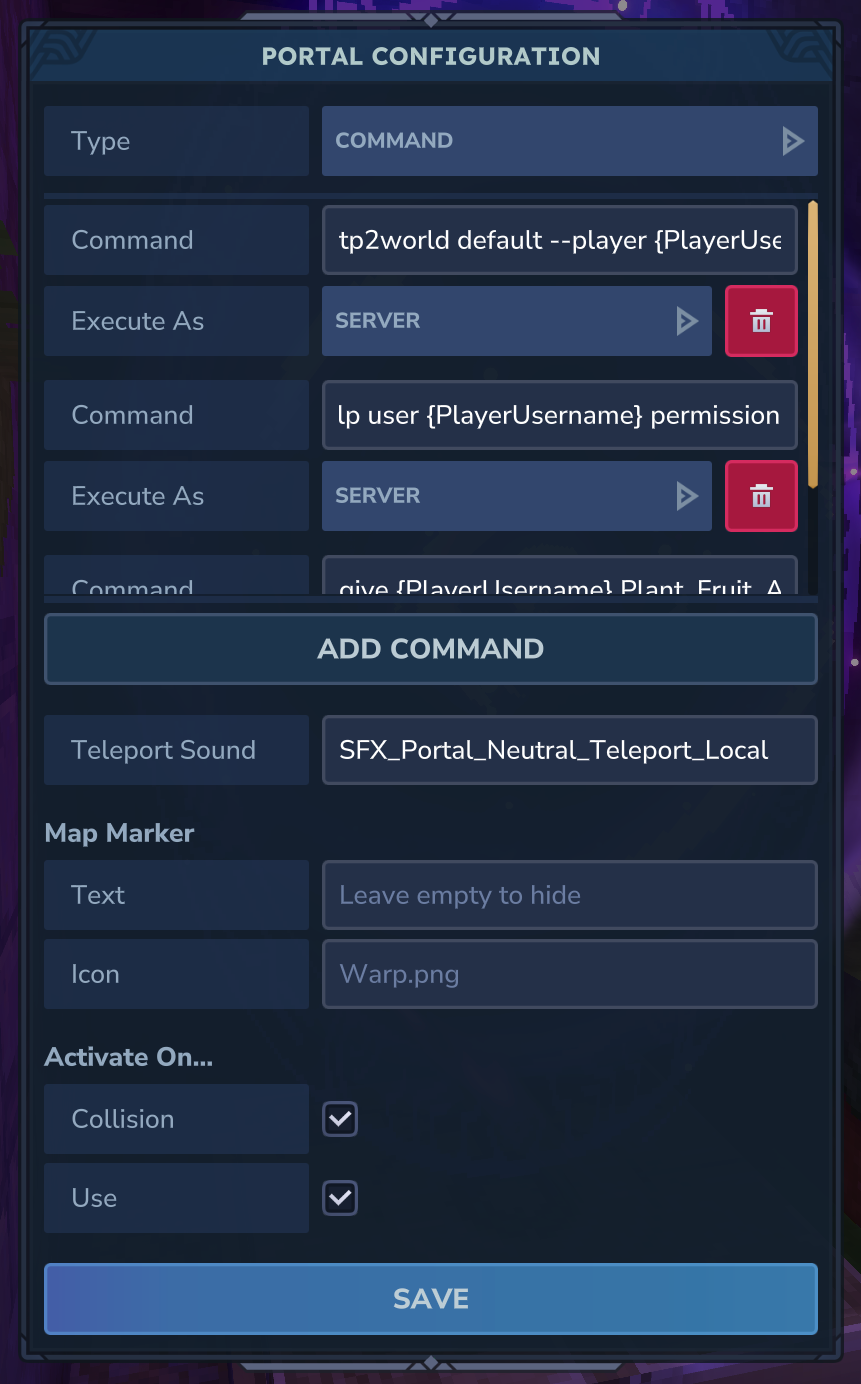
The configuration UI allows you to set the following options:
| Option | Description |
|---|---|
| Type | The config type. Currently only the "Command" type is supported |
| Commands | A list of commands to execute when the player activates the portal. Each command has its own execution mode. Use the "Add Command" button to add more |
| Execute As | Per-command setting: Server - runs the command as console / CommandSender; Player - runs the command as the interacting player |
| Teleport Sound | Sound effect ID to play when the portal is activated. Leave empty for no sound (default: SFX_Portal_Neutral_Teleport_Local) |
| Map Marker Text | Optional label displayed on the world map and compass |
| Map Marker Icon | Icon filename from server assets for the map marker (default: Warp.png) |
| Collision | Enable or disable portal activation when a player walks through the portal's hitbox (default: enabled) |
| Use | Enable or disable portal activation when a player presses the interact key (default: enabled) |
Map Markers
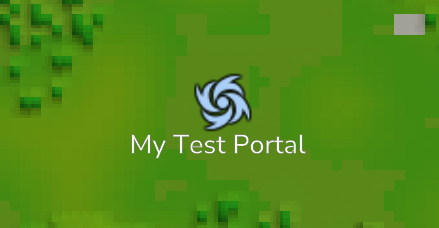
When you configure a portal with a Map Marker Text, the portal will be displayed on the world map and compass, making it easy for players to locate.
Portal marker on the world map:
Portal marker on the compass:

Placeholders
Use these placeholders in portal commands. They are replaced with actual values when the portal is activated.
| Placeholder | Description |
|---|---|
{PlayerUsername} |
Username of the player activating the portal |
{PlayerUuid} |
UUID of the player activating the portal |
{PosX} |
X coordinate of the portal block |
{PosY} |
Y coordinate of the portal block |
{PosZ} |
Z coordinate of the portal block |
{WorldName} |
Name of the world containing the portal |
Example Commands
A portal can have multiple commands that run in sequence. Each command can have its own execution mode.
For example, a portal could be configured with the following commands:
tp {PlayerUsername} 100 64 200(Execute As: Server)say Player {PlayerUsername} has entered a portal(Execute As: Server)spawn(Execute As: Player)
Portal Blocks
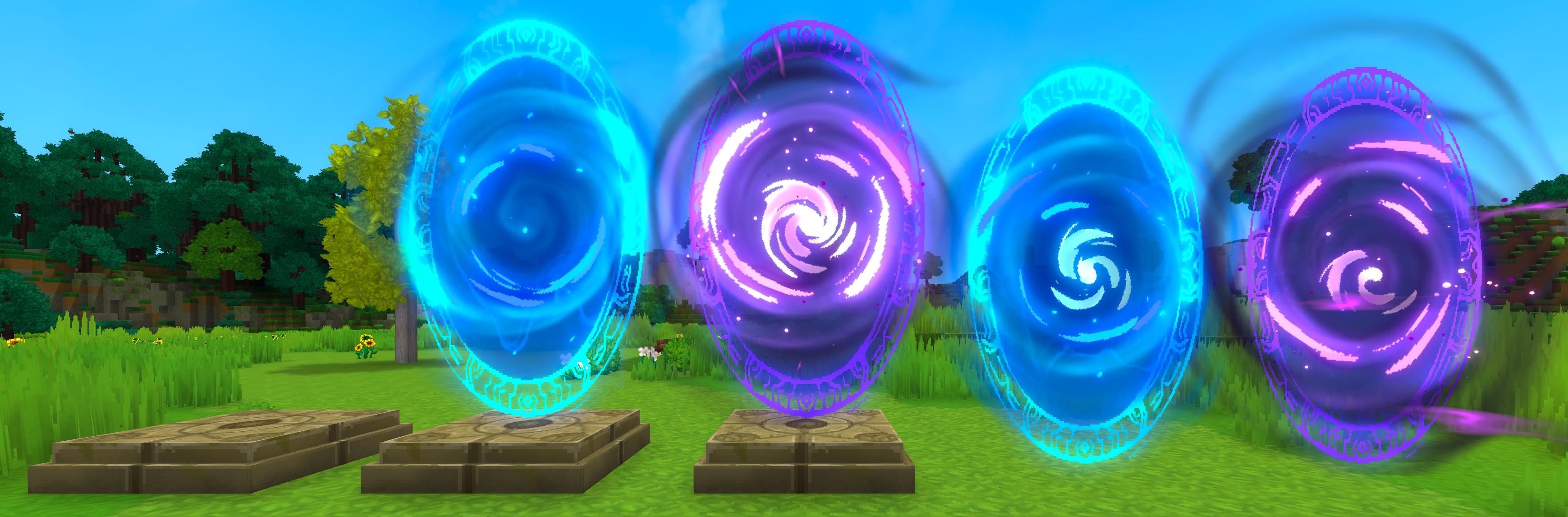
Portal blocks can be found in the creative inventory under Blocks > Portals.
Using Portals
Players can activate a configured portal in two ways (both enabled by default, configurable per portal):
- Collision - Walking through the portal's hitbox
- Use - Pressing the interact key on the portal
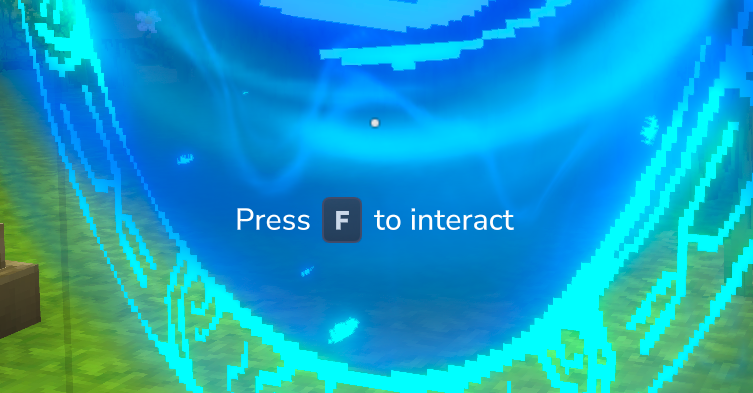
If a portal has not been configured yet, the player will receive a chat message indicating that the portal is not configured.
Portal Base (Two-Piece Setup)
The Portal Base is a decorative pad that serves as a foundation for portal effects. The portal base portals are vertically offset to sit perfectly on top of the base.:
HiWire_AdminPortals_PortalBase- The base padHiWire_AdminPortals_PortalBase_Portal_ForgottenTemple- Blue portal effect (designed to sit on the base)HiWire_AdminPortals_PortalBase_Portal_Void- Purple portal effect (designed to sit on the base)
Standalone Portals
Self-contained portal blocks that are aligned with the world grid. The bottom of the portal aligns with the block boundary, so they sit flush on the ground without floating like portals on top of a base.:
HiWire_AdminPortals_StandalonePortal_ForgottenTemple- Blue standalone portalHiWire_AdminPortals_StandalonePortal_Void- Purple standalone portal
Customization
The mod supports user overrides for translations, UI definitions, and assets. Place your customizations in the mod's data folder under mods/HiWire_AdminPortals_Overrides.
Translation Files
The mod uses translation files located in /Server/Languages/{language}/HiWire/AdminPortals/:
Items.lang- Portal item names and descriptionsChatMessages.lang- Chat notifications and command messagesUI.lang- User interface labels
Translation files with all keys are created and automatically updated at mods/HiWire_AdminPortals_Overrides/Server/Languages/{language}/HiWire/AdminPortals/. Edit these files to customize translations without modifying the original mod files.
Custom Placeholders
Mod developers can register custom placeholders by accessing the PlaceholderManager:
final var plugin = PluginManager.get().getPlugin(new PluginIdentifier("HiWire", "AdminPortals"));
if (plugin instanceof AdminPortalsPlugin adminPortalsPlugin) {
    final var placeholderManager = adminPortalsPlugin.getPlaceholderManager();

    // Register a simple placeholder. It can be used with {ServerName}
    placeholderManager.register("ServerName", ctx -> "My Server");

    // Register a placeholder using context data
    placeholderManager.register("PlayerHealth", ctx -> {
        final var playerRef = ctx.playerRef();
        final var health = // Get player health via playerRef
        return String.valueOf(health);
    });
}
The PlaceholderContext provides access to:
playerRef()- The player activating the portalworld()- The world containing the portalpos()- The block position (Vector3i)portalConfig()- The portal's configurationitemStack()- The item used for interaction (nullable)interactionType()- The type of interactioninteractionContext()- Additional interaction context
License
MIT License
Copyright (c) 2026 HiWire Studio
Permission is hereby granted, free of charge, to any person obtaining a copy of this software and associated documentation files (the "Software"), to deal in the Software without restriction, including without limitation the rights to use, copy, modify, merge, publish, distribute, sublicense, and/or sell copies of the Software, and to permit persons to whom the Software is furnished to do so, subject to the following conditions:
The above copyright notice and this permission notice shall be included in all copies or substantial portions of the Software.
THE SOFTWARE IS PROVIDED "AS IS", WITHOUT WARRANTY OF ANY KIND, EXPRESS OR IMPLIED, INCLUDING BUT NOT LIMITED TO THE WARRANTIES OF MERCHANTABILITY, FITNESS FOR A PARTICULAR PURPOSE AND NONINFRINGEMENT. IN NO EVENT SHALL THE AUTHORS OR COPYRIGHT HOLDERS BE LIABLE FOR ANY CLAIM, DAMAGES OR OTHER LIABILITY, WHETHER IN AN ACTION OF CONTRACT, TORT OR OTHERWISE, ARISING FROM, OUT OF OR IN CONNECTION WITH THE SOFTWARE OR THE USE OR OTHER DEALINGS IN THE SOFTWARE.
Support
- Author: HiWire-Nick
Project description from CurseForge.
Pick your setup
Admin Portals releases for each Hytale build.
Choose the version and loader you play, then open the matching release.
Hytale version
0.5
1 loader buildCheck the dependencies, then try the file in a copied instance before changing a world you care about.
Recent files
Admin Portals releases and Hytale builds
hiwire-adminportals-mod-0.8.0.jar
30 Aug 2026
Client Not supported Server Required Dependencies No extras listed Listed on Project page
Check the 0.6 setup 0.6 release
hiwire-adminportals-mod-0.7.0.jar
26 May 2026
Client Not supported Server Required Dependencies No extras listed Listed on Project page
Check the 0.5 setup 0.5 release
hiwire-adminportals-mod-0.6.1.jar
31 Mar 2026
Client Not supported Server Required Dependencies No extras listed Listed on Project page
Check the setup hiwire-adminportals-mod-0.6.0.jar
1 Mar 2026
Client Not supported Server Required Dependencies No extras listed Listed on Project page
Check the setup hiwire-adminportals-mod-0.5.0.jar
20 Feb 2026
Client Not supported Server Required Dependencies No extras listed Listed on Project page
Check the setup hiwire-adminportals-mod-0.4.2.jar
17 Feb 2026
Client Not supported Server Required Dependencies No extras listed Listed on Project page
Check the setup hiwire-adminportals-mod-0.4.1.jar
27 Jan 2026
Client Not supported Server Required Dependencies No extras listed Listed on Project page
Check the setup hiwire-adminportals-mod-0.4.0.jar
22 Jan 2026
Client Not supported Server Required Dependencies No extras listed Listed on Project page
Check the setup hiwire-adminportals-mod-0.3.0.jar
21 Jan 2026
Client Not supported Server Required Dependencies No extras listed Listed on Project page
Check the setup hiwire-adminportals-mod-0.2.1.jar
20 Jan 2026
Client Not supported Server Required Dependencies No extras listed Listed on Project page
Check the setup hiwire-adminportals-mod-0.2.0.jar
19 Jan 2026
Client Not supported Server Required Dependencies No extras listed Listed on Project page
Check the setup hiwire-adminportals-plugin-0.1.0.jar
18 Jan 2026
Client Not supported Server Required Dependencies No extras listed Listed on Project page
Check the setup Looking for an older file? The official CurseForge project page is in Resources.