HyPipes-1.2.2.jar
4 Feb 2026
Client Not supported Server Required Dependencies No extras listed Listed on Project page
Check the setup 
CurseForge · Hytale mod
Streamlined pipe logistics system for automated item transfer between containers.
Quick answer
HyPipes-1.2.2.jar targets Hytale. Do not install it as a separate client mod. Enable it on the world host—the local server in singleplayer or the dedicated server in multiplayer. No required dependencies listed for this file.
Where it goes
Do not install it as a separate client mod. Enable it on the world host—the local server in singleplayer or the dedicated server in multiplayer.
Put Hytale mods on the world host or dedicated server. Singleplayer runs a local server too; Hytale does not use separate client mods.
HyPipes-1.2.2.jar. Change the file and its required mods may change too.
This file does not list any required mods. Do not add a library just because a different file uses it.
This file does not list any required or optional project dependencies. Check the creator notes before changing an existing world.
Before you install it
Built for HyPipes-1.2.2.jar. Pick another file and the loader, install side or required mods may change.
Use HyPipes-1.2.2.jar. It targets Hytale; another release may target a different game build or dependency set.
This file does not list any required mods. Do not add a library just because a different file uses it.
Do not install it as a separate client mod. Enable it on the world host—the local server in singleplayer or the dedicated server in multiplayer.
Use the “Get this file” button beside HyPipes-1.2.2.jar. It opens that exact file at the source.
About this project
This mod is not a finished product.
HyPipes will be updated regularly over the coming days, with balance tweaks, new features, and additional content planned. As development continues, you may encounter bugs, incomplete behaviors, or temporary inconsistencies, feedback is welcome and appreciated: please join the WanMine Discord server!
HyPipes introduces a powerful and intuitive automation layer to Hytale, allowing you to create complex item transport networks with ease. Designed with a "native-feel" philosophy, the system integrates seamlessly with existing containers and blocks.
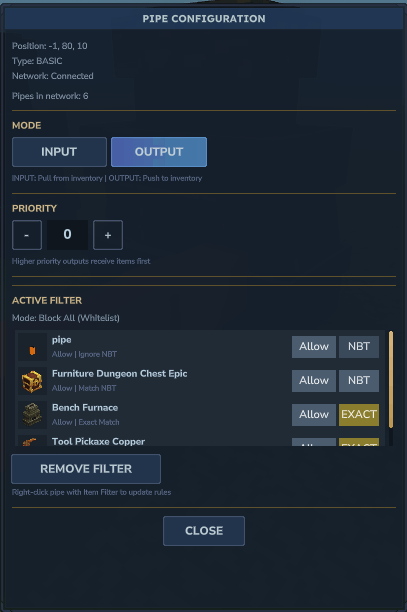
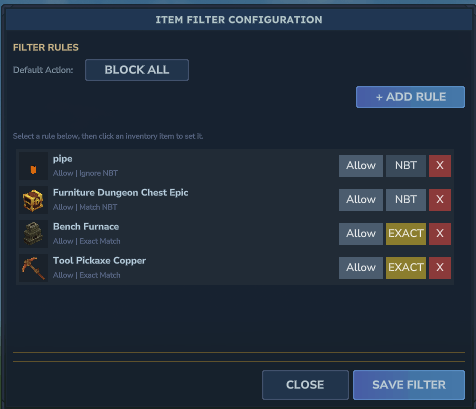
The filtration engine has been rebuilt to support Global Action Modes. You no longer need to manually define every exclusion.
(Priority 10 > Priority 0).Choose how items are distributed among outputs of the *same* priority level:
pipe_config.json: You can customize the number of items moved per tick and the transfer frequency to suit your needs.
Place Pipes to connect your Source container (e.g., a chest full of wood) to your Destination container.
Press F on the pipe directly touching (or adjacent to) the Source container.
The pipe will open a GUI where you can switch to I/O Mode, assign priority and more!
Right click item filter while in your hand
Configure black listed and whitelisted items
Press F on an input pipe to apply the filter
Project description from CurseForge.
Recent files
4 Feb 2026
29 Jan 2026
25 Jan 2026
Looking for an older file? The official CurseForge project page is in Resources.