TeamPlugin-1.0.jar
19 Jan 2026
Client Not supported Server Required Dependencies No extras listed Listed on Project page
Check the setup 
CurseForge · Hytale mod
Create teams with unique chat colors and toggleable PvP
Quick answer
Simple Teams TeamPlugin-1.0.jar targets Hytale. Do not install it as a separate client mod. Enable it on the world host—the local server in singleplayer or the dedicated server in multiplayer. No required dependencies listed for this file.
Where it goes
Do not install it as a separate client mod. Enable it on the world host—the local server in singleplayer or the dedicated server in multiplayer.
Put Hytale mods on the world host or dedicated server. Singleplayer runs a local server too; Hytale does not use separate client mods.
TeamPlugin-1.0.jar. Change the file and its required mods may change too.
This file does not list any required mods. Do not add a library just because a different file uses it.
This file does not list any required or optional project dependencies. Check the creator notes before changing an existing world.
Before you install it
Built for Simple Teams TeamPlugin-1.0.jar. Pick another file and the loader, install side or required mods may change.
Use TeamPlugin-1.0.jar. It targets Hytale; another release may target a different game build or dependency set.
This file does not list any required mods. Do not add a library just because a different file uses it.
Do not install it as a separate client mod. Enable it on the world host—the local server in singleplayer or the dedicated server in multiplayer.
Use the “Get this file” button beside TeamPlugin-1.0.jar. It opens that exact file at the source.
About this project
Simple Teams is a plugin that allows you to create teams with custom chat colors and toggleable friendly PvP. The teams are persistent (saved through JSON) through server restarts and username changes. This is my first Mod/Plugin and I was using it to learn about hytale modding, so it hasn't been heavily tested with large servers and likely has a couple bugs. If you find any bugs please report them to me.
How to use the plugin:
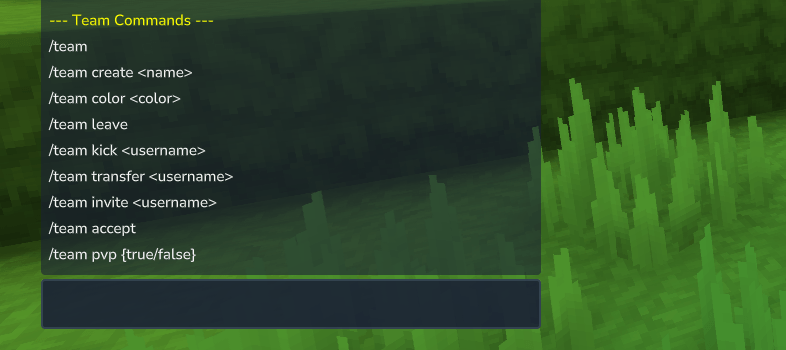
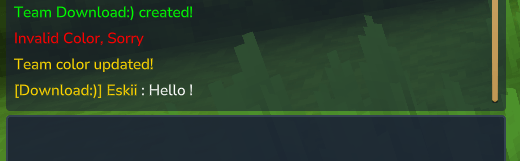
View all the commands in game by typing "/team help"Create a Team by typing "/team create <team name>"
Change your team color by typing "/team color <color>"
Look below for a list of available colors
Invite online players to your team by using "/team invite <username>"
The invited player has 60 seconds to type "/team accept" to join the team.To leave the team you can type "/team leave". You cannot leave the team if you are the owner and there are other members.
To transfer ownership of your team use "/team transfer <username>"
To kick someone from your team use "/team kick <username>"
Friendly PvP is disabled by default, but you can change its value by typing "/team pvp <true/false>". Everyone on your team will be notified of this change.
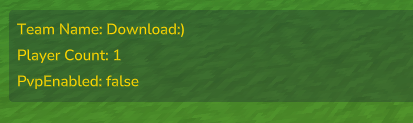
Lastly if you just type "/team" you will see some basic stats about your team.
Red, Blue, Green, Yellow, White, Black, Grey, Orange, Pink, Magneta, Cyan, Lightblue, Lightgreen, Darkred, Darkblue, Darkgreen, Purple, Gold, Aqua, Lime, Brown, Silver, Navy, Teal.
If you have any color requests let me know!
Possible Future Features:
But I'm probably going to move on to a new project...
Project description from CurseForge.
Recent files
19 Jan 2026
Looking for an older file? The official CurseForge project page is in Resources.