Hytale version
Back to mods 
CurseForge · Hytale mod
SimpleCommandInteraction
Added interaction in asset editor to execute commands
Choose a version Pick your version below, then grab the matching file.
Quick answer
Which SimpleCommandInteraction release should I use?
Latest stable file SimpleCommandInteractionPlugin-1.0.3.jar
Game version 0.7
Mod system Built-in Hytale mod system
SimpleCommandInteractionPlugin-1.0.3.jar targets 0.7. Do not install it as a separate client mod. Enable it on the world host—the local server in singleplayer or the dedicated server in multiplayer. No required dependencies listed for this file.
Where it goes
Where should SimpleCommandInteraction be installed in Hytale?
Do not install it as a separate client mod. Enable it on the world host—the local server in singleplayer or the dedicated server in multiplayer.
Separate client mod Not supported
World host / dedicated server Required
Mod system for this release Built-in Hytale mod system
Required install it here Optional supported, not mandatory Not supported do not install here Source doesn’t say do not assume
Put Hytale mods on the world host or dedicated server. Singleplayer runs a local server too; Hytale does not use separate client mods.
What else does SimpleCommandInteractionPlugin-1.0.3.jar need?
SimpleCommandInteractionPlugin-1.0.3.jar. Change the file and its required mods may change too.
This file does not list any required mods. Do not add a library just because a different file uses it.
This file does not list any required or optional project dependencies. Check the creator notes before changing an existing world.
Before you install it
Add SimpleCommandInteraction without breaking your instance.
Built for SimpleCommandInteractionPlugin-1.0.3.jar. Pick another file and the loader, install side or required mods may change.
- 01
Stick to this file
Use SimpleCommandInteractionPlugin-1.0.3.jar. It targets 0.7; another release may target a different game build or dependency set.
- 02
Bring the mods it needs
This file does not list any required mods. Do not add a library just because a different file uses it.
- 03
Enable it on the world host
Do not install it as a separate client mod. Enable it on the world host—the local server in singleplayer or the dedicated server in multiplayer.
- 04
Pick the file you checked
Use the “Get this file” button beside SimpleCommandInteractionPlugin-1.0.3.jar. It opens that exact file at the source.
About this project
What does SimpleCommandInteraction add?
This plugin is for admins who want to EXECUTE commands like "Command Blocks" from minecraft but in Hytale.
Made for version 0.7.0-0.8.0. If you need for version lower than that, write a comment (Starting from 13.10.2026 i will be answering comment more frequently) Or DM me on curseforge or Any platform you can find me by @wolfifurr
WARNINGS:
This plugin CANT get and interact with entities through "@" expression - only interact with entities, for example right click on entity and they will execute command "/say Hey @s , don't touch me!". There is no get all entities like @e in minecraft. AND this plugin can't REPEAT commands or CHAIN them like "Command Blocks" in minecraft by itself, you need to make it through "Next" and other built-in options if want that.
This plugin only EXECUTE commands that PLAYER/CONSOLE can execute from chat.
CONSOLE CANT use something like /pos1 or any other selection commands because selections are tied to players
When "From player?" NOT selected COMMAND will EXECUTE with CONSOLE permission!!!!!!
Instruction: (For version 1.0.3, if there is no such version, go to github releases or wait for release on website)
There are only 2 new "Interactions" for ASSET EDITOR that you need to insert yourself
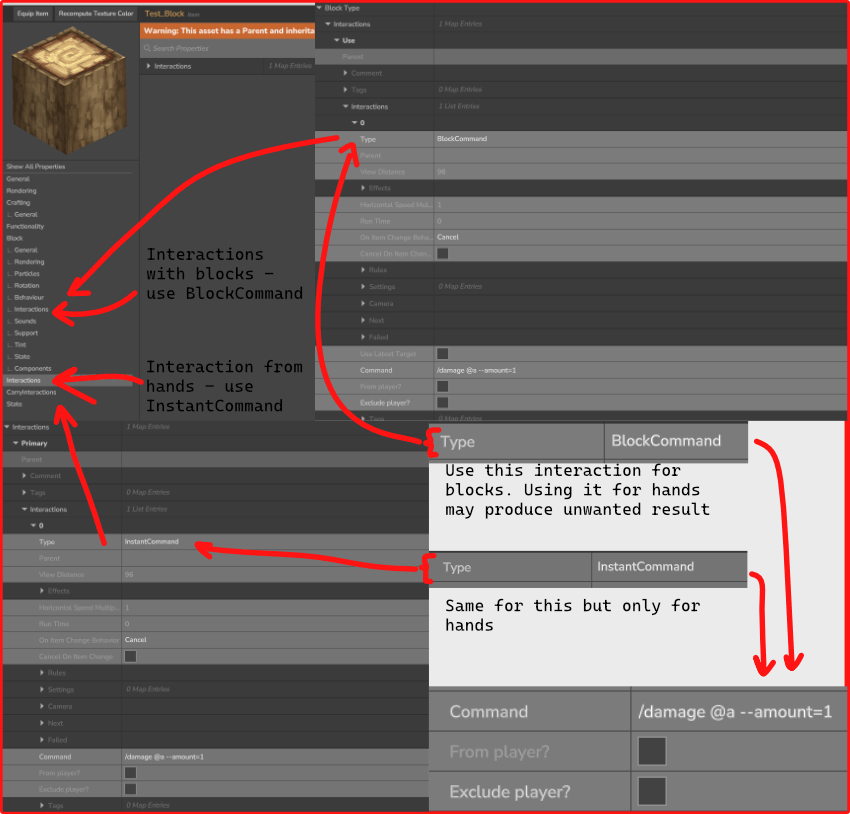
BlockCommand used for BLOCKS in "Interactions" under "Block" section
InstantCommand used for ITEMS OR ENTITIES in "Interactions" not under "Block" section
From player? - execute command from player that used interaction
Exclude player? - execute command with exception for interacted player (Example: "/say Hello" will work, "/damage @s --amount=1" will NOT work when "Exclude player?" checked)
Commands can be with '/' or without
Any bugs please write it in Issues in github (more likely to be seen faster) or in comments
Expressions:
- @a - ALL PLAYERS
- @r - RANDOM PLAYER
- @s - PLAYER THAT INTERACTED
- @p - CLOSEST PLAYER TO INTERACTION
- @w - GETS WORLD'S NAME (contributed by Riley Tuoti)
I hope this instruction is clear enough
Instalation: Put .jar file into Mods folder in %appdata%/Roaming/Hytale/UserData/Mods and select it while creating a world or into mods folder inside save folder
Project description from CurseForge.
Pick your setup
SimpleCommandInteraction releases for each Hytale build.
Choose the version and loader you play, then open the matching release.
Check the dependencies, then try the file in a copied instance before changing a world you care about.
Recent files
SimpleCommandInteraction releases and Hytale builds
SimpleCommandInteractionPlugin-1.0.3.jar
13 Oct 2026
Client Not supported Server Required Dependencies No extras listed Listed on Project page
Check the 0.7 setup 0.7 release
SimpleCommandInteractionPlugin-1.0.2.jar
10 Feb 2026
Client Not supported Server Required Dependencies No extras listed Listed on Project page
Check the setup SimpleCommandInteractionPlugin-1.0.1.jar
24 Jan 2026
Client Not supported Server Required Dependencies No extras listed Listed on Project page
Check the setup SimpleCommandInteractionPlugin-1.0.jar
19 Jan 2026
Client Not supported Server Required Dependencies No extras listed Listed on Project page
Check the setup Looking for an older file? The official CurseForge project page is in Resources.
 mod
mod CurseForge · Hytale
pillows n' plushies
weaponised femboy body pillows (dakimakura), cozy cushion blocks, plushie characters, silly fumo, futon bed, lain onesie mage robes (kigurumi), pillow hexstaff + hexbook + glyph guide for hexcode magic via patchly! anime ref: astolfo, ferris, rimuru, lain!
 mod
mod CurseForge · Hytale
Fullmetal Labyrinth
Adds a brand-new Labyrinth Dimension featuring a vast desert surface and an endless maze stretching deep below. Discover unique locations and face a variety of dangerous new enemies as you explore its depths!
 mod
mod CurseForge · Hytale
Target Health Bar
A lightweight target health HUD mod for Hytale. Shows a colored bar with the target's health, name, distance and attitude towards the player.