Hytale version
Back to mods 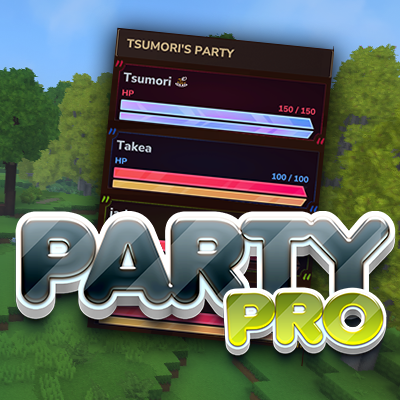
CurseForge · Hytale mod
PartyPro - RPGLeveling/MMOSkillTree/SimpleClaims Integration
A complete party system with HUD, compass tracking, ping beacons, teleportation, and persistent groups for multiplayer servers.
Choose a version Pick your version below, then grab the matching file.
Quick answer
Which PartyPro - RPGLeveling/MMOSkillTree/SimpleClaims Integration release should I use?
Latest stable file partypro-1.0.36.jar
Game version 0.7
Mod system Built-in Hytale mod system
PartyPro - RPGLeveling/MMOSkillTree/SimpleClaims Integration partypro-1.0.36.jar targets 0.7. Do not install it as a separate client mod. Enable it on the world host—the local server in singleplayer or the dedicated server in multiplayer. No required dependencies listed for this file.
Where it goes
Where should PartyPro - RPGLeveling/MMOSkillTree/SimpleClaims Integration be installed in Hytale?
Do not install it as a separate client mod. Enable it on the world host—the local server in singleplayer or the dedicated server in multiplayer.
Separate client mod Not supported
World host / dedicated server Required
Mod system for this release Built-in Hytale mod system
Required install it here Optional supported, not mandatory Not supported do not install here Source doesn’t say do not assume
Put Hytale mods on the world host or dedicated server. Singleplayer runs a local server too; Hytale does not use separate client mods.
What else does PartyPro - RPGLeveling/MMOSkillTree/SimpleClaims Integration partypro-1.0.36.jar need?
partypro-1.0.36.jar. Change the file and its required mods may change too.
This file does not list any required mods. Do not add a library just because a different file uses it.
This file does not list any required or optional project dependencies. Check the creator notes before changing an existing world.
Before you install it
Add PartyPro - RPGLeveling/MMOSkillTree/SimpleClaims Integration without breaking your instance.
Built for PartyPro - RPGLeveling/MMOSkillTree/SimpleClaims Integration partypro-1.0.36.jar. Pick another file and the loader, install side or required mods may change.
- 01
Stick to this file
Use partypro-1.0.36.jar. It targets 0.7; another release may target a different game build or dependency set.
- 02
Bring the mods it needs
This file does not list any required mods. Do not add a library just because a different file uses it.
- 03
Enable it on the world host
Do not install it as a separate client mod. Enable it on the world host—the local server in singleplayer or the dedicated server in multiplayer.
- 04
Pick the file you checked
Use the “Get this file” button beside partypro-1.0.36.jar. It opens that exact file at the source.
About this project
What does PartyPro - RPGLeveling/MMOSkillTree/SimpleClaims Integration add?
ClaimPro - Release! https://www.curseforge.com/hytale/mods/claimpro
💬 Support & Feedback
Documentation: https://pro-hytale-mods.gitbook.io/pro-hytale-mods-docs/getting-started/quickstart
PartyPro
Team up in Hytale. PartyPro adds a complete party system with real-time HUD, map tracking, ping system, party chat, XP sharing, statistics, and leaderboards.
Works standalone — no dependencies required.
Optional integrations with RPGLeveling, MMOSkillTree, and SimpleClaims activate automatically when installed.
📖 Full Documentation: https://pro-hytale-mods.gitbook.io/pro-hytale-mods-docs/getting-started/quickstart
⚔️ Party System
- Create and manage parties with up to 16 players
- Public parties anyone can join, or private with password protection
- Invite system with auto-accept and auto-decline modes
- Leadership transfer, member kicking, party renaming
- Parties persist across server restarts
- Configurable offline timeout to auto-remove inactive players
🖥️ Real-Time Party HUD
- Health and energy bars for every member
- Network ping (color-coded: 🟢 green / 🟡 yellow / 🔴 red)
- Distance or exact coordinates to each member
- Online/offline indicators and leader icon
- Normal and Compact display modes
- Fully customizable position (left/right, X/Y offset) per player
- Custom text slots for levels, classes, or ranks
🗺️ Map Tracking
- Party members shown as colored icons on the world map
- Distance labels on each marker
- Three waypoint modes: all players, party only, or hidden
- 16 unique member colors
📍 Ping System
- Middle-click any block to ping it for your party
- Colored beacon particle visible in the world (30s duration)
- Ping markers on the world map
- Unique color per member, configurable cooldown
💬 Party Chat
- Toggle with
/p chat— messages go only to party members [Party]prefix formatting- Chat history viewable in the Party Browser GUI
📋 Party Browser GUI
Open with /p — a full interactive menu:
- My Party — members, settings, kick/transfer/disband
- Parties — browse and search public parties, join with password
- Invites — accept or decline pending invites
- Players — see online players, invite them
- Chat — party chat with message history
- Stats — per-member and combined statistics
- Top — leaderboard comparing all server parties
- Settings — HUD, waypoints, invite mode
- Integrations — RPGLeveling, MMOSkillTree, SimpleClaims
📊 Statistics & Leaderboards
Tracked per player and per party:
- Mob kills, player kills, deaths
- Damage dealt and taken
- Blocks placed and broken
- Items collected and crafted
- Distance traveled, pings sent, teleports used
- Time spent together
Leaderboard ranks all parties by kills, damage, blocks, distance, or time. Top 3 highlighted in 🥇 gold, 🥈 silver, 🥉 bronze. Configurable auto-reset (daily or monthly).
🛡️ PvP Protection
Friendly fire between party members is blocked by default. The party leader can toggle PvP on or off.
🧑🤝🧑 Player Avatars
The Party Browser shows player headshot avatars next to names. Skins are fetched from a configurable API and cached locally.
Commands & Permissions
All commands use /p (alias: /party).
Party Commands — Permission group: Adventure
/p — Opens the Party Browser (tsumori.partypro.command.p)/p create — Creates a party (tsumori.partypro.command.p.create)/p invite — Invites a player (tsumori.partypro.command.p.invite)/p accept — Accepts an invite (tsumori.partypro.command.p.accept)/p decline — Declines an invite (tsumori.partypro.command.p.decline)/p leave — Leaves your party (tsumori.partypro.command.p.leave)/p kick — Kicks a member, leader only (tsumori.partypro.command.p.kick)/p transfer — Transfers leadership (tsumori.partypro.command.p.transfer)/p disband — Disbands the party, leader only (tsumori.partypro.command.p.disband)/p rename — Renames the party, leader only (tsumori.partypro.command.p.rename)/p tp — Teleports to a member (tsumori.partypro.command.p.tp)/p chat — Toggles party chat (tsumori.partypro.command.p.chat)/p info — Shows party info (tsumori.partypro.command.p.info)/p invites — Shows pending invites (tsumori.partypro.command.p.invites)/p browse — Browse parties/players (tsumori.partypro.command.p.browse)
Utility Commands
/pping — Pings the block you're looking at (tsumori.partypro.command.ping)
Admin Commands — Permission group: Creative (OP)
/p debug — Debug tools (tsumori.partypro.command.p.debug)
Wildcards: tsumori.partypro.command.* grants all commands, tsumori.partypro.command.p.* grants all /p subcommands.
Aliases: /p join = accept · /p deny = decline · /p remove = kick · /p promote = transfer · /p teleport / /p goto = tp · /p status / /p list / /p members = info · /p browser / /p find / /p players = browse · /p pending = invites
🔗 Integrations
RPGLeveling
- Player levels displayed in the party HUD
- XP sharing among party members (split or bonus mode)
- Per-party-size multipliers and distance limits
- Config:
RPGLeveling_x_PartyPro.json
MMOSkillTree
- Selected skill level displayed in the HUD
- Skill XP sharing (same-skill or all-skills mode)
- Per-party-size multipliers
- Config:
MMOSkillTree_x_PartyPro.json
SimpleClaims
- Party members auto-added as claim allies
- Auto-removal when leaving the party
- Configurable in the Integrations tab
🌍 Languages
7 languages included: English · German · Spanish · Portuguese (BR) · Hungarian · French · Russian
Set "language": "DE" in config.json. All language files in PartyPro/language/ are fully editable. New translation keys are merged automatically on updates your customizations are preserved.
⚙️ Per-Player Settings
Each player controls their own experience via the Settings tab in the Party Browser:
- HUD on/off, left/right side, normal/compact mode
- Custom X/Y offset for HUD position
- Show only online members
- Show coordinates instead of distance
- Middle-mouse ping on/off
- Map waypoint mode (all / party only / none)
- Invite mode (normal / auto-accept / auto-decline)
All settings persist across sessions.
📦 Installation
- Drop
partypro-x.x.x.jarinto your server'sModsfolder - Start the server
- Done
Config files are created automatically on first run. No dependencies required.
🔧 For Developers
PartyPro provides a public API for other mods:
if (PartyProAPI.isAvailable()) {
PartyProAPI api = PartyProAPI.getInstance();

boolean together = api.areInSameParty(player1, player2);
api.setPlayerCustomText1(playerId, "Lv.42");

api.registerListener(new PartyEventListener() {
[@Override](https://github.com/Override)
public void onMemberJoin(PartyMemberJoinEvent event) {
// react to party changes
}
});
}
Query party data, display custom text in the HUD, and listen to 6 event types (create, disband, join, leave, leader change, settings change).
Project description from CurseForge.
Pick your setup
PartyPro - RPGLeveling/MMOSkillTree/SimpleClaims Integration releases for each Hytale build.
Choose the version and loader you play, then open the matching release.
Hytale version
0.6
1 loader buildHytale version
0.5
1 loader buildCheck the dependencies, then try the file in a copied instance before changing a world you care about.
Recent files
PartyPro - RPGLeveling/MMOSkillTree/SimpleClaims Integration releases and Hytale builds
partypro-1.0.36.jar
12 Oct 2026
Client Not supported Server Required Dependencies No extras listed Listed on Project page
Check the 0.7 setup 0.7 release
partypro-1.0.35.jar
27 Aug 2026
Client Not supported Server Required Dependencies No extras listed Listed on Project page
Check the 0.6 setup 0.6 release
partypro-1.0.32.jar
8 Aug 2026
Client Not supported Server Required Dependencies No extras listed Listed on Project page
Check the 0.5 setup 0.5 release
partypro-1.0.31.jar
31 May 2026
Client Not supported Server Required Dependencies No extras listed Listed on Project page
Check the 0.5 setup 0.5 release
partypro-1.0.3.jar
26 May 2026
Client Not supported Server Required Dependencies No extras listed Listed on Project page
Check the setup partypro-1.0.2.1.jar
11 May 2026
Client Not supported Server Required Dependencies No extras listed Listed on Project page
Check the setup partypro-1.0.2.jar
11 May 2026
Client Not supported Server Required Dependencies No extras listed Listed on Project page
Check the setup partypro-1.0.1.jar
10 May 2026
Client Not supported Server Required Dependencies No extras listed Listed on Project page
Check the setup partypro-1.0.0.jar
10 May 2026
Client Not supported Server Required Dependencies No extras listed Listed on Project page
Check the setup partypro-0.9.0.jar
26 Mar 2026
Client Not supported Server Required Dependencies No extras listed Listed on Project page
Check the setup partypro-0.8.93.jar
9 Mar 2026
Client Not supported Server Required Dependencies No extras listed Listed on Project page
Check the setup partypro-0.8.92.jar (HOTFIX)
8 Mar 2026
Client Not supported Server Required Dependencies No extras listed Listed on Project page
Check the setup Looking for an older file? The official CurseForge project page is in Resources.