Revela's HUD - Version 1.6
6 Apr 2026
Client Not supported Server Required Dependencies No extras listed Listed on Project page
Check the setup 
CurseForge · Hytale mod
Provides a configurable HUD overlay showing real-time player statistics, including kills, deaths, playtime, and coordinates.
Quick answer
Revela's HUD - Version 1.6 targets Hytale. Do not install it as a separate client mod. Enable it on the world host—the local server in singleplayer or the dedicated server in multiplayer. No required dependencies listed for this file.
Where it goes
Do not install it as a separate client mod. Enable it on the world host—the local server in singleplayer or the dedicated server in multiplayer.
Put Hytale mods on the world host or dedicated server. Singleplayer runs a local server too; Hytale does not use separate client mods.
Revela's HUD - Version 1.6. Change the file and its required mods may change too.
This file does not list any required mods. Do not add a library just because a different file uses it.
This file does not list any required or optional project dependencies. Check the creator notes before changing an existing world.
Before you install it
Built for Revela's HUD - Version 1.6. Pick another file and the loader, install side or required mods may change.
Use Revela's HUD - Version 1.6. It targets Hytale; another release may target a different game build or dependency set.
This file does not list any required mods. Do not add a library just because a different file uses it.
Do not install it as a separate client mod. Enable it on the world host—the local server in singleplayer or the dedicated server in multiplayer.
Use the “Get this file” button beside Revela's HUD - Version 1.6. It opens that exact file at the source.
About this project
Revela's HUD is a lightweight, server-side mod that adds a customizable in-game HUD overlay displaying real-time player statistics.
It is designed to be informative without being intrusive, giving players constant access to helpful/informative gameplay data.
The overlay updates live as players play, fight, and move through the world -- no commands or menus required once enabled.
And YES, you can show/hide your coordinates with a simple command!
📈 Live Player Statistics
🧩 Configurable HUD Layout
hud-config.json👁️ Per-Player Visibility Controls
⚙️ Server-Side Only
🧠 Native Command & Permission System
💾 Autosave Functionality (New in Version 1.4)
/overlayToggles the overlay on or off for the player.
/overlay onEnables the overlay.
/overlay offDisables the overlay.
/overlay coordsToggles the coordinates line.
/overlay hide coordsHides the coordinates line.
/overlay show coordsShows the coordinates line.
Players can use
/overlay hide --helpor/overlay show --helpto see available options in-game.
This mod uses explicit permission nodes only (no wildcards).
revela.hud.command.overlay
Allows access to /overlay.
revela.hud.command.overlay.toggle
revela.hud.command.overlay.on
revela.hud.command.overlay.off
revela.hud.command.overlay.coords
revela.hud.command.overlay.hide
revela.hud.command.overlay.hide.coords

revela.hud.command.overlay.show
revela.hud.command.overlay.show.coords
Players must have the specific subcommand permission to use it.
Granting only the base permission allows/overlaybut not subcommands.
The mod generates a hud-config.json file on first startup.
This file allows server owners to:
Changes take effect after a server restart.
1/1) is always displayed by the engine and cannot be removed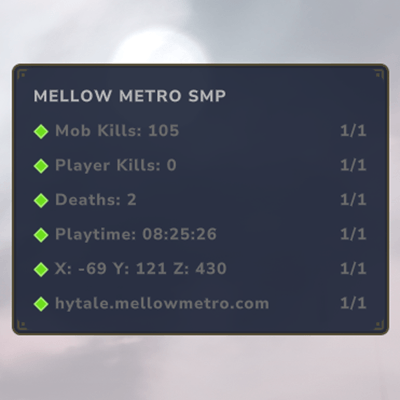
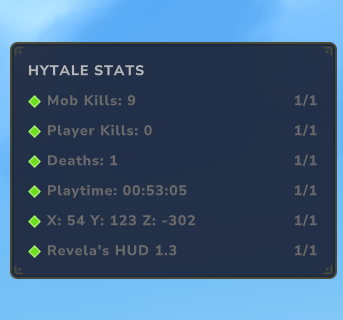
Project description from CurseForge.
Recent files
6 Apr 2026
18 Mar 2026
21 Jan 2026
20 Jan 2026
Looking for an older file? The official CurseForge project page is in Resources.