Quick answer
Which AutoSorter release should I use?
Latest stable file AutoSorterV1.20.0.jar
Game version Not listed
Mod system Built-in Hytale mod system
AutoSorterV1.20.0.jar targets Hytale. Do not install it as a separate client mod. Enable it on the world host—the local server in singleplayer or the dedicated server in multiplayer. No required dependencies listed for this file.
Where it goes
Where should AutoSorter be installed in Hytale?
Do not install it as a separate client mod. Enable it on the world host—the local server in singleplayer or the dedicated server in multiplayer.
Separate client mod Not supported
World host / dedicated server Required
Mod system for this release Built-in Hytale mod system
Required install it here Optional supported, not mandatory Not supported do not install here Source doesn’t say do not assume
Put Hytale mods on the world host or dedicated server. Singleplayer runs a local server too; Hytale does not use separate client mods.
What else does AutoSorterV1.20.0.jar need?
AutoSorterV1.20.0.jar. Change the file and its required mods may change too.
This file does not list any required mods. Do not add a library just because a different file uses it.
This file does not list any required or optional project dependencies. Check the creator notes before changing an existing world.
Before you install it
Add AutoSorter without breaking your instance.
Built for AutoSorterV1.20.0.jar. Pick another file and the loader, install side or required mods may change.
- 01
Stick to this file
Use AutoSorterV1.20.0.jar. It targets Hytale; another release may target a different game build or dependency set.
- 02
Bring the mods it needs
This file does not list any required mods. Do not add a library just because a different file uses it.
- 03
Enable it on the world host
Do not install it as a separate client mod. Enable it on the world host—the local server in singleplayer or the dedicated server in multiplayer.
- 04
Pick the file you checked
Use the “Get this file” button beside AutoSorterV1.20.0.jar. It opens that exact file at the source.
About this project
What does AutoSorter add?
AutoSorter for Hytale
Unlock a premium, lag-free experience at the best price on the market. Rent your high-quality game servers here and start playing without limits!
If you need a server and you want support me click in the banner and buy a server

AutoSorter is the definitive inventory management and automation solution for Hytale. Designed for a seamless experience, this mod allows you to organize your storage and automate your production lines intelligently without lifting a finger.
🚀 Key Features
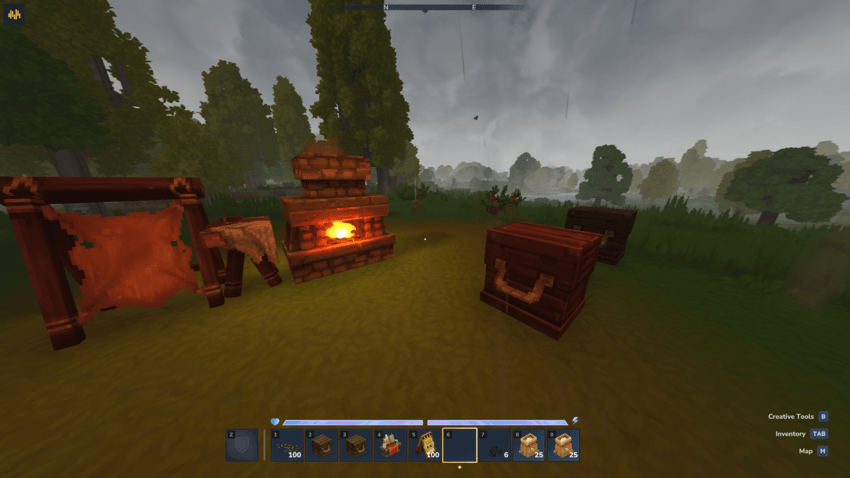
- Universal Automation: Works on both Chests and Workstations (Furnaces, Tanning Racks, etc.). Automate your gathering and your crafting at the same time!
- Fully Customizable Performance: Each container can be fine-tuned:
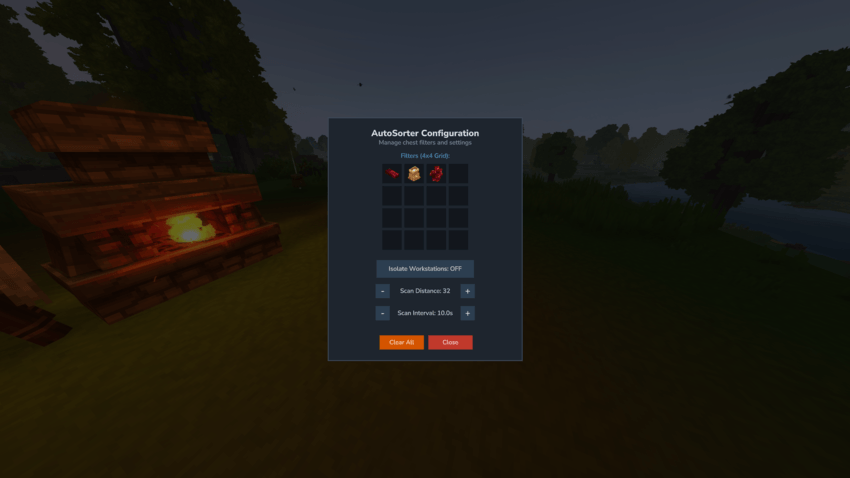
- Scan Distance: Custom radius from 1 up to 32 blocks.
- Scan Interval: Adjust the speed from 1.0s to 10.0s per scan.
- 4x4 Filter Grid: Configure up to 16 different filter slots per container for ultra-precise categorization.
- Workstation Isolation: Toggle a safety mode to prevent chests from "stealing" items from active workstations unless you explicitly allow it.
- Metadata-Safe: Advanced detection system that protects custom items (enchantments, special traits), ensuring no data is ever lost during transfers.
- Multidimensional Support: Works perfectly across any world or dimension without coordinate conflicts.
🛠️ How It Works
- Open Configuration: Use Crouch + Interact (Default: Shift + F) on any Chest or Workstation to open its unique configuration menu. > ⚠️ Control Note: The mod uses your [Crouch/Slide/Roll] Key + [Interact with a Block] Key. If you have rebound your keys, use your custom key combo instead of the default Shift + F.
- Assign Filters: Click a slot in the grid while holding an item to add it as a filter. To remove one, just click the filter icon.
- Tune the Settings:
- Use the Scan Distance buttons to decide how far the container looks for items.
- Use the Scan Interval buttons to set the frequency of the sorting.
- Automatic Action: Once configured, the container will proactively pull matching items from surrounding sources based on your specific distance and time settings.
⚙️ Advanced Configuration
Prefer a different way to access the menu? The mod creates a file named [autosorter_config.json] in your server folder. You can edit it to change the interaction mode: ```json { "_comment": "Modes: SHIFT_RIGHT_CLICK (Crouch+Use, default), WALK_INTERACT (Walk+Use)", "interactionMode": "SHIFT_RIGHT_CLICK" }
📦 Pro Tip for Crafters
Configure your Furnaces with filters to automatically pull ores from nearby input chests and your Chests to pull the finished ingots back. Full automation has never been so easy!
✨ Key Features:
- Block Ownership (Anti-Theft): Every container (chests, furnaces, crafting benches) now automatically tracks who placed it. By default, the sorter will completely ignore containers owned by other players, permanently stopping neighbors from "sucking up" your materials.
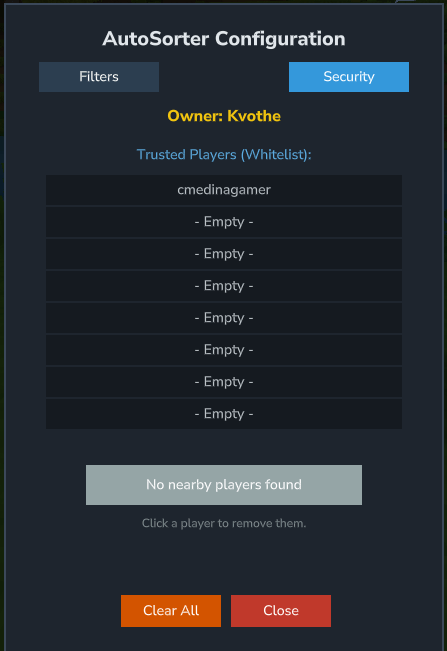
- Tabbed User Interface: We've organized the UI for better usability:
- Filters Tab: Manage your item filters, scan distance, and intervals.
- Security Tab: Manage who has access to your sorting network. Only the chest owner can access this menu.
- Bidirectional Trust System: Want to share your storage with a friend? It's effortless. If either of you adds the other to your Trusted Players list, your chests will seamlessly communicate with each other. It's a fully collaborative approach.
- Smart Nearby Player Selector: No more typing complicated nicknames. Use the dynamic "Add Nearby" button to instantly add any friend standing close to you to your whitelist with a single click.
Project description from CurseForge.
Recent files
AutoSorter releases and Hytale builds
28 Aug 2026
Client Not supported Server Required Dependencies No extras listed Listed on Project page
Check the setup → 28 Aug 2026
Client Not supported Server Required Dependencies No extras listed Listed on Project page
Check the setup → 10 Jun 2026
Client Not supported Server Required Dependencies No extras listed Listed on Project page
Check the setup → 18 May 2026
Client Not supported Server Required Dependencies No extras listed Listed on Project page
Check the setup → 29 Mar 2026
Client Not supported Server Required Dependencies No extras listed Listed on Project page
Check the setup → 29 Mar 2026
Client Not supported Server Required Dependencies No extras listed Listed on Project page
Check the setup → 22 Mar 2026
Client Not supported Server Required Dependencies No extras listed Listed on Project page
Check the setup → 20 Mar 2026
Client Not supported Server Required Dependencies No extras listed Listed on Project page
Check the setup → 2 Mar 2026
Client Not supported Server Required Dependencies No extras listed Listed on Project page
Check the setup → 21 Feb 2026
Client Not supported Server Required Dependencies No extras listed Listed on Project page
Check the setup → 21 Feb 2026
Client Not supported Server Required Dependencies No extras listed Listed on Project page
Check the setup → 4 Feb 2026
Client Not supported Server Required Dependencies No extras listed Listed on Project page
Check the setup → 
 mod
mod mod
mod mod
mod