ModelChanger-1.3.0.jar
24 Jan 2026
Client Not supported Server Required Dependencies No extras listed Listed on Project page
Check the setup 
CurseForge · Hytale mod
Set default player skins/models on servers and singleplayer, with per-user forced skins and selectable whitelists
Quick answer
Default Player Skins ModelChanger-1.3.0.jar targets Hytale. Do not install it as a separate client mod. Enable it on the world host—the local server in singleplayer or the dedicated server in multiplayer. No required dependencies listed for this file.
Where it goes
Do not install it as a separate client mod. Enable it on the world host—the local server in singleplayer or the dedicated server in multiplayer.
Put Hytale mods on the world host or dedicated server. Singleplayer runs a local server too; Hytale does not use separate client mods.
ModelChanger-1.3.0.jar. Change the file and its required mods may change too.
This file does not list any required mods. Do not add a library just because a different file uses it.
This file does not list any required or optional project dependencies. Check the creator notes before changing an existing world.
Before you install it
Built for Default Player Skins ModelChanger-1.3.0.jar. Pick another file and the loader, install side or required mods may change.
Use ModelChanger-1.3.0.jar. It targets Hytale; another release may target a different game build or dependency set.
This file does not list any required mods. Do not add a library just because a different file uses it.
Do not install it as a separate client mod. Enable it on the world host—the local server in singleplayer or the dedicated server in multiplayer.
Use the “Get this file” button beside ModelChanger-1.3.0.jar. It opens that exact file at the source.
About this project
Ever wanted players to spawn with a specific skin/model automatically?
Default Player Skins is a simple and server-friendly mod that lets you assign default skins for players, both in singleplayer and multiplayer servers.
✅ Set a global default model
✅ Force a model per specific player
✅ Limit which models a player can select (whitelist)
✅ Easy configuration (only a few files needed)
✅ Custom model support
✅ Live config management (OP tools)
You can configure a global default model for everyone:
defaultModeldefaultScaleForce a specific model for certain players:
playerModelsExample:
ExamplePlayer → Bear_GrizzlyControl which models each player is allowed to select from the menu:
playerAvailableModelsExample allowed models:
New option added in v1.2.0:
persistSkinChangeBehavior:
persistSkinChange: true → The selected skin persists after reconnectingpersistSkinChange: false → The player always returns to the default model from playerModelsOptional OP requirement:
requireOp: false → everyone can use the commandrequireOp: true → only OPs can use the command/myskin menu - Opens the skin selection UI/myskin reload - Reloads config.json without restarting the server (OP only)/myskin config - View current configuration/myskin config set <option> <value> - Change config settings/myskin config addmodel <player> <model> - Add an allowed skin to a player/myskin config removemodel <player> <model> - Remove an allowed skin from a player/myskin config setdefault <player> <model> - Set player default model/myskin config list <player> - List all available skins for a playerThis mod supports permission nodes for better server control:
myskin.use - Use basic commands (menu)myskin.reload - Reload config.jsonmyskin.config - Manage config with /myskin config ...Example of the /myskin menu interface:
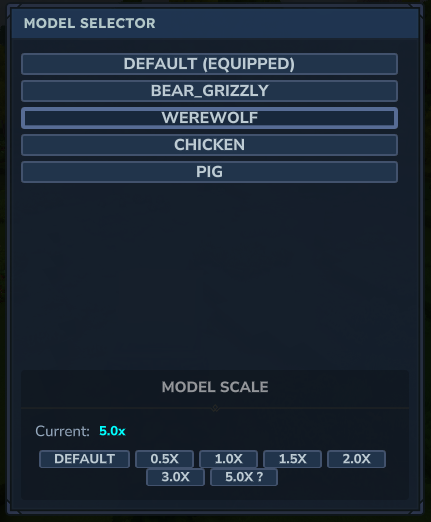
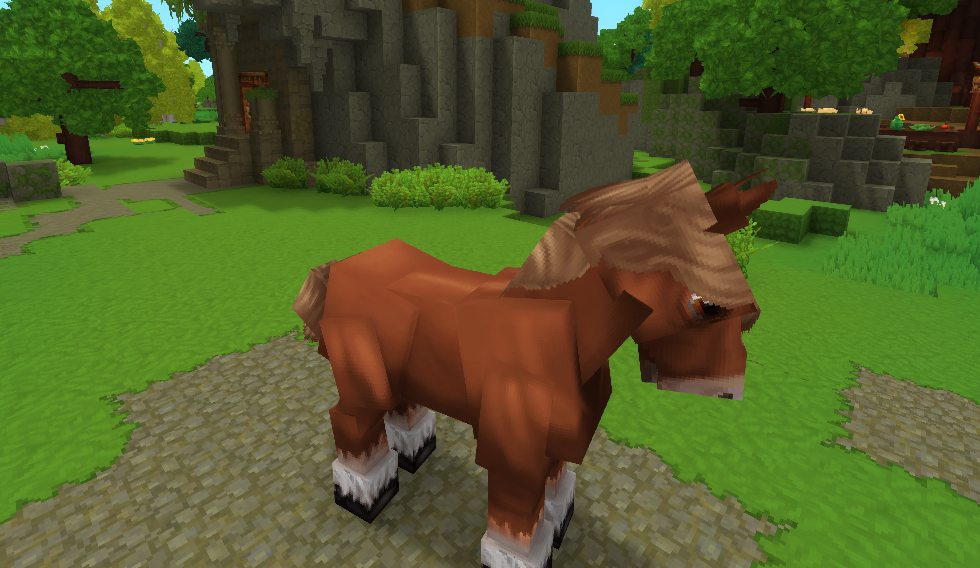
A config file is generated inside the server mods config folder.
{
  "enabled": true,
  "requireOp": false,
  "defaultModel": "",
  "defaultScale": 1.0,
  "persistSkinChange": true,
  "playerModels": {
    "Scarr": "Werewolf"
  },
  "playerAvailableModels": {
    "Scarr": [
      "Bear_Grizzly",
      "Werewolf",
      "Chicken",
      "Pig"
    ]
  },
  "showScaleInGui": true,
  "minScale": 0.1,
  "maxScale": 10.0,
  "modelDefaultScales": {},
  "playerScales": {
    "Scarr": 5
  },
  "scaleButtons": [0.5, 1.0, 1.5, 2.0, 3.0, 5.0]
}
To add your own models you only need:
Place your custom files here:
Common/Characters/
Each model needs:
ModelName.blockymodel (model data)ModelName.png (texture)Create a JSON definition file here:
Server/Models/
Example: MyModel.json
{
  "Model": "/Common/Characters/MyModel.blockymodel"
}
Made with ❤️ by Scarforges
Project description from CurseForge.
Recent files
24 Jan 2026
21 Jan 2026
21 Jan 2026
21 Jan 2026
21 Jan 2026
Looking for an older file? The official CurseForge project page is in Resources.