SimplexDesigns_LightBlock_Additions_v1.0.1.zip
31 Jan 2026
Client Not supported Server Required Dependencies No extras listed Listed on Project page
Check the setup 
CurseForge · Hytale mod
Adds 10 colorful light blocks that can be crafted in single player or found in creative.
Quick answer
Light Blocks SimplexDesigns_LightBlock_Additions_v1.0.1.zip targets Hytale. Do not install it as a separate client mod. Enable it on the world host—the local server in singleplayer or the dedicated server in multiplayer. No required dependencies listed for this file.
Where it goes
Do not install it as a separate client mod. Enable it on the world host—the local server in singleplayer or the dedicated server in multiplayer.
Put Hytale mods on the world host or dedicated server. Singleplayer runs a local server too; Hytale does not use separate client mods.
SimplexDesigns_LightBlock_Additions_v1.0.1.zip. Change the file and its required mods may change too.
This file does not list any required mods. Do not add a library just because a different file uses it.
This file does not list any required or optional project dependencies. Check the creator notes before changing an existing world.
Before you install it
Built for Light Blocks SimplexDesigns_LightBlock_Additions_v1.0.1.zip. Pick another file and the loader, install side or required mods may change.
Use SimplexDesigns_LightBlock_Additions_v1.0.1.zip. It targets Hytale; another release may target a different game build or dependency set.
This file does not list any required mods. Do not add a library just because a different file uses it.
Do not install it as a separate client mod. Enable it on the world host—the local server in singleplayer or the dedicated server in multiplayer.
Use the “Get this file” button beside SimplexDesigns_LightBlock_Additions_v1.0.1.zip. It opens that exact file at the source.
About this project
With this addon, you can craft 10 colorful light blocks to spruce up your world with colored lighting while being hidden.
*Please note that they can be hard to find during the day due to being complely invisible. So best time to break them is at night, otherwise just look for the very faint block outline when looking at them. I made them pop into a hand form to make them easier to see once minned and places a placed varient with the invisible textures.
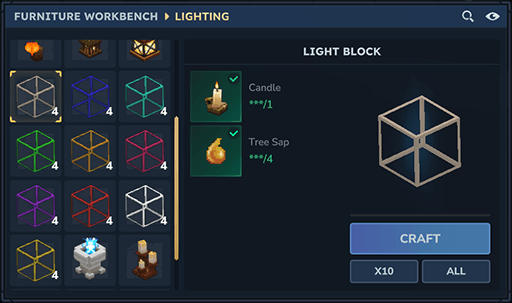
These can be crafted inside the Furniture workbench in survival mode or Found in Creative > Furniture > Lighting sub category.
Install locations (Download zip and place in mods folder, then right click world and checkmark the mod.)
Windows: C:\Users<USER>\AppData\Roaming\Hytale\UserData\Mods
Linux: ~/.local/share/Hytale/UserData/Mods
Steamdeck: /home/deck/.var/app/com.hypixel.HytaleLauncher/data/Hytale/UserData/Mods
Mac OS: ~/Library/Application Support/Hytale/Mods
Project description from CurseForge.
Recent files
31 Jan 2026
Looking for an older file? The official CurseForge project page is in Resources.
 mod
modThis project brings dozens of new building aesthetics inspired by early industrial architecture — think towering brick factories, ornate ironwork, smoky chimneys, and the raw mechanical beauty of the dawn of the industrial age.
 mod
modCraft Onyxium and Prisma armor, weapons, and tools! Custom workbench for required ingredients!
 mod
modSpawn a gravestone when a player dies. UPDATE 5 READY. Lightweight and Efficient!