periodic-hud-1.0.0.jar
22 Jan 2026
Client Not supported Server Required Dependencies No extras listed Listed on Project page
Check the setup 
CurseForge · Hytale mod
PeriodicHUD is a lightweight and highly configurable Hytale plugin that automatically displays custom HUD notifications in the top-right corner of your players' screens at regular intervals
Quick answer
Periodic HUD periodic-hud-1.0.0.jar targets Hytale. Do not install it as a separate client mod. Enable it on the world host—the local server in singleplayer or the dedicated server in multiplayer. No required dependencies listed for this file.
Where it goes
Do not install it as a separate client mod. Enable it on the world host—the local server in singleplayer or the dedicated server in multiplayer.
Put Hytale mods on the world host or dedicated server. Singleplayer runs a local server too; Hytale does not use separate client mods.
periodic-hud-1.0.0.jar. Change the file and its required mods may change too.
This file does not list any required mods. Do not add a library just because a different file uses it.
This file does not list any required or optional project dependencies. Check the creator notes before changing an existing world.
Before you install it
Built for Periodic HUD periodic-hud-1.0.0.jar. Pick another file and the loader, install side or required mods may change.
Use periodic-hud-1.0.0.jar. It targets Hytale; another release may target a different game build or dependency set.
This file does not list any required mods. Do not add a library just because a different file uses it.
Do not install it as a separate client mod. Enable it on the world host—the local server in singleplayer or the dedicated server in multiplayer.
Use the “Get this file” button beside periodic-hud-1.0.0.jar. It opens that exact file at the source.
About this project

The configuration file is located at: mods/Commentary_PeriodicHUD/PeriodicHUD.json
All commands require the periodichud.command.manage permission (operators by default).
/ph view - Preview the HUD immediately/ph config - Show current configuration/ph reload - Reload configuration without restarting the serverHere the HUD is displayed in the top-right corner with custom messages:
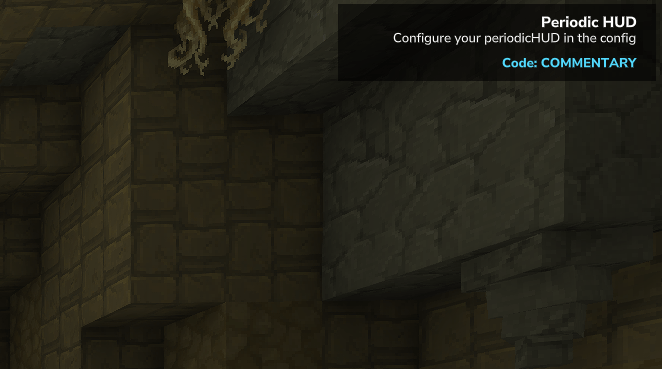
The messages can be changed via the config file and reloaded instantly with /ph reload
You can configure the timing to match your server's needs: Timer = 5 displays the HUD every 5 minutes DurationSeconds = 15 keeps it visible for 15 seconds
Project description from CurseForge.
Recent files
22 Jan 2026
Looking for an older file? The official CurseForge project page is in Resources.
 mod
mod**Twinfang Glaives** adds a growing collection of dual-wielded glaives to Hytale.
 mod
modadds a kweebec helper that can mine, fight, build, and gather resources.
 mod
modHytale RPG Leveling Mod - Endless Leveling adds full character progression: levels, stats, classes, races, augments, skills/abilities, dungeons & dynamic events. Solo Leveling inspired endless growth for singleplayer & servers.