Spawners-1.5.0.jar
29 Mar 2026
Client Not supported Server Required Dependencies No extras listed Listed on Project page
Check the setup 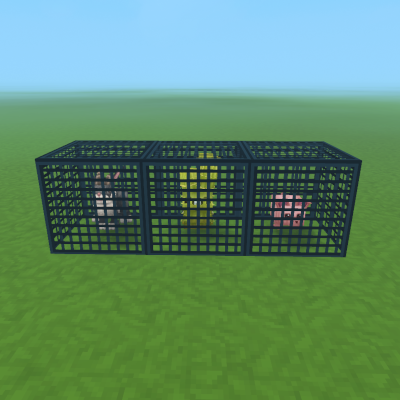
CurseForge · Hytale mod
A mod that adds entity spawners to hytale
Quick answer
Mob Spawners Spawners-1.5.0.jar targets Hytale. Do not install it as a separate client mod. Enable it on the world host—the local server in singleplayer or the dedicated server in multiplayer. No required dependencies listed for this file.
Where it goes
Do not install it as a separate client mod. Enable it on the world host—the local server in singleplayer or the dedicated server in multiplayer.
Put Hytale mods on the world host or dedicated server. Singleplayer runs a local server too; Hytale does not use separate client mods.
Spawners-1.5.0.jar. Change the file and its required mods may change too.
This file does not list any required mods. Do not add a library just because a different file uses it.
This file does not list any required or optional project dependencies. Check the creator notes before changing an existing world.
Before you install it
Built for Mob Spawners Spawners-1.5.0.jar. Pick another file and the loader, install side or required mods may change.
Use Spawners-1.5.0.jar. It targets Hytale; another release may target a different game build or dependency set.
This file does not list any required mods. Do not add a library just because a different file uses it.
Do not install it as a separate client mod. Enable it on the world host—the local server in singleplayer or the dedicated server in multiplayer.
Use the “Get this file” button beside Spawners-1.5.0.jar. It opens that exact file at the source.
About this project
Hytale Spawners adds custom mob spawners to the game for complex game modes or for general SMP

/spawner <mob_type> <target> - Gives a spawner of the specified mob type to the target player - spawner.give/help spawner/sadmin debug-spawner <relativeLocation> - Displays a preview of spawn radius (green) and nearby check radius (red), Will only show spawn radius if they are the same - spawner.admin.debug/sadmin reload - Reloads the config and lang file - spawner.admin.reload--amount - The amount of spawners to give (default: 1) - --amount=10--spawnAmount - The range of mobs that will spawn (default depends on config) - --spawnAmount 5 10--spawnInterval - The range of ticks between spawn attempts (default depends on config) - --spawnInterval 1000 8000--spawnRadius - The width (first argument) and height (second) radius that entities will spawn around the spawner (default depends on config) - --spawnRadius 5 10For more detailed info check out the github
SpawnerSpawnEvent.Pre - Called before a mob is spawned, can be canceledSpawnerSpawnEvent.Post - Called after a mob is spawnedSpawnerBlockPlaceEvent.Pre - Called before a spawner block is placed, can be canceledSpawnerBlockPlaceEvent.Post - Called after a spawner block is placedspawnRange - The range of entities to spawnspawnRadius - The radius that entities will spawn around the spawnerspawnTicksRange - The min and max ticks between spawn attemptsmaxSpawnAttempts - The max amount of failed spawn attempts before waiting for the next spawn attemptrenderMobModel - Should the preview mob spawn in the middle of the spawnermaxNearbyEntities - The max nearby entitiescheckNearbyEntities - Should the spawner check for nearby entities before spawningnearbyEntitiesCheckRadius - The radius around the spawner to check for nearby entitiesuseWorldTimeTicks - Should spawn attempts use the World time ticks or System time ticks (if you have IsGameTimePaused set to true and still want the spawners to spawn set this value to false)rotatePreviewEntity - Should the preview entity rotate? (Experimental)previewEntityRotationDegreesPerTick - The amount of degrees to rotate per ticknerfSpawnerMobs - If set to true the spawned entity will be given the Spawner_Role (edit the max health on that to change the nerfed entity health) where it has no pathing or targeting (drops will still work)dropSpawnerWhenMined - Should the spawner be dropped when mined?RWS at checkout for 5% off!Project description from CurseForge.
Recent files
29 Mar 2026
28 Feb 2026
28 Feb 2026
28 Feb 2026
25 Feb 2026
3 Feb 2026
3 Feb 2026
30 Jan 2026
28 Jan 2026
24 Jan 2026
23 Jan 2026
Looking for an older file? The official CurseForge project page is in Resources.