HyComputer-1.2.3.jar
28 Mar 2026
Client Not supported Server Required Dependencies No extras listed Listed on Project page
Check the setup 
CurseForge · Hytale mod
With HyComputer, you can execute commands (both vanilla and modded) using convenient buttons instead of typing. All commands are fully customizable.
Quick answer
HyComputer & HyPod HyComputer-1.2.3.jar targets Hytale. Do not install it as a separate client mod. Enable it on the world host—the local server in singleplayer or the dedicated server in multiplayer. No required dependencies listed for this file.
Where it goes
Do not install it as a separate client mod. Enable it on the world host—the local server in singleplayer or the dedicated server in multiplayer.
Put Hytale mods on the world host or dedicated server. Singleplayer runs a local server too; Hytale does not use separate client mods.
HyComputer-1.2.3.jar. Change the file and its required mods may change too.
This file does not list any required mods. Do not add a library just because a different file uses it.
This file does not list any required or optional project dependencies. Check the creator notes before changing an existing world.
Before you install it
Built for HyComputer & HyPod HyComputer-1.2.3.jar. Pick another file and the loader, install side or required mods may change.
Use HyComputer-1.2.3.jar. It targets Hytale; another release may target a different game build or dependency set.
This file does not list any required mods. Do not add a library just because a different file uses it.
Do not install it as a separate client mod. Enable it on the world host—the local server in singleplayer or the dedicated server in multiplayer.
Use the “Get this file” button beside HyComputer-1.2.3.jar. It opens that exact file at the source.
About this project
HyComputer is a Hytale mod designed to streamline how you interact with chat commands. Currently, most mods require manual typing for configuration or activation, which can break the game's immersion. Stopping your gameplay to type complex commands is a thing of the past!
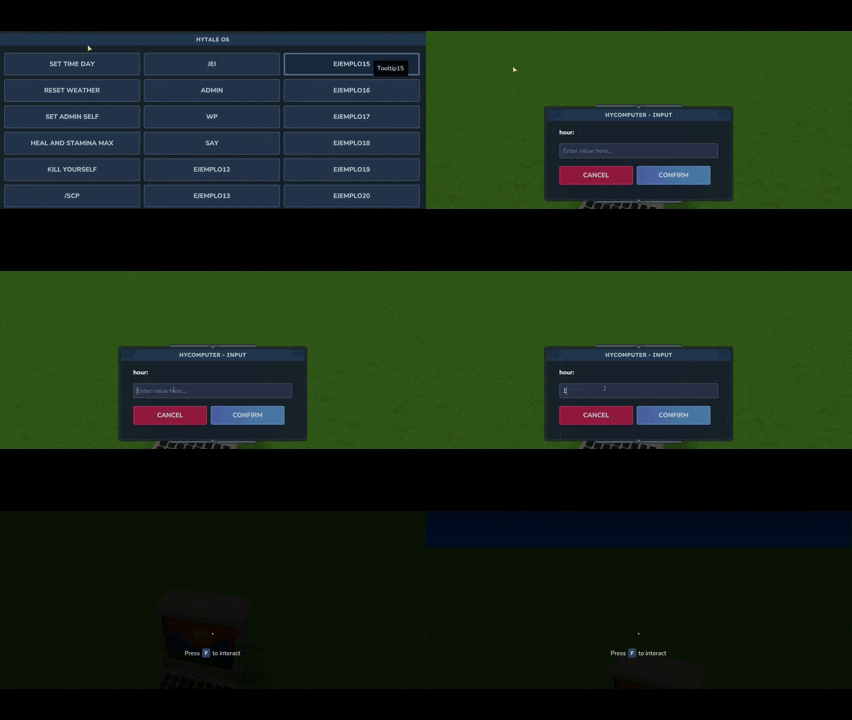
With HyComputer, you can place a functional computer anywhere in your world. It features a clean graphical interface with customizable buttons to execute any command—whether they are Vanilla (like /time, /weather, /op) or from other installed mods (like opening GUIs or creating waypoints).
Command integration with arguments has been added. Now, by adding %text% to the command in the JSON, a second window will appear in-game asking for the value of that argument. For example, with time %hour%, you can type the hour you want to set the time to. Another example would be say %user% %message%: two windows will appear to enter a name and a text, resulting in /say FirstValue SecondValue.

HyPod brings the full power of HyComputer to you on the go. It functions as a remote terminal: once booted, you can access your custom command buttons by equipping it in your hotbar or off-hand (press K).
Download the latest release of HyComputer.
Place the .jar file into your server's or client's Mods folder.
Start the game to generate the default configuration file.
The mod automatically generates a HyComputer.json file in your mod folder the first time it runs. You can configure up to 21 custom buttons.
For each button, there are three parameters:
/).You can also configure the header message that appears at the top of the window. It’s ideal for providing information to your server members (upcoming events, rules, or relevant info).
Default Configuration Example:
...
}
I give full permission to include HyComputer in any modpack.
Enjoy the mod! If you have any feedback or find any bugs, feel free to reach out.
Project description from CurseForge.
Recent files
28 Mar 2026
25 Feb 2026
7 Feb 2026
26 Jan 2026
26 Jan 2026
25 Jan 2026
23 Jan 2026
Looking for an older file? The official CurseForge project page is in Resources.