
WaterDepthGauge-1.1.1.jar
1 Jun 2026
Client Not supported Server Required Dependencies No extras listed Listed on Project page
Check the setup 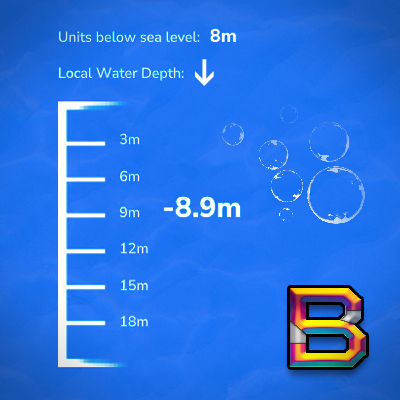
CurseForge · Hytale mod
A real-time HUD that automatically displays your underwater depth in meters when submerged, helping divers track how deep they've descended from the water's surface.
Quick answer
Water Depth Gauge WaterDepthGauge-1.1.1.jar targets Hytale. Do not install it as a separate client mod. Enable it on the world host—the local server in singleplayer or the dedicated server in multiplayer. No required dependencies listed for this file.
Where it goes
Do not install it as a separate client mod. Enable it on the world host—the local server in singleplayer or the dedicated server in multiplayer.
Put Hytale mods on the world host or dedicated server. Singleplayer runs a local server too; Hytale does not use separate client mods.
WaterDepthGauge-1.1.1.jar. Change the file and its required mods may change too.
This file does not list any required mods. Do not add a library just because a different file uses it.
This file does not list any required or optional project dependencies. Check the creator notes before changing an existing world.
Before you install it
Built for Water Depth Gauge WaterDepthGauge-1.1.1.jar. Pick another file and the loader, install side or required mods may change.
Use WaterDepthGauge-1.1.1.jar. It targets Hytale; another release may target a different game build or dependency set.
This file does not list any required mods. Do not add a library just because a different file uses it.
Do not install it as a separate client mod. Enable it on the world host—the local server in singleplayer or the dedicated server in multiplayer.
Use the “Get this file” button beside WaterDepthGauge-1.1.1.jar. It opens that exact file at the source.
About this project
Shows a real-time depth gauge when you go underwater. Displays both your current depth and depth relative to sea level.
%AppData%\Roaming\Hytale\UserData\Mods\The gauge appears automatically when you go underwater (0.5m+ depth) and hides when you surface. No setup needed.
All settings are saved per-player (each player has their own preferences).
/wdepth - Show your current settings/wdepth help - Show command list and usage/wdepth on - Enable depth gauge (default)/wdepth off - Disable depth gauge/wdepth sea <on|off> - Toggle sea level depth display/wdepth decimal <on|off> - Toggle decimal precision (e.g., 5.3m vs 5m)/wdepth credits - Show plugin creditsYour personal settings are saved per-player to disk. Each player has independent preferences that persist across sessions.
Settings file location: C:\Users\[USERNAME]\AppData\Roaming\Hytale\UserData\Saves\[WORLD_NAME]\mods\BeyondSmash_WaterDepthGauge\player_settings.json
To access: Press Win+R, then paste: %AppData%\Hytale\UserData\Saves\[WORLD_NAME]\mods\BeyondSmash_WaterDepthGauge
Local Depth: Measured from where you entered the water (resets each time)
Sea Level Depth: Measured from Y=115 (Hytale's sea level)
Gauge Range: Auto-adjusts in 20m chunks (0-20m, 20-40m, 40-60m, etc.)
Color: Markers turn pale orange at 5m intervals (5m, 10m, 15m, etc.)
Direction Arrow: Yellow arrow shows movement:
^ = Going upv = Going downPer-player settings now persist to disk.
What Changed:
/wdepth help command for easy command referenceNew Commands:
/wdepth help - Show command list and usage/wdepth sea <on|off> - Toggle sea level display (was only in config file before)/wdepth decimal <on|off> - Toggle decimal precision (was only in config file before)Why? Before v1.0.4, settings were stored in memory only and reset every time you disconnected. Now they're saved to player_settings.json per-player and persist across sessions.
Full changelog: https://github.com/BeyondSmash/WaterDepthGauge/blob/main/CHANGELOG.md
Gauge doesn't show up
Check that you didn't disable it with /wdepth off
Can I move or resize the gauge?
Not currently - it's at (Top: 475, Left: 20) with fixed size
Works with other HUD mods?
Yes, fully compatible with all MultipleHUD-based mods
Do my settings persist?
Yes, all settings are saved to disk per-player and persist across sessions
Created by BeyondSmash
Supports MultipleHUD compatibility by Buuz135
Project description from CurseForge.
Recent files
1 Jun 2026
27 Mar 2026
7 Mar 2026
21 Feb 2026
17 Feb 2026
9 Feb 2026
9 Feb 2026
4 Feb 2026
31 Jan 2026
28 Jan 2026
23 Jan 2026
Looking for an older file? The official CurseForge project page is in Resources.